- fractionThe fractional distance at which to place the LineValueSampler line.
C++ Type:double
Unit:(no unit assumed)
Controllable:No
Description:The fractional distance at which to place the LineValueSampler line.
- fuel_pin_geometryName of the UserObject that reads the pin geometry from the mesh.
C++ Type:UserObjectName
Controllable:No
Description:Name of the UserObject that reads the pin geometry from the mesh.
- materialfuelThe material on which to generate LineValueSampler output. Options are: fuel clad
Default:fuel
C++ Type:MooseEnum
Controllable:No
Description:The material on which to generate LineValueSampler output. Options are: fuel clad
- num_pointsThe number of points to sample along the line
C++ Type:unsigned int
Controllable:No
Description:The number of points to sample along the line
- orientationhorizontalThe orientation of the line for the LineValueSampler output. Options are: horizontal vertical
Default:horizontal
C++ Type:MooseEnum
Controllable:No
Description:The orientation of the line for the LineValueSampler output. Options are: horizontal vertical
- variableThe names of the variables that this VectorPostprocessor operates on
C++ Type:std::vector<VariableName>
Unit:(no unit assumed)
Controllable:No
Description:The names of the variables that this VectorPostprocessor operates on
FuelRodLineValueSampler
Description
'FuelRodLineValueSampler' is a customized version of the LineValueSampler VectorPostprocessor to extract quantities at a user-specified fractional location within either the fuel and/or cladding for a BISON fuel rod model. The 'FuelRodLineValueSampler' VectorPostprocessor uses the FuelPinGeometry UserObject to automatically compute the user-specified locations of the line for both the fuel and cladding.
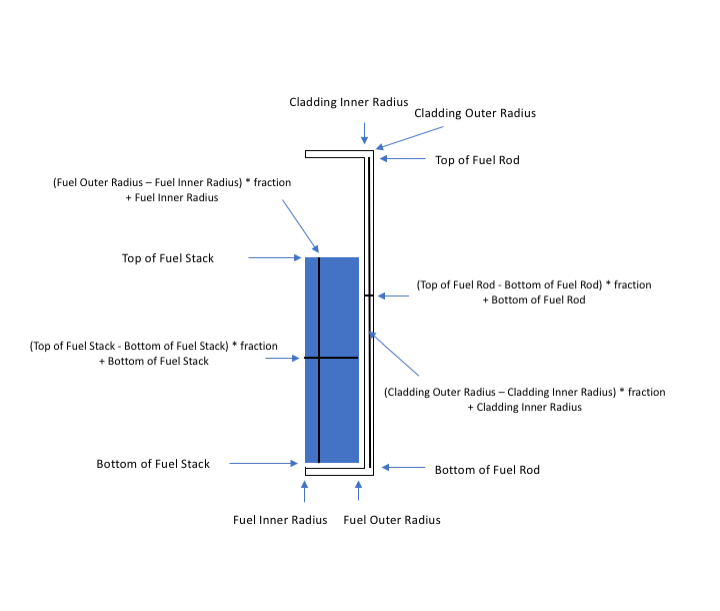
Figure 1: Schematic showing the midplane locations for the fuel and cladding.
Example Input Syntax
[VectorPostprocessors<<<{"href": "../../syntax/VectorPostprocessors/index.html"}>>>]
  [fuel_vonmises]
    type = FuelRodLineValueSampler<<<{"description": "Creates a custom LineValueSampler VectorPostprocessor to outputquantities of interest within the fuel or cladding materials usingeither horizontal or vertical lines specified by a fraction.", "href": "FuelRodLineValueSampler.html"}>>>
    variable<<<{"description": "The names of the variables that this VectorPostprocessor operates on"}>>> = vonmises_stress
    material<<<{"description": "The material on which to generate LineValueSampler output. Options are: fuel clad"}>>> = 'fuel'
    fraction<<<{"description": "The fractional distance at which to place the LineValueSampler line."}>>> = 0.51
    num_points<<<{"description": "The number of points to sample along the line"}>>> = 20
    orientation<<<{"description": "The orientation of the line for the LineValueSampler output. Options are: horizontal vertical"}>>> = 'horizontal'
    fuel_pin_geometry<<<{"description": "Name of the UserObject that reads the pin geometry from the mesh."}>>> = 'pin_geometry'
    outputs<<<{"description": "Vector of output names where you would like to restrict the output of variables(s) associated with this object"}>>> = chkfile
  []
  [clad_vonmises]
    type = FuelRodLineValueSampler<<<{"description": "Creates a custom LineValueSampler VectorPostprocessor to outputquantities of interest within the fuel or cladding materials usingeither horizontal or vertical lines specified by a fraction.", "href": "FuelRodLineValueSampler.html"}>>>
    variable<<<{"description": "The names of the variables that this VectorPostprocessor operates on"}>>> = vonmises_stress
    material<<<{"description": "The material on which to generate LineValueSampler output. Options are: fuel clad"}>>> = 'clad'
    fraction<<<{"description": "The fractional distance at which to place the LineValueSampler line."}>>> = 0.51
    num_points<<<{"description": "The number of points to sample along the line"}>>> = 9
    orientation<<<{"description": "The orientation of the line for the LineValueSampler output. Options are: horizontal vertical"}>>> = 'horizontal'
    fuel_pin_geometry<<<{"description": "Name of the UserObject that reads the pin geometry from the mesh."}>>> = 'pin_geometry'
    outputs<<<{"description": "Vector of output names where you would like to restrict the output of variables(s) associated with this object"}>>> = chkfile
  []
[]Input Parameters
- _auto_broadcastFalse
Default:False
C++ Type:bool
Controllable:No
- contains_complete_historyFalseSet this flag to indicate that the values in all vectors declared by this VPP represent a time history (e.g. with each invocation, new values are added and old values are never removed). This changes the output so that only a single file is output and updated with each invocation
Default:False
C++ Type:bool
Controllable:No
Description:Set this flag to indicate that the values in all vectors declared by this VPP represent a time history (e.g. with each invocation, new values are added and old values are never removed). This changes the output so that only a single file is output and updated with each invocation
- parallel_typeREPLICATEDSet how the data is represented within the VectorPostprocessor (VPP); 'distributed' indicates that data within the VPP is distributed and no auto communication is performed, this setting will result in parallel output within the CSV output; 'replicated' indicates that the data within the VPP is correct on processor 0, the data will automatically be broadcast to all processors unless the '_auto_broadcast' param is set to false within the validParams function.
Default:REPLICATED
C++ Type:MooseEnum
Options:DISTRIBUTED, REPLICATED
Controllable:No
Description:Set how the data is represented within the VectorPostprocessor (VPP); 'distributed' indicates that data within the VPP is distributed and no auto communication is performed, this setting will result in parallel output within the CSV output; 'replicated' indicates that the data within the VPP is correct on processor 0, the data will automatically be broadcast to all processors unless the '_auto_broadcast' param is set to false within the validParams function.
- scaling1The postprocessor that the variables are multiplied with
Default:1
C++ Type:PostprocessorName
Unit:(no unit assumed)
Controllable:No
Description:The postprocessor that the variables are multiplied with
- warn_discontinuous_face_valuesTrueWhether to return a warning if a discontinuous variable is sampled on a face
Default:True
C++ Type:bool
Controllable:No
Description:Whether to return a warning if a discontinuous variable is sampled on a face
Optional Parameters
- allow_duplicate_execution_on_initialFalseIn the case where this UserObject is depended upon by an initial condition, allow it to be executed twice during the initial setup (once before the IC and again after mesh adaptivity (if applicable).
Default:False
C++ Type:bool
Controllable:No
Description:In the case where this UserObject is depended upon by an initial condition, allow it to be executed twice during the initial setup (once before the IC and again after mesh adaptivity (if applicable).
- execute_onTIMESTEP_ENDThe list of flag(s) indicating when this object should be executed. For a description of each flag, see https://mooseframework.inl.gov/source/interfaces/SetupInterface.html.
Default:TIMESTEP_END
C++ Type:ExecFlagEnum
Options:XFEM_MARK, NONE, INITIAL, LINEAR, NONLINEAR_CONVERGENCE, NONLINEAR, POSTCHECK, TIMESTEP_END, TIMESTEP_BEGIN, MULTIAPP_FIXED_POINT_END, MULTIAPP_FIXED_POINT_BEGIN, FINAL, CUSTOM
Controllable:No
Description:The list of flag(s) indicating when this object should be executed. For a description of each flag, see https://mooseframework.inl.gov/source/interfaces/SetupInterface.html.
- execution_order_group0Execution order groups are executed in increasing order (e.g., the lowest number is executed first). Note that negative group numbers may be used to execute groups before the default (0) group. Please refer to the user object documentation for ordering of user object execution within a group.
Default:0
C++ Type:int
Controllable:No
Description:Execution order groups are executed in increasing order (e.g., the lowest number is executed first). Note that negative group numbers may be used to execute groups before the default (0) group. Please refer to the user object documentation for ordering of user object execution within a group.
- force_postauxFalseForces the UserObject to be executed in POSTAUX
Default:False
C++ Type:bool
Controllable:No
Description:Forces the UserObject to be executed in POSTAUX
- force_preauxFalseForces the UserObject to be executed in PREAUX
Default:False
C++ Type:bool
Controllable:No
Description:Forces the UserObject to be executed in PREAUX
- force_preicFalseForces the UserObject to be executed in PREIC during initial setup
Default:False
C++ Type:bool
Controllable:No
Description:Forces the UserObject to be executed in PREIC during initial setup
Execution Scheduling Parameters
- control_tagsAdds user-defined labels for accessing object parameters via control logic.
C++ Type:std::vector<std::string>
Controllable:No
Description:Adds user-defined labels for accessing object parameters via control logic.
- enableTrueSet the enabled status of the MooseObject.
Default:True
C++ Type:bool
Controllable:Yes
Description:Set the enabled status of the MooseObject.
- outputsVector of output names where you would like to restrict the output of variables(s) associated with this object
C++ Type:std::vector<OutputName>
Controllable:No
Description:Vector of output names where you would like to restrict the output of variables(s) associated with this object
- use_displaced_meshFalseWhether or not this object should use the displaced mesh for computation. Note that in the case this is true but no displacements are provided in the Mesh block the undisplaced mesh will still be used.
Default:False
C++ Type:bool
Controllable:No
Description:Whether or not this object should use the displaced mesh for computation. Note that in the case this is true but no displacements are provided in the Mesh block the undisplaced mesh will still be used.
Advanced Parameters
- prop_getter_suffixAn optional suffix parameter that can be appended to any attempt to retrieve/get material properties. The suffix will be prepended with a '_' character.
C++ Type:MaterialPropertyName
Unit:(no unit assumed)
Controllable:No
Description:An optional suffix parameter that can be appended to any attempt to retrieve/get material properties. The suffix will be prepended with a '_' character.
- use_interpolated_stateFalseFor the old and older state use projected material properties interpolated at the quadrature points. To set up projection use the ProjectedStatefulMaterialStorageAction.
Default:False
C++ Type:bool
Controllable:No
Description:For the old and older state use projected material properties interpolated at the quadrature points. To set up projection use the ProjectedStatefulMaterialStorageAction.
Material Property Retrieval Parameters
Input Files
- (test/tests/fuelrodlinevaluesampler/chk_layered1D_mesh.i)
- (test/tests/fuelrodlinevaluesampler/example_problem_smeared_test2.i)
- (test/tests/fuelrodlinevaluesampler/example_problem_smeared_test.i)
- (assessment/metallic_fuel/FBTA/analysis/steady_state/common_inputs/test_base.i)
- (assessment/metallic_fuel/EBRII/X447/analysis/legacy/x447_base.i)
- (assessment/metallic_fuel/EBRII/X447/analysis/enhancement/x447_enh_base.i)
- (assessment/metallic_fuel/EBRII/X423/analysis/x423_vp_base.i)
- (assessment/metallic_fuel/EBRII/X423/analysis/x423_lm_base.i)
- (test/tests/fuelrodlinevaluesampler/chk_layered2D_mesh.i)
- (assessment/metallic_fuel/WPF/analysis/X425_T418/X425_base.i)
- (assessment/metallic_fuel/FBTA/analysis/steady_state/AK181/181193/IFR1_181193.i)
- (assessment/metallic_fuel/WPF/analysis/FM-1/FM_base.i)
References
No citations exist within this document.(test/tests/fuelrodlinevaluesampler/example_problem_smeared_test.i)
initial_fuel_density = 10431.0

[GlobalParams]
  density = ${initial_fuel_density}
  displacements = 'disp_x disp_y'
  energy_per_fission = 3.2e-11 # J/fission
  temperature = temp
[]

[Problem]
  type = ReferenceResidualProblem
  reference_vector = 'ref'
  extra_tag_vectors = 'ref'
[]

[Mesh]
  coord_type = RZ
  displacements = 'disp_x disp_y'
  patch_update_strategy = auto
  patch_size = 10 # For contact algorithm
  partitioner = centroid
  centroid_partitioner_direction = y
  [mesh]
    type = FileMeshGenerator
    file = SmearedTwoPelletOneType2D.e
  []
[]

[Variables]
  [temp]
    initial_condition = 580.0 # set initial temp to coolant inlet
  []
[]

[AuxVariables]
  [fast_neutron_flux]
    block = clad
  []
  [fast_neutron_fluence]
    block = clad
  []
  [grain_radius]
    block = pellet_type_1
    initial_condition = 10e-6
  []
  [gap_cond]
    order = CONSTANT
    family = MONOMIAL
  []
  [coolant_htc]
    order = CONSTANT
    family = MONOMIAL
  []
[]

[Functions]
  [power_history]
    type = PiecewiseLinear
    data_file = powerhistory.csv
    scale_factor = 1
  []
  [axial_peaking_factors]
    type = ParsedFunction
    expression = 1
  []
  [pressure_ramp]
    type = PiecewiseLinear
    x = '-200 0'
    y = '0 1'
  []
[]

[Physics/SolidMechanics/QuasiStatic]
  [fuel]
    block = pellet_type_1
    strain = FINITE
    incremental = true
    extra_vector_tags = 'ref'
    add_variables = true
    decomposition_method = EigenSolution
    eigenstrain_names = 'fuel_volumetric_swelling_eigenstrain
      fuel_relocation_eigenstrain fuel_thermal_eigenstrain'
    generate_output = 'stress_xx stress_yy stress_zz vonmises_stress'
  []
  [clad]
    block = clad
    strain = FINITE
    incremental = true
    extra_vector_tags = 'ref'
    add_variables = true
    decomposition_method = EigenSolution
    eigenstrain_names = 'clad_thermal_strain clad_irradiation_growth_eigenstrain'
    generate_output = 'stress_xx stress_yy stress_zz vonmises_stress'
  []
[]

[Kernels]
  [gravity]
    type = Gravity
    variable = disp_y
    value = -9.81
  []
  [heat]
    type = HeatConduction
    variable = temp
    extra_vector_tags = 'ref'
  []
  [heat_ie]
    type = HeatConductionTimeDerivative
    variable = temp
    extra_vector_tags = 'ref'
  []
  [heat_source]
    type = NeutronHeatSource
    variable = temp
    extra_vector_tags = 'ref'
    block = pellet_type_1
    burnup_function = burnup
  []
[]

[UserObjects]
  [pin_geometry]
    type = FuelPinGeometry
  []
[]

[Burnup]
  [burnup]
    block = pellet_type_1
    rod_ave_lin_pow = power_history # using the power function defined above
    axial_power_profile = axial_peaking_factors # using the axial power profile function defined above
    num_radial = 80
    num_axial = 11
    fuel_pin_geometry = 'pin_geometry'
    fuel_volume_ratio = 0.987775 # for use with dished pellets (ratio of actual volume to cylinder volume)
    order = CONSTANT
    family = MONOMIAL
    RPF = RPF
  []
[]

[AuxKernels]
  [fast_neutron_flux]
    type = FastNeutronFluxAux
    variable = fast_neutron_flux
    block = clad
    rod_ave_lin_pow = power_history
    axial_power_profile = axial_peaking_factors
    factor = 3e13
    execute_on = timestep_begin
  []
  [fast_neutron_fluence]
    type = FastNeutronFluenceAux
    variable = fast_neutron_fluence
    block = clad
    fast_neutron_flux = fast_neutron_flux
    execute_on = timestep_begin
  []
  [grain_radius]
    type = GrainRadiusAux
    block = pellet_type_1
    variable = grain_radius
    temperature = temp
    execute_on = linear
  []
  [conductance]
    type = MaterialRealAux
    property = gap_conductance
    variable = gap_cond
    boundary = 10
    execute_on = 'initial timestep_end'
  []
  [coolant_htc]
    type = MaterialRealAux
    property = coolant_channel_htc
    variable = coolant_htc
    boundary = 2
    execute_on = 'initial timestep_end'
  []
[]

[Contact]
  [pellet_clad_mechanical]
    primary = 5
    secondary = 10
    formulation = KINEMATIC
    model = frictionless
    normalize_penalty = true
    penalty = 1e14
  []
[]

[ThermalContact]
  [thermal_contact]
    type = GasGapHeatTransfer
    variable = temp
    primary = 5
    secondary = 10
    initial_moles = initial_moles # coupling to a postprocessor which supplies the initial plenum/gap gas mass
    gas_released = fis_gas_released # coupling to a postprocessor which supplies the fission gas addition
    contact_pressure = contact_pressure
  []
[]

[BCs]
  [no_x_all] # pin pellets and clad along axis of symmetry (y)
    type = DirichletBC
    variable = disp_x
    boundary = 12
    value = 0.0
  []
  [no_y_clad_bottom] # pin clad bottom in the axial direction (y)
    type = DirichletBC
    variable = disp_y
    boundary = '1'
    value = 0.0
  []
  [no_y_fuel_bottom] # pin fuel bottom in the axial direction (y)
    type = DirichletBC
    variable = disp_y
    boundary = '1020'
    value = 0.0
  []
  [Pressure] #  apply coolant pressure on clad outer walls
    [coolantPressure]
      boundary = '1 2 3'
      factor = 15.5e6
      function = pressure_ramp # use the pressure_ramp function defined above
    []
  []
  [PlenumPressure] #  apply plenum pressure on clad inner walls and pellet surfaces
    [plenumPressure]
      boundary = 9
      initial_pressure = 2.0e6
      startup_time = -200
      R = 8.3143
      output_initial_moles = initial_moles # coupling to post processor to get initial fill gas mass
      temperature = ave_temp_interior # coupling to post processor to get gas temperature approximation
      volume = gas_volume # coupling to post processor to get gas volume
      material_input = fis_gas_released # coupling to post processor to get fission gas added
      output = plenum_pressure # coupling to post processor to output plenum/gap pressure
      displacements = 'disp_x disp_y'
      execute_on = 'initial linear'
    []
  []
[]

[CoolantChannel]
  [convective_clad_surface] # apply convective boundary to clad outer surface
    boundary = '1 2 3'
    variable = temp
    inlet_temperature = 580 # K
    inlet_pressure = 15.5e6 # Pa
    inlet_massflux = 3800 # kg/m^2-sec
    rod_diameter = 0.948e-2 # m
    rod_pitch = 1.26e-2 # m
    linear_heat_rate = power_history
    axial_power_profile = axial_peaking_factors
  []
[]

[Materials]
  [fuel_thermal]
    type = UO2Thermal
    block = pellet_type_1
    thermal_conductivity_model = NFIR
    initial_porosity = 0.0
    temperature = temp
    burnup_function = burnup
  []
  [fuel_volumetric_swelling]
    type = UO2VolumetricSwellingEigenstrain
    block = pellet_type_1
    burnup_function = burnup
    initial_fuel_density = 10431.0
    eigenstrain_name = 'fuel_volumetric_swelling_eigenstrain'
  []
  [fuel_elasticity_tensor]
    type = UO2ElasticityTensor
    block = pellet_type_1
  []
  [fuel_thermal_expansion]
    type = UO2ThermalExpansionMartinEigenstrain
    block = pellet_type_1
    stress_free_temperature = 295
    eigenstrain_name = 'fuel_thermal_eigenstrain'
  []
  [hotpressing]
    type = UO2HotPressingCreepUpdate
    block = pellet_type_1
    burnup_function = burnup
    initial_grain_radius = 10.0e-6
  []
  [radial_return_stress]
    type = ComputeMultipleInelasticStress
    tangent_operator = elastic
    inelastic_models = 'hotpressing'
    block = pellet_type_1
  []
  [fuel_relocation]
    type = UO2RelocationEigenstrain
    block = pellet_type_1
    burnup_function = burnup
    fuel_pin_geometry = 'pin_geometry'
    relocation_activation1 = 5000 #TM default value
    rod_ave_lin_pow = power_history
    axial_power_profile = axial_peaking_factors
    burnup_relocation_stop = 1.e20
    eigenstrain_name = 'fuel_relocation_eigenstrain'
  []
  [clad_thermal]
    type = HeatConductionMaterial
    block = clad
    thermal_conductivity = 16.0
    specific_heat = 330.0
  []
  [clad_elasticity_tensor]
    type = ZryElasticityTensor
    block = clad
  []
  [clad_creep_model]
    type = ZryCreepHayesHoppeUpdate
    block = clad
    fast_neutron_flux = fast_neutron_flux
    model_irradiation_creep = true
    model_thermal_creep = true
  []
  [clad_inelastic_stress]
    type = ComputeMultipleInelasticStress
    block = clad
    tangent_operator = elastic
    inelastic_models = 'clad_creep_model'
  []
  [clad_thermal_expansion]
    type = ComputeThermalExpansionEigenstrain
    block = clad
    thermal_expansion_coeff = 5.0e-6
    stress_free_temperature = 295.0
    eigenstrain_name = clad_thermal_strain
  []
  [clad_irradiation_growth]
    type = ZryIrradiationGrowthEigenstrain
    block = clad
    fast_neutron_fluence = fast_neutron_fluence
    zircaloy_material_type = ESCORE_IrradiationGrowthZr4
    eigenstrain_name = clad_irradiation_growth_eigenstrain
  []
  [fission_gas_release]
    type = UO2Sifgrs
    block = pellet_type_1
    temperature = temp
    burnup_function = burnup
    grain_radius = grain_radius
    gbs_model = true
  []
  [clad_density]
    type = StrainAdjustedDensity
    block = clad
    strain_free_density = 6551.0
  []
  [fuel_density]
    type = StrainAdjustedDensity
    block = pellet_type_1
    strain_free_density = ${initial_fuel_density}
  []
[]

[Dampers]
  [BoundingValueNodalDamper]
    type = BoundingValueNodalDamper
    variable = temp
    max_value = 3200
    min_value = 300
  []
[]

[Preconditioning]
  [SMP]
    type = SMP
    coupled_groups = 'disp_x,disp_y'
  []
[]

[Executioner]
  type = Transient
  solve_type = 'PJFNK'

  petsc_options = '-pc_type_asm'
  petsc_options_iname = '-pc_type -pc_factor_mat_solver_package -ksp_gmres_restart'
  petsc_options_value = 'lu       superlu_dist                  51'

  line_search = 'none'

  verbose = true

  l_max_its = 100
  l_tol = 1e-5 #8e-3

  nl_max_its = 15

  nl_rel_tol = 1e-10

  nl_abs_tol = 1e-8

  start_time = -200
  num_steps = 2

  dtmax = 2e6
  dtmin = 1

  [TimeStepper]
    type = IterationAdaptiveDT
    dt = 2.0e2
    optimal_iterations = 6
    iteration_window = 2
  []
[]

[Postprocessors]
  [ave_temp_interior] # average temperature of the cladding interior and all pellet exteriors
    type = SideAverageValue
    boundary = 9
    variable = temp
    execute_on = 'initial linear'
  []
  [clad_inner_vol] # volume inside of cladding
    type = InternalVolume
    boundary = 7
    outputs = exodus
    execute_on = 'initial timestep_end'
  []
  [pellet_volume] # fuel pellet total volume
    type = InternalVolume
    boundary = 8
    outputs = exodus
    execute_on = 'initial timestep_end'
  []
  [avg_clad_temp] # average temperature of cladding interior
    type = SideAverageValue
    boundary = 7
    variable = temp
    execute_on = 'initial timestep_end'
  []
  [fis_gas_produced] # fission gas produced (moles)
    type = ElementIntegralFisGasGeneratedSifgrs
    block = pellet_type_1
    execute_on = timestep_end
  []
  [fis_gas_released] # fission gas released to plenum (moles)
    type = ElementIntegralFisGasReleasedSifgrs
    block = pellet_type_1
    execute_on = timestep_end
  []
  [fis_gas_grain]
    type = ElementIntegralFisGasGrainSifgrs
    block = pellet_type_1
    outputs = exodus
    execute_on = timestep_end
  []
  [fis_gas_boundary]
    type = ElementIntegralFisGasBoundarySifgrs
    block = pellet_type_1
    outputs = exodus
    execute_on = timestep_end
  []
  [gas_volume] # gas volume
    type = InternalVolume
    boundary = 9
    component = 1
    execute_on = 'initial linear'
  []
  [flux_from_clad] # area integrated heat flux from the cladding
    type = SideDiffusiveFluxIntegral
    variable = temp
    boundary = 5
    diffusivity = thermal_conductivity
    execute_on = 'initial timestep_end'
  []
  [flux_from_fuel] # area integrated heat flux from the fuel
    type = SideDiffusiveFluxIntegral
    variable = temp
    boundary = 10
    diffusivity = thermal_conductivity
    execute_on = 'initial timestep_end'
  []
  [_dt] # time step
    type = TimestepSize
    execute_on = timestep_end
  []
  [nonlinear_its] # number of nonlinear iterations at each timestep
    type = NumNonlinearIterations
    execute_on = timestep_end
  []
  [rod_total_power]
    type = ElementIntegralPower
    variable = temp
    burnup_function = burnup
    block = pellet_type_1
    execute_on = 'initial timestep_end'
  []
  [rod_input_power]
    type = FunctionValuePostprocessor
    function = power_history
    scale_factor = 0.02372 # rod height
    execute_on = 'initial timestep_end'
  []
[]

[VectorPostprocessors]
  [fuel_vonmises]
    type = FuelRodLineValueSampler
    variable = vonmises_stress
    material = 'fuel'
    fraction = 0.51
    num_points = 20
    orientation = 'horizontal'
    fuel_pin_geometry = 'pin_geometry'
    outputs = chkfile
  []
  [clad_vonmises]
    type = FuelRodLineValueSampler
    variable = vonmises_stress
    material = 'clad'
    fraction = 0.51
    num_points = 9
    orientation = 'horizontal'
    fuel_pin_geometry = 'pin_geometry'
    outputs = chkfile
  []
[]

[Outputs]
  exodus = true
  color = false
  csv = true
  [console]
    type = Console
    output_linear = true
    max_rows = 25
  []
  [chkfile]
    type = CSV
    execute_on = 'FINAL'
  []
[]
(test/tests/fuelrodlinevaluesampler/chk_layered1D_mesh.i)
#
# Thick cylinder problem where the mesh is split between cladding and coating blocks.
#
# ri = 1.0
# ro = sqrt(2)
# pi = 2.0
# po = 1.0
#
#           (ri^2*pi-ro^2*po)   (pi-po)*ri^2*ro^2    -2
# sigma_r = ----------------- - ----------------- = -----
#              (ro^2-ri^2)       (ro^2-ri^2)*r^2     r^2
#
#           (ri^2*pi-ro^2*po)   (pi-po)*ri^2*ro^2     2
# sigma_t = ----------------- + ----------------- = -----
#              (ro^2-ri^2)       (ro^2-ri^2)*r^2     r^2
#
#           (sigma_t-nu*sigma_r)*r
#  disp_r = ----------------------
#                      E
#

[GlobalParams]
  displacements = disp_x
  slice_heights = '1.0'
  volumetric_locking_correction = false
[]

[Mesh]
  coord_type = RZ
  [layered1D_mesh]
    type = Layered1DMeshGenerator
    uniform_slice_heights = false
    slices_per_block = '1'
    include_fuel = false
    include_clad = true
    include_plenum = false
    pellet_bottom_coor = 0
    pellet_outer_radius = '1.0'
    clad_gap_width = 0.0
    clad_thickness = 0.3
    pellet_mesh_density = customize
    clad_mesh_density = customize
    nx_c = 300
    elem_type = EDGE3
  []
[]

[Functions]
  [clad_inner_pressure]
    type = ParsedFunction
    expression = 2.0
  []
  [clad_outer_pressure]
    type = ParsedFunction
    expression = 1.0
  []
[]

[BCs]
  [exterior_pressure_x]
    type = Pressure
    variable = disp_x
    boundary = 2
    factor = 1.0
    function = clad_outer_pressure
  []
  [interior_pressure_x]
    type = Pressure
    variable = disp_x
    boundary = 5
    factor = 1.0
    function = clad_inner_pressure
  []
[]

[AuxVariables]
  [stress_xx]
    order = CONSTANT
    family = MONOMIAL
  []
  [stress_zz]
    order = CONSTANT
    family = MONOMIAL
  []
[]

[AuxKernels]
  [stress_xx]
    type = RankTwoAux
    rank_two_tensor = stress
    variable = stress_xx
    index_i = 0
    index_j = 0
    execute_on = timestep_end
  []
  [stress_zz]
    type = RankTwoAux
    rank_two_tensor = stress
    variable = stress_zz
    index_i = 2
    index_j = 2
    execute_on = timestep_end
  []
[]

[UserObjects]
  [pin_geometry]
    type = Layered1DFuelPinGeometry
    include_clad = true
    include_fuel = false
    mesh_generator = layered1D_mesh
  []
[]

[Physics]
  [SolidMechanics]
    [Layered1D]
      [clad]
        add_variables = true
        add_scalar_variables = true
        out_of_plane_strain_name = strain_yy
        fuel_pin_geometry = pin_geometry
        block = clad
        out_of_plane_pressure_function = 0.0
        strain = finite
        mesh_generator = layered1D_mesh
      []
    []
  []
[]

[Materials]
  [clad_elasticity_tensor]
    type = ComputeIsotropicElasticityTensor
    block = 'clad'
    youngs_modulus = 1e6
    poissons_ratio = 0.25
  []
  [clad_stress]
    type = ComputeFiniteStrainElasticStress
    block = 'clad'
  []
[]

[Executioner]
  type = Transient

  solve_type = 'PJFNK'

  petsc_options_iname = '-ksp_gmres_restart -pc_type -pc_hypre_type -pc_hypre_boomeramg_max_iter'
  petsc_options_value = '201                hypre    boomeramg      4'

  line_search = 'none'

  nl_rel_tol = 1e-8

  l_tol = 1e-8
  l_max_its = 100

  start_time = 0.0
  dt = 1.0
  end_time = 1.0
[]

[Postprocessors]
  [max_stress_xx]
    type = ElementExtremeValue
    variable = stress_xx
  []
  [max_stress_zz]
    type = ElementExtremeValue
    variable = stress_zz
  []
  [min_stress_xx]
    type = ElementExtremeValue
    variable = stress_xx
    value_type = min
  []
  [min_stress_zz]
    type = ElementExtremeValue
    variable = stress_zz
    value_type = min
  []
  [disp_x_inner]
    type = NodalVariableValue
    nodeid = 0
    variable = disp_x
  []
[]

[VectorPostprocessors]
  [clad_stress_xx]
    type = FuelRodLineValueSampler
    variable = stress_xx
    material = 'clad'
    fraction = 0.5
    num_points = 10
    orientation = 'horizontal'
    fuel_pin_geometry = 'pin_geometry'
    outputs = chkfile
  []
[]

[Outputs]
  exodus = true
  csv = true
  [chkfile]
    type = CSV
    execute_on = 'FINAL'
  []
[]
(test/tests/fuelrodlinevaluesampler/example_problem_smeared_test2.i)
[GlobalParams]
  density = 10431.0
  displacements = 'disp_x disp_y'
  energy_per_fission = 3.2e-11 # J/fission
  temperature = temp
[]

[Problem]
  type = ReferenceResidualProblem
  reference_vector = 'ref'
  extra_tag_vectors = 'ref'
[]

[Mesh]
  coord_type = RZ
  patch_update_strategy = auto
  patch_size = 10
  partitioner = centroid
  centroid_partitioner_direction = y
  [mesh]
    type = FileMeshGenerator
    file = SmearedTwoPelletOneType2D.e
  []
[]

[Variables]
  [temp]
    initial_condition = 580.0
  []
[]

[AuxVariables]
  [fast_neutron_flux]
    block = clad
  []
  [fast_neutron_fluence]
    block = clad
  []
  [grain_radius]
    block = pellet_type_1
    initial_condition = 10e-6
  []
  [gap_cond]
    order = CONSTANT
    family = MONOMIAL
  []
  [coolant_htc]
    order = CONSTANT
    family = MONOMIAL
  []
[]

[Functions]
  [power_history]
    type = PiecewiseLinear
    data_file = powerhistory.csv
    scale_factor = 1
  []
  [axial_peaking_factors]
    type = ParsedFunction
    expression = 1
  []
  [pressure_ramp]
    type = PiecewiseLinear
    x = '-200 0'
    y = '0 1'
  []
[]

[Physics/SolidMechanics/QuasiStatic]
  [fuel]
    block = pellet_type_1
    strain = FINITE
    incremental = true
    extra_vector_tags = 'ref'
    add_variables = true
    decomposition_method = EigenSolution
    eigenstrain_names = 'fuel_volumetric_swelling_eigenstrain
      fuel_relocation_eigenstrain fuel_thermal_eigenstrain'
    generate_output = 'stress_xx stress_yy stress_zz vonmises_stress'
  []
  [clad]
    block = clad
    strain = FINITE
    incremental = true
    extra_vector_tags = 'ref'
    add_variables = true
    decomposition_method = EigenSolution
    eigenstrain_names = 'clad_thermal_strain clad_irradiation_growth_eigenstrain'
    generate_output = 'stress_xx stress_yy stress_zz vonmises_stress'
  []
[]

[Kernels]
  [gravity]
    type = Gravity
    variable = disp_y
    value = -9.81
  []
  [heat]
    type = HeatConduction
    variable = temp
    extra_vector_tags = 'ref'
  []
  [heat_ie]
    type = HeatConductionTimeDerivative
    variable = temp
    extra_vector_tags = 'ref'
  []
  [heat_source]
    type = NeutronHeatSource
    variable = temp
    extra_vector_tags = 'ref'
    block = pellet_type_1
    burnup_function = burnup
  []
[]

[UserObjects]
  [pin_geometry]
    type = FuelPinGeometry
  []
[]

[Burnup]
  [burnup]
    block = pellet_type_1
    rod_ave_lin_pow = power_history # using the power function defined above
    axial_power_profile = axial_peaking_factors # using the axial power profile function defined above
    num_radial = 80
    num_axial = 11
    fuel_pin_geometry = 'pin_geometry'
    fuel_volume_ratio = 0.987775 # for use with dished pellets (ratio of actual volume to cylinder volume)
    order = CONSTANT
    family = MONOMIAL
    RPF = RPF
  []
[]

[AuxKernels]
  [fast_neutron_flux]
    type = FastNeutronFluxAux
    variable = fast_neutron_flux
    block = clad
    rod_ave_lin_pow = power_history
    axial_power_profile = axial_peaking_factors
    factor = 3e13
    execute_on = timestep_begin
  []
  [fast_neutron_fluence]
    type = FastNeutronFluenceAux
    variable = fast_neutron_fluence
    block = clad
    fast_neutron_flux = fast_neutron_flux
    execute_on = timestep_begin
  []
  [grain_radius]
    type = GrainRadiusAux
    block = pellet_type_1
    variable = grain_radius
    temperature = temp
    execute_on = linear
  []
  [conductance]
    type = MaterialRealAux
    property = gap_conductance
    variable = gap_cond
    boundary = 10
    execute_on = 'initial timestep_end'
  []
  [coolant_htc]
    type = MaterialRealAux
    property = coolant_channel_htc
    variable = coolant_htc
    boundary = 2
    execute_on = 'initial timestep_end'
  []
[]

[Contact]
  [pellet_clad_mechanical]
    primary = 5
    secondary = 10
    formulation = KINEMATIC
    model = frictionless
    normalize_penalty = true
    penalty = 1e14
  []
[]

[ThermalContact]
  [thermal_contact]
    type = GasGapHeatTransfer
    variable = temp
    primary = 5
    secondary = 10
    initial_moles = initial_moles # coupling to a postprocessor which supplies the initial plenum/gap gas mass
    gas_released = fis_gas_released # coupling to a postprocessor which supplies the fission gas addition
    contact_pressure = contact_pressure
  []
[]

[BCs]
  [no_x_all] # pin pellets and clad along axis of symmetry (y)
    type = DirichletBC
    variable = disp_x
    boundary = 12
    value = 0.0
  []
  [no_y_clad_bottom] # pin clad bottom in the axial direction (y)
    type = DirichletBC
    variable = disp_y
    boundary = '1'
    value = 0.0
  []
  [no_y_fuel_bottom] # pin fuel bottom in the axial direction (y)
    type = DirichletBC
    variable = disp_y
    boundary = '1020'
    value = 0.0
  []
  [Pressure] #  apply coolant pressure on clad outer walls
    [coolantPressure]
      boundary = '1 2 3'
      factor = 15.5e6
      function = pressure_ramp # use the pressure_ramp function defined above
    []
  []
  [PlenumPressure] #  apply plenum pressure on clad inner walls and pellet surfaces
    [plenumPressure]
      boundary = 9
      initial_pressure = 2.0e6
      startup_time = -200
      R = 8.3143
      output_initial_moles = initial_moles # coupling to post processor to get initial fill gas mass
      temperature = ave_temp_interior # coupling to post processor to get gas temperature approximation
      volume = gas_volume # coupling to post processor to get gas volume
      material_input = fis_gas_released # coupling to post processor to get fission gas added
      output = plenum_pressure # coupling to post processor to output plenum/gap pressure
      displacements = 'disp_x disp_y'
      execute_on = 'initial linear'
    []
  []
[]

[CoolantChannel]
  [convective_clad_surface] # apply convective boundary to clad outer surface
    boundary = '1 2 3'
    variable = temp
    inlet_temperature = 580 # K
    inlet_pressure = 15.5e6 # Pa
    inlet_massflux = 3800 # kg/m^2-sec
    rod_diameter = 0.948e-2 # m
    rod_pitch = 1.26e-2 # m
    linear_heat_rate = power_history
    axial_power_profile = axial_peaking_factors
  []
[]

[Materials]
  [fuel_thermal]
    type = UO2Thermal
    block = pellet_type_1
    thermal_conductivity_model = NFIR
    initial_porosity = 0.0
    temperature = temp
    burnup_function = burnup
  []
  [fuel_volumetric_swelling]
    type = UO2VolumetricSwellingEigenstrain
    block = pellet_type_1
    burnup_function = burnup
    initial_fuel_density = 10431.0
    eigenstrain_name = 'fuel_volumetric_swelling_eigenstrain'
  []
  [fuel_elasticity_tensor]
    type = UO2ElasticityTensor
    block = pellet_type_1
  []
  [fuel_thermal_expansion]
    type = UO2ThermalExpansionMartinEigenstrain
    block = pellet_type_1
    stress_free_temperature = 295
    eigenstrain_name = 'fuel_thermal_eigenstrain'
  []
  [hotpressing]
    type = UO2HotPressingCreepUpdate
    block = pellet_type_1
    burnup_function = burnup
    initial_grain_radius = 10.0e-6
  []
  [radial_return_stress]
    type = ComputeMultipleInelasticStress
    tangent_operator = elastic
    inelastic_models = 'hotpressing'
    block = pellet_type_1
  []
  [fuel_relocation]
    type = UO2RelocationEigenstrain
    block = pellet_type_1
    burnup_function = burnup
    fuel_pin_geometry = 'pin_geometry'
    relocation_activation1 = 5000 #TM default value
    rod_ave_lin_pow = power_history
    axial_power_profile = axial_peaking_factors
    burnup_relocation_stop = 1.e20
    eigenstrain_name = fuel_relocation_eigenstrain
  []
  [clad_thermal]
    type = HeatConductionMaterial
    block = clad
    thermal_conductivity = 16.0
    specific_heat = 330.0
  []
  [clad_elasticity_tensor]
    type = ZryElasticityTensor
    block = clad
  []
  [clad_creep_model]
    type = ZryCreepHayesHoppeUpdate
    block = clad
    fast_neutron_flux = fast_neutron_flux
    model_irradiation_creep = true
    model_thermal_creep = true
  []
  [clad_inelastic_stress]
    type = ComputeMultipleInelasticStress
    block = clad
    tangent_operator = elastic
    inelastic_models = 'clad_creep_model'
  []
  [clad_thermal_expansion]
    type = ComputeThermalExpansionEigenstrain
    block = clad
    thermal_expansion_coeff = 5.0e-6
    stress_free_temperature = 295.0
    eigenstrain_name = clad_thermal_strain
  []
  [clad_irradiation_growth]
    type = ZryIrradiationGrowthEigenstrain
    block = clad
    fast_neutron_fluence = fast_neutron_fluence
    zircaloy_material_type = ESCORE_IrradiationGrowthZr4
    eigenstrain_name = clad_irradiation_growth_eigenstrain
  []
  [fission_gas_release]
    type = UO2Sifgrs
    block = pellet_type_1
    temperature = temp
    burnup_function = burnup
    grain_radius = grain_radius
    gbs_model = true
  []
  [clad_density]
    type = StrainAdjustedDensity
    block = clad
    strain_free_density = 6551.0
  []
  [fuel_density]
    type = StrainAdjustedDensity
    block = pellet_type_1
    strain_free_density = 10431.0
  []
[]

[Dampers]
  [BoundingValueNodalDamper]
    type = BoundingValueNodalDamper
    variable = temp
    max_value = 3200
    min_value = 300
  []
[]

[Preconditioning]
  [SMP]
    type = SMP
    coupled_groups = 'disp_x,disp_y'
  []
[]

[Executioner]
  type = Transient
  solve_type = 'PJFNK'

  petsc_options = '-pc_type_asm'
  petsc_options_iname = '-pc_type -pc_factor_mat_solver_package -ksp_gmres_restart'
  petsc_options_value = 'lu       superlu_dist                  51'

  line_search = 'none'

  verbose = true

  l_max_its = 100
  l_tol = 1e-5 #8e-3

  nl_max_its = 15

  nl_rel_tol = 1e-10

  nl_abs_tol = 1e-8

  start_time = -200
  num_steps = 2

  dtmax = 2e6
  dtmin = 1

  [TimeStepper]
    type = IterationAdaptiveDT
    dt = 2.0e2
    optimal_iterations = 6
    iteration_window = 2
  []
[]

[Postprocessors]
  [ave_temp_interior] # average temperature of the cladding interior and all pellet exteriors
    type = SideAverageValue
    boundary = 9
    variable = temp
    execute_on = 'initial linear'
  []
  [clad_inner_vol] # volume inside of cladding
    type = InternalVolume
    boundary = 7
    outputs = exodus
    execute_on = 'initial timestep_end'
  []
  [pellet_volume] # fuel pellet total volume
    type = InternalVolume
    boundary = 8
    outputs = exodus
    execute_on = 'initial timestep_end'
  []
  [avg_clad_temp] # average temperature of cladding interior
    type = SideAverageValue
    boundary = 7
    variable = temp
    execute_on = 'initial timestep_end'
  []
  [fis_gas_produced] # fission gas produced (moles)
    type = ElementIntegralFisGasGeneratedSifgrs
    block = pellet_type_1
    execute_on = timestep_end
  []
  [fis_gas_released] # fission gas released to plenum (moles)
    type = ElementIntegralFisGasReleasedSifgrs
    block = pellet_type_1
    execute_on = timestep_end
  []
  [fis_gas_grain]
    type = ElementIntegralFisGasGrainSifgrs
    block = pellet_type_1
    outputs = exodus
    execute_on = timestep_end
  []
  [fis_gas_boundary]
    type = ElementIntegralFisGasBoundarySifgrs
    block = pellet_type_1
    outputs = exodus
    execute_on = timestep_end
  []
  [gas_volume] # gas volume
    type = InternalVolume
    boundary = 9
    component = 1
    execute_on = 'initial linear'
  []
  [flux_from_clad] # area integrated heat flux from the cladding
    type = SideDiffusiveFluxIntegral
    variable = temp
    boundary = 5
    diffusivity = thermal_conductivity
    execute_on = 'initial timestep_end'
  []
  [flux_from_fuel] # area integrated heat flux from the fuel
    type = SideDiffusiveFluxIntegral
    variable = temp
    boundary = 10
    diffusivity = thermal_conductivity
    execute_on = 'initial timestep_end'
  []
  [_dt] # time step
    type = TimestepSize
    execute_on = timestep_end
  []
  [nonlinear_its] # number of nonlinear iterations at each timestep
    type = NumNonlinearIterations
    execute_on = timestep_end
  []
  [rod_total_power]
    type = ElementIntegralPower
    variable = temp
    burnup_function = burnup
    block = pellet_type_1
    execute_on = 'initial timestep_end'
  []
  [rod_input_power]
    type = FunctionValuePostprocessor
    function = power_history
    scale_factor = 0.02372 # rod height
    execute_on = 'initial timestep_end'
  []
[]

[VectorPostprocessors]
  [fuel_vonmises]
    type = FuelRodLineValueSampler
    variable = vonmises_stress
    material = 'fuel'
    fraction = 0.51
    num_points = 20
    orientation = 'vertical'
    fuel_pin_geometry = 'pin_geometry'
    outputs = chkfile
  []
  [clad_vonmises]
    type = FuelRodLineValueSampler
    variable = vonmises_stress
    material = 'clad'
    fraction = 0.51
    num_points = 20
    orientation = 'vertical'
    fuel_pin_geometry = 'pin_geometry'
    outputs = chkfile
  []
[]

[Outputs]
  exodus = true
  color = false
  csv = true
  [console]
    type = Console
    output_linear = true
    max_rows = 25
  []
  [chkfile]
    type = CSV
    execute_on = 'FINAL'
  []
[]
(test/tests/fuelrodlinevaluesampler/example_problem_smeared_test.i)
initial_fuel_density = 10431.0

[GlobalParams]
  density = ${initial_fuel_density}
  displacements = 'disp_x disp_y'
  energy_per_fission = 3.2e-11 # J/fission
  temperature = temp
[]

[Problem]
  type = ReferenceResidualProblem
  reference_vector = 'ref'
  extra_tag_vectors = 'ref'
[]

[Mesh]
  coord_type = RZ
  displacements = 'disp_x disp_y'
  patch_update_strategy = auto
  patch_size = 10 # For contact algorithm
  partitioner = centroid
  centroid_partitioner_direction = y
  [mesh]
    type = FileMeshGenerator
    file = SmearedTwoPelletOneType2D.e
  []
[]

[Variables]
  [temp]
    initial_condition = 580.0 # set initial temp to coolant inlet
  []
[]

[AuxVariables]
  [fast_neutron_flux]
    block = clad
  []
  [fast_neutron_fluence]
    block = clad
  []
  [grain_radius]
    block = pellet_type_1
    initial_condition = 10e-6
  []
  [gap_cond]
    order = CONSTANT
    family = MONOMIAL
  []
  [coolant_htc]
    order = CONSTANT
    family = MONOMIAL
  []
[]

[Functions]
  [power_history]
    type = PiecewiseLinear
    data_file = powerhistory.csv
    scale_factor = 1
  []
  [axial_peaking_factors]
    type = ParsedFunction
    expression = 1
  []
  [pressure_ramp]
    type = PiecewiseLinear
    x = '-200 0'
    y = '0 1'
  []
[]

[Physics/SolidMechanics/QuasiStatic]
  [fuel]
    block = pellet_type_1
    strain = FINITE
    incremental = true
    extra_vector_tags = 'ref'
    add_variables = true
    decomposition_method = EigenSolution
    eigenstrain_names = 'fuel_volumetric_swelling_eigenstrain
      fuel_relocation_eigenstrain fuel_thermal_eigenstrain'
    generate_output = 'stress_xx stress_yy stress_zz vonmises_stress'
  []
  [clad]
    block = clad
    strain = FINITE
    incremental = true
    extra_vector_tags = 'ref'
    add_variables = true
    decomposition_method = EigenSolution
    eigenstrain_names = 'clad_thermal_strain clad_irradiation_growth_eigenstrain'
    generate_output = 'stress_xx stress_yy stress_zz vonmises_stress'
  []
[]

[Kernels]
  [gravity]
    type = Gravity
    variable = disp_y
    value = -9.81
  []
  [heat]
    type = HeatConduction
    variable = temp
    extra_vector_tags = 'ref'
  []
  [heat_ie]
    type = HeatConductionTimeDerivative
    variable = temp
    extra_vector_tags = 'ref'
  []
  [heat_source]
    type = NeutronHeatSource
    variable = temp
    extra_vector_tags = 'ref'
    block = pellet_type_1
    burnup_function = burnup
  []
[]

[UserObjects]
  [pin_geometry]
    type = FuelPinGeometry
  []
[]

[Burnup]
  [burnup]
    block = pellet_type_1
    rod_ave_lin_pow = power_history # using the power function defined above
    axial_power_profile = axial_peaking_factors # using the axial power profile function defined above
    num_radial = 80
    num_axial = 11
    fuel_pin_geometry = 'pin_geometry'
    fuel_volume_ratio = 0.987775 # for use with dished pellets (ratio of actual volume to cylinder volume)
    order = CONSTANT
    family = MONOMIAL
    RPF = RPF
  []
[]

[AuxKernels]
  [fast_neutron_flux]
    type = FastNeutronFluxAux
    variable = fast_neutron_flux
    block = clad
    rod_ave_lin_pow = power_history
    axial_power_profile = axial_peaking_factors
    factor = 3e13
    execute_on = timestep_begin
  []
  [fast_neutron_fluence]
    type = FastNeutronFluenceAux
    variable = fast_neutron_fluence
    block = clad
    fast_neutron_flux = fast_neutron_flux
    execute_on = timestep_begin
  []
  [grain_radius]
    type = GrainRadiusAux
    block = pellet_type_1
    variable = grain_radius
    temperature = temp
    execute_on = linear
  []
  [conductance]
    type = MaterialRealAux
    property = gap_conductance
    variable = gap_cond
    boundary = 10
    execute_on = 'initial timestep_end'
  []
  [coolant_htc]
    type = MaterialRealAux
    property = coolant_channel_htc
    variable = coolant_htc
    boundary = 2
    execute_on = 'initial timestep_end'
  []
[]

[Contact]
  [pellet_clad_mechanical]
    primary = 5
    secondary = 10
    formulation = KINEMATIC
    model = frictionless
    normalize_penalty = true
    penalty = 1e14
  []
[]

[ThermalContact]
  [thermal_contact]
    type = GasGapHeatTransfer
    variable = temp
    primary = 5
    secondary = 10
    initial_moles = initial_moles # coupling to a postprocessor which supplies the initial plenum/gap gas mass
    gas_released = fis_gas_released # coupling to a postprocessor which supplies the fission gas addition
    contact_pressure = contact_pressure
  []
[]

[BCs]
  [no_x_all] # pin pellets and clad along axis of symmetry (y)
    type = DirichletBC
    variable = disp_x
    boundary = 12
    value = 0.0
  []
  [no_y_clad_bottom] # pin clad bottom in the axial direction (y)
    type = DirichletBC
    variable = disp_y
    boundary = '1'
    value = 0.0
  []
  [no_y_fuel_bottom] # pin fuel bottom in the axial direction (y)
    type = DirichletBC
    variable = disp_y
    boundary = '1020'
    value = 0.0
  []
  [Pressure] #  apply coolant pressure on clad outer walls
    [coolantPressure]
      boundary = '1 2 3'
      factor = 15.5e6
      function = pressure_ramp # use the pressure_ramp function defined above
    []
  []
  [PlenumPressure] #  apply plenum pressure on clad inner walls and pellet surfaces
    [plenumPressure]
      boundary = 9
      initial_pressure = 2.0e6
      startup_time = -200
      R = 8.3143
      output_initial_moles = initial_moles # coupling to post processor to get initial fill gas mass
      temperature = ave_temp_interior # coupling to post processor to get gas temperature approximation
      volume = gas_volume # coupling to post processor to get gas volume
      material_input = fis_gas_released # coupling to post processor to get fission gas added
      output = plenum_pressure # coupling to post processor to output plenum/gap pressure
      displacements = 'disp_x disp_y'
      execute_on = 'initial linear'
    []
  []
[]

[CoolantChannel]
  [convective_clad_surface] # apply convective boundary to clad outer surface
    boundary = '1 2 3'
    variable = temp
    inlet_temperature = 580 # K
    inlet_pressure = 15.5e6 # Pa
    inlet_massflux = 3800 # kg/m^2-sec
    rod_diameter = 0.948e-2 # m
    rod_pitch = 1.26e-2 # m
    linear_heat_rate = power_history
    axial_power_profile = axial_peaking_factors
  []
[]

[Materials]
  [fuel_thermal]
    type = UO2Thermal
    block = pellet_type_1
    thermal_conductivity_model = NFIR
    initial_porosity = 0.0
    temperature = temp
    burnup_function = burnup
  []
  [fuel_volumetric_swelling]
    type = UO2VolumetricSwellingEigenstrain
    block = pellet_type_1
    burnup_function = burnup
    initial_fuel_density = 10431.0
    eigenstrain_name = 'fuel_volumetric_swelling_eigenstrain'
  []
  [fuel_elasticity_tensor]
    type = UO2ElasticityTensor
    block = pellet_type_1
  []
  [fuel_thermal_expansion]
    type = UO2ThermalExpansionMartinEigenstrain
    block = pellet_type_1
    stress_free_temperature = 295
    eigenstrain_name = 'fuel_thermal_eigenstrain'
  []
  [hotpressing]
    type = UO2HotPressingCreepUpdate
    block = pellet_type_1
    burnup_function = burnup
    initial_grain_radius = 10.0e-6
  []
  [radial_return_stress]
    type = ComputeMultipleInelasticStress
    tangent_operator = elastic
    inelastic_models = 'hotpressing'
    block = pellet_type_1
  []
  [fuel_relocation]
    type = UO2RelocationEigenstrain
    block = pellet_type_1
    burnup_function = burnup
    fuel_pin_geometry = 'pin_geometry'
    relocation_activation1 = 5000 #TM default value
    rod_ave_lin_pow = power_history
    axial_power_profile = axial_peaking_factors
    burnup_relocation_stop = 1.e20
    eigenstrain_name = 'fuel_relocation_eigenstrain'
  []
  [clad_thermal]
    type = HeatConductionMaterial
    block = clad
    thermal_conductivity = 16.0
    specific_heat = 330.0
  []
  [clad_elasticity_tensor]
    type = ZryElasticityTensor
    block = clad
  []
  [clad_creep_model]
    type = ZryCreepHayesHoppeUpdate
    block = clad
    fast_neutron_flux = fast_neutron_flux
    model_irradiation_creep = true
    model_thermal_creep = true
  []
  [clad_inelastic_stress]
    type = ComputeMultipleInelasticStress
    block = clad
    tangent_operator = elastic
    inelastic_models = 'clad_creep_model'
  []
  [clad_thermal_expansion]
    type = ComputeThermalExpansionEigenstrain
    block = clad
    thermal_expansion_coeff = 5.0e-6
    stress_free_temperature = 295.0
    eigenstrain_name = clad_thermal_strain
  []
  [clad_irradiation_growth]
    type = ZryIrradiationGrowthEigenstrain
    block = clad
    fast_neutron_fluence = fast_neutron_fluence
    zircaloy_material_type = ESCORE_IrradiationGrowthZr4
    eigenstrain_name = clad_irradiation_growth_eigenstrain
  []
  [fission_gas_release]
    type = UO2Sifgrs
    block = pellet_type_1
    temperature = temp
    burnup_function = burnup
    grain_radius = grain_radius
    gbs_model = true
  []
  [clad_density]
    type = StrainAdjustedDensity
    block = clad
    strain_free_density = 6551.0
  []
  [fuel_density]
    type = StrainAdjustedDensity
    block = pellet_type_1
    strain_free_density = ${initial_fuel_density}
  []
[]

[Dampers]
  [BoundingValueNodalDamper]
    type = BoundingValueNodalDamper
    variable = temp
    max_value = 3200
    min_value = 300
  []
[]

[Preconditioning]
  [SMP]
    type = SMP
    coupled_groups = 'disp_x,disp_y'
  []
[]

[Executioner]
  type = Transient
  solve_type = 'PJFNK'

  petsc_options = '-pc_type_asm'
  petsc_options_iname = '-pc_type -pc_factor_mat_solver_package -ksp_gmres_restart'
  petsc_options_value = 'lu       superlu_dist                  51'

  line_search = 'none'

  verbose = true

  l_max_its = 100
  l_tol = 1e-5 #8e-3

  nl_max_its = 15

  nl_rel_tol = 1e-10

  nl_abs_tol = 1e-8

  start_time = -200
  num_steps = 2

  dtmax = 2e6
  dtmin = 1

  [TimeStepper]
    type = IterationAdaptiveDT
    dt = 2.0e2
    optimal_iterations = 6
    iteration_window = 2
  []
[]

[Postprocessors]
  [ave_temp_interior] # average temperature of the cladding interior and all pellet exteriors
    type = SideAverageValue
    boundary = 9
    variable = temp
    execute_on = 'initial linear'
  []
  [clad_inner_vol] # volume inside of cladding
    type = InternalVolume
    boundary = 7
    outputs = exodus
    execute_on = 'initial timestep_end'
  []
  [pellet_volume] # fuel pellet total volume
    type = InternalVolume
    boundary = 8
    outputs = exodus
    execute_on = 'initial timestep_end'
  []
  [avg_clad_temp] # average temperature of cladding interior
    type = SideAverageValue
    boundary = 7
    variable = temp
    execute_on = 'initial timestep_end'
  []
  [fis_gas_produced] # fission gas produced (moles)
    type = ElementIntegralFisGasGeneratedSifgrs
    block = pellet_type_1
    execute_on = timestep_end
  []
  [fis_gas_released] # fission gas released to plenum (moles)
    type = ElementIntegralFisGasReleasedSifgrs
    block = pellet_type_1
    execute_on = timestep_end
  []
  [fis_gas_grain]
    type = ElementIntegralFisGasGrainSifgrs
    block = pellet_type_1
    outputs = exodus
    execute_on = timestep_end
  []
  [fis_gas_boundary]
    type = ElementIntegralFisGasBoundarySifgrs
    block = pellet_type_1
    outputs = exodus
    execute_on = timestep_end
  []
  [gas_volume] # gas volume
    type = InternalVolume
    boundary = 9
    component = 1
    execute_on = 'initial linear'
  []
  [flux_from_clad] # area integrated heat flux from the cladding
    type = SideDiffusiveFluxIntegral
    variable = temp
    boundary = 5
    diffusivity = thermal_conductivity
    execute_on = 'initial timestep_end'
  []
  [flux_from_fuel] # area integrated heat flux from the fuel
    type = SideDiffusiveFluxIntegral
    variable = temp
    boundary = 10
    diffusivity = thermal_conductivity
    execute_on = 'initial timestep_end'
  []
  [_dt] # time step
    type = TimestepSize
    execute_on = timestep_end
  []
  [nonlinear_its] # number of nonlinear iterations at each timestep
    type = NumNonlinearIterations
    execute_on = timestep_end
  []
  [rod_total_power]
    type = ElementIntegralPower
    variable = temp
    burnup_function = burnup
    block = pellet_type_1
    execute_on = 'initial timestep_end'
  []
  [rod_input_power]
    type = FunctionValuePostprocessor
    function = power_history
    scale_factor = 0.02372 # rod height
    execute_on = 'initial timestep_end'
  []
[]

[VectorPostprocessors]
  [fuel_vonmises]
    type = FuelRodLineValueSampler
    variable = vonmises_stress
    material = 'fuel'
    fraction = 0.51
    num_points = 20
    orientation = 'horizontal'
    fuel_pin_geometry = 'pin_geometry'
    outputs = chkfile
  []
  [clad_vonmises]
    type = FuelRodLineValueSampler
    variable = vonmises_stress
    material = 'clad'
    fraction = 0.51
    num_points = 9
    orientation = 'horizontal'
    fuel_pin_geometry = 'pin_geometry'
    outputs = chkfile
  []
[]

[Outputs]
  exodus = true
  color = false
  csv = true
  [console]
    type = Console
    output_linear = true
    max_rows = 25
  []
  [chkfile]
    type = CSV
    execute_on = 'FINAL'
  []
[]
(assessment/metallic_fuel/FBTA/analysis/steady_state/common_inputs/test_base.i)
# IFR Steady State Irradiation Base Input File
# Inspired by X441 Assessment Case

fipd_submodule_dir = '../../../../../../../fipd-bison-integration-data/'

gap_bottom_length = 0.31e-3
top_bot_cladding_height = 2.24e-3
# calculations
cladding_ir = '${fparse fuel_radius + cladding_gap_width}'
gas_plenum_height = '${fparse plenum_volume / pi / cladding_ir^2}'
fuel_y_start = '${fparse gap_bottom_length + top_bot_cladding_height}'
alpha_start = 877
alpha_end = 936
bubble_concentration = 1e15

cladding_block = 'cladding'

clad_n_rad = 10

[GlobalParams]
  order = FIRST
  energy_per_fission = 3.2e-11 # J/fission
  displacements = 'disp_x disp_y'
  alpha_transition_end = ${alpha_end}
  alpha_transition_start = ${alpha_start}
[]

[Problem]
  type = ReferenceResidualProblem
  reference_vector = 'ref'
  extra_tag_vectors = 'ref'
  group_variables = 'disp_x disp_y'
  converge_on = 'disp_x disp_y temp'
[]

[Mesh]
  # Pin design parameters from FIPD database
  [gen]
    type = FIPDRodletMeshGenerator
    fipd_geom_file = ${raw ' ${fipd_submodule_dir} / ${exp_id} / ${pin_id} / ${pin_id} _design.csv'}

    gap_bottom_length = 0.31e-3 # arbitrary
    cladding_bottom_plug_length = 2.24e-3 # arbitrary
    cladding_top_plug_length = 2.24e-3 # arbitrary

    cladding_sidewall_radial_elements = ${clad_n_rad}
    cladding_sidewall_axial_element_numbers = '2 150 150'
    # use_tri_for_cladding_sidewall = '0 1 0'
    cladding_top_plug_radial_elements = 10
    cladding_top_plug_axial_elements = 5
    cladding_bottom_plug_axial_elements = 5
    fuel_radial_elements = 6
    fuel_axial_element_intervals = '0 1'
    fuel_axial_element_numbers = '250'

    use_default_cladding_sidewall_axial_element_intervals = true

    elem_type = QUAD4
    make_stand = true
    make_cap = true
    cap_axial_elements = 15
    stand_axial_elements = 15
  []

  [sodium_height]
    type = SideSetsFromBoundingBoxGenerator
    input = gen
    bottom_left = '0 0 0'
    top_right = '${fparse cladding_ir + cladding_thickness} ${fparse fuel_y_start + fuel_height} 0'
    included_boundaries = 'cladding_inside_right'
    boundary_new = '1005'
  []
  [gas_height]
    type = SideSetsFromBoundingBoxGenerator
    input = sodium_height
    bottom_left = '0 ${fparse fuel_y_start + fuel_height} 0'
    top_right = '${fparse cladding_ir + cladding_thickness} ${fparse fuel_y_start + fuel_height + gas_plenum_height + top_bot_cladding_height} 0'
    included_boundaries = 'cladding_inside_right'
    boundary_new = '1006'
  []
  [sodium_plenum_rename]
    type = RenameBoundaryGenerator
    input = gas_height
    old_boundary = '1005 1006'
    new_boundary = 'sodium_height gas_height'
  []

  patch_size = 40
  patch_update_strategy = always
  partitioner = centroid
  centroid_partitioner_direction = y
  coord_type = RZ
[]

[Variables]
  [temp]
    initial_condition = 298
    block = 'fuel ${cladding_block} cap stand'
  []
  [disp_x]
    block = 'fuel ${cladding_block} cap stand'
  []
  [disp_y]
    block = 'fuel ${cladding_block} cap stand'
  []
[]

[Functions]
  [fflux_axial_peaking_factors] # Fast flux peaking factor from FIPD database; used for fuel related simulations
    type = FIPDAxialProfileFunction
    data_file = ${raw ' ${fipd_submodule_dir} / ${exp_id} / ${pin_id} / peakingfactor_flux_relative_ ${pin_id} .csv'}
    use_metadata = true
    mesh_generator = gen
    zero_ends = true
    data_shift_type = peaking
    extrapolate_to_zero = true
  []
  [fflux_axial_peaking_factors_elongate] # Fast flux peaking factor from FIPD database; used for cladding related simulations
    type = FIPDAxialProfileFunction
    data_file = ${raw ' ${fipd_submodule_dir} / ${exp_id} / ${pin_id} / peakingfactor_flux_relative_ ${pin_id} .csv'}
    use_metadata = true
    mesh_generator = gen
    zero_ends = true
    data_shift_type = peaking
    extrapolate_to_zero = true
    fuel_elongation_pp = max_fuel_elongation # pp used to track fuel elongation
  []
  [flux_history] # Time-dependent pin average fast flux from FIPD database
    type = PiecewiseLinear
    data_file = ${raw ' ${fipd_submodule_dir} / ${exp_id} / ${pin_id} / flux_history_ ${pin_id} .csv'}
  []
  [clad_od_temp] # Time-dependent cladding OD temperature from FIPD database
    type = FIPDAxialProfileFunction
    data_file = ${raw ' ${fipd_submodule_dir} / ${exp_id} / ${pin_id} / clad_od_temp_history_ ${pin_id} .csv'}
    use_metadata = true
    mesh_generator = gen
  []
  [ab_sodium_vol]
    type = MeshPropertyFunction
    mesh_generator = gen
    mesh_property_name = sodium_volume
    scale_factor = -1.0
  []
  [sodium_volume]
    # Need to account for the factor that hot pressing is also occupying the open pores
    type = ParsedFunction
    symbol_names = 'porosity_sodium_logging_avg volume_fuel raw_sodium_vol temp_sodium_avg'
    symbol_values = 'porosity_sodium_logging_avg volume_fuel ab_sodium_vol temp_sodium_avg'
    # Note the the symbol before volume_fuel should be negative as volume_fuel itself is negative
    expression = 'raw_sodium_vol * 954 / (1102 - 0.23 * temp_sodium_avg) - volume_fuel * porosity_sodium_logging_avg'
  []
  [power_history] # Time-dependent pin average power from FIPD database
    type = PiecewiseLinear
    data_file = ${raw ' ${fipd_submodule_dir} / ${exp_id} / ${pin_id} / power_history_ ${pin_id} .csv'}
  []

  [axial_peaking_factors]
    type = FIPDAxialProfileFunction
    data_file = ${raw ' ${fipd_submodule_dir} / ${exp_id} / ${pin_id} / peakingfactor_power_relative_ ${pin_id} .csv'}
    use_metadata = true
    mesh_generator = gen
    zero_ends = true
    data_shift_type = peaking
  []
  [axial_peaking_factors_extended]
    type = FIPDAxialProfileFunction
    data_file = ${raw ' ${fipd_submodule_dir} / ${exp_id} / ${pin_id} / peakingfactor_power_relative_ ${pin_id} .csv'}
    use_metadata = true
    mesh_generator = gen
    zero_ends = true
    data_shift_type = peaking
    fuel_elongation_pp = max_fuel_elongation # pp used to track fuel elongation
  []
  [anisotropic_swelling_factor]
    type = ParsedFunction
    symbol_names = 'disp_x_fuel_radial_surface_avg disp_y_fuel_top_surface_avg fuel_height fuel_radius'
    symbol_values = 'disp_x_fuel_radial_surface_avg disp_y_fuel_top_surface_avg ${fuel_height} ${fuel_radius}'
    expression = '(disp_x_fuel_radial_surface_avg / ${fuel_radius}) / (disp_y_fuel_top_surface_avg / ${fuel_height})'
  []
  [gap_thermal_conductivity]
    type = ParsedFunction
    expression = '124.67 - 0.11381 * t + 5.5226e-5 * t^2 - 1.1842e-8 * t^3'
  []
  [id_vpp_func] # vpp_function used to track FCCI-related cladding degradation.
    type = MetallicFuelWastageDegradationFunction
    vectorpostprocessor_name = id_wastage
    argument_column = y
    wastage_type = ID
    value_column = wastage_thickness
    use_metadata = true
    degradation_factor = 0.001
    mesh_generator = 'gen'
    transition_width = 1E-4
  []
  [od_vpp_func] # vpp_function used to track CCCI-related cladding degradation.
    type = MetallicFuelWastageDegradationFunction
    vectorpostprocessor_name = od_wastage
    argument_column = y
    wastage_type = OD
    value_column = cc_wastage_thickness
    use_metadata = true
    degradation_factor = 0.001
    mesh_generator = 'gen'
    transition_width = 1E-4
  []
  [fuel_melt_func]
    type = MetallicFuelMeltingFunction
    vectorpostprocessor_name = fuel_melting
    argument_column = y
    value_column = fuel_melting_thickness
    use_metadata = true
    mesh_generator = 'gen'
    transition_width = 2e-4
  []
[]

[Physics/SolidMechanics/QuasiStatic]
  [fuel]
    block = fuel
    strain = FINITE
    generate_output = 'firstinv_strain stress_xx stress_yy stress_zz vonmises_stress hydrostatic_stress creep_strain_xx creep_strain_yy creep_strain_zz elastic_strain_xx elastic_strain_yy elastic_strain_zz strain_xx strain_yy strain_zz'
    extra_vector_tags = 'ref'
    eigenstrain_names = 'fuel_thermal_strain solid_swelling_eigenstrain'
    use_automatic_differentiation = true
    volumetric_locking_correction = true
  []
[]

[Kernels]
  [gravity]
    type = ADGravity
    block = 'fuel ${cladding_block}'
    variable = disp_y
    value = -9.81
    extra_vector_tags = 'ref'
  []
  [heat]
    type = ADHeatConduction
    block = 'fuel ${cladding_block} cap stand'
    variable = temp
    extra_vector_tags = 'ref'
  []
  [heat_ie]
    type = ADHeatConductionTimeDerivative
    block = 'fuel ${cladding_block} cap stand'
    variable = temp
    extra_vector_tags = 'ref'
  []
  [heat_source]
    type = ADFissionRateHeatSource
    variable = temp
    block = 'fuel'
    fission_rate = fission_rate
    extra_vector_tags = 'ref'
    energy_deposited_in_fuel = 0.95
  []

  [disp_x_dt]
    type = ADTimeDerivative
    variable = disp_x
    block = 'cap stand'
    extra_vector_tags = 'ref'
  []
  [disp_y_dt]
    type = ADTimeDerivative
    variable = disp_y
    block = 'cap stand'
    extra_vector_tags = 'ref'
  []
  [disp_x_diff]
    type = ADMatAnisoDiffusion
    variable = disp_x
    block = 'cap stand'
    diffusivity = d_x
    extra_vector_tags = 'ref'
  []
  [disp_y_diff]
    type = ADMatDiffusion
    variable = disp_y
    block = 'cap stand'
    diffusivity = 1e8
    extra_vector_tags = 'ref'
  []
[]

[UserObjects]
  [pin_geometry]
    type = FuelPinGeometry
    clad_bottom = cladding_outside_bottom
    clad_inner_wall = cladding_inside_right
    clad_outer_wall = cladding_outside_right
    clad_top = cladding_outside_top
    pellet_exteriors = fuel_outside_all
  []
  [fuel_thm_exp]
    type = LayeredAverage
    variable = fuel_thermal_strain_xx
    direction = y
    num_layers = 1000
    block = fuel
  []
  [clad_thm_exp]
    type = LayeredAverage
    variable = clad_thermal_eigenstrain_xx
    direction = y
    num_layers = 1000
    block = ${cladding_block}
  []
[]

[Contact]
  [fuel_cladding_mechanical]
    primary = cladding_inside_right
    secondary = fuel_outer_radial_surface
    model = coulomb
    friction_coefficient = 0.1
    formulation = mortar
    c_normal = '${fparse 1e17 * magic_factor}'
    c_tangential = '${fparse 1e19 * magic_factor}'
    correct_edge_dropping = true
  []
[]

[MortarGapHeatTransfer]
  [inside2outside]
    temperature = temp
    boundary = 'cladding_inside_right'
    gap_conductivity_function = gap_thermal_conductivity
    gap_conductivity_function_variable = temp
    primary_boundary = cladding_inside_right
    secondary_boundary = fuel_contact_surfaces
    gap_flux_options = 'CONDUCTION'
    ghost_point_neighbors = true
  []
[]

[BCs]
  [no_x_all]
    type = ADDirichletBC
    variable = disp_x
    boundary = 'centerline cap_top'
    value = 0.0
    preset = false
  []
  [no_y_clad]
    type = ADDirichletBC
    variable = disp_y
    boundary = 'cladding_inside_bottom'
    value = 0.0
    preset = false
  []
  [Pressure]
    [coolantPressure]
      boundary = 'cladding_outside_right'
      factor = 0.151e6
      use_automatic_differentiation = true
    []
  []
  [PlenumPressure]
    [plenumPressure]
      boundary = 'inside_surfaces'
      initial_pressure = 84116 # in Pa, 12.2 psi
      startup_time = 0
      R = 8.3143
      temperature = temp_gas_avg
      volume = volume_plenum
      output = plenum_pressure
      material_input = fg_released
      use_automatic_differentiation = true
    []
  []
  [surf] # Setting temperature BC base on FIPD data
    type = ADFunctionDirichletBC
    variable = temp
    boundary = 'cladding_outside_bottom cladding_outside_right cladding_outside_top'
    function = clad_od_temp
  []
[]

[AuxVariables]
  [cumulative_damage_index]
    order = CONSTANT
    family = MONOMIAL
  []
  [relx]
  []
  [clad_thm_exp]
    order = CONSTANT
    family = MONOMIAL
    block = '${cladding_block}'
  []
  [clad_thermal_eigenstrain_xx]
    order = CONSTANT
    family = MONOMIAL
    block = '${cladding_block}'
  []
  [fuel_thermal_strain_xx]
    order = CONSTANT
    family = MONOMIAL
    block = fuel
  []
  [fuel_thermal_strain_yy]
    order = CONSTANT
    family = MONOMIAL
    block = fuel
  []
  [fuel_thm_exp]
    order = CONSTANT
    family = MONOMIAL
    block = fuel
  []
  [func_val1]
  []
  [func_val2]
  []
  [func_val3]
  []
  # OPTD Dummy during this stage
  [pen_thick_aux]
    family = MONOMIAL
    order = CONSTANT
    block = 'fuel ${cladding_block}'
  []
  [total_id_reduction]
    family = MONOMIAL
    order = CONSTANT
    block = 'fuel ${cladding_block}'
  []
  [fast_neutron_fluence_aux]
    order = CONSTANT
    family = MONOMIAL
    block = '${cladding_block}'
  []
[]

[AuxKernels]
  [func_val1]
    type = FunctionAux
    function = id_vpp_func
    variable = func_val1
    block = ${cladding_block}
  []
  [func_val2]
    type = FunctionAux
    function = od_vpp_func
    variable = func_val2
    block = ${cladding_block}
  []
  [func_val3]
    type = FunctionAux
    function = fuel_melt_func
    variable = func_val3
    block = fuel
  []
  [cdf_amount]
    block = '${cladding_block}'
    type = MaterialRealAux
    property = cdf_failure
    variable = cumulative_damage_index
  []
  [relx_aux]
    type = ParsedAux
    variable = relx
    block = fuel
    use_xyzt = true
    expression = 'x / ${fuel_radius}'
  []
  [clad_thm_exp]
    type = SpatialUserObjectAux
    variable = clad_thm_exp
    execute_on = 'initial timestep_end'
    user_object = clad_thm_exp
    block = '${cladding_block}'
  []
  [clad_thermal_eigenstrain_xx]
    type = ADRankTwoAux
    rank_two_tensor = cladding_thermal_eigenstrain
    variable = clad_thermal_eigenstrain_xx
    index_j = 0
    index_i = 0
    execute_on = 'initial timestep_end'
    block = '${cladding_block}'
  []
  [fuel_thermal_strain_xx]
    type = ADRankTwoAux
    rank_two_tensor = fuel_thermal_strain
    variable = fuel_thermal_strain_xx
    index_j = 0
    index_i = 0
    execute_on = 'initial timestep_end'
    block = fuel
  []
  [fuel_thermal_strain_yy]
    type = ADRankTwoAux
    rank_two_tensor = fuel_thermal_strain
    variable = fuel_thermal_strain_yy
    index_j = 1
    index_i = 1
    execute_on = 'initial timestep_end'
    block = fuel
  []
  [fuel_thm_exp]
    type = SpatialUserObjectAux
    variable = fuel_thm_exp
    execute_on = 'initial timestep_end'
    user_object = fuel_thm_exp
    block = fuel
  []

  # OPTD
  [assign_pen_thick_aux]
    type = ADMaterialRealAux
    variable = pen_thick_aux
    property = liquid_penetration
    block = 'fuel ${cladding_block}'
  []
  [assign_total_id_reduction]
    type = ParsedAux
    variable = total_id_reduction
    coupled_variables = 'pen_thick_aux wastage_thickness'
    expression = 'pen_thick_aux + wastage_thickness'
    block = 'fuel ${cladding_block}'
  []
[]

[Materials]
  [fuel_pen]
    type = ADMetallicFuelLiquidCladdingPenetration
    temperature = temp
    mesh_generator = gen
    fuel_elongation_pp = max_fuel_elongation
    liquid_penetration_model = 'ANL_CONSERVATIVE'
    fuel_pu = Pu_0
    burnup = burnup
    outputs = all
    calculate_fuel_melting_thickness = true
    block = 'fuel ${cladding_block}'
  []
  [d_x]
    type = ADConstantAnisotropicMobility
    tensor = '1e3 0 0
              0   1e6 0
              0   0 0'
    M_name = d_x
  []
  [cap_thcond]
    type = ADGenericConstantMaterial
    prop_names = 'thermal_conductivity specific_heat density'
    prop_values = '65 1200 830'
    block = 'cap stand'
    outputs = all
  []
  [interconnected_porosity]
    type = ADParsedMaterial
    block = 'fuel'
    property_name = interconnected_porosity
    material_property_names = 'porosity interconnectivity'
    expression = 'porosity * interconnectivity'
    outputs = all
  []

  [fission_rate]
    type = ADUPuZrFissionRate
    rod_linear_power = power_history
    axial_power_profile = axial_peaking_factors
    pellet_radius = ${fuel_radius}
    # initial_X_Zr=${initial_X_Zr}
    X_Zr = ${initial_X_Zr}
    X_Pu_function = ${X_Pu}
    block = 'fuel'
    outputs = all
  []
  [fission_rate_elongate]
    type = ADUPuZrFissionRate
    rod_linear_power = power_history
    axial_power_profile = axial_peaking_factors_extended
    pellet_radius = ${fuel_radius}
    # initial_X_Zr = ${initial_X_Zr}
    X_Zr = ${initial_X_Zr}
    X_Pu_function = ${X_Pu}
    block = '${cladding_block}'
    outputs = all
    fission_rate_name = fission_rate
  []
  [burnup]
    type = ADUPuZrBurnup
    initial_X_Zr = ${initial_X_Zr}
    initial_X_Pu = ${X_Pu}
    density = ${fuel_density}
    block = 'fuel'
    outputs = all
  []
  [burnup_elongate]
    type = ADUPuZrBurnup
    initial_X_Pu = ${X_Pu}
    initial_X_Zr = ${initial_X_Zr}
    outputs = all
    block = '${cladding_block}'
    density = ${fuel_density}
    burnup_name = burnup
  []
  [fuel_elastic_stress]
    type = ADComputeMultipleInelasticStress
    inelastic_models = 'hotpress fuel_upuzrcreep gas_swelling'
    block = 'fuel'
    outputs = all
  []
  [hotpress]
    type = ADUPuZrHotPressingStressUpdate
    block = 'fuel'
    outputs = all
    surface_energy = 1.6
    plenum_pressure = plenum_pressure
    porosity_name = porosity
    max_inelastic_increment = 1e-1
    interconnectivity = interconnectivity
    bubble_concentration = ${bubble_concentration}
    temperature = temp
    creep_model = MFH
    fission_rate = fission_rate
    atomic_volume = 2.15e-29
    porosity_start = 0.01
    porosity_end = 0
    grain_boundary_D0 = 4e-29
    grain_boundary_Q = 0
    absolute_tolerance = 1e-9
  []
  [porosity]
    type = ADPorosityFromStrain
    block = 'fuel'
    initial_porosity = 1e-10
    inelastic_strain = 'combined_inelastic_strain'
    outputs = all
  []
  [fuel_elasticity_tensor]
    type = ADUPuZrElasticityTensor
    X_Zr = ${initial_X_Zr}
    X_Pu = ${X_Pu}
    youngs_model = LANL
    block = 'fuel'
    temperature = temp
    use_old_porosity = true
    outputs = all
    output_properties = 'youngs_modulus poissons_ratio'
  []
  [fuel_upuzrcreep]
    type = ADUPuZrCreepUpdate
    block = 'fuel'
    temperature = temp
    porosity = porosity
    use_old_porosity = true
    max_inelastic_increment = 1e-3
    outputs = all
    automatic_differentiation_return_mapping = false
  []
  [fuel_thermal_expansion]
    type = ADUPuZrThermalExpansionEigenstrain
    block = 'fuel'
    temperature = temp
    stress_free_temperature = 298.0
    eigenstrain_name = fuel_thermal_strain
    outputs = all
    thermal_expansion_model = LANL
    X_Zr = ${initial_X_Zr}
    X_Pu = ${X_Pu}
  []
  [gas_swelling]
    type = ADSimpleFissionGasViscoplasticityStressUpdate
    temperature = temp
    outputs = all
    block = 'fuel'
    bubble_concentration = ${bubble_concentration}
    initial_bubble_concentration = ${bubble_concentration}
    compute_interconnectivity = true
    fission_gas_yield = 0.3017 #0.25
    fission_rate = fission_rate
    initial_atoms_per_bubble = 1e-05
    initial_bubble_radius = 1e-15
    initial_fgm_dissolved = 0
    interconnection_cutoff = 0.99
    interconnection_initiating_porosity = 0.23
    interconnection_terminating_porosity = 0.25
    max_inelastic_increment = 1e-2
    retained_gas_fraction = 0.25
    interconnection_dependent_retained_gas_fraction = 0.5
    surface_energy = 1.6
    anisotropic_factor = 0.26
    initial_porosity = 1e-10
    fuel_melting_function = fuel_melt_func
  []
  [solid_swelling]
    type = ADBurnupDependentEigenstrain
    eigenstrain_name = solid_swelling_eigenstrain
    block = 'fuel'
    swelling_name = 'solid_swelling'
    outputs = all
    anisotropic_factor = 0.26
  []
  [metal_fuel_thermal]
    type = ADUPuZrThermal
    block = 'fuel'
    X_Zr = ${initial_X_Zr}
    X_Pu = ${X_Pu}
    spheat_model = savage
    porosity = porosity
    temperature = temp
    outputs = all
    porosity_model = logged
    sodium_logged_porosity = sodium_logged_porosity
  []
  [sodium_logging]
    type = ADUPuZrSodiumLogging
    block = 'fuel'
    porosity = porosity
    interconnectivity = interconnectivity
    sodium_infiltration_fraction = 0.28
    outputs = all
  []
  [fuel_density]
    type = ADStrainAdjustedDensity
    block = 'fuel'
    strain_free_density = ${fuel_density}
    outputs = all
  []
  [fast_neutron_flux]
    type = ADFastNeutronFlux
    calculate_fluence = true
    axial_power_profile = fflux_axial_peaking_factors
    rod_ave_lin_pow = flux_history
    block = fuel
    factor = 1.0
    outputs = all
  []
  [fast_neutron_flux_elongate]
    type = ADFastNeutronFlux
    calculate_fluence = true
    axial_power_profile = fflux_axial_peaking_factors_elongate
    rod_ave_lin_pow = flux_history
    block = '${cladding_block}'
    factor = 1.0
    outputs = all
  []
[]

[Dampers]
  [disp_x]
    type = MaxIncrement
    variable = disp_x
    max_increment = 1e-4
  []
  [disp_y]
    type = MaxIncrement
    variable = disp_y
    max_increment = 1e-3
  []
  [temp]
    type = MaxIncrement
    variable = temp
    max_increment = 50
  []
[]

[Preconditioning]
  [vcp]
    type = VCP
    full = true
    primary_variable = 'disp_x disp_y temp'
    preconditioner = 'LU'
    adaptive_condensation = true
    lm_variable = 'fuel_cladding_mechanical_normal_lm fuel_cladding_mechanical_tangential_lm inside2outside_thermal_lm'
    is_lm_coupling_diagonal = true
  []
[]

[Executioner]
  type = Transient
  solve_type = 'NEWTON'
  petsc_options = '-snes_ksp_ew -snes_converged_reason -ksp_converged_reason'
  petsc_options_iname = '-pc_type -pc_factor_mat_solver_type -mat_mffd_err -pc_factor_shift_type -pc_factor_shift_amount -snes_force_iteration'
  petsc_options_value = 'lu    superlu_dist   1e-5          NONZERO               1e-15 1'
  line_search = 'none'
  snesmf_reuse_base = false
  verbose = true

  l_max_its = 60
  nl_max_its = 20
  nl_rel_tol = 1e-7
  nl_abs_tol = 1e-8 #1e9

  end_time = ${run_time}
  dtmin = 1
  dtmax = ${max_time_step}

  automatic_scaling = true
  compute_scaling_once = false
  off_diagonals_in_auto_scaling = true
  ignore_variables_for_autoscaling = 'fuel_cladding_mechanical_normal_lm fuel_cladding_mechanical_tangential_lm inside2outside_thermal_lm'

  [TimeStepper]
    type = IterationAdaptiveDT
    timestep_limiting_postprocessor = time_step_limit
    force_step_every_function_point = true
    timestep_limiting_function = power_history
    dt = 1e2
    iteration_window = 4
    optimal_iterations = 10
  []
[]

[Postprocessors]
  [_dt]
    type = TimestepSize
  []
  # elemental temperatures
  [temp_fuel_avg]
    type = ElementAverageValue
    variable = temp
    block = 'fuel'
    execute_on = 'initial timestep_end'
  []
  [temp_fuel_max]
    type = ElementExtremeValue
    variable = temp
    block = 'fuel'
  []
  [temp_fuel_min]
    type = ElementExtremeValue
    variable = temp
    block = 'fuel'
    value_type = min
  []
  [temp_cladding_avg]
    type = ElementAverageValue
    variable = temp
    block = '${cladding_block}'
  []
  [temp_cladding_max]
    type = ElementExtremeValue
    variable = temp
    block = '${cladding_block}'
  []
  [temp_cladding_min]
    type = ElementExtremeValue
    variable = temp
    block = '${cladding_block}'
    value_type = min
  []

  # boundary temperatures
  [temp_gas_avg]
    type = SideAverageValue
    boundary = 'gas_height cladding_inside_top'
    variable = temp
    execute_on = 'initial timestep_end'
  []
  [temp_sodium_avg]
    type = ElementAverageValue
    block = 'cap'
    variable = temp
    execute_on = 'initial timestep_end'
  []
  [temp_inside_surfaces_avg]
    type = SideAverageValue
    boundary = 'inside_surfaces'
    variable = temp
    execute_on = 'initial timestep_end'
  []
  [temp_fuel_centerline_avg]
    type = AxisymmetricCenterlineAverageValue
    boundary = 'centerline'
    variable = temp
  []
  [temp_fuel_centerline_max]
    type = NodalExtremeValue
    boundary = 'centerline'
    variable = temp
  []
  [temp_fuel_centerline_min]
    type = NodalExtremeValue
    boundary = 'centerline'
    variable = temp
    value_type = min
  []
  [temp_fuel_surface_avg]
    type = SideAverageValue
    boundary = 'fuel_outer_radial_surface'
    variable = temp
  []
  [temp_fuel_surface_max]
    type = NodalExtremeValue
    boundary = 'fuel_outer_radial_surface'
    variable = temp
  []
  [temp_fuel_surface_min]
    type = NodalExtremeValue
    boundary = 'fuel_outer_radial_surface'
    variable = temp
    value_type = min
  []
  [temp_cladding_inside_right_avg]
    type = SideAverageValue
    boundary = 'cladding_inside_right'
    variable = temp
  []
  [temp_cladding_inside_right_max]
    type = NodalExtremeValue
    boundary = 'cladding_inside_right'
    variable = temp
  []
  [temp_cladding_outside_right_avg]
    type = SideAverageValue
    boundary = 'cladding_outside_right'
    variable = temp
  []

  # stresses
  [stress_vonmises_fuel_avg]
    type = ElementAverageValue
    variable = vonmises_stress
    block = 'fuel'
  []
  [stress_vonmises_fuel_max]
    type = ElementExtremeValue
    variable = vonmises_stress
    block = 'fuel'
  []
  [stress_vonmises_fuel_min]
    type = ElementExtremeValue
    variable = vonmises_stress
    value_type = min
    block = 'fuel'
  []
  [stress_hydro_fuel_avg]
    type = ElementAverageValue
    variable = hydrostatic_stress
    block = 'fuel'
  []
  [stress_hydro_fuel_max]
    type = ElementExtremeValue
    variable = hydrostatic_stress
    block = 'fuel'
  []
  [stress_hydro_fuel_min]
    type = ElementExtremeValue
    variable = hydrostatic_stress
    value_type = min
    block = 'fuel'
  []
  [stress_vonmises_cladding_avg]
    type = ElementAverageValue
    variable = vonmises_stress
    block = '${cladding_block}'
  []
  [stress_vonmises_cladding_max]
    type = ElementExtremeValue
    variable = vonmises_stress
    block = '${cladding_block}'
  []
  [stress_vonmises_cladding_min]
    type = ElementExtremeValue
    variable = vonmises_stress
    value_type = min
    block = '${cladding_block}'
  []
  [stress_hydro_cladding_avg]
    type = ElementAverageValue
    variable = hydrostatic_stress
    block = '${cladding_block}'
  []
  [stress_hydro_cladding_max]
    type = ElementExtremeValue
    variable = hydrostatic_stress
    block = '${cladding_block}'
  []
  [stress_hydro_cladding_min]
    type = ElementExtremeValue
    variable = hydrostatic_stress
    value_type = min
    block = '${cladding_block}'
  []
  [contact_pressure_max]
    type = NodalExtremeValue
    variable = fuel_cladding_mechanical_normal_lm
    boundary = 'fuel_outer_radial_surface'
  []

  # strain information
  [strain_solid_swelling_fuel_avg]
    type = ElementAverageValue
    variable = solid_swelling
    block = 'fuel'
  []
  [strain_gas_swelling_fuel_avg]
    type = ElementAverageValue
    variable = effective_fission_gas_strain
    block = 'fuel'
  []
  [strain_hot_pressing_fuel_avg]
    type = ElementAverageValue
    variable = effective_hot_pressing_strain
    block = 'fuel'
  []
  [strain_volumetric_fuel_avg]
    type = ElementAverageValue
    variable = firstinv_strain
    block = 'fuel'
  []
  [strain_axial_fuel_avg]
    type = ParsedPostprocessor
    pp_names = 'disp_y_fuel_top_surface_avg disp_y_fuel_bottom_surface_avg'
    expression = '(disp_y_fuel_top_surface_avg - disp_y_fuel_bottom_surface_avg) / ${fuel_height}'
  []
  [disp_y_fuel_top_surface_avg]
    type = SideAverageValue
    variable = disp_y
    boundary = 'fuel_top'
  []
  [disp_y_fuel_top_surface_max]
    type = NodalExtremeValue
    variable = disp_y
    boundary = 'fuel_top'
  []
  [disp_y_fuel_bottom_surface_avg]
    type = SideAverageValue
    variable = disp_y
    boundary = 'fuel_bottom'
  []
  [disp_y_fuel_bottom_surface_max]
    type = NodalExtremeValue
    variable = disp_y
    boundary = 'fuel_bottom'
  []
  [disp_x_fuel_radial_surface_max]
    type = NodalExtremeValue
    variable = disp_x
    boundary = 'fuel_outer_radial_surface'
  []
  [disp_x_fuel_radial_surface_avg]
    type = SideAverageValue
    variable = disp_x
    boundary = 'fuel_outer_radial_surface'
  []
  [disp_x_cladding_interior_max]
    type = NodalExtremeValue
    variable = disp_x
    boundary = 'cladding_inside_right'
  []
  [disp_x_cladding_interior_min]
    type = NodalExtremeValue
    variable = disp_x
    boundary = 'cladding_inside_right'
    value_type = min
  []
  [disp_x_cladding_interior_avg]
    type = SideAverageValue
    variable = disp_x
    boundary = 'cladding_inside_right'
  []
  [disp_x_cladding_exterior_max]
    type = NodalExtremeValue
    variable = disp_x
    boundary = 'cladding_outside_right'
  []
  [disp_x_cladding_exterior_avg]
    type = SideAverageValue
    variable = disp_x
    boundary = 'cladding_outside_right'
  []
  [anisotropic_swelling_factor]
    type = FunctionValuePostprocessor
    function = anisotropic_swelling_factor
  []
  [max_fuel_elongation]
    type = NodalExtremeValue
    variable = disp_y
    boundary = fuel_outside_all
  []

  # geometric information
  [volume_cladding_interior]
    type = InternalVolume
    boundary = 'cladding_inside_all'
  []
  [volume_fuel]
    type = InternalVolume
    boundary = 'fuel_outside_all'
    execute_on = 'initial timestep_end'
  []
  [volume_plenum]
    type = InternalVolume
    boundary = 'inside_surfaces'
    execute_on = 'initial timestep_end'
    addition = sodium_volume
  []
  [plenum_ratio]
    type = ParsedPostprocessor
    pp_names = 'volume_plenum volume_fuel'
    expression = 'volume_plenum / volume_fuel'
    execute_on = 'initial timestep_end'
  []
  [volume_sodium]
    type = FunctionValuePostprocessor
    function = sodium_volume
    execute_on = 'initial timestep_end'
  []

  # energy information
  [flux_clad]
    type = ADSideDiffusiveFluxIntegral
    variable = temp
    boundary = 'cladding_inside_right'
    diffusivity = thermal_conductivity
  []
  [flux_fuel]
    type = ADSideDiffusiveFluxIntegral
    variable = temp
    boundary = 'fuel_contact_surfaces'
    diffusivity = thermal_conductivity
  []
  [power_integral]
    type = ADElementIntegralPower
    variable = temp
    use_material_fission_rate = true
    fission_rate_material = fission_rate
    block = fuel
  []
  [linear_heat_generation_rate]
    type = FunctionValuePostprocessor
    function = power_history
    scale_factor = 0.01
  []
  [burnup_avg]
    type = ElementAverageValue
    block = fuel
    variable = burnup
  []
  [burnup_max]
    type = ElementExtremeValue
    block = fuel
    variable = burnup
  []
  [fission_rate_avg]
    type = ElementAverageValue
    variable = fission_rate
    block = fuel
  []

  # fission gas information
  [fg_produced]
    type = ADElementIntegralMaterialProperty
    mat_prop = fgm_produced
    block = fuel
  []
  [fg_released]
    type = ADElementIntegralMaterialProperty
    mat_prop = fgm_released
    block = fuel
    execute_on = 'initial timestep_end'
  []
  [fg_percent]
    type = FGRPercent
    fission_gas_released = fg_released
    fission_gas_generated = fg_produced
  []
  [interconnected_porosity_fuel_avg]
    type = ElementAverageValue
    variable = interconnected_porosity
    block = fuel
    execute_on = 'initial timestep_end'
  []
  [porosity_fuel_avg]
    type = ElementAverageValue
    variable = porosity
    block = fuel
  []
  [porosity_fuel_max]
    type = ElementExtremeValue
    variable = porosity
    block = fuel
  []
  [porosity_fuel_min]
    type = ElementExtremeValue
    variable = porosity
    value_type = min
    block = fuel
  []
  [porosity_sodium_logging_avg]
    type = ElementAverageValue
    variable = sodium_logged_porosity
    block = fuel
  []

  # extras
  [actual_time_step_limit]
    type = MaterialTimeStepPostprocessor
    block = 'fuel ${cladding_block}'
    outputs = none
  []
  [time_step_limit]
    type = ParsedPostprocessor
    expression = 'if(actual_time_step_limit > 1e6, 1e6, actual_time_step_limit)'
    pp_names = 'actual_time_step_limit'
  []
  [max_wastagethickness]
    type = ElementExtremeValue
    value_type = max
    variable = wastage_thickness
    # outputs = 'console'
  []
  [max_wst_temp]
    type = ElementExtremeValue
    value_type = max
    variable = temp
    proxy_variable = wastage_thickness
    block = '${cladding_block}'
  []
  [max_wst_burnup]
    type = ElementExtremeValue
    value_type = max
    variable = burnup
    proxy_variable = wastage_thickness
    block = '${cladding_block}'
  []
  [max_cdf]
    type = ElementExtremeValue
    value_type = max
    variable = cumulative_damage_index
  []
[]

[VectorPostprocessors]
  [id_wastage]
    type = FuelRodLineValueSampler
    variable = wastage_thickness
    material = 'clad'
    fraction = 0.0
    num_points = 600
    orientation = 'vertical'
    fuel_pin_geometry = 'pin_geometry'
    execute_on = 'initial timestep_end'
    allow_duplicate_execution_on_initial = true
    outputs = csv_wst_a
  []
  [id_pen_total]
    type = FuelRodLineValueSampler
    variable = total_id_reduction
    material = 'clad'
    fraction = 0.0
    num_points = 600
    orientation = 'vertical'
    fuel_pin_geometry = 'pin_geometry'
    execute_on = 'initial timestep_end'
    allow_duplicate_execution_on_initial = true
    outputs = none
  []
  [od_wastage]
    type = FuelRodLineValueSampler
    variable = cc_wastage_thickness
    material = 'clad'
    fraction = 1.0
    num_points = 600
    orientation = 'vertical'
    fuel_pin_geometry = 'pin_geometry'
    execute_on = 'initial timestep_end'
    allow_duplicate_execution_on_initial = true
    outputs = none
  []
  [fuel_melting]
    type = FuelRodLineValueSampler
    variable = fuel_melting_thickness
    material = 'fuel'
    fraction = 1.0
    num_points = 600
    orientation = 'vertical'
    fuel_pin_geometry = 'pin_geometry'
    execute_on = 'initial timestep_end'
    allow_duplicate_execution_on_initial = true
    outputs = none
  []
[]

[PerformanceMetricOutputs]
  outputs = 'console'
[]

[Outputs]
  # print_linear_residuals = true
  # color = true
  # perf_graph = true
  # sync_times = ${time_spots}

  [checkpoint]
    type = Checkpoint
    time_step_interval = 1
    enable = false
  []
  [exodus]
    type = Exodus
    sync_only = true
    sync_times = ${time_spots}
    enable = false
    additional_execute_on = 'FAILED'
  []
  [exodus_final]
    type = Exodus
    execute_on = 'FINAL'
  []
  [console]
    type = Console
    show = 'time_step_size temp_fuel_avg temp_fuel_centerline_max temp_cladding_avg temp_cladding_max stress_vonmises_fuel_max stress_hydro_fuel_max stress_hydro_fuel_min contact_pressure_max strain_axial_fuel_avg power_integral burnup_avg fission_rate_avg fg_percent porosity_fuel_avg time_step_limit anisotropic_swelling_factor plenum_ratio volume_fuel volume_plenum max_wastagethickness max_cdf'
  []
  [csv_wst_a]
    type = CSV
    sync_only = true
    sync_times = ${time_spots_a}
    enable = ${enable_a}
    execute_postprocessors_on = none
    create_latest_symlink = true
  []
  [csv_general]
    type = CSV
    sync_only = true
    sync_times = ${time_spots}
    enable = true
  []
[]

[Debug]
  show_var_residual = 'disp_x disp_y temp'
  show_var_residual_norms = true
[]
(assessment/metallic_fuel/EBRII/X447/analysis/legacy/x447_base.i)
[GlobalParams]
  density = ${fuel_density}
  order = FIRST
  family = LAGRANGE
  energy_per_fission = 3.2e-11 # J/fission
  volumetric_locking_correction = false
  displacements = 'disp_x disp_y' # RZ-2D
  X_Pu = ${fuel_pu}
  X_Zr = ${fuel_zr}
[]

[Problem]
  type = ReferenceResidualProblem
  extra_tag_vectors = 'ref'
  reference_vector = 'ref'
  group_variables = 'disp_x disp_y'
[]

[Mesh]
  coord_type = RZ
  # Pin design parameters from FIPD database
  [gen]
    type = FIPDRodletMeshGenerator
    fipd_geom_file = ${raw '../../../../../../../fipd-bison-integration-data/X447/ ${pin_id} / ${pin_id} _design.csv'}

    gap_bottom_length = 0.31e-3 # arbitrary
    cladding_bottom_plug_length = 2.24e-3 # arbitrary
    cladding_top_plug_length = 2.24e-3 # arbitrary

    cladding_sidewall_radial_elements = 10
    cladding_sidewall_axial_element_numbers = '2 150 150'
    cladding_top_plug_radial_elements = 10
    cladding_top_plug_axial_elements = 5
    cladding_bottom_plug_radial_elements = 10
    cladding_bottom_plug_axial_elements = 5
    fuel_radial_elements = 6
    fuel_axial_element_intervals = '0 1'
    fuel_axial_element_numbers = '150'
    use_default_cladding_sidewall_axial_element_intervals = true
    elem_type = QUAD4
  []
[]

[Variables]
  [temp]
    initial_condition = 298
  []
[]

[AuxVariables]
  [creep_strain_mag]
    order = CONSTANT
    family = MONOMIAL
  []
  [gap_cond]
    order = CONSTANT
    family = MONOMIAL
  []
  [coolant_htc]
    order = CONSTANT
    family = MONOMIAL
  []
  [cumulative_damage_index]
    order = CONSTANT
    family = MONOMIAL
  []
  [element_failed]
    order = CONSTANT
    family = MONOMIAL
  []
  [solid_swell]
    block = fuel
    order = CONSTANT
    family = MONOMIAL
  []
  [gas_swell]
    block = fuel
    order = CONSTANT
    family = MONOMIAL
  []
  [total_hoop_strain]
    order = CONSTANT
    family = MONOMIAL
  []
  [func_val1] # Just for visualization
  []
  [func_val2] # Just for visualization
  []
  # AuxVariables used for thermal expansion correction
  [fuel_thermal_strain_xx]
    order = CONSTANT
    family = MONOMIAL
    block = fuel
  []
  [fuel_thm_exp]
    order = CONSTANT
    family = MONOMIAL
    block = fuel
  []
  [clad_thermal_eigenstrain_xx]
    order = CONSTANT
    family = MONOMIAL
    block = cladding
  []
  [clad_thm_exp]
    order = CONSTANT
    family = MONOMIAL
    block = cladding
  []
[]

[Functions]
  [clad_od_temp] # Time-dependent cladding OD temperature from FIPD database
    type = FIPDAxialProfileFunction
    data_file = ${raw '../../../../../../../fipd-bison-integration-data/X447/ ${pin_id} /clad_od_temp_history_ ${pin_id} .csv'}
    use_metadata = true
    mesh_generator = gen
  []
  [power_history] # Time-dependent pin average power from FIPD database
    type = PiecewiseLinear
    data_file = ${raw '../../../../../../../fipd-bison-integration-data/X447/ ${pin_id} /power_history_ ${pin_id} .csv'}
  []
  [pwr_axial_peaking_factors] # Power peaking factor from FIPD database; used for fuel related simulations
    type = FIPDAxialProfileFunction
    data_file = ${raw '../../../../../../../fipd-bison-integration-data/X447/ ${pin_id} /peakingfactor_power_relative_ ${pin_id} .csv'}
    use_metadata = true
    mesh_generator = gen
    zero_ends = true
    data_shift_type = peaking
  []
  [pwr_axial_peaking_factors_elongate] # Power peaking factor from FIPD database; used for cladding related simulations
    type = FIPDAxialProfileFunction
    data_file = ${raw '../../../../../../../fipd-bison-integration-data/X447/ ${pin_id} /peakingfactor_power_relative_ ${pin_id} .csv'}
    use_metadata = true
    mesh_generator = gen
    zero_ends = true
    data_shift_type = peaking
    fuel_elongation_pp = max_fuel_elongation # pp used to track fuel elongation
  []
  [fflux_axial_peaking_factors] # Fast flux peaking factor from FIPD database; used for fuel related simulations
    type = FIPDAxialProfileFunction
    data_file = ${raw '../../../../../../../fipd-bison-integration-data/X447/ ${pin_id} /peakingfactor_flux_relative_ ${pin_id} .csv'}
    use_metadata = true
    mesh_generator = gen
    zero_ends = true
    data_shift_type = peaking
    extrapolate_to_zero = true
  []
  [fflux_axial_peaking_factors_elongate] # Fast flux peaking factor from FIPD database; used for cladding related simulations
    type = FIPDAxialProfileFunction
    data_file = ${raw '../../../../../../../fipd-bison-integration-data/X447/ ${pin_id} /peakingfactor_flux_relative_ ${pin_id} .csv'}
    use_metadata = true
    mesh_generator = gen
    zero_ends = true
    data_shift_type = peaking
    extrapolate_to_zero = true
    fuel_elongation_pp = max_fuel_elongation # pp used to track fuel elongation
  []
  [flux_history] # Time-dependent pin average fast flux from FIPD database
    type = PiecewiseLinear
    data_file = ${raw '../../../../../../../fipd-bison-integration-data/X447/ ${pin_id} /flux_history_ ${pin_id} .csv'}
  []
  [flow_rate_history] # Time-dependent flow mass flux from FIPD database; no longer needed if FIPD temperature is used as BC.
    type = PiecewiseLinear
    data_file = ${raw '../../../../../../../fipd-bison-integration-data/X447/ ${pin_id} /flow_history_ ${pin_id} .csv'}
  []
  [coolant_press_ramp]
    type = PiecewiseLinear
    x = '0 ${time_last}'
    y = '0.151e6 0.151e6'
  []
  [id_vpp_func] # vpp_function used to track FCCI-related cladding degradation.
    type = MetallicFuelWastageDegradationFunction
    vectorpostprocessor_name = id_wastage
    argument_column = y
    wastage_type = ID
    value_column = wastage_thickness
    use_metadata = true
    degradation_factor = 0.001
    mesh_generator = 'gen'
    transition_width = 1E-4
  []
  [od_vpp_func] # vpp_function used to track CCCI-related cladding degradation.
    type = MetallicFuelWastageDegradationFunction
    vectorpostprocessor_name = od_wastage
    argument_column = y
    wastage_type = OD
    value_column = cc_wastage_thickness
    use_metadata = true
    degradation_factor = 0.001
    mesh_generator = 'gen'
    transition_width = 1E-4
  []
  [ci_temp] # vpp_function used to track cladding ID temperature.
    type = PiecewiseLinearFromVectorPostprocessor
    argument_column = y
    component = y
    value_column = temp
    vectorpostprocessor_name = clad_inn_temp
  []
  [na_vol] # Get sodium volume from mesh generator
    type = MeshPropertyFunction
    mesh_generator = gen
    mesh_property_name = sodium_volume
    scale_factor = -1.0
  []
[]

[Physics/SolidMechanics/QuasiStatic]
  temperature = temp
  add_variables = true
  [fuel]
    strain = FINITE
    generate_output = 'stress_xx stress_yy stress_zz vonmises_stress hydrostatic_stress creep_strain_xx creep_strain_yy creep_strain_zz elastic_strain_xx elastic_strain_yy elastic_strain_zz strain_xx strain_yy strain_zz volumetric_strain'
    extra_vector_tags = 'ref'
    block = fuel
    eigenstrain_names = 'fuel_thermal_strain fuel_volumetric_strain'
  []
  [clad]
    strain = FINITE
    generate_output = 'stress_xx stress_yy stress_zz vonmises_stress hydrostatic_stress creep_strain_xx creep_strain_yy creep_strain_zz elastic_strain_xx elastic_strain_yy elastic_strain_zz strain_xx strain_yy strain_zz hoop_stress hoop_creep_strain hoop_elastic_strain'
    extra_vector_tags = 'ref'
    block = cladding
    eigenstrain_names = 'clad_thermal_eigenstrain'
  []
[]

[Kernels]
  [gravity]
    type = Gravity
    variable = disp_y
    value = -9.81
    extra_vector_tags = 'ref'
  []
  [heat]
    type = HeatConduction
    variable = temp
    extra_vector_tags = 'ref'
  []
  [heat_ie_f]
    type = HeatConductionTimeDerivative
    variable = temp
    extra_vector_tags = 'ref'
    block = fuel
  []
  [heat_ie_c]
    type = HeatConductionTimeDerivative
    variable = temp
    extra_vector_tags = 'ref'
    block = cladding
  []
  [heat_source]
    type = FissionRateHeatSource
    variable = temp
    fission_rate = fission_rate
    block = fuel
    extra_vector_tags = 'ref'
  []
[]

[AuxKernels]
  [conductance]
    type = MaterialRealAux
    property = gap_conductance
    variable = gap_cond
    boundary = fuel_outer_radial_surface
  []
  [cdf_amount]
    block = cladding
    type = MaterialRealAux
    property = cdf_failure
    variable = cumulative_damage_index
  []
  [failed_element]
    block = cladding
    type = MaterialRealAux
    property = failed
    variable = element_failed
  []
  [gas_swell]
    type = MaterialRealAux
    variable = gas_swell
    property = gas_swelling
    execute_on = timestep_end
  []
  [solid_swell]
    type = MaterialRealAux
    variable = solid_swell
    property = solid_swelling
    execute_on = timestep_end
  []
  [total_hoop_strain]
    type = RankTwoAux
    rank_two_tensor = total_strain
    variable = total_hoop_strain
    index_j = 2
    index_i = 2
    execute_on = timestep_end
    block = cladding
  []
  [func_val1]
    type = FunctionAux
    function = id_vpp_func
    variable = func_val1
    block = cladding
  []
  [func_val2]
    type = FunctionAux
    function = od_vpp_func
    variable = func_val2
    block = cladding
  []
  # AuxKernels used to correct thermal expansion
  [fuel_thermal_strain_xx]
    type = RankTwoAux
    rank_two_tensor = fuel_thermal_strain
    variable = fuel_thermal_strain_xx
    index_j = 0
    index_i = 0
    execute_on = 'initial timestep_end'
    block = fuel
  []
  [fuel_thm_exp]
    type = SpatialUserObjectAux
    variable = fuel_thm_exp
    execute_on = 'initial timestep_end'
    user_object = fuel_thm_exp
    block = fuel
  []
  [clad_thermal_eigenstrain_xx]
    type = RankTwoAux
    rank_two_tensor = clad_thermal_eigenstrain
    variable = clad_thermal_eigenstrain_xx
    index_j = 0
    index_i = 0
    execute_on = 'initial timestep_end'
    block = cladding
  []
  [clad_thm_exp]
    type = SpatialUserObjectAux
    variable = clad_thm_exp
    execute_on = 'initial timestep_end'
    user_object = clad_thm_exp
    block = cladding
  []
[]

[Contact]
  [pellet_clad_mechanical]
    primary = cladding_inside_right
    secondary = fuel_outer_radial_surface
    penalty = 1e12
    model = frictionless
    normalize_penalty = true
    tangential_tolerance = 1e-3
    normal_smoothing_distance = 0.1
  []
[]

[ThermalContact]
  [thermal_contact]
    type = GapHeatTransfer
    variable = temp
    primary = cladding_inside_right
    secondary = fuel_outer_radial_surface
    quadrature = true
    gap_conductivity = 61.0
    min_gap = 0.5e-03 # Adjustable
  []
[]

[BCs]
  [no_x_all]
    type = DirichletBC
    variable = disp_x
    boundary = centerline
    value = 0.0
  []
  [no_y_fuel]
    type = DirichletBC
    variable = disp_y
    boundary = fuel_bottom
    value = 0.0
  []
  [no_y_clad]
    type = DirichletBC
    variable = disp_y
    boundary = cladding_outside_bottom
    value = 0.0
  []
  [fuel_top_temp] # Artificially set fuel top temperature; this could also be a Robin BC. Helps to avoid superhigh fuel top temperature in some extreme cases
    type = FunctionDirichletBC
    boundary = fuel_top
    variable = temp
    function = ci_temp
  []
  [surf] # Setting temperature BC base on FIPD data
    type = FunctionDirichletBC
    variable = temp
    boundary = 'cladding_outside_bottom cladding_outside_right cladding_outside_top'
    function = clad_od_temp
  []
  [Pressure]
    [coolantPressure]
      boundary = 'cladding_outside_bottom cladding_outside_right cladding_outside_top'
      function = coolant_press_ramp
    []
  []
  [PlenumPressure]
    [plenumPressure]
      boundary = 'fuel_outside_all cladding_inside_all'
      initial_pressure = 0.084e6 # Pa
      startup_time = 0
      R = 8.3143
      temperature = ave_temp_interior
      volume = gas_volume
      output = plenum_pressure
      material_input = fis_gas_released
    []
  []
[]

[Materials]
  [fission_rate]
    type = UPuZrFissionRate
    block = fuel
    rod_linear_power = power_history
    axial_power_profile = pwr_axial_peaking_factors
    use_metadata = true
    mesh_generator = gen
    outputs = all
  []
  [fission_rate_elongate]
    type = UPuZrFissionRate
    block = cladding
    fission_rate_name = fission_rate
    rod_linear_power = power_history
    axial_power_profile = pwr_axial_peaking_factors_elongate
    use_metadata = true
    mesh_generator = gen
    outputs = all
  []
  [burnup]
    type = UPuZrBurnup
    initial_X_Pu = ${fuel_pu}
    initial_X_Zr = ${fuel_zr}
    outputs = all
    block = fuel
  []
  [burnup_elongate]
    type = UPuZrBurnup
    initial_X_Pu = ${fuel_pu}
    initial_X_Zr = ${fuel_zr}
    outputs = all
    block = cladding
    burnup_name = burnup
  []
  [fast_neutron_flux]
    type = FastNeutronFlux
    calculate_fluence = true
    rod_ave_lin_pow = flux_history
    axial_power_profile = fflux_axial_peaking_factors
    block = fuel
    factor = 1.0
    outputs = all
  []
  [fast_neutron_flux_elongate]
    type = FastNeutronFlux
    calculate_fluence = true
    rod_ave_lin_pow = flux_history
    axial_power_profile = fflux_axial_peaking_factors_elongate
    block = cladding
    factor = 1.0
    outputs = all
  []
  [fuel_elasticity_tensor]
    type = UPuZrElasticityTensor
    block = fuel
    temperature = temp
  []
  [fuel_elastic_stress]
    type = ComputeMultipleInelasticStress
    tangent_operator = nonlinear
    inelastic_models = 'fuel_upuzrcreep'
    block = fuel
  []
  [fuel_upuzrcreep]
    type = UPuZrCreepUpdate
    block = fuel
    temperature = temp
    porosity = porosity
    max_inelastic_increment = 2e-3
  []
  [fuel_thermal_expansion]
    type = ComputeThermalExpansionEigenstrain
    block = fuel
    thermal_expansion_coeff = 1.18e-5
    temperature = temp
    stress_free_temperature = 295.0
    eigenstrain_name = fuel_thermal_strain
    outputs = all
  []
  [fuel_volumetric_swelling] # Use LIFE-METAL Empirical model
    type = UPuZrVolumetricSwellingEigenstrainLM
    block = fuel
    use_preset_bubble_size = true
    anisotropic_factor = 1.26
    temperature = temp
    fission_rate = fission_rate
    burnup = burnup
    fis_gas_ret = fis_gas_ret
    hydrostatic_stress = hydrostatic_stress
    eigenstrain_name = fuel_volumetric_strain
    gas_swelling_scale_factor = 1.0
    outputs = all
  []
  [metal_fuel_thermal]
    type = UPuZrThermal
    block = fuel
    spheat_model = savage
    thcond_model = lanl
    porosity = porosity
    temperature = temp
  []
  [fuel_density]
    type = StrainAdjustedDensity
    displacements = 'disp_x disp_y'
    block = fuel
    strain_free_density = ${fuel_density}
  []
  [fission_gas_behavior]
    type = FgrUPuZrLM
    block = fuel
    temperature = temp
    fission_rate = fission_rate
    epsilon_c = 0.36
  []
  [clad_elasticity_tensor]
    type = HT9ElasticityTensor
    temperature = temp
    id_wastage_degradation_function = id_vpp_func
    od_wastage_degradation_function = od_vpp_func
    block = cladding
  []
  [clad_stress]
    type = ComputeMultipleInelasticStress
    tangent_operator = nonlinear
    inelastic_models = 'clad_ht9creep'
    block = cladding
  []
  [clad_ht9creep]
    type = HT9CreepUpdate
    block = cladding
    temperature = temp
    fast_neutron_flux = fast_neutron_flux
    id_wastage_degradation_function = id_vpp_func
    od_wastage_degradation_function = od_vpp_func
  []
  [thermal_expansion]
    type = ComputeThermalExpansionEigenstrain
    block = cladding
    thermal_expansion_coeff = 1.2e-5
    temperature = temp
    stress_free_temperature = 295.0
    eigenstrain_name = clad_thermal_eigenstrain
    outputs = all
  []
  [clad_thermal]
    type = HT9Thermal
    block = cladding
    temperature = temp
  []
  [clad_density]
    type = StrainAdjustedDensity
    block = cladding
    strain_free_density = 7874.0
  []
  [longHT9_failure]
    type = HT9FailureClad
    block = cladding
    method = cdf_long
    temperature = temp
    outputs = all
    hoop_stress = stress_zz # Since 2D-RZ
  []
  [wastage_thickness]
    type = MetallicFuelWastage
    method = burnup_ht9_opt
    burnup = burnup
    temperature = temp
    scale_factor = 1
    boundary = cladding_inside_right
    outputs = all
  []
  [cc_wastage_thickness]
    type = MetallicFuelCoolantWastage
    clad_material = HT9
    use_effective_method = true
    temperature = temp
    scale_factor = 1
    boundary = cladding_outside_right
    outputs = all
  []
[]

[Dampers]
  [limitT]
    type = MaxIncrement
    max_increment = 50
    variable = temp
  []
[]

[Preconditioning]
  [SMP]
    type = SMP
    full = true
  []
[]

[Executioner]
  type = Transient
  solve_type = 'PJFNK'
  petsc_options = '-snes_ksp_ew'
  petsc_options_iname = '-pc_type -pc_factor_mat_solver_package -ksp_gmres_restart'
  petsc_options_value = 'lu       superlu_dist                  101' #51
  line_search = 'none'

  l_max_its = 100
  l_tol = 1e-3
  nl_max_its = 50
  nl_rel_tol = 1e-5
  nl_abs_tol = 1e-7

  end_time = ${time_last}
  dtmin = 1
  dtmax = ${max_dt}

  [Quadrature]
    order = fifth
    side_order = seventh
  []
  [TimeStepper]
    type = IterationAdaptiveDT
    timestep_limiting_function = power_history
    max_function_change = 300
    timestep_limiting_postprocessor = creep_timestep
    dt = 100
    time_t = '0 9300'
    time_dt = '100 100'
    iteration_window = 2
    optimal_iterations = 10
    force_step_every_function_point = true
  []
[]

[Postprocessors]
  [ave_temp_interior]
    type = SideAverageValue
    boundary = cladding_inside_top
    variable = temp
    execute_on = 'initial linear'
  []
  [approx_FCT]
    type = AverageNodalVariableValue
    boundary = centerline
    variable = temp
  []
  [max_approx_FCT]
    type = TimeExtremeValue
    value_type = max
    postprocessor = approx_FCT
  []
  [ave_FST]
    type = SideAverageValue
    boundary = fuel_outer_radial_surface
    variable = temp
  []
  [max_ave_FST]
    type = TimeExtremeValue
    value_type = max
    postprocessor = ave_FST
  []
  [ave_CIT]
    type = SideAverageValue
    boundary = cladding_inside_right
    variable = temp
  []
  [max_ave_CIT]
    type = TimeExtremeValue
    value_type = max
    postprocessor = ave_CIT
  []
  [avg_clad_temp]
    type = ElementAverageValue
    variable = temp
    block = cladding
  []
  [peak_clad_temp]
    type = ElementExtremeValue
    variable = temp
    value_type = max
    block = cladding
  []
  [peak_fuel_temp]
    type = ElementExtremeValue
    variable = temp
    value_type = max
    block = fuel
  []
  [max_hydro]
    type = ElementExtremeValue
    variable = hydrostatic_stress
    value_type = max
    block = fuel
  []
  [min_hydro]
    type = ElementExtremeValue
    variable = hydrostatic_stress
    value_type = min
    block = fuel
  []
  [avg_hydro]
    type = ElementAverageValue
    variable = hydrostatic_stress
    block = fuel
  []
  [peak_porosity]
    type = ElementExtremeValue
    variable = porosity
    value_type = max
    block = fuel
  []
  [clad_inner_vol]
    type = InternalVolume
    boundary = cladding_inside_all
  []
  [pellet_volume]
    type = InternalVolume
    boundary = fuel_outside_all
  []
  [gas_volume]
    type = InternalVolume
    boundary = 'fuel_outside_all cladding_inside_all'
    execute_on = 'initial timestep_end'
    addition = na_vol
  []
  [clad_fuel_gap]
    type = NodalExtremeValue
    variable = penetration
    boundary = fuel_outer_radial_surface
  []
  [max_cont_press]
    type = NodalExtremeValue
    variable = contact_pressure
    boundary = fuel_outer_radial_surface
  []
  [flux_from_clad]
    type = SideDiffusiveFluxIntegral
    variable = temp
    boundary = cladding_inside_right
    diffusivity = thermal_conductivity
  []
  [flux_from_fuel]
    type = SideDiffusiveFluxIntegral
    variable = temp
    boundary = fuel_outer_radial_surface
    diffusivity = thermal_conductivity
  []
  [rod_total_power]
    type = ElementIntegralPower
    variable = temp
    use_material_fission_rate = true
    fission_rate_material = fission_rate
    block = fuel
  []
  [LHGR_W_per_cm]
    type = FunctionValuePostprocessor
    function = power_history
    scale_factor = 0.01
  []
  [average_burnup]
    type = ElementAverageValue
    block = fuel
    variable = burnup
  []
  [max_cdf]
    type = ElementExtremeValue
    value_type = max
    variable = cumulative_damage_index
  []
  [fis_gas_produced]
    type = ElementIntegralMaterialProperty
    mat_prop = fis_gas_prod
    block = fuel
  []
  [fis_gas_released]
    type = ElementIntegralMaterialProperty
    mat_prop = fis_gas_rel
    block = fuel
    execute_on = 'initial timestep_end'
  []
  [creep_timestep]
    type = MaterialTimeStepPostprocessor
    block = fuel
  []
  [hydrostatic_stress]
    type = ElementAverageValue
    variable = hydrostatic_stress
    execute_on = 'initial timestep_end'
    block = fuel
  []
  [solid_swelling]
    type = ElementAverageValue
    variable = solid_swell
    block = fuel
  []
  [gas_swelling]
    type = ElementAverageValue
    variable = gas_swell
    block = fuel
  []
  [volumetric_strain]
    type = ElementAverageValue
    variable = volumetric_strain
    block = fuel
  []
  [fission_rate]
    type = ElementAverageValue
    variable = fission_rate
    block = fuel
  []
  [porosity]
    type = ElementAverageValue
    variable = porosity
    block = fuel
  []
  [gaseous_porosity]
    type = ElementAverageValue
    variable = gaseous_porosity
    block = fuel
  []
  [fis_gas_percent]
    type = FGRPercent
    fission_gas_released = fis_gas_released
    fission_gas_generated = fis_gas_produced
  []
  [max_clad_hoop_creep]
    type = ElementExtremeValue
    value_type = max
    block = cladding
    variable = hoop_creep_strain
  []
  [max_clad_creep_strain_mag]
    type = ElementExtremeValue
    value_type = max
    block = cladding
    variable = creep_strain_mag
  []
  [max_total_hoop_strain]
    type = ElementExtremeValue
    value_type = max
    block = cladding
    variable = total_hoop_strain
  []
  [max_fuel_elongation]
    type = NodalExtremeValue
    variable = disp_y
    boundary = fuel_outside_all
  []
  [max_clad_elongation]
    type = NodalExtremeValue
    variable = disp_y
    boundary = 'cladding_outside_top cladding_outside_right'
  []
  [max_wastagethickness]
    type = ElementExtremeValue
    value_type = max
    variable = wastage_thickness
    outputs = 'console'
  []
  [avg_fuel_temp]
    type = ElementAverageValue
    variable = temp
    block = fuel
    execute_on = 'initial timestep_end'
    allow_duplicate_execution_on_initial = true
  []
[]

[VectorPostprocessors]
  [clad_x_disp]
    type = NodalValueSampler
    variable = disp_x
    boundary = cladding_outside_right
    sort_by = y
    outputs = none
  []
  [fuel_cl_temp]
    type = NodalValueSampler
    variable = temp
    boundary = centerline
    sort_by = y
    outputs = none
  []
  [fuel_surf_temp]
    type = NodalValueSampler
    variable = temp
    boundary = fuel_outer_radial_surface
    sort_by = y
    outputs = none
  []
  [clad_inn_temp]
    type = NodalValueSampler
    variable = temp
    boundary = cladding_inside_right
    sort_by = y
    execute_on = 'initial timestep_end'
    allow_duplicate_execution_on_initial = true
    outputs = none
  []
  [clad_out_temp]
    type = NodalValueSampler
    variable = temp
    boundary = cladding_outside_right
    sort_by = y
    outputs = none
  []
  [id_wastage]
    type = FuelRodLineValueSampler
    variable = wastage_thickness
    material = 'clad'
    fraction = 0.0
    num_points = 600
    orientation = 'vertical'
    fuel_pin_geometry = 'pin_geometry'
    execute_on = 'initial timestep_end'
    allow_duplicate_execution_on_initial = true
    outputs = csv_wst_a
  []
  [od_wastage]
    type = FuelRodLineValueSampler
    variable = cc_wastage_thickness
    material = 'clad'
    fraction = 1.0
    num_points = 600
    orientation = 'vertical'
    fuel_pin_geometry = 'pin_geometry'
    execute_on = 'initial timestep_end'
    allow_duplicate_execution_on_initial = true
    outputs = none
  []
  [nrad_comparison_a]
    type = FIPDAxialPIEComparison
    boundary = cladding_outside_right
    sort_by = y
    csv_file = ${raw '../../../../../../../fipd-bison-integration-data/X447/ ${pin_id} /X447A_ ${pin_id} _PR.csv'}
    variable = disp_x
    thermal_strain_variable = clad_thm_exp
    involved_component = cladding
    mesh_generator = gen
    series_type_to_read = 'Cladding O.D. (mils)'
    outputs = csv_vpp_a
    enable = ${enable_a}
  []
[]

[UserObjects]
  [pin_geometry]
    type = FuelPinGeometry
    clad_bottom = cladding_outside_bottom
    clad_inner_wall = cladding_inside_right
    clad_outer_wall = cladding_outside_right
    clad_top = cladding_outside_top
    pellet_exteriors = fuel_outside_all
  []
  [fuel_thm_exp]
    type = LayeredAverage
    variable = fuel_thermal_strain_xx
    direction = y
    num_layers = 1000
    block = fuel
  []
  [clad_thm_exp]
    type = LayeredAverage
    variable = clad_thermal_eigenstrain_xx
    direction = y
    num_layers = 1000
    block = cladding
  []
[]

[Outputs]
  perf_graph = true
  checkpoint = false
  color = true
  [console]
    type = Console
    max_rows = 25
    time_step_interval =  1
    output_linear = true
    sync_times = ${time_spots}
  []
  [csv_vpp_a]
    type = CSV
    sync_only = true
    sync_times = ${time_spots_a}
    enable = ${enable_a}
    execute_postprocessors_on = none
    create_latest_symlink = true
  []
  [csv_wst_a]
    type = CSV
    sync_only = true
    sync_times = ${time_spots_a}
    enable = ${enable_a}
    execute_postprocessors_on = none
    create_latest_symlink = true
  []
  [csv_general]
    type = CSV
    sync_only = true
    sync_times = ${time_spots}
    enable = true
  []
  [exodus]
    type = Exodus
    time_step_interval =  20
    sync_times = ${time_spots}
    enable = false
  []
[]
(assessment/metallic_fuel/EBRII/X447/analysis/enhancement/x447_enh_base.i)
# Enhanced X447 analysis
# Uses advanced contact and gap conductance modeling from X441 assessment case
# Uses 0.3017 for fission gas yield, which is consistent with X423 assessment case

## Sodium logging was calculated by hand here for confirmation
## The hotpressing, or the accumulation of solid FPs (~15% at ~10% BU)
## Will consume the available porosity

gap_bottom_length = 0.31e-3
top_bot_cladding_height = 2.24e-3
# Calculations
cladding_ir = ${fparse fuel_radius + cladding_gap_width}
gas_plenum_height = ${fparse plenum_volume / pi / cladding_ir^2}
fuel_y_start = ${fparse gap_bottom_length + top_bot_cladding_height}
alpha_start = 877
alpha_end = 936
bubble_concentration = 1e15

[GlobalParams]
  order = FIRST
  energy_per_fission = 3.2e-11 # J/fission
  displacements = 'disp_x disp_y'
  alpha_transition_end = ${alpha_end}
  alpha_transition_start = ${alpha_start}
[]

[Problem]
  type = ReferenceResidualProblem
  reference_vector = 'ref'
  extra_tag_vectors = 'ref'
  group_variables = 'disp_x disp_y'
  converge_on = 'disp_x disp_y temp'
[]

[Mesh]
  # Pin design parameters from FIPD database
  [gen]
    type = FIPDRodletMeshGenerator
    fipd_geom_file = ${raw '../../../../../../../fipd-bison-integration-data/X447/ ${pin_id} / ${pin_id} _design.csv'}

    gap_bottom_length = ${gap_bottom_length}          # arbitrary
    cladding_bottom_plug_length = ${top_bot_cladding_height} # arbitrary
    cladding_top_plug_length = ${top_bot_cladding_height}    # arbitrary

    cladding_sidewall_radial_elements = 10
    cladding_sidewall_axial_element_numbers = '2 150 150'
    cladding_top_plug_radial_elements = 10
    cladding_top_plug_axial_elements = 5
    cladding_bottom_plug_axial_elements = 5
    fuel_radial_elements = 6
    fuel_axial_element_intervals = '0 1'
    fuel_axial_element_numbers = '150'
    use_default_cladding_sidewall_axial_element_intervals = true
    elem_type = QUAD4
    make_stand = true
    make_cap = true
    cap_axial_elements = 15
    stand_axial_elements = 15
  []
  [sodium_height]
    type = SideSetsFromBoundingBoxGenerator
    input = gen
    bottom_left = '0 0 0'
    top_right = '${fparse cladding_ir + cladding_thickness} ${fparse fuel_y_start + fuel_height} 0'
    included_boundaries = 'cladding_inside_right'
    boundary_new = '1005'
  []
  [gas_height]
    type = SideSetsFromBoundingBoxGenerator
    input = sodium_height
    bottom_left = '0 ${fparse fuel_y_start + fuel_height} 0'
    top_right = '${fparse cladding_ir + cladding_thickness} ${fparse fuel_y_start + fuel_height + gas_plenum_height + top_bot_cladding_height} 0'
    included_boundaries = 'cladding_inside_right'
    boundary_new = '1006'
  []
  [sodium_plenum_rename]
    type = RenameBoundaryGenerator
    input = gas_height
    old_boundary = '1005 1006'
    new_boundary = 'sodium_height gas_height'
  []

  patch_size = 120
  patch_update_strategy = always
  partitioner = centroid
  centroid_partitioner_direction = y
  coord_type = RZ
[]

[Variables]
  [temp]
    initial_condition = 298
    block = 'fuel cladding cap stand'
  []
  [disp_x]
    block = 'fuel cladding cap stand'
  []
  [disp_y]
    block = 'fuel cladding cap stand'
  []
[]

[Functions]
  [fflux_axial_peaking_factors] # Fast flux peaking factor from FIPD database; used for fuel related simulations
    type = FIPDAxialProfileFunction
    data_file = ${raw '../../../../../../../fipd-bison-integration-data/X447/ ${pin_id} /peakingfactor_flux_relative_ ${pin_id} .csv'}
    use_metadata = true
    mesh_generator = gen
    zero_ends = true
    data_shift_type = peaking
    extrapolate_to_zero = true
  []
  [fflux_axial_peaking_factors_elongate] # Fast flux peaking factor from FIPD database; used for cladding related simulations
    type = FIPDAxialProfileFunction
    data_file = ${raw '../../../../../../../fipd-bison-integration-data/X447/ ${pin_id} /peakingfactor_flux_relative_ ${pin_id} .csv'}
    use_metadata = true
    mesh_generator = gen
    zero_ends = true
    data_shift_type = peaking
    extrapolate_to_zero = true
    fuel_elongation_pp = max_fuel_elongation # pp used to track fuel elongation
  []
  [flux_history] # Time-dependent pin average fast flux from FIPD database
    type = PiecewiseLinear
    data_file = ${raw '../../../../../../../fipd-bison-integration-data/X447/ ${pin_id} /flux_history_ ${pin_id} .csv'}
  []
  [clad_od_temp] # Time-dependent cladding OD temperature from FIPD database
    type =  FIPDAxialProfileFunction
    data_file = ${raw '../../../../../../../fipd-bison-integration-data/X447/ ${pin_id} /clad_od_temp_history_ ${pin_id} .csv'}
    use_metadata = true
    mesh_generator = gen
  []
  [ab_sodium_vol]
    type = MeshPropertyFunction
    mesh_generator = gen
    mesh_property_name = sodium_volume
    scale_factor = -1.0
  []
  [sodium_volume]
    # Need to account for the factor that hot pressing is also occupying the open pores
    type = ParsedFunction
    symbol_names = 'porosity_sodium_logging_avg volume_fuel raw_sodium_vol temp_sodium_avg'
    symbol_values = 'porosity_sodium_logging_avg volume_fuel ab_sodium_vol temp_sodium_avg'
    # Note the the symbol before volume_fuel should be negative as volume_fuel itself is negative
    expression = 'raw_sodium_vol * 954 / (1102 - 0.23 * temp_sodium_avg) - volume_fuel * porosity_sodium_logging_avg'
  []
  [power_history] # Time-dependent pin average power from FIPD database
    type = PiecewiseLinear
    data_file = ${raw '../../../../../../../fipd-bison-integration-data/X447/ ${pin_id} /power_history_ ${pin_id} .csv'}
  []

  [axial_peaking_factors]
    type = FIPDAxialProfileFunction
    data_file = ${raw '../../../../../../../fipd-bison-integration-data/X447/ ${pin_id} /peakingfactor_power_relative_ ${pin_id} .csv'}
    use_metadata = true
    mesh_generator = gen
    zero_ends = true
    data_shift_type = peaking
  []
  [axial_peaking_factors_extended]
    type = FIPDAxialProfileFunction
    data_file = ${raw '../../../../../../../fipd-bison-integration-data/X447/ ${pin_id} /peakingfactor_power_relative_ ${pin_id} .csv'}
    use_metadata = true
    mesh_generator = gen
    zero_ends = true
    data_shift_type = peaking
    fuel_elongation_pp = max_fuel_elongation # pp used to track fuel elongation
  []
  [anisotropic_swelling_factor]
    type = ParsedFunction
    symbol_names = 'disp_x_fuel_radial_surface_avg disp_y_fuel_top_surface_avg fuel_height fuel_radius'
    symbol_values = 'disp_x_fuel_radial_surface_avg disp_y_fuel_top_surface_avg ${fuel_height} '
                    '${fuel_radius}'
    expression = '(disp_x_fuel_radial_surface_avg / ${fuel_radius}) / '
                 '(disp_y_fuel_top_surface_avg / ${fuel_height})'
  []
  [gap_thermal_conductivity]
    type = ParsedFunction
    expression = '124.67 - 0.11381 * t + 5.5226e-5 * t^2 - 1.1842e-8 * t^3'
  []

  [id_vpp_func] # vpp_function used to track FCCI-related cladding degradation.
    type = MetallicFuelWastageDegradationFunction
    vectorpostprocessor_name = id_wastage
    argument_column = y
    wastage_type = ID
    value_column = wastage_thickness
    use_metadata = true
    degradation_factor = 0.001
    mesh_generator = 'gen'
    transition_width = 1E-4
  []
  [od_vpp_func] # vpp_function used to track CCCI-related cladding degradation.
    type = MetallicFuelWastageDegradationFunction
    vectorpostprocessor_name = od_wastage
    argument_column = y
    wastage_type = OD
    value_column = cc_wastage_thickness
    use_metadata = true
    degradation_factor = 0.001
    mesh_generator = 'gen'
    transition_width = 1E-4
  []
[]

[Physics/SolidMechanics/QuasiStatic]
  [fuel]
    block = fuel
    strain = FINITE
    generate_output = 'firstinv_strain stress_xx stress_yy stress_zz vonmises_stress '
                      'hydrostatic_stress creep_strain_xx creep_strain_yy creep_strain_zz '
                      'elastic_strain_xx elastic_strain_yy elastic_strain_zz strain_xx strain_yy '
                      'strain_zz'
    extra_vector_tags = 'ref'
    eigenstrain_names = 'fuel_thermal_strain solid_swelling_eigenstrain'
    use_automatic_differentiation = true
    volumetric_locking_correction = true
  []
  [cladding]
    strain = FINITE
    generate_output = 'stress_xx stress_yy stress_zz vonmises_stress hydrostatic_stress '
                      'creep_strain_xx creep_strain_yy creep_strain_zz elastic_strain_xx '
                      'elastic_strain_yy elastic_strain_zz strain_xx strain_yy strain_zz'
    extra_vector_tags = 'ref'
    block = 'cladding'
    eigenstrain_names = 'cladding_thermal_eigenstrain'
    use_automatic_differentiation = true
    volumetric_locking_correction = true
  []
[]

[Kernels]
  [gravity]
    type = ADGravity
    block = 'fuel cladding'
    variable = disp_y
    value = -9.81
    extra_vector_tags = 'ref'
  []
  [heat]
    type = ADHeatConduction
    block = 'fuel cladding cap stand'
    variable = temp
    extra_vector_tags = 'ref'
  []
  [heat_ie]
    type = ADHeatConductionTimeDerivative
    block = 'fuel cladding cap stand'
    variable = temp
    extra_vector_tags = 'ref'
  []
  [heat_source]
    type = ADFissionRateHeatSource
    variable = temp
    block = 'fuel'
    fission_rate = fission_rate
    extra_vector_tags = 'ref'
    energy_deposited_in_fuel = 0.95
  []

  [disp_x_dt]
    type = ADTimeDerivative
    variable = disp_x
    block = ' cap stand'
    extra_vector_tags = 'ref'
  []
  [disp_y_dt]
    type = ADTimeDerivative
    variable = disp_y
    block = 'cap stand'
    extra_vector_tags = 'ref'
  []
  [disp_x_diff]
    type = ADMatAnisoDiffusion
    variable = disp_x
    block = 'cap stand'
    diffusivity = d_x
    extra_vector_tags = 'ref'
  []
  [disp_y_diff]
    type = ADMatDiffusion
    variable = disp_y
    block = 'cap stand'
    diffusivity = 1e8
    extra_vector_tags = 'ref'
  []
[]

[UserObjects]
  [pin_geometry]
    type = FuelPinGeometry
    clad_bottom = cladding_outside_bottom
    clad_inner_wall = cladding_inside_right
    clad_outer_wall = cladding_outside_right
    clad_top = cladding_outside_top
    pellet_exteriors = fuel_outside_all
  []
  [clad_thm_exp]
    type = LayeredAverage
    variable = clad_thermal_eigenstrain_xx
    direction = y
    num_layers = 1000
    block = cladding
  []
[]

[Contact]
  [fuel_cladding_mechanical]
    primary = cladding_inside_right
    secondary = fuel_outer_radial_surface
    model = coulomb
    friction_coefficient = 0.1
    formulation = mortar
    c_normal = ${fparse 1e17 * magic_factor}
    c_tangential = ${fparse 1e19 * magic_factor}
    correct_edge_dropping = true
  []
[]

[MortarGapHeatTransfer]
  [inside2outside]
    temperature = temp
    boundary = 'cladding_inside_right'
    gap_conductivity_function = gap_thermal_conductivity
    gap_conductivity_function_variable = temp
    primary_boundary = cladding_inside_right
    secondary_boundary = fuel_contact_surfaces
    gap_flux_options = 'CONDUCTION'
    ghost_point_neighbors = true
  []
[]

[BCs]
  [no_x_all]
    type = ADDirichletBC
    variable = disp_x
    boundary = 'centerline cap_top'
    value = 0.0
    preset = false
  []
  [no_y_clad]
    type = ADDirichletBC
    variable = disp_y
    boundary = 'cladding_inside_bottom'
    value = 0.0
    preset = false
  []
  [Pressure]
    [coolantPressure]
      boundary = 'cladding_outside_right'
      factor = 0.151e6
      use_automatic_differentiation = true
    []
  []
  [PlenumPressure]
    [plenumPressure]
      boundary = 'inside_surfaces'
      initial_pressure = 84116 # in Pa, 12.2 psi
      startup_time = 0
      R = 8.3143
      temperature = temp_gas_avg
      volume = volume_plenum
      output = plenum_pressure
      material_input = fg_released
      use_automatic_differentiation = true
    []
  []

  [surf] # Setting temperature BC base on FIPD data
    type = FunctionDirichletBC
    variable = temp
    boundary = 'cladding_outside_bottom cladding_outside_right cladding_outside_top'
    function = clad_od_temp
  []
[]


[AuxVariables]
  [cumulative_damage_index]
    order = CONSTANT
    family = MONOMIAL
  []
  [relx]
  []
  [clad_thm_exp]
    order = CONSTANT
    family = MONOMIAL
    block = cladding
  []
  [clad_thermal_eigenstrain_xx]
    order = CONSTANT
    family = MONOMIAL
    block = cladding
  []
[]

[AuxKernels]
  [cdf_amount]
    block = cladding
    type = MaterialRealAux
    property = cdf_failure
    variable = cumulative_damage_index
  []
  [clad_thm_exp]
    type = SpatialUserObjectAux
    variable = clad_thm_exp
    execute_on = 'initial timestep_end'
    user_object = clad_thm_exp
    block = cladding
  []
  [clad_thermal_eigenstrain_xx]
    type = ADRankTwoAux
    rank_two_tensor = cladding_thermal_eigenstrain
    variable = clad_thermal_eigenstrain_xx
    index_j = 0
    index_i = 0
    execute_on = 'initial timestep_end'
    block = cladding
  []
[]

[Materials]
  [longHT9_failure]
    type = HT9FailureClad
    block = cladding
    method = cdf_long
    temperature = temp
    outputs = all
    hoop_stress = stress_zz # Since 2D-RZ
  []
  [d_x]
    type = ADConstantAnisotropicMobility
    tensor = '1e3 0 0
              0   1e6 0
              0   0 0'
    M_name = d_x
  []
  [cap_thcond]
    type = ADGenericConstantMaterial
    prop_names = 'thermal_conductivity specific_heat density'
    prop_values = '65 1200 830'
    block = 'cap stand'
    outputs = all
  []
  [interconnected_porosity]
    type = ADParsedMaterial
    block = 'fuel'
    property_name = interconnected_porosity
    material_property_names = 'porosity interconnectivity'
    expression = 'porosity * interconnectivity'
    outputs = all
  []

  [fission_rate]
    type = ADUPuZrFissionRate
    rod_linear_power = power_history
    axial_power_profile = axial_peaking_factors
    pellet_radius = ${fuel_radius}
    initial_X_Zr=${initial_X_Zr}
    X_Zr = ${initial_X_Zr}
    X_Pu_function = 0
    block = 'fuel'
    outputs = all
  []
  [fission_rate_elongate]
    type = ADUPuZrFissionRate
    rod_linear_power = power_history
    axial_power_profile = axial_peaking_factors_extended
    pellet_radius = ${fuel_radius}
    # initial_X_Zr=${initial_X_Zr}
    X_Zr = ${initial_X_Zr}
    X_Pu_function = 0
    block = 'cladding'
    outputs = all
    fission_rate_name = fission_rate
  []
  [burnup]
    type = ADUPuZrBurnup
    initial_X_Zr = ${initial_X_Zr}
    initial_X_Pu = 0
    density = ${fuel_density}
    block = 'fuel'
    outputs = all
  []
  [burnup_elongate]
    type = ADUPuZrBurnup
    initial_X_Pu = 0
    initial_X_Zr = ${initial_X_Zr}
    outputs = all
    block = cladding
    density = ${fuel_density}
    burnup_name = burnup
  []
  [fuel_elastic_stress]
    type = ADComputeMultipleInelasticStress
    inelastic_models = 'hotpress fuel_upuzrcreep gas_swelling'
    block = 'fuel'
    outputs = all
  []
  [hotpress]
    type = ADUPuZrHotPressingStressUpdate
    block = 'fuel'
    outputs = all
    surface_energy = 1.6
    plenum_pressure = plenum_pressure
    porosity_name = porosity
    max_inelastic_increment = 1e-1
    interconnectivity = interconnectivity
    bubble_concentration = ${bubble_concentration}
    temperature = temp
    creep_model = MFH
    fission_rate = fission_rate
    atomic_volume = 2.15e-29
    porosity_start = 0.01
    porosity_end = 0
    grain_boundary_D0 = 4e-29
    grain_boundary_Q = 0
    absolute_tolerance = 1e-9
  []
  [porosity]
    type = ADPorosityFromStrain
    block = 'fuel'
    initial_porosity = 1e-10
    inelastic_strain = 'combined_inelastic_strain'
    outputs = all
  []
  [fuel_elasticity_tensor]
    type = ADUPuZrElasticityTensor
    X_Zr = ${initial_X_Zr}
    X_Pu = 0
    youngs_model = LANL
    block = 'fuel'
    temperature = temp
    use_old_porosity = true
    outputs = all
    output_properties = 'youngs_modulus poissons_ratio'
  []
  [fuel_upuzrcreep]
    type = ADUPuZrCreepUpdate
    block = 'fuel'
    temperature = temp
    porosity = porosity
    use_old_porosity = true
    max_inelastic_increment = 1e-1
    outputs = all
    automatic_differentiation_return_mapping = false
  []
  [fuel_thermal_expansion]
    type = ADUPuZrThermalExpansionEigenstrain
    block = 'fuel'
    temperature = temp
    stress_free_temperature = 298.0
    eigenstrain_name = fuel_thermal_strain
    outputs = all
    thermal_expansion_model = LANL
    X_Zr = ${initial_X_Zr}
    X_Pu = 0
  []
  [gas_swelling]
    type = ADSimpleFissionGasViscoplasticityStressUpdate
    temperature = temp
    outputs = all
    block = 'fuel'
    bubble_concentration = ${bubble_concentration}
    initial_bubble_concentration = ${bubble_concentration}
    compute_interconnectivity = true
    fission_gas_yield = 0.3017 #0.25
    fission_rate = fission_rate
    initial_atoms_per_bubble = 1e-05
    initial_bubble_radius = 1e-15
    initial_fgm_dissolved = 0
    interconnection_cutoff = 0.99
    interconnection_initiating_porosity = 0.23
    interconnection_terminating_porosity = 0.25
    max_inelastic_increment = 1e-2
    retained_gas_fraction = 0.25
    interconnection_dependent_retained_gas_fraction = 0.5
    surface_energy = 1.6
    anisotropic_factor = 0.26
    initial_porosity = 1e-10
  []
  [solid_swelling]
    type = ADBurnupDependentEigenstrain
    eigenstrain_name = solid_swelling_eigenstrain
    block = 'fuel'
    swelling_name = 'solid_swelling'
    outputs = all
  []
  [metal_fuel_thermal]
    type = ADUPuZrThermal
    block = 'fuel'
    X_Zr = ${initial_X_Zr}
    X_Pu = 0
    spheat_model = savage
    porosity = porosity
    temperature = temp
    outputs = all
    porosity_model = logged
    sodium_logged_porosity = sodium_logged_porosity
  []
  [sodium_logging]
    type = ADUPuZrSodiumLogging
    block = 'fuel'
    porosity = porosity
    interconnectivity = interconnectivity
    sodium_infiltration_fraction = 0.28
    outputs = all
  []
  [fuel_density]
    type = ADStrainAdjustedDensity
    block = 'fuel'
    strain_free_density = ${fuel_density}
    outputs = all
  []
  [fast_neutron_flux]
    type = ADFastNeutronFlux
    calculate_fluence = true
    axial_power_profile = fflux_axial_peaking_factors
    rod_ave_lin_pow = flux_history
    block = fuel
    factor = 1.0
    outputs = all
  []
  [fast_neutron_flux_elongate]
    type = ADFastNeutronFlux
    calculate_fluence = true
    axial_power_profile = fflux_axial_peaking_factors_elongate
    rod_ave_lin_pow = flux_history
    block = cladding
    factor = 1.0
    outputs = all
  []
  [cladding_elasticity_tensor]
    type = ADHT9ElasticityTensor
    temperature = temp
    block = 'cladding'
    outputs = all
    id_wastage_degradation_function = id_vpp_func
    od_wastage_degradation_function = od_vpp_func
    output_properties = 'youngs_modulus poissons_ratio'
  []
  [cladding_stress]
    type = ADComputeMultipleInelasticStress
    inelastic_models = 'cladding_creep'
    block = 'cladding'
    outputs = all
  []
  [cladding_creep]
    type = ADHT9CreepUpdate
    block = 'cladding'
    temperature = temp
    outputs = all
    primary_creep_model = MFH
    secondary_creep_model = MFH
    tertiary_creep_model = MFH
    irradiation_creep_model = MFH
    use_effective_time_for_tertiary = true
    use_effective_time_for_primary = true
    fast_neutron_flux = fast_neutron_flux
  []
  [thermal_expansion]
    type = ADHT9ThermalExpansionEigenstrain
    block = 'cladding'
    temperature = temp
    stress_free_temperature = 298.0
    eigenstrain_name = cladding_thermal_eigenstrain
    outputs = all
  []
  [cladding_thermal]
    type = ADHT9Thermal
    block = 'cladding'
    temperature = temp
    outputs = all
  []
  [cladding_density]
    type = ADStrainAdjustedDensity
    block = 'cladding'
    strain_free_density = ${cladding_density}
    outputs = all
  []
  [wastage_thickness]
    type = ADMetallicFuelWastage
    method = burnup_ht9_opt
    burnup = burnup
    temperature = temp
    scale_factor = 1
    block = 'cladding'
    outputs = all
  []
  [cc_wastage_thickness]
    type = ADMetallicFuelCoolantWastage
    clad_material = HT9
    use_effective_method = true
    temperature = temp
    scale_factor = 1
    block = 'cladding'
    outputs = all
  []
[]

[Dampers]
  [disp_x]
    type = MaxIncrement
    variable = disp_x
    max_increment = 1e-4
  []
  [disp_y]
    type = MaxIncrement
    variable = disp_y
    max_increment = 1e-3
  []
  [temp]
    type = MaxIncrement
    variable = temp
    max_increment = 50
  []
[]

[Preconditioning]
  [vcp]
    type = VCP
    full = true
    primary_variable = 'disp_x disp_y temp'
    preconditioner = 'LU'
    adaptive_condensation = true
    lm_variable = 'fuel_cladding_mechanical_normal_lm fuel_cladding_mechanical_tangential_lm inside2outside_thermal_lm'
    is_lm_coupling_diagonal = true
  []
[]

[Executioner]
  type = Transient
  solve_type = 'NEWTON'
  petsc_options = '-snes_ksp_ew -snes_converged_reason -ksp_converged_reason'
  petsc_options_iname = '-pc_type -pc_factor_mat_solver_type -mat_mffd_err -pc_factor_shift_type -pc_factor_shift_amount -snes_force_iteration'
  petsc_options_value = 'lu    superlu_dist   1e-5          NONZERO               1e-15 1'
  line_search = 'none'
  snesmf_reuse_base = false
  verbose = true

  l_max_its = 60
  nl_max_its = 15 #20
  nl_rel_tol = 5e-6
  nl_abs_tol = 5e-9

  end_time = ${run_time}
  dtmin = 1
  dtmax = ${max_time_step}

  automatic_scaling = true
  compute_scaling_once = false
  off_diagonals_in_auto_scaling = true
  ignore_variables_for_autoscaling = 'fuel_cladding_mechanical_normal_lm fuel_cladding_mechanical_tangential_lm inside2outside_thermal_lm'

  [TimeStepper]
    type = IterationAdaptiveDT
    timestep_limiting_postprocessor = time_step_limit
    force_step_every_function_point = true
    max_function_change = 300
    timestep_limiting_function = power_history
    dt = 1e2
    iteration_window = 4
    optimal_iterations = 10
  []
[]

[Postprocessors]
  # elemental temperatures
  [temp_fuel_avg]
    type = ElementAverageValue
    variable = temp
    block = 'fuel'
    execute_on = 'initial timestep_end'
  []
  [temp_fuel_max]
    type = ElementExtremeValue
    variable = temp
    block = 'fuel'
  []
  [temp_fuel_min]
    type = ElementExtremeValue
    variable = temp
    block = 'fuel'
    value_type = min
  []
  [temp_cladding_avg]
    type = ElementAverageValue
    variable = temp
    block = 'cladding'
  []
  [temp_cladding_max]
    type = ElementExtremeValue
    variable = temp
    block = 'cladding'
  []
  [temp_cladding_min]
    type = ElementExtremeValue
    variable = temp
    block = 'cladding'
    value_type = min
  []

  # boundary temperatures
  [temp_gas_avg]
    type = ElementAverageValue
    block = 'cap'
    variable = temp
    execute_on = 'initial timestep_end'
  []
  # Beyond gap closure, sodium temperarture is almost the same as the cap.
  [temp_sodium_avg]
    type = ElementAverageValue
    block = 'cap'
    variable = temp
    execute_on = 'initial timestep_end'
  []
  [temp_inside_surfaces_avg]
    type = SideAverageValue
    boundary = 'inside_surfaces'
    variable = temp
    execute_on = 'initial timestep_end'
  []
  [temp_fuel_centerline_avg]
    type = AxisymmetricCenterlineAverageValue
    boundary = 'centerline'
    variable = temp
  []
  [temp_fuel_centerline_max]
    type = NodalExtremeValue
    boundary = 'centerline'
    variable = temp
  []
  [temp_fuel_centerline_min]
    type = NodalExtremeValue
    boundary = 'centerline'
    variable = temp
    value_type = min
  []
  [temp_fuel_surface_avg]
    type = SideAverageValue
    boundary = 'fuel_outer_radial_surface'
    variable = temp
  []
  [temp_fuel_surface_max]
    type = NodalExtremeValue
    boundary = 'fuel_outer_radial_surface'
    variable = temp
  []
  [temp_fuel_surface_min]
    type = NodalExtremeValue
    boundary = 'fuel_outer_radial_surface'
    variable = temp
    value_type = min
  []
  [temp_cladding_inside_right_avg]
    type = SideAverageValue
    boundary = 'cladding_inside_right'
    variable = temp
  []
  [temp_cladding_inside_right_max]
    type = NodalExtremeValue
    boundary = 'cladding_inside_right'
    variable = temp
  []
  [temp_cladding_outside_right_avg]
    type = SideAverageValue
    boundary = 'cladding_outside_right'
    variable = temp
  []

  # stresses
  [stress_vonmises_fuel_avg]
    type = ElementAverageValue
    variable = vonmises_stress
    block = 'fuel'
  []
  [stress_vonmises_fuel_max]
    type = ElementExtremeValue
    variable = vonmises_stress
    block = 'fuel'
  []
  [stress_vonmises_fuel_min]
    type = ElementExtremeValue
    variable = vonmises_stress
    value_type = min
    block = 'fuel'
  []
  [stress_hydro_fuel_avg]
    type = ElementAverageValue
    variable = hydrostatic_stress
    block = 'fuel'
  []
  [stress_hydro_fuel_max]
    type = ElementExtremeValue
    variable = hydrostatic_stress
    block = 'fuel'
  []
  [stress_hydro_fuel_min]
    type = ElementExtremeValue
    variable = hydrostatic_stress
    value_type = min
    block = 'fuel'
  []
  [stress_vonmises_cladding_avg]
    type = ElementAverageValue
    variable = vonmises_stress
    block = 'cladding'
  []
  [stress_vonmises_cladding_max]
    type = ElementExtremeValue
    variable = vonmises_stress
    block = 'cladding'
  []
  [stress_vonmises_cladding_min]
    type = ElementExtremeValue
    variable = vonmises_stress
    value_type = min
    block = 'cladding'
  []
  [stress_hydro_cladding_avg]
    type = ElementAverageValue
    variable = hydrostatic_stress
    block = 'cladding'
  []
  [stress_hydro_cladding_max]
    type = ElementExtremeValue
    variable = hydrostatic_stress
    block = 'cladding'
  []
  [stress_hydro_cladding_min]
    type = ElementExtremeValue
    variable = hydrostatic_stress
    value_type = min
    block = 'cladding'
  []
  [contact_pressure_max]
    type = NodalExtremeValue
    variable = fuel_cladding_mechanical_normal_lm
    boundary = 'fuel_outer_radial_surface'
  []

  # strain information
  [strain_solid_swelling_fuel_avg]
    type = ElementAverageValue
    variable = solid_swelling
    block = 'fuel'
  []
  [strain_gas_swelling_fuel_avg]
    type = ElementAverageValue
    variable = effective_fission_gas_strain
    block = 'fuel'
  []
  [strain_hot_pressing_fuel_avg]
    type = ElementAverageValue
    variable = effective_hot_pressing_strain
    block = 'fuel'
  []
  [strain_volumetric_fuel_avg]
    type = ElementAverageValue
    variable = firstinv_strain
    block = 'fuel'
  []
  [strain_axial_fuel_avg]
    type = ParsedPostprocessor
    pp_names = 'disp_y_fuel_top_surface_avg disp_y_fuel_bottom_surface_avg'
    expression = '(disp_y_fuel_top_surface_avg - disp_y_fuel_bottom_surface_avg) / ${fuel_height}'
  []
  [disp_y_fuel_top_surface_avg]
    type = SideAverageValue
    variable = disp_y
    boundary = 'fuel_top'
  []
  [disp_y_fuel_top_surface_max]
    type = NodalExtremeValue
    variable = disp_y
    boundary = 'fuel_top'
  []
  [disp_y_fuel_bottom_surface_avg]
    type = SideAverageValue
    variable = disp_y
    boundary = 'fuel_bottom'
  []
  [disp_y_fuel_bottom_surface_max]
    type = NodalExtremeValue
    variable = disp_y
    boundary = 'fuel_bottom'
  []
  [disp_x_fuel_radial_surface_max]
    type = NodalExtremeValue
    variable = disp_x
    boundary = 'fuel_outer_radial_surface'
  []
  [disp_x_fuel_radial_surface_avg]
    type = SideAverageValue
    variable = disp_x
    boundary = 'fuel_outer_radial_surface'
  []
  [disp_x_cladding_interior_max]
    type = NodalExtremeValue
    variable = disp_x
    boundary = 'cladding_inside_right'
  []
  [disp_x_cladding_interior_min]
    type = NodalExtremeValue
    variable = disp_x
    boundary = 'cladding_inside_right'
    value_type = min
  []
  [disp_x_cladding_interior_avg]
    type = SideAverageValue
    variable = disp_x
    boundary = 'cladding_inside_right'
  []
  [disp_x_cladding_exterior_max]
    type = NodalExtremeValue
    variable = disp_x
    boundary = 'cladding_outside_right'
  []
  [disp_x_cladding_exterior_avg]
    type = SideAverageValue
    variable = disp_x
    boundary = 'cladding_outside_right'
  []
  [anisotropic_swelling_factor]
    type = FunctionValuePostprocessor
    function = anisotropic_swelling_factor
  []
  [max_fuel_elongation]
    type = NodalExtremeValue
    variable = disp_y
    boundary = fuel_outside_all
  []

  # geometric information
  [volume_cladding_interior]
    type = InternalVolume
    boundary = 'cladding_inside_all'
  []
  [volume_fuel]
    type = InternalVolume
    boundary = 'fuel_outside_all'
    execute_on = 'initial timestep_end'
  []
  [volume_plenum]
    type = InternalVolume
    boundary = 'inside_surfaces'
    execute_on = 'initial timestep_end'
    addition = sodium_volume
  []
  [plenum_ratio]
    type = ParsedPostprocessor
    pp_names = 'volume_plenum volume_fuel'
    expression = 'volume_plenum / volume_fuel'
    execute_on = 'initial timestep_end'
  []
  [volume_sodium]
    type = FunctionValuePostprocessor
    function = sodium_volume
    execute_on = 'initial timestep_end'
  []

  # energy information
  [flux_clad]
    type = ADSideDiffusiveFluxIntegral
    variable = temp
    boundary = 'cladding_inside_right'
    diffusivity = thermal_conductivity
  []
  [flux_fuel]
    type = ADSideDiffusiveFluxIntegral
    variable = temp
    boundary = 'fuel_contact_surfaces'
    diffusivity = thermal_conductivity
  []
  [power_integral]
    type = ADElementIntegralPower
    variable = temp
    use_material_fission_rate = true
    fission_rate_material = fission_rate
    block = fuel
  []
  [linear_heat_generation_rate]
    type = FunctionValuePostprocessor
    function = power_history
    scale_factor = 0.01
  []
  [burnup_avg]
    type = ElementAverageValue
    block = fuel
    variable = burnup
  []
  [burnup_max]
    type = ElementExtremeValue
    block = fuel
    variable = burnup
  []
  [fission_rate_avg]
    type = ElementAverageValue
    variable = fission_rate
    block = fuel
  []

  # fission gas information
  [fg_produced]
    type = ADElementIntegralMaterialProperty
    mat_prop = fgm_produced
    block = fuel
  []
  [fg_released]
    type = ADElementIntegralMaterialProperty
    mat_prop = fgm_released
    block = fuel
    execute_on = 'initial timestep_end'
  []
  [fg_percent]
    type = FGRPercent
    fission_gas_released = fg_released
    fission_gas_generated = fg_produced
  []
  [interconnected_porosity_fuel_avg]
    type = ElementAverageValue
    variable = interconnected_porosity
    block = fuel
    execute_on = 'initial timestep_end'
  []
  [porosity_fuel_avg]
    type = ElementAverageValue
    variable = porosity
    block = fuel
  []
  [porosity_fuel_max]
    type = ElementExtremeValue
    variable = porosity
    block = fuel
  []
  [porosity_fuel_min]
    type = ElementExtremeValue
    variable = porosity
    value_type = min
    block = fuel
  []
  [porosity_sodium_logging_avg]
    type = ElementAverageValue
    variable = sodium_logged_porosity
    block = fuel
  []

  # extras
  [actual_time_step_limit]
    type = MaterialTimeStepPostprocessor
    block = 'fuel cladding'
    outputs = none
  []
  [time_step_limit]
    type = ParsedPostprocessor
    expression = 'if(actual_time_step_limit > max_dt, max_dt, actual_time_step_limit)'
    pp_names = 'actual_time_step_limit'
    constant_names = 'max_dt'
    constant_expressions = '${max_time_step}'
  []
  [max_wastagethickness]
    type = ElementExtremeValue
    value_type = max
    variable = wastage_thickness
  []
  [max_wst_temp]
    type=ElementExtremeValue
    value_type=max
    variable=temp
    proxy_variable=wastage_thickness
    block='cladding'
  []
  [max_wst_burnup]
    type=ElementExtremeValue
    value_type=max
    variable=burnup
    proxy_variable=wastage_thickness
    block='cladding'
  []
  [max_cdf]
    type = ElementExtremeValue
    value_type = max
    variable = cumulative_damage_index
  []
[]

[VectorPostprocessors]
  [id_wastage]
    type = FuelRodLineValueSampler
    variable = wastage_thickness
    material = 'clad'
    fraction = 0.0
    num_points = 600
    orientation = 'vertical'
    fuel_pin_geometry = 'pin_geometry'
    execute_on = 'initial timestep_end'
    allow_duplicate_execution_on_initial = true
    outputs = csv_wst_a
  []
  [od_wastage]
    type = FuelRodLineValueSampler
    variable = cc_wastage_thickness
    material = 'clad'
    fraction = 1.0
    num_points = 600
    orientation = 'vertical'
    fuel_pin_geometry = 'pin_geometry'
    execute_on = 'initial timestep_end'
    allow_duplicate_execution_on_initial = true
    outputs = none
  []
  [nrad_comparison_a]
    type = FIPDAxialPIEComparison
    boundary = cladding_outside_right
    sort_by = y
    csv_file = ${raw '../../../../../../../fipd-bison-integration-data/X447/ ${pin_id} /X447A_ ${pin_id} _PR.csv'}
    variable = disp_x
    thermal_strain_variable = clad_thm_exp
    involved_component = cladding
    mesh_generator = gen
    series_type_to_read = 'Cladding O.D. (mils)'
    outputs = csv_vpp_a
    enable = ${enable_a}
  []
[]

[PerformanceMetricOutputs]
  outputs = 'console'
[]

[Outputs]
  print_linear_residuals = true
  color = true
  perf_graph = true
  sync_times=${time_spots}
  [checkpoint]
    type = Checkpoint
    sync_times = '19339200'
    file_base = 'midpoint_cp'
  []
  [exodus]
    type = Exodus
    time_step_interval =  500
    sync_times = ${time_spots}
    enable = false
    file_base = 'x447_${pin_id}_exodus'
  []
  [console]
    type = Console
    show = 'time_step_size max_fuel_elongation burnup_avg  max_wastagethickness'
  []
  [csv_vpp_a]
    type = CSV
    sync_only = true
    sync_times = ${time_spots_a}
    enable = ${enable_a}
    execute_postprocessors_on = none
    create_latest_symlink = true
    file_base = 'x447_${pin_id}_csv_vpp_a'
  []
  [csv_wst_a]
    type = CSV
    sync_only = true
    sync_times = ${time_spots_a}
    enable = ${enable_a}
    execute_postprocessors_on = none
    create_latest_symlink = true
    file_base = 'x447_${pin_id}_csv_wst_a'
  []
  [csv_general]
    type = CSV
    sync_only = true
    sync_times = ${time_spots}
    enable = true
    file_base = 'x447_${pin_id}_csv_general'
  []
[]

[Debug]
  show_var_residual = 'disp_x disp_y temp'
  show_var_residual_norms = true
[]
(assessment/metallic_fuel/EBRII/X423/analysis/x423_vp_base.i)
[GlobalParams]
  density = ${fuel_density}
  order = FIRST
  family = LAGRANGE
  energy_per_fission = 3.2e-11  # J/fission
  volumetric_locking_correction = true
  displacements = 'disp_x disp_y'
  X_Pu = ${fuel_pu}
  X_Zr = ${fuel_zr}
[]

[Problem]
  type = ReferenceResidualProblem
  extra_tag_vectors = 'ref'
  reference_vector = 'ref'
  group_variables = 'disp_x disp_y'
[]

[Mesh]
  coord_type = RZ
  [gen]
    type = FIPDRodletMeshGenerator
    fipd_geom_file = ${raw '../../../../../../fipd-bison-integration-data/X423/ ${pin_id} / ${pin_id} _design.csv'}
    fipd_as_fabricated_file = ${raw '../../../../../../fipd-bison-integration-data/X423/ ${pin_id} / ${pin_id} _as_fabricated.csv'}

    gap_bottom_length = 0.31e-3 # arbitrary
    cladding_bottom_plug_length = 2.24e-3 # arbitrary
    cladding_top_plug_length = 2.24e-3 # arbitrary

    cladding_sidewall_radial_elements = 10
    cladding_sidewall_axial_element_numbers = '2 150 150'
    cladding_top_plug_radial_elements = 10
    cladding_top_plug_axial_elements = 5
    cladding_bottom_plug_radial_elements = 10
    cladding_bottom_plug_axial_elements = 5
    fuel_radial_elements = 6
    fuel_axial_element_intervals = '0 1'
    fuel_axial_element_numbers = '150'
    use_default_cladding_sidewall_axial_element_intervals = true
    elem_type = QUAD4
  []
[]

[Variables]
  [temp]
    initial_condition = 298
  []
[]

[AuxVariables]
  # Aux variables for output
  [porosity]
    order = CONSTANT
    family = MONOMIAL
    block = fuel
  []
  [creep_strain_mag]
    order = CONSTANT
    family = MONOMIAL
  []
  [gap_cond]
    order = CONSTANT
    family = MONOMIAL
  []
  [coolant_htc]
    order = CONSTANT
    family = MONOMIAL
  []
  [cumulative_damage_index]
    order = CONSTANT
    family = MONOMIAL
  []
  [element_failed]
    order = CONSTANT
    family = MONOMIAL
  []
  [volumetric_strain]
    block = fuel
    order = CONSTANT
    family = MONOMIAL
  []
  [hoop_stress]
    order = CONSTANT
    family = MONOMIAL
  []
  [hoop_creep_strain]
    order = CONSTANT
    family = MONOMIAL
  []
  [hoop_elastic_strain]
    order = CONSTANT
    family = MONOMIAL
  []
  [total_hoop_strain]
    order = CONSTANT
    family = MONOMIAL
  []
  [func_val1]
  []
  [func_val2]
  []
  # AuxVariables used for thermal expansion correction
  [fuel_thermal_strain_xx]
    order = CONSTANT
    family = MONOMIAL
    block = fuel
  []
  [fuel_thermal_strain_yy]
    order = CONSTANT
    family = MONOMIAL
    block = fuel
  []
  [fuel_thm_exp]
    order = CONSTANT
    family = MONOMIAL
    block = fuel
  []
  [clad_thermal_eigenstrain_xx]
    order = CONSTANT
    family = MONOMIAL
    block = cladding
  []
  [clad_thm_exp]
    order = CONSTANT
    family = MONOMIAL
    block = cladding
  []
[]

[Functions]  #copied from fipd-tdep
  [clad_od_temp]
    type =  FIPDAxialProfileFunction
    data_file = ${raw '../../../../../../fipd-bison-integration-data/X423/ ${pin_id} /clad_od_temp_history_ ${pin_id} .csv'}
    use_metadata = true
    mesh_generator = gen
  []
  [power_history]
    type = PiecewiseLinear
    data_file = ${raw '../../../../../../fipd-bison-integration-data/X423/ ${pin_id} /power_history_ ${pin_id} .csv'}
  []
  [pwr_axial_peaking_factors]
    type = FIPDAxialProfileFunction
    data_file = ${raw '../../../../../../fipd-bison-integration-data/X423/ ${pin_id} /peakingfactor_power_relative_ ${pin_id} .csv'}
    use_metadata = true
    mesh_generator = gen
    zero_ends = true
    data_shift_type = peaking
  []
  [pwr_axial_peaking_factors_elongate]
    type = FIPDAxialProfileFunction
    data_file = ${raw '../../../../../../fipd-bison-integration-data/X423/ ${pin_id} /peakingfactor_power_relative_ ${pin_id} .csv'}
    use_metadata = true
    mesh_generator = gen
    zero_ends = true
    data_shift_type = peaking
    fuel_elongation_pp = max_fuel_elongation
  []
  [fflux_axial_peaking_factors]
    type = FIPDAxialProfileFunction
    data_file = ${raw '../../../../../../fipd-bison-integration-data/X423/ ${pin_id} /peakingfactor_flux_relative_ ${pin_id} .csv'}
    use_metadata = true
    mesh_generator = gen
    zero_ends = true
    data_shift_type = peaking
    extrapolate_to_zero = true
  []
  [fflux_axial_peaking_factors_elongate]
    type = FIPDAxialProfileFunction
    data_file = ${raw '../../../../../../fipd-bison-integration-data/X423/ ${pin_id} /peakingfactor_flux_relative_ ${pin_id} .csv'}
    use_metadata = true
    mesh_generator = gen
    zero_ends = true
    data_shift_type = peaking
    extrapolate_to_zero = true
    fuel_elongation_pp = max_fuel_elongation
  []
  [flux_history]
    type = PiecewiseLinear
    data_file = ${raw '../../../../../../fipd-bison-integration-data/X423/ ${pin_id} /flux_history_ ${pin_id} .csv'}
  []
  [coolant_press_ramp]
    type = PiecewiseLinear
    x = '0 56465640'
    y = '0.151e6 0.151e6'
  []
  [id_vpp_func]
    type = MetallicFuelWastageDegradationFunction
    vectorpostprocessor_name = id_wastage
    argument_column = y
    wastage_type = ID
    value_column = wastage_thickness
    use_metadata = true
    degradation_factor = 0.001
    mesh_generator = 'gen'
    transition_width = 1E-4
  []
  [od_vpp_func]
    type = MetallicFuelWastageDegradationFunction
    vectorpostprocessor_name = od_wastage
    argument_column = y
    wastage_type = OD
    value_column = cc_wastage_thickness
    use_metadata = true
    degradation_factor = 0.001
    mesh_generator = 'gen'
    transition_width = 1E-4
  []
  [ci_temp]
    type = PiecewiseLinearFromVectorPostprocessor
    argument_column = y
    component = y
    value_column = temp
    vectorpostprocessor_name = clad_inn_temp
  []
  [na_vol]
    type = MeshPropertyFunction
    mesh_generator = gen
    mesh_property_name = sodium_volume
    scale_factor = -1.0
  []
  [fuel_height]
    type = MeshPropertyFunction
    mesh_generator = gen
    mesh_property_name = fuel_height
  []
  [fuel_radius]
    type = MeshPropertyFunction
    mesh_generator = gen
    mesh_property_name = fuel_radius
  []
  [pore_volume_fcn]
    type = ParsedFunction
    symbol_names = 'volume_fuel interconnected_porosity_fuel_avg'
    symbol_values = 'volume_fuel interconnected_porosity_fuel_avg'
    expression = '-volume_fuel * interconnected_porosity_fuel_avg'
  []
  [anisotropic_swelling_factor]
    type = ParsedFunction
    symbol_names = 'disp_x_fuel_radial_surface_avg disp_y_fuel_top_surface_avg fuel_height fuel_radius'
    symbol_values = 'disp_x_fuel_radial_surface_avg disp_y_fuel_top_surface_avg fuel_height fuel_radius'
    expression = '(disp_x_fuel_radial_surface_avg / fuel_radius) / (disp_y_fuel_top_surface_avg / fuel_height)'
  []
[]

# From Topher
[Physics/SolidMechanics/QuasiStatic]
  [fuel]
    strain = FINITE
    add_variables = true
    generate_output = 'firstinv_strain stress_xx stress_yy stress_zz vonmises_stress hydrostatic_stress creep_strain_xx creep_strain_yy creep_strain_zz elastic_strain_xx elastic_strain_yy elastic_strain_zz strain_xx strain_yy strain_zz'
    extra_vector_tags = 'ref'
    block = fuel
    eigenstrain_names = 'fuel_thermal_strain solid_swelling_eigenstrain'
    use_automatic_differentiation = true
  []
  [clad]
    strain = FINITE
    add_variables = true
    generate_output = 'stress_xx stress_yy stress_zz vonmises_stress hydrostatic_stress creep_strain_xx creep_strain_yy creep_strain_zz elastic_strain_xx elastic_strain_yy elastic_strain_zz strain_xx strain_yy strain_zz'
    extra_vector_tags = 'ref'
    block = cladding
    eigenstrain_names = 'clad_swelling clad_thermal_eigenstrain'
    use_automatic_differentiation = true
  []
[]

[Kernels]
  # Define kernels for the various terms in the PDE system
  [gravity]
    type = ADGravity
    variable = disp_y
    value = -9.81
    extra_vector_tags = 'ref'
  []
  [heat]
    type = ADHeatConduction
    variable = temp
    extra_vector_tags = 'ref'
  []
  [heat_ie_f]
    type = ADHeatConductionTimeDerivative
    variable = temp
    extra_vector_tags = 'ref'
    block = fuel
    density_name = density
  []
  [heat_ie_c]
    type = ADHeatConductionTimeDerivative
    variable = temp
    extra_vector_tags = 'ref'
    block = cladding
    density_name = density
  []
  [heat_source]
    type = ADFissionRateHeatSource
    variable = temp
    fission_rate = fission_rate
    block = fuel
    extra_vector_tags = 'ref'
  []
[]

[AuxKernels]
  [porosity]
    type = ADMaterialRealAux
    property = porosity
    variable = porosity
    block = fuel
  []
  [conductance]
    type = MaterialRealAux
    property = gap_conductance
    variable = gap_cond
    boundary = fuel_outer_radial_surface
  []
  [cdf_amount]
    block = cladding
    type = MaterialRealAux
    property = cdf_failure
    variable = cumulative_damage_index
  []
  [failed_element]
    boundary = 'cladding_outside_right'
    type = MaterialRealAux
    property = failed
    variable = element_failed
  []
  [volumetric_strain]
    type = ADRankTwoScalarAux
    rank_two_tensor = total_strain
    variable = volumetric_strain
    scalar_type = VolumetricStrain
    execute_on = timestep_end
    block = fuel
  []
  [hoop_stress]
    type = ADRankTwoAux
    rank_two_tensor = stress
    variable = hoop_stress
    index_j = 2
    index_i = 2
    execute_on = timestep_end
  []
  [hoop_creep_strain]
    type = ADRankTwoAux
    rank_two_tensor = creep_strain
    variable = hoop_creep_strain
    index_j = 2
    index_i = 2
    execute_on = timestep_end
    block = cladding
  []
  [hoop_elastic_strain]
    type = ADRankTwoAux
    rank_two_tensor = elastic_strain
    variable = hoop_elastic_strain
    index_j = 2
    index_i = 2
    execute_on = timestep_end
    block = cladding
  []
  [total_hoop_strain]
    type = ADRankTwoAux
    rank_two_tensor = total_strain
    variable = total_hoop_strain
    index_j = 2
    index_i = 2
    execute_on = timestep_end
    block = cladding
  []
  [func_val1]
    type = FunctionAux
    function = id_vpp_func
    variable = func_val1
    block = cladding
  []
  [func_val2]
    type = FunctionAux
    function = od_vpp_func
    variable = func_val2
    block = cladding
  []

  [fuel_thermal_strain_xx]
    type = ADRankTwoAux
    rank_two_tensor = fuel_thermal_strain
    variable = fuel_thermal_strain_xx
    index_j = 0
    index_i = 0
    execute_on = 'initial timestep_end'
    block = fuel
  []
  [fuel_thermal_strain_yy]
    type = ADRankTwoAux
    rank_two_tensor = fuel_thermal_strain
    variable = fuel_thermal_strain_yy
    index_j = 1
    index_i = 1
    execute_on = 'initial timestep_end'
    block = fuel
  []
  [fuel_thm_exp]
    type = SpatialUserObjectAux
    variable = fuel_thm_exp
    execute_on = 'initial timestep_end'
    user_object = fuel_thm_exp
    block = fuel
  []
  [clad_thermal_eigenstrain_xx]
    type = ADRankTwoAux
    rank_two_tensor = clad_thermal_eigenstrain
    variable = clad_thermal_eigenstrain_xx
    index_j = 0
    index_i = 0
    execute_on = 'initial timestep_end'
    block = cladding
  []
  [clad_thm_exp]
    type = SpatialUserObjectAux
    variable = clad_thm_exp
    execute_on = 'initial timestep_end'
    user_object = clad_thm_exp
    block = cladding
  []
[]

[Contact]
  [pellet_clad_mechanical]
    primary = cladding_inside_right
    secondary = fuel_outer_radial_surface
    penalty = 1e12
    model = frictionless
    #system = constraint
    normalize_penalty = true
    tangential_tolerance = 1e-3
    normal_smoothing_distance = 0.1
  []
[]

[ThermalContact]
  [thermal_contact]
    type = GapHeatTransfer
    variable = temp
    primary = cladding_inside_right
    secondary = fuel_outer_radial_surface
    quadrature = true
    gap_conductivity = 61.0
    min_gap = 0.5e-03
  []
[]

[BCs]
  [no_x_all]
    type = ADDirichletBC
    variable = disp_x
    boundary = centerline
    value = 0.0
  []
  [no_y_fuel]
    type = ADDirichletBC
    variable = disp_y
    boundary = fuel_bottom
    value = 0.0
  []
  [no_y_clad]
    type = ADDirichletBC
    variable = disp_y
    boundary = cladding_outside_bottom
    value = 0.0
  []
  [fuel_top_temp]
    type = ADFunctionDirichletBC
    boundary = fuel_top
    variable = temp
    function = ci_temp
  []
  [surf] #copied from fipd-tdep
    type = ADFunctionDirichletBC
    variable = temp
    boundary = 'cladding_outside_bottom cladding_outside_right cladding_outside_top'
    function = clad_od_temp
  []
  [Pressure]
    [coolantPressure]
      boundary = 'cladding_outside_bottom cladding_outside_right cladding_outside_top'
      function = coolant_press_ramp
      use_automatic_differentiation = true
    []
  []
  [PlenumPressure]
    [plenumPressure]
      boundary = 'fuel_outside_all cladding_inside_all'
      initial_pressure = 0.084e6 # Pa
      startup_time = 0
      R = 8.3143
      temperature = ave_temp_interior
      volume = gas_volume
      output = plenum_pressure
      material_input = fg_released
      additional_volumes = volume_pore
      temperature_of_additional_volumes = temp_fuel_avg
      use_automatic_differentiation = true
    []
  []
[]

[Materials]
  [interconnected_porosity] # Topher
    type = ADParsedMaterial
    property_name = interconnected_porosity
    material_property_names = 'porosity interconnectivity'
    expression = 'porosity * interconnectivity'
    outputs = all
    block = fuel
  []
  [porosity] # Topher
    type = ADPorosityFromStrain
    block = fuel
    initial_porosity = 1e-10
    inelastic_strain = 'combined_inelastic_strain'
    outputs = none
  []
  [gas_swelling] # Topher
    type = ADSimpleFissionGasViscoplasticityStressUpdate
    temperature = temp
    outputs = all
    block = fuel
    bubble_concentration = 1e15
    initial_bubble_concentration = 1e15
    compute_interconnectivity = true
    fission_gas_yield = 0.3017
    fission_rate = fission_rate
    initial_atoms_per_bubble = 1e-05
    initial_bubble_radius = 1e-15
    initial_fgm_dissolved = 0
    interconnection_cutoff = 0.999
    interconnection_initiating_porosity = 0.26
    interconnection_terminating_porosity = 0.28
    max_inelastic_increment = 0.001
    retained_gas_fraction = 0.25
    interconnection_dependent_retained_gas_fraction = 0.5
    surface_energy = 1.6
    anisotropic_factor = 0.26
    initial_porosity = 1e-10
  []
  [solid_swelling] # Topher
    type = ADBurnupDependentEigenstrain
    eigenstrain_name = solid_swelling_eigenstrain
    block = fuel
    swelling_name = 'solid_swelling'
    outputs = all
    anisotropic_factor = 0.26
  []
  [sodium_logging]
    type = ADUPuZrSodiumLogging
    block = fuel
    porosity = porosity
    interconnectivity = interconnectivity
    sodium_infiltration_fraction = 0.08
    outputs = all
  []

  [fission_rate]
    type = ADUPuZrFissionRate
    block = fuel
    rod_linear_power = power_history
    axial_power_profile = pwr_axial_peaking_factors
    use_metadata = true
    mesh_generator = gen
    outputs = all
  []
  [fission_rate_elongate]
    type = ADUPuZrFissionRate
    block = cladding
    fission_rate_name = fission_rate
    rod_linear_power = power_history
    axial_power_profile = pwr_axial_peaking_factors_elongate
    use_metadata = true
    mesh_generator = gen
    outputs = all
  []
  [burnup]
    type = ADUPuZrBurnup
    initial_X_Pu = ${fuel_pu}
    initial_X_Zr = ${fuel_zr}
    density = ${fuel_density}
    outputs = all
    block = fuel
  []
  [burnup_elongate]
    type = ADUPuZrBurnup
    initial_X_Pu = ${fuel_pu}
    initial_X_Zr = ${fuel_zr}
    density = ${fuel_density}
    outputs = all
    block = cladding
    burnup_name = burnup
  []
  [fast_neutron_flux]
    type = ADFastNeutronFlux
    calculate_fluence = true
    rod_ave_lin_pow = flux_history
    axial_power_profile = fflux_axial_peaking_factors
    block = fuel
    factor = 1.0
    outputs = all
  []
  [fast_neutron_flux_elongate]
    type = ADFastNeutronFlux
    calculate_fluence = true
    rod_ave_lin_pow = flux_history
    axial_power_profile = fflux_axial_peaking_factors_elongate
    block = cladding
    factor = 1.0
    outputs = all
  []
  [fuel_elasticity_tensor]
    type = ADUPuZrElasticityTensor
    block = fuel
    temperature = temp
    use_old_porosity = true
  []
  [fuel_elastic_stress]
    type = ADComputeMultipleInelasticStress
    # tangent_operator = nonlinear
    inelastic_models = 'fuel_upuzrcreep gas_swelling'
    block = fuel
    outputs = all
  []
  [fuel_upuzrcreep]
    type = ADUPuZrCreepUpdate
    block = fuel
    temperature = temp
    porosity = porosity
    max_inelastic_increment = 2e-3
    use_old_porosity = true
  []
  [fuel_thermal_expansion]
    type = ADComputeThermalExpansionEigenstrain
    block = fuel
    thermal_expansion_coeff = 1.18e-5
    temperature = temp
    stress_free_temperature = 295.0
    eigenstrain_name = fuel_thermal_strain
    outputs = all
  []
  [metal_fuel_thermal]
    type = ADUPuZrThermal
    block = fuel
    spheat_model = savage
    thcond_model = lanl
    porosity = porosity
    temperature = temp
  []
  [fuel_density]
    type = ADStrainAdjustedDensity
    displacements = 'disp_x disp_y'
    block = fuel
    strain_free_density = ${fuel_density}
  []
  [clad_elasticity_tensor]
    type = ADD9ElasticityTensor
    temperature = temp
    id_wastage_degradation_function = id_vpp_func
    od_wastage_degradation_function = od_vpp_func
    block = cladding
  []
  [clad_stress]
    type = ADComputeMultipleInelasticStress
    # tangent_operator = nonlinear
    inelastic_models = 'clad_ss316creep'
    block = cladding
  []
  [clad_ss316creep]
    type = ADD9CreepUpdate
    block = cladding
    temperature = temp
    fast_neutron_flux = fast_neutron_flux
    id_wastage_degradation_function = id_vpp_func
    od_wastage_degradation_function = od_vpp_func
  []
  [clad_swelling]
    type = ADSS316VolumetricSwellingEigenstrain
    eigenstrain_name = clad_swelling
    fast_neutron_fluence = fast_neutron_fluence
    fast_neutron_flux = fast_neutron_flux
    temperature = temp
    outputs = all
  []
  [thermal_expansion]
    type = ADD9ThermalExpansionEigenstrain
    block = cladding
    temperature = temp
    stress_free_temperature = 295.0
    eigenstrain_name = clad_thermal_eigenstrain
    outputs = all
  []
  [clad_thermal]
    type = ADD9Thermal
    block = cladding
    temperature = temp
  []
  [clad_density]
    type = ADStrainAdjustedDensity
    block = cladding
    strain_free_density = 7874.0
  []
  [longSS316_failure]
    type = D9FailureClad
    block = cladding
    method = steady_state
    temperature = temp
    outputs = all
    hoop_stress = stress_zz # Since 2D-RZ
  []
  [wastage_thickness]
    type = ADMetallicFuelWastage
    method = flux_ss316
    temperature = temp
    scale_factor = 1
    boundary = cladding_inside_right
    outputs = all
  []
  [cc_wastage_thickness]
    type = ADMetallicFuelCoolantWastage
    clad_material = SS316
    use_effective_method = true
    temperature = temp
    scale_factor = 1
    boundary = cladding_outside_right
    outputs = all
  []
[]

[Dampers]
  [disp_x]
    type = MaxIncrement
    variable = disp_x
    max_increment = 1e-3
  []
  [disp_y]
    type = MaxIncrement
    variable = disp_y
    max_increment = 1e-3
  []
  [temp]
    type = MaxIncrement
    variable = temp
    max_increment = 50
  []
[]

[Preconditioning]
  [SMP]
    type = SMP
    full = true
  []
[]

[Executioner]
  type = Transient
  solve_type = 'PJFNK'
  petsc_options = '-snes_ksp_ew'
  petsc_options_iname = '-pc_type -pc_factor_mat_solver_package -ksp_gmres_restart'
  petsc_options_value = 'lu       superlu_dist                  51'
  line_search = 'none'

  l_max_its = 100
  l_tol = 1e-3
  nl_max_its = 50
  nl_rel_tol = 1e-5
  nl_abs_tol = 1e-7

  end_time = ${time_last}
  dtmin = 1
  dtmax = ${max_dt}

  automatic_scaling = true
  compute_scaling_once = false

  [Quadrature]
    order = fifth
    side_order = seventh
  []
  [TimeStepper]
    type = IterationAdaptiveDT
    timestep_limiting_function = power_history
    #max_function_change = 300 # Removed to decrease run time
    timestep_limiting_postprocessor = creep_timestep
    dt = 100
    iteration_window = 2
    optimal_iterations = 10
    force_step_every_function_point = true
  []
[]

[Postprocessors]
  [_dt]
    type = TimestepSize
    outputs = 'csv_general console'
  []
  [num_lin_it]
    type = NumLinearIterations
    outputs = csv_general
  []
  [num_nonlin_it]
    type = NumNonlinearIterations
    outputs = csv_general
  []
  [tot_lin_it]
    type = CumulativeValuePostprocessor
    postprocessor = num_lin_it
    outputs = csv_general
  []
  [tot_nonlin_it]
    type = CumulativeValuePostprocessor
    postprocessor = num_nonlin_it
    outputs = csv_general
  []
  [alive_time]
    type = PerfGraphData
    section_name = Root
    data_type = TOTAL
    outputs = csv_general
  []
  [ave_temp_interior]
    type = SideAverageValue
    boundary = cladding_inside_top
    variable = temp
    execute_on = 'initial linear'
    outputs = csv_general
  []
  [approx_FCT]
    type = AverageNodalVariableValue
    boundary = centerline
    variable = temp
    outputs = csv_general
  []
  [max_approx_FCT]
    type = TimeExtremeValue
    value_type = max
    postprocessor = approx_FCT
    outputs = csv_general
  []
  [ave_FST]
    type = SideAverageValue
    boundary = fuel_outer_radial_surface
    variable = temp
    outputs = csv_general
  []
  [max_ave_FST]
    type = TimeExtremeValue
    value_type = max
    postprocessor = ave_FST
    outputs = csv_general
  []
  [ave_CIT]
    type = SideAverageValue
    boundary = cladding_inside_right
    variable = temp
    outputs = csv_general
  []
  [max_ave_CIT]
    type = TimeExtremeValue
    value_type = max
    postprocessor = ave_CIT
    outputs = csv_general
  []
  [avg_clad_temp]
    type = ElementAverageValue
    variable = temp
    block = cladding
    outputs = csv_general
  []
  [peak_clad_temp]
    type = ElementExtremeValue
    variable = temp
    value_type = max
    block = cladding
    outputs = csv_general
  []
  [peak_fuel_temp]
    type = ElementExtremeValue
    variable = temp
    value_type = max
    block = fuel
    outputs = csv_general
  []
  [max_hydro]
    type = ElementExtremeValue
    variable = hydrostatic_stress
    value_type = max
    block = fuel
    outputs = csv_general
  []
  [min_hydro]
    type = ElementExtremeValue
    variable = hydrostatic_stress
    value_type = min
    block = fuel
    outputs = csv_general
  []
  [avg_hydro]
    type = ElementAverageValue
    variable = hydrostatic_stress
    block = fuel
    outputs = csv_general
  []
  [peak_porosity]
    type = ElementExtremeValue
    variable = porosity
    value_type = max
    block = fuel
    outputs = csv_general
  []
  [clad_inner_vol]
    type = InternalVolume
    boundary = cladding_inside_all
    outputs = csv_general
  []
  [pellet_volume]
    type = InternalVolume
    boundary = fuel_outside_all
    outputs = csv_general
  []
  [gas_volume]
    type = InternalVolume
    boundary = 'fuel_outside_all cladding_inside_all'
    execute_on = 'initial timestep_end'
    addition = na_vol
    outputs = csv_general
  []
  [clad_fuel_gap]
    type = NodalExtremeValue
    variable = penetration
    boundary = fuel_outer_radial_surface
    outputs = csv_general
  []
  [max_cont_press]
    type = NodalExtremeValue
    variable = contact_pressure
    boundary = fuel_outer_radial_surface
    outputs = csv_general
  []
  [flux_from_clad]
    type = ADSideDiffusiveFluxIntegral
    variable = temp
    boundary = cladding_inside_right
    diffusivity = thermal_conductivity
    outputs = csv_general
  []
  [flux_from_fuel]
    type = ADSideDiffusiveFluxIntegral
    variable = temp
    boundary = fuel_outer_radial_surface
    diffusivity = thermal_conductivity
    outputs = csv_general
  []
  [rod_total_power]
    type = ADElementIntegralPower
    variable = temp
    use_material_fission_rate = true
    fission_rate_material = fission_rate
    block = fuel
    outputs = csv_general
  []
  [LHGR_W_per_cm]
    type = FunctionValuePostprocessor
    function = power_history
    scale_factor = 0.01
    outputs = csv_general
  []
  [average_burnup]
    type = ElementAverageValue
    block = fuel
    variable = burnup
    outputs = csv_general
  []
  [max_cdf]
    type = ElementExtremeValue
    value_type = max
    variable = cumulative_damage_index
    outputs = csv_general
  []

  # fission gas information (Topher)
  [fg_produced]
    type = ADElementIntegralMaterialProperty
    mat_prop = fgm_produced
    block = fuel
    outputs = csv_general
  []
  [fg_released]
    type = ADElementIntegralMaterialProperty
    mat_prop = fgm_released
    block = fuel
    execute_on = 'initial timestep_end'
    outputs = csv_general
  []
  [fg_percent]
    type = FGRPercent
    fission_gas_released = fg_released
    fission_gas_generated = fg_produced
    outputs = csv_general
  []
  [interconnected_porosity_fuel_avg]
    type = ElementAverageValue
    variable = interconnected_porosity
    block = fuel
    execute_on = 'initial timestep_end'
    outputs = csv_general
  []
  [porosity_fuel_avg]
    type = ElementAverageValue
    variable = porosity
    block = fuel
    outputs = csv_general
  []
  [porosity_fuel_max]
    type = ElementExtremeValue
    variable = porosity
    block = fuel
    outputs = csv_general
  []
  [porosity_fuel_min]
    type = ElementExtremeValue
    variable = porosity
    value_type = min
    block = fuel
    outputs = csv_general
  []

  [creep_timestep]
    type = MaterialTimeStepPostprocessor
    block = fuel
    outputs = 'csv_general console'
  []
  [hydrostatic_stress]
    type = ElementAverageValue
    variable = hydrostatic_stress
    execute_on = 'initial timestep_end'
    block = fuel
    outputs = csv_general
  []
  [volumetric_strain]
    type = ElementAverageValue
    variable = volumetric_strain
    block = fuel
    outputs = csv_general
  []
  [fission_rate]
    type = ElementAverageValue
    variable = fission_rate
    block = fuel
    outputs = csv_general
  []
  [porosity]
    type = ElementAverageValue
    variable = porosity
    block = fuel
    outputs = csv_general
  []
  [max_clad_hoop_creep]
    type = ElementExtremeValue
    value_type = max
    block = cladding
    variable = hoop_creep_strain
    outputs = csv_general
  []
  [max_clad_creep_strain_mag]
    type = ElementExtremeValue
    value_type = max
    block = cladding
    variable = creep_strain_mag
    outputs = csv_general
  []
  [max_total_hoop_strain]
    type = ElementExtremeValue
    value_type = max
    block = cladding
    variable = total_hoop_strain
    outputs = csv_general
  []
  [max_fuel_elongation]
    type = NodalExtremeValue
    variable = disp_y
    boundary = fuel_outside_all
    outputs = csv_general
  []
  [avg_fuel_ax_thm_str]
    type = AxisymmetricCenterlineAverageValue
    variable = fuel_thermal_strain_yy
    boundary = fuel_inner_radial_surface
    outputs = csv_general
  []
  [max_clad_elongation]
    type = NodalExtremeValue
    variable = disp_y
    boundary = 'cladding_outside_top cladding_outside_right'
    outputs = csv_general
  []
  [max_wastagethickness]
    type = ElementExtremeValue
    value_type = max
    variable = wastage_thickness
    outputs = 'console'
  []
  [avg_fuel_temp]
    type = ElementAverageValue
    variable = temp
    block = fuel
    execute_on = 'initial timestep_end'
    allow_duplicate_execution_on_initial = true
    outputs = csv_general
  []

  # Fuel strain information (Topher)
  [strain_solid_swelling_fuel_avg]
    type = ElementAverageValue
    variable = solid_swelling
    block = fuel
    outputs = csv_general
  []
  [strain_gas_swelling_fuel_avg]
    type = ElementAverageValue
    variable = effective_fission_gas_strain
    block = fuel
    outputs = csv_general
  []
  [strain_volumetric_fuel_avg]
    type = ElementAverageValue
    variable = firstinv_strain
    block = fuel
    outputs = csv_general
  []

  [volume_fuel]
    type = InternalVolume
    boundary = 'fuel_outside_all'
    execute_on = 'initial timestep_end'
    outputs = csv_general
  []

  [disp_x_fuel_radial_surface_avg]
    type = SideAverageValue
    variable = disp_x
    boundary = 'fuel_outside_all'
    outputs = csv_general
  []
  [disp_y_fuel_top_surface_avg]
    type = SideAverageValue
    variable = disp_y
    boundary = 'fuel_top'
    outputs = csv_general
  []
  [temp_fuel_avg]
    type = ElementAverageValue
    variable = temp
    block = fuel
    execute_on = 'initial timestep_end'
    outputs = csv_general
  []
  [volume_pore]
    type = FunctionValuePostprocessor
    function = pore_volume_fcn
    execute_on = 'initial timestep_end'
    outputs = csv_general
  []
[]

[VectorPostprocessors]
  [clad_x_disp]
    type = NodalValueSampler
    variable = disp_x
    boundary = cladding_outside_right
    sort_by = y
    outputs = none
  []
  [fuel_cl_temp]
    type = NodalValueSampler
    variable = temp
    boundary = centerline
    sort_by = y
    outputs = none
  []
  [fuel_surf_temp]
    type = NodalValueSampler
    variable = temp
    boundary = fuel_outer_radial_surface
    sort_by = y
    outputs = none
  []
  [clad_inn_temp]
    type = NodalValueSampler
    variable = temp
    boundary = cladding_inside_right
    sort_by = y
    execute_on = 'initial timestep_end'
    allow_duplicate_execution_on_initial = true
    outputs = none
  []
  [clad_out_temp]
    type = NodalValueSampler
    variable = temp
    boundary = cladding_outside_right
    sort_by = y
    outputs = none
  []
  [id_wastage]
    type = FuelRodLineValueSampler
    variable = wastage_thickness
    material = 'clad'
    fraction = 0.0
    num_points = 600
    orientation = 'vertical'
    fuel_pin_geometry = 'pin_geometry'
    execute_on = 'initial timestep_end'
    allow_duplicate_execution_on_initial = true
    outputs = none
  []
  [od_wastage]
    type = FuelRodLineValueSampler
    variable = cc_wastage_thickness
    material = 'clad'
    fraction = 1.0
    num_points = 600
    orientation = 'vertical'
    fuel_pin_geometry = 'pin_geometry'
    execute_on = 'initial timestep_end'
    allow_duplicate_execution_on_initial = true
    outputs = none
  []
  # PIE Comparison VPPs
  [nrad_comparison_0]
    type = FIPDAxialPIEComparison
    boundary = fuel_outer_radial_surface
    sort_by = y
    csv_file = ${raw '../../../../../../fipd-bison-integration-data/X423/ ${pin_id} /X423_ ${pin_id} _NRAD.csv'}
    variable = disp_x
    thermal_strain_variable = fuel_thm_exp
    involved_component = fuel
    mesh_generator = gen
    series_type_to_read = 'Fuel O.D. (mils)'
    outputs = csv_vpp_0
    enable = ${enable_0}
    execute_on = 'initial timestep_end'
    extra_pp_output_name = 'extra_csv extra_csv_0'
    max_fuel_elongation_pp_name = max_fuel_elongation
    avg_fuel_ax_thm_str_pp_name = avg_fuel_ax_thm_str
    gas_swelling_pp_name = strain_gas_swelling_fuel_avg
    solid_swelling_pp_name = strain_solid_swelling_fuel_avg
  []
  [nrad_comparison_a]
    type = FIPDAxialPIEComparison
    boundary = fuel_outer_radial_surface
    sort_by = y
    csv_file = ${raw '../../../../../../fipd-bison-integration-data/X423/ ${pin_id} /X423A_ ${pin_id} _NRAD.csv'}
    variable = disp_x
    thermal_strain_variable = fuel_thm_exp
    involved_component = fuel
    mesh_generator = gen
    series_type_to_read = 'Fuel O.D. (mils)'
    outputs = csv_vpp_a
    enable = ${enable_a}
    execute_on = 'initial timestep_end'
    extra_pp_output_name = 'extra_csv extra_csv_a'
    max_fuel_elongation_pp_name = max_fuel_elongation
    avg_fuel_ax_thm_str_pp_name = avg_fuel_ax_thm_str
    gas_swelling_pp_name = strain_gas_swelling_fuel_avg
    solid_swelling_pp_name = strain_solid_swelling_fuel_avg
  []
  [nrad_comparison_b]
    type = FIPDAxialPIEComparison
    boundary = fuel_outer_radial_surface
    sort_by = y
    csv_file = ${raw '../../../../../../fipd-bison-integration-data/X423/ ${pin_id} /X423B_ ${pin_id} _NRAD.csv'}
    variable = disp_x
    thermal_strain_variable = fuel_thm_exp
    involved_component = fuel
    mesh_generator = gen
    series_type_to_read = 'Fuel O.D. (mils)'
    outputs = csv_vpp_b
    enable = ${enable_b}
    execute_on = 'initial timestep_end'
    extra_pp_output_name = 'extra_csv extra_csv_b'
    max_fuel_elongation_pp_name = max_fuel_elongation
    avg_fuel_ax_thm_str_pp_name = avg_fuel_ax_thm_str
    gas_swelling_pp_name = strain_gas_swelling_fuel_avg
    solid_swelling_pp_name = strain_solid_swelling_fuel_avg
  []
  [nrad_comparison_c]
    type = FIPDAxialPIEComparison
    boundary = fuel_outer_radial_surface
    sort_by = y
    csv_file = ${raw '../../../../../../fipd-bison-integration-data/X423/ ${pin_id} /X423C_ ${pin_id} _NRAD.csv'}
    variable = disp_x
    thermal_strain_variable = fuel_thm_exp
    involved_component = fuel
    mesh_generator = gen
    series_type_to_read = 'Fuel O.D. (mils)'
    outputs = csv_vpp_c
    enable = ${enable_c}
    execute_on = 'initial timestep_end'
    extra_pp_output_name = 'extra_csv extra_csv_c'
    max_fuel_elongation_pp_name = max_fuel_elongation
    avg_fuel_ax_thm_str_pp_name = avg_fuel_ax_thm_str
    gas_swelling_pp_name = strain_gas_swelling_fuel_avg
    solid_swelling_pp_name = strain_solid_swelling_fuel_avg
  []
[]

[UserObjects]
  [pin_geometry]
    type = FuelPinGeometry
    clad_bottom = cladding_outside_bottom
    clad_inner_wall = cladding_inside_right
    clad_outer_wall = cladding_outside_right
    clad_top = cladding_outside_top
    pellet_exteriors = fuel_outside_all
  []
  [fuel_thm_exp]
    type = LayeredAverage
    variable = fuel_thermal_strain_xx
    direction = y
    num_layers = 1000
    block = fuel
  []
  [clad_thm_exp]
    type = LayeredAverage
    variable = clad_thermal_eigenstrain_xx
    direction = y
    num_layers = 1000
    block = cladding
  []
[]

[Outputs]
  perf_graph = true
  color = false
  [console]
    type = Console
    max_rows = 25
    time_step_interval =  1
    output_linear = true
    sync_times = ${time_spots}
  []
  [csv_vpp_0]
    type = CSV
    sync_only = true
    sync_times = ${time_spots_0}
    enable = ${enable_0}
    create_latest_symlink = true
  []
  [csv_vpp_a]
    type = CSV
    sync_only = true
    sync_times = ${time_spots_a}
    enable = ${enable_a}
    create_latest_symlink = true
  []
  [csv_vpp_b]
    type = CSV
    sync_only = true
    sync_times = ${time_spots_b}
    enable = ${enable_b}
    create_latest_symlink = true
  []
  [csv_vpp_c]
    type = CSV
    sync_only = true
    sync_times = ${time_spots_c}
    enable = ${enable_c}
    create_latest_symlink = true
  []
  [csv_general]
    type = CSV
    sync_times = ${time_spots}
  []
  [extra_csv]
    type = CSV
    sync_only = true
    sync_times = ${time_spots_extra}
  []
  [extra_csv_0]
    type = CSV
    sync_only = true
    sync_times = ${time_spots_0}
    enable = ${enable_0}
  []
  [extra_csv_a]
    type = CSV
    sync_only = true
    sync_times = ${time_spots_a}
    enable = ${enable_a}
  []
  [extra_csv_b]
    type = CSV
    sync_only = true
    sync_times = ${time_spots_b}
    enable = ${enable_b}
  []
  [extra_csv_c]
    type = CSV
    sync_only = true
    sync_times = ${time_spots_c}
    enable = ${enable_c}
  []
  [exodus]
    type = Exodus
    sync_only = true
    sync_times = ${time_spots}
  []
[]
(assessment/metallic_fuel/EBRII/X423/analysis/x423_lm_base.i)
[GlobalParams]
  density = ${fuel_density}
  order = FIRST
  family = LAGRANGE
  energy_per_fission = 3.2e-11  # J/fission
  volumetric_locking_correction = true
  displacements = 'disp_x disp_y'
  X_Pu = ${fuel_pu}
  X_Zr = ${fuel_zr}
[]

[Problem]
  type = ReferenceResidualProblem
  extra_tag_vectors = 'ref'
  reference_vector = 'ref'
  group_variables = 'disp_x disp_y'
[]

[Mesh]
  coord_type = RZ
  [gen]
    type = FIPDRodletMeshGenerator
    fipd_geom_file = ${raw '../../../../../../fipd-bison-integration-data/X423/ ${pin_id} / ${pin_id} _design.csv'}
    fipd_as_fabricated_file = ${raw '../../../../../../fipd-bison-integration-data/X423/ ${pin_id} / ${pin_id} _as_fabricated.csv'}

    gap_bottom_length = 0.31e-3 # arbitrary
    cladding_bottom_plug_length = 2.24e-3 # arbitrary
    cladding_top_plug_length = 2.24e-3 # arbitrary

    cladding_sidewall_radial_elements = 10
    cladding_sidewall_axial_element_numbers = '2 150 150'
    cladding_top_plug_radial_elements = 10
    cladding_top_plug_axial_elements = 5
    cladding_bottom_plug_radial_elements = 10
    cladding_bottom_plug_axial_elements = 5
    fuel_radial_elements = 6
    fuel_axial_element_intervals = '0 1'
    fuel_axial_element_numbers = '150'
    use_default_cladding_sidewall_axial_element_intervals = true
    elem_type = QUAD4
  []
[]

[Variables]
  [temp]
    initial_condition = 298
  []
[]

[AuxVariables]
  # Aux variables for output
  [creep_strain_mag]
    order = CONSTANT
    family = MONOMIAL
  []
  [gap_cond]
    order = CONSTANT
    family = MONOMIAL
  []
  [coolant_htc]
    order = CONSTANT
    family = MONOMIAL
  []
  [cumulative_damage_index]
    order = CONSTANT
    family = MONOMIAL
  []
  [element_failed]
    order = CONSTANT
    family = MONOMIAL
  []
  [solid_swell]
    block = fuel
    order = CONSTANT
    family = MONOMIAL
  []
  [gas_swell]
    block = fuel
    order = CONSTANT
    family = MONOMIAL
  []
  [volumetric_strain]
    block = fuel
    order = CONSTANT
    family = MONOMIAL
  []
  [hoop_stress]
    order = CONSTANT
    family = MONOMIAL
  []
  [hoop_creep_strain]
    order = CONSTANT
    family = MONOMIAL
  []
  [hoop_elastic_strain]
    order = CONSTANT
    family = MONOMIAL
  []
  [total_hoop_strain]
    order = CONSTANT
    family = MONOMIAL
  []
  [func_val1]
  []
  [func_val2]
  []
  # AuxVariables used for thermal expansion correction
  [fuel_thermal_strain_xx]
    order = CONSTANT
    family = MONOMIAL
    block = fuel
  []
  [fuel_thermal_strain_yy]
    order = CONSTANT
    family = MONOMIAL
    block = fuel
  []
  [fuel_thm_exp]
    order = CONSTANT
    family = MONOMIAL
    block = fuel
  []
  [clad_thermal_eigenstrain_xx]
    order = CONSTANT
    family = MONOMIAL
    block = cladding
  []
  [clad_thm_exp]
    order = CONSTANT
    family = MONOMIAL
    block = cladding
  []
[]

[Functions]  #copied from fipd-tdep
  [clad_od_temp]
    type =  FIPDAxialProfileFunction
    data_file = ${raw '../../../../../../fipd-bison-integration-data/X423/ ${pin_id} /clad_od_temp_history_ ${pin_id} .csv'}
    use_metadata = true
    mesh_generator = gen
  []
  [power_history]
    type = PiecewiseLinear
    data_file = ${raw '../../../../../../fipd-bison-integration-data/X423/ ${pin_id} /power_history_ ${pin_id} .csv'}
  []
  [pwr_axial_peaking_factors]
    type = FIPDAxialProfileFunction
    data_file = ${raw '../../../../../../fipd-bison-integration-data/X423/ ${pin_id} /peakingfactor_power_relative_ ${pin_id} .csv'}
    use_metadata = true
    mesh_generator = gen
    zero_ends = true
    data_shift_type = peaking
  []
  [pwr_axial_peaking_factors_elongate]
    type = FIPDAxialProfileFunction
    data_file = ${raw '../../../../../../fipd-bison-integration-data/X423/ ${pin_id} /peakingfactor_power_relative_ ${pin_id} .csv'}
    use_metadata = true
    mesh_generator = gen
    zero_ends = true
    data_shift_type = peaking
    fuel_elongation_pp = max_fuel_elongation
  []
  [fflux_axial_peaking_factors]
    type = FIPDAxialProfileFunction
    data_file = ${raw '../../../../../../fipd-bison-integration-data/X423/ ${pin_id} /peakingfactor_flux_relative_ ${pin_id} .csv'}
    use_metadata = true
    mesh_generator = gen
    zero_ends = true
    data_shift_type = peaking
    extrapolate_to_zero = true
  []
  [fflux_axial_peaking_factors_elongate]
    type = FIPDAxialProfileFunction
    data_file = ${raw '../../../../../../fipd-bison-integration-data/X423/ ${pin_id} /peakingfactor_flux_relative_ ${pin_id} .csv'}
    use_metadata = true
    mesh_generator = gen
    zero_ends = true
    data_shift_type = peaking
    extrapolate_to_zero = true
    fuel_elongation_pp = max_fuel_elongation
  []
  [flux_history]
    type = PiecewiseLinear
    data_file = ${raw '../../../../../../fipd-bison-integration-data/X423/ ${pin_id} /flux_history_ ${pin_id} .csv'}
  []
  [coolant_press_ramp]
    type = PiecewiseLinear
    x = '0 56465640'
    y = '0.151e6 0.151e6'
  []
  [id_vpp_func]
    type = MetallicFuelWastageDegradationFunction
    vectorpostprocessor_name = id_wastage
    argument_column = y
    wastage_type = ID
    value_column = wastage_thickness
    use_metadata = true
    degradation_factor = 0.001
    mesh_generator = 'gen'
    transition_width = 1E-4
  []
  [od_vpp_func]
    type = MetallicFuelWastageDegradationFunction
    vectorpostprocessor_name = od_wastage
    argument_column = y
    wastage_type = OD
    value_column = cc_wastage_thickness
    use_metadata = true
    degradation_factor = 0.001
    mesh_generator = 'gen'
    transition_width = 1E-4
  []
  [ci_temp]
    type = PiecewiseLinearFromVectorPostprocessor
    argument_column = y
    component = y
    value_column = temp
    vectorpostprocessor_name = clad_inn_temp
  []
  [na_vol]
    type = MeshPropertyFunction
    mesh_generator = gen
    mesh_property_name = sodium_volume
    scale_factor = -1.0
  []
[]

[Physics/SolidMechanics/QuasiStatic]
  temperature = temp
  [fuel]
    strain = FINITE
    add_variables = true
    generate_output = 'stress_xx stress_yy stress_zz vonmises_stress hydrostatic_stress creep_strain_xx creep_strain_yy creep_strain_zz elastic_strain_xx elastic_strain_yy elastic_strain_zz strain_xx strain_yy strain_zz'
    extra_vector_tags = 'ref'
    block = fuel
    eigenstrain_names = 'fuel_thermal_strain fuel_volumetric_strain'
  []
  [clad]
    strain = FINITE
    add_variables = true
    generate_output = 'stress_xx stress_yy stress_zz vonmises_stress hydrostatic_stress creep_strain_xx creep_strain_yy creep_strain_zz elastic_strain_xx elastic_strain_yy elastic_strain_zz strain_xx strain_yy strain_zz'
    extra_vector_tags = 'ref'
    block = cladding
    eigenstrain_names = 'clad_swelling clad_thermal_eigenstrain'
  []
[]

[Kernels]
  # Define kernels for the various terms in the PDE system
  [gravity]
    type = Gravity
    variable = disp_y
    value = -9.81
    extra_vector_tags = 'ref'
  []
  [heat]
    type = HeatConduction
    variable = temp
    extra_vector_tags = 'ref'
  []
  [heat_ie_f]
    type = HeatConductionTimeDerivative
    variable = temp
    extra_vector_tags = 'ref'
    block = fuel
    density_name = density
  []
  [heat_ie_c]
    type = HeatConductionTimeDerivative
    variable = temp
    extra_vector_tags = 'ref'
    block = cladding
    density_name = density
  []
  [heat_source]
    type = FissionRateHeatSource
    variable = temp
    fission_rate = fission_rate
    block = fuel
    extra_vector_tags = 'ref'
  []
[]

[AuxKernels]
  [conductance]
    type = MaterialRealAux
    property = gap_conductance
    variable = gap_cond
    boundary = fuel_outer_radial_surface
  []
  [cdf_amount]
    block = cladding
    type = MaterialRealAux
    property = cdf_failure
    variable = cumulative_damage_index
  []
  [failed_element]
    boundary = 'cladding_outside_right'
    type = MaterialRealAux
    property = failed
    variable = element_failed
  []
  [gas_swell]
    type = MaterialRealAux
    variable = gas_swell
    property = gas_swelling
    execute_on = timestep_end
  []
  [solid_swell]
    type = MaterialRealAux
    variable = solid_swell
    property = solid_swelling
    execute_on = timestep_end
  []
  [volumetric_strain]
    type = RankTwoScalarAux
    rank_two_tensor = total_strain
    variable = volumetric_strain
    scalar_type = VolumetricStrain
    execute_on = timestep_end
    block = fuel
  []
  [hoop_stress]
    type = RankTwoAux
    rank_two_tensor = stress
    variable = hoop_stress
    index_j = 2
    index_i = 2
    execute_on = timestep_end
  []
  [hoop_creep_strain]
    type = RankTwoAux
    rank_two_tensor = creep_strain
    variable = hoop_creep_strain
    index_j = 2
    index_i = 2
    execute_on = timestep_end
    block = cladding
  []
  [hoop_elastic_strain]
    type = RankTwoAux
    rank_two_tensor = elastic_strain
    variable = hoop_elastic_strain
    index_j = 2
    index_i = 2
    execute_on = timestep_end
    block = cladding
  []
  [total_hoop_strain]
    type = RankTwoAux
    rank_two_tensor = total_strain
    variable = total_hoop_strain
    index_j = 2
    index_i = 2
    execute_on = timestep_end
    block = cladding
  []
  [func_val1]
    type = FunctionAux
    function = id_vpp_func
    variable = func_val1
    block = cladding
  []
  [func_val2]
    type = FunctionAux
    function = od_vpp_func
    variable = func_val2
    block = cladding
  []
  # AuxKernels used to correct thermal expansion
  [fuel_thermal_strain_xx]
    type = RankTwoAux
    rank_two_tensor = fuel_thermal_strain
    variable = fuel_thermal_strain_xx
    index_j = 0
    index_i = 0
    execute_on = 'initial timestep_end'
    block = fuel
  []
  [fuel_thermal_strain_yy]
    type = RankTwoAux
    rank_two_tensor = fuel_thermal_strain
    variable = fuel_thermal_strain_yy
    index_j = 1
    index_i = 1
    execute_on = 'initial timestep_end'
    block = fuel
  []
  [fuel_thm_exp]
    type = SpatialUserObjectAux
    variable = fuel_thm_exp
    execute_on = 'initial timestep_end'
    user_object = fuel_thm_exp
    block = fuel
  []
  [clad_thermal_eigenstrain_xx]
    type = RankTwoAux
    rank_two_tensor = clad_thermal_eigenstrain
    variable = clad_thermal_eigenstrain_xx
    index_j = 0
    index_i = 0
    execute_on = 'initial timestep_end'
    block = cladding
  []
  [clad_thm_exp]
    type = SpatialUserObjectAux
    variable = clad_thm_exp
    execute_on = 'initial timestep_end'
    user_object = clad_thm_exp
    block = cladding
  []
[]

[Contact]
  [pellet_clad_mechanical]
    primary = cladding_inside_right
    secondary = fuel_outer_radial_surface
    penalty = 1e12
    model = frictionless
    normalize_penalty = true
    tangential_tolerance = 1e-3
    normal_smoothing_distance = 0.1
  []
[]

[ThermalContact]
  [thermal_contact]
    type = GapHeatTransfer
    variable = temp
    primary = cladding_inside_right
    secondary = fuel_outer_radial_surface
    quadrature = true
    gap_conductivity = 61.0
    min_gap = 0.5e-03
  []
[]

[BCs]
  [no_x_all]
    type = DirichletBC
    variable = disp_x
    boundary = centerline
    value = 0.0
  []
  [no_y_fuel]
    type = DirichletBC
    variable = disp_y
    boundary = fuel_bottom
    value = 0.0
  []
  [no_y_clad]
    type = DirichletBC
    variable = disp_y
    boundary = cladding_outside_bottom
    value = 0.0
  []
  [fuel_top_temp]
    type = FunctionDirichletBC
    boundary = fuel_top
    variable = temp
    function = ci_temp
  []
  [surf] #copied from fipd-tdep
    type = FunctionDirichletBC
    variable = temp
    boundary = 'cladding_outside_bottom cladding_outside_right cladding_outside_top'
    function = clad_od_temp
  []
  [Pressure]
    [coolantPressure]
      boundary = 'cladding_outside_bottom cladding_outside_right cladding_outside_top'
      function = coolant_press_ramp
    []
  []
  [PlenumPressure]
    [plenumPressure]
      boundary = 'fuel_outside_all cladding_inside_all'
      initial_pressure = 0.084e6 # Pa
      startup_time = 0
      R = 8.3143
      temperature = ave_temp_interior
      volume = gas_volume
      output = plenum_pressure
      material_input = fis_gas_released
    []
  []
[]

[Materials]
  [fission_rate]
    type = UPuZrFissionRate
    block = fuel
    rod_linear_power = power_history
    axial_power_profile = pwr_axial_peaking_factors
    use_metadata = true
    mesh_generator = gen
    outputs = all
  []
  [fission_rate_elongate]
    type = UPuZrFissionRate
    block = cladding
    fission_rate_name = fission_rate
    rod_linear_power = power_history
    axial_power_profile = pwr_axial_peaking_factors_elongate
    use_metadata = true
    mesh_generator = gen
    outputs = all
  []
  [burnup]
    type = UPuZrBurnup
    initial_X_Pu = ${fuel_pu}
    initial_X_Zr = ${fuel_zr}
    density = ${fuel_density}
    outputs = all
    block = fuel
  []
  [burnup_elongate]
    type = UPuZrBurnup
    initial_X_Pu = ${fuel_pu}
    initial_X_Zr = ${fuel_zr}
    density = ${fuel_density}
    outputs = all
    block = cladding
    burnup_name = burnup
  []
  [fast_neutron_flux]
    type = FastNeutronFlux
    calculate_fluence = true
    rod_ave_lin_pow = flux_history
    axial_power_profile = fflux_axial_peaking_factors
    block = fuel
    factor = 1.0
    outputs = all
  []
  [fast_neutron_flux_elongate]
    type = FastNeutronFlux
    calculate_fluence = true
    rod_ave_lin_pow = flux_history
    axial_power_profile = fflux_axial_peaking_factors_elongate
    block = cladding
    factor = 1.0
    outputs = all
  []
  [fuel_elasticity_tensor]
    type = UPuZrElasticityTensor
    block = fuel
    temperature = temp
  []
  [fuel_elastic_stress]
    type = ComputeMultipleInelasticStress
    tangent_operator = nonlinear
    inelastic_models = 'fuel_upuzrcreep'
    block = fuel
  []
  [fuel_upuzrcreep]
    type = UPuZrCreepUpdate
    block = fuel
    temperature = temp
    porosity = porosity
    max_inelastic_increment = 2e-3
  []
  [fuel_thermal_expansion]
    type = ComputeThermalExpansionEigenstrain
    block = fuel
    thermal_expansion_coeff = 1.18e-5
    temperature = temp
    stress_free_temperature = 295.0
    eigenstrain_name = fuel_thermal_strain
  []
  [fuel_volumetric_swelling]
    type = UPuZrVolumetricSwellingEigenstrainLM
    block = fuel
    use_preset_bubble_size = true
    anisotropic_factor = 1.26
    temperature = temp
    fission_rate = fission_rate
    burnup = burnup
    fis_gas_ret = fis_gas_ret
    hydrostatic_stress = hydrostatic_stress
    eigenstrain_name = fuel_volumetric_strain
    gas_swelling_scale_factor = 1.0
    outputs = all
  []
  [metal_fuel_thermal]
    type = UPuZrThermal
    block = fuel
    spheat_model = savage
    thcond_model = lanl
    porosity = porosity
    temperature = temp
  []
  [fuel_density]
    type = StrainAdjustedDensity
    displacements = 'disp_x disp_y'
    block = fuel
    strain_free_density = ${fuel_density}
  []
  [fission_gas_behavior]
    type = FgrUPuZrLM
    block = fuel
    temperature = temp
    fission_rate = fission_rate
    epsilon_c = 0.36
  []
  [clad_elasticity_tensor]
    type = SS316ElasticityTensor
    temperature = temp
    id_wastage_degradation_function = id_vpp_func
    od_wastage_degradation_function = od_vpp_func
    block = cladding
    elastic_constants_model = legacy_ifr
  []
  [clad_stress]
    type = ComputeMultipleInelasticStress
    tangent_operator = nonlinear
    inelastic_models = 'clad_ss316creep'
    block = cladding
  []
  [clad_ss316creep]
    type = SS316CreepUpdate
    block = cladding
    temperature = temp
    fast_neutron_flux = fast_neutron_flux
    id_wastage_degradation_function = id_vpp_func
    od_wastage_degradation_function = od_vpp_func
  []
  [clad_swelling]
    type = SS316VolumetricSwellingEigenstrain
    eigenstrain_name = clad_swelling
    fast_neutron_fluence = fast_neutron_fluence
    fast_neutron_flux = fast_neutron_flux
    temperature = temp
    outputs = all
  []
  [thermal_expansion]
    type = SS316ThermalExpansionEigenstrain
    block = cladding
    temperature = temp
    stress_free_temperature = 295.0
    eigenstrain_name = clad_thermal_eigenstrain
  []
  [clad_thermal]
    type = SS316Thermal
    block = cladding
    temperature = temp
  []
  [clad_density]
    type = StrainAdjustedDensity
    block = cladding
    strain_free_density = 7874.0
  []
  [longSS316_failure]
    type = D9FailureClad
    block = cladding
    method = steady_state
    temperature = temp
    outputs = all
    hoop_stress = stress_zz # Since 2D-RZ
  []
  [wastage_thickness]
    type = MetallicFuelWastage
    method = flux_ss316
    temperature = temp
    scale_factor = 1
    boundary = cladding_inside_right
    outputs = all
  []
  [cc_wastage_thickness]
    type = MetallicFuelCoolantWastage
    clad_material = SS316
    use_effective_method = true
    temperature = temp
    scale_factor = 1
    boundary = cladding_outside_right
    outputs = all
  []
[]

[Dampers]
  [limitT]
    type = MaxIncrement
    max_increment = 50
    variable = temp
  []
[]

[Preconditioning]
  [SMP]
    type = SMP
    full = true
  []
[]

[Executioner]
  type = Transient
  solve_type = 'PJFNK'
  petsc_options = '-snes_ksp_ew'
  petsc_options_iname = '-pc_type -pc_factor_mat_solver_package -ksp_gmres_restart'
  petsc_options_value = 'lu       superlu_dist                  51'
  line_search = 'none'

  l_max_its = 100
  l_tol = 1e-3
  nl_max_its = 50
  nl_rel_tol = 1e-5
  nl_abs_tol = 1e-7

  end_time = ${time_last}
  dtmin = 1
  dtmax = ${max_dt}

  [Quadrature]
    order = fifth
    side_order = seventh
  []
  [TimeStepper]
    type = IterationAdaptiveDT
    timestep_limiting_function = power_history
    #max_function_change = 300 # Removed to decrease run time
    timestep_limiting_postprocessor = creep_timestep
    dt = 100
    iteration_window = 2
    optimal_iterations = 10
    force_step_every_function_point = true
  []
[]

[Postprocessors]
  [_dt]
    type = TimestepSize
    outputs = 'csv_general console'
  []
  [num_lin_it]
    type = NumLinearIterations
    outputs = csv_general
  []
  [num_nonlin_it]
    type = NumNonlinearIterations
    outputs = csv_general
  []
  [tot_lin_it]
    type = CumulativeValuePostprocessor
    postprocessor = num_lin_it
    outputs = csv_general
  []
  [tot_nonlin_it]
    type = CumulativeValuePostprocessor
    postprocessor = num_nonlin_it
    outputs = csv_general
  []
  [alive_time]
    type = PerfGraphData
    section_name = Root
    data_type = TOTAL
    outputs = csv_general
  []
  [ave_temp_interior]
    type = SideAverageValue
    boundary = cladding_inside_top
    variable = temp
    execute_on = 'initial linear'
    outputs = csv_general
  []
  [approx_FCT]
    type = AverageNodalVariableValue
    boundary = centerline
    variable = temp
    outputs = csv_general
  []
  [max_approx_FCT]
    type = TimeExtremeValue
    value_type = max
    postprocessor = approx_FCT
    outputs = csv_general
  []
  [ave_FST]
    type = SideAverageValue
    boundary = fuel_outer_radial_surface
    variable = temp
    outputs = csv_general
  []
  [max_ave_FST]
    type = TimeExtremeValue
    value_type = max
    postprocessor = ave_FST
    outputs = csv_general
  []
  [ave_CIT]
    type = SideAverageValue
    boundary = cladding_inside_right
    variable = temp
    outputs = csv_general
  []
  [max_ave_CIT]
    type = TimeExtremeValue
    value_type = max
    postprocessor = ave_CIT
    outputs = csv_general
  []
  [avg_clad_temp]
    type = ElementAverageValue
    variable = temp
    block = cladding
    outputs = csv_general
  []
  [peak_clad_temp]
    type = ElementExtremeValue
    variable = temp
    value_type = max
    block = cladding
    outputs = csv_general
  []
  [peak_fuel_temp]
    type = ElementExtremeValue
    variable = temp
    value_type = max
    block = fuel
    outputs = csv_general
  []
  [max_hydro]
    type = ElementExtremeValue
    variable = hydrostatic_stress
    value_type = max
    block = fuel
    outputs = csv_general
  []
  [min_hydro]
    type = ElementExtremeValue
    variable = hydrostatic_stress
    value_type = min
    block = fuel
    outputs = csv_general
  []
  [avg_hydro]
    type = ElementAverageValue
    variable = hydrostatic_stress
    block = fuel
    outputs = csv_general
  []
  [peak_porosity]
    type = ElementExtremeValue
    variable = porosity
    value_type = max
    block = fuel
    outputs = csv_general
  []
  [clad_inner_vol]
    type = InternalVolume
    boundary = cladding_inside_all
    outputs = csv_general
  []
  [pellet_volume]
    type = InternalVolume
    boundary = fuel_outside_all
    outputs = csv_general
  []
  [gas_volume]
    type = InternalVolume
    boundary = 'fuel_outside_all cladding_inside_all'
    execute_on = 'initial timestep_end'
    addition = na_vol
    outputs = csv_general
  []
  [clad_fuel_gap]
    type = NodalExtremeValue
    variable = penetration
    boundary = fuel_outer_radial_surface
    outputs = csv_general
  []
  [max_cont_press]
    type = NodalExtremeValue
    variable = contact_pressure
    boundary = fuel_outer_radial_surface
    outputs = csv_general
  []
  [flux_from_clad]
    type = SideDiffusiveFluxIntegral
    variable = temp
    boundary = cladding_inside_right
    diffusivity = thermal_conductivity
    outputs = csv_general
  []
  [flux_from_fuel]
    type = SideDiffusiveFluxIntegral
    variable = temp
    boundary = fuel_outer_radial_surface
    diffusivity = thermal_conductivity
    outputs = csv_general
  []
  [rod_total_power]
    type = ElementIntegralPower
    variable = temp
    use_material_fission_rate = true
    fission_rate_material = fission_rate
    block = fuel
    outputs = csv_general
  []
  [LHGR_W_per_cm]
    type = FunctionValuePostprocessor
    function = power_history
    scale_factor = 0.01
    outputs = csv_general
  []
  [average_burnup]
    type = ElementAverageValue
    block = fuel
    variable = burnup
    outputs = csv_general
  []
  [max_cdf]
    type = ElementExtremeValue
    value_type = max
    variable = cumulative_damage_index
    outputs = csv_general
  []
  [fis_gas_produced]
    type = ElementIntegralMaterialProperty
    mat_prop = fis_gas_prod
    block = fuel
    outputs = csv_general
  []
  [fis_gas_released]
    type = ElementIntegralMaterialProperty
    mat_prop = fis_gas_rel
    block = fuel
    execute_on = 'initial timestep_end'
    outputs = csv_general
  []
  [creep_timestep]
    type = MaterialTimeStepPostprocessor
    block = fuel
    outputs = 'csv_general console'
  []
  [hydrostatic_stress]
    type = ElementAverageValue
    variable = hydrostatic_stress
    execute_on = 'initial timestep_end'
    block = fuel
    outputs = csv_general
  []
  [solid_swelling]
    type = ElementAverageValue
    variable = solid_swell
    block = fuel
    outputs = csv_general
  []
  [gas_swelling]
    type = ElementAverageValue
    variable = gas_swell
    block = fuel
    outputs = csv_general
  []
  [volumetric_strain]
    type = ElementAverageValue
    variable = volumetric_strain
    block = fuel
    outputs = csv_general
  []
  [fission_rate]
    type = ElementAverageValue
    variable = fission_rate
    block = fuel
    outputs = csv_general
  []
  [porosity]
    type = ElementAverageValue
    variable = porosity
    block = fuel
    outputs = csv_general
  []
  [gaseous_porosity]
    type = ElementAverageValue
    variable = gaseous_porosity
    block = fuel
    outputs = csv_general
  []
  [fis_gas_percent]
    type = FGRPercent
    fission_gas_released = fis_gas_released
    fission_gas_generated = fis_gas_produced
    outputs = csv_general
  []
  [max_clad_hoop_creep]
    type = ElementExtremeValue
    value_type = max
    block = cladding
    variable = hoop_creep_strain
    outputs = csv_general
  []
  [max_clad_creep_strain_mag]
    type = ElementExtremeValue
    value_type = max
    block = cladding
    variable = creep_strain_mag
    outputs = csv_general
  []
  [max_total_hoop_strain]
    type = ElementExtremeValue
    value_type = max
    block = cladding
    variable = total_hoop_strain
    outputs = csv_general
  []
  [max_fuel_elongation]
    type = NodalExtremeValue
    variable = disp_y
    boundary = fuel_top
    outputs = csv_general
  []
  [avg_fuel_ax_thm_str]
    type = AxisymmetricCenterlineAverageValue
    variable = fuel_thermal_strain_yy
    boundary = fuel_inner_radial_surface
    outputs = csv_general
  []
  [max_clad_elongation]
    type = NodalExtremeValue
    variable = disp_y
    boundary = 'cladding_outside_top cladding_outside_right'
    outputs = csv_general
  []
  [max_wastagethickness]
    type = ElementExtremeValue
    value_type = max
    variable = wastage_thickness
    outputs = 'console'
  []
  [avg_fuel_temp]
    type = ElementAverageValue
    variable = temp
    block = fuel
    execute_on = 'initial timestep_end'
    allow_duplicate_execution_on_initial = true
    outputs = csv_general
  []
[]

[VectorPostprocessors]
  [clad_x_disp]
    type = NodalValueSampler
    variable = disp_x
    boundary = cladding_outside_right
    sort_by = y
    outputs = none
  []
  [fuel_cl_temp]
    type = NodalValueSampler
    variable = temp
    boundary = centerline
    sort_by = y
    outputs = none
  []
  [fuel_surf_temp]
    type = NodalValueSampler
    variable = temp
    boundary = fuel_outer_radial_surface
    sort_by = y
    outputs = none
  []
  [clad_inn_temp]
    type = NodalValueSampler
    variable = temp
    boundary = cladding_inside_right
    sort_by = y
    execute_on = 'initial timestep_end'
    allow_duplicate_execution_on_initial = true
    outputs = none
  []
  [clad_out_temp]
    type = NodalValueSampler
    variable = temp
    boundary = cladding_outside_right
    sort_by = y
    outputs = none
  []
  [id_wastage]
    type = FuelRodLineValueSampler
    variable = wastage_thickness
    material = 'clad'
    fraction = 0.0
    num_points = 600
    orientation = 'vertical'
    fuel_pin_geometry = 'pin_geometry'
    execute_on = 'initial timestep_end'
    allow_duplicate_execution_on_initial = true
    outputs = none
  []
  [od_wastage]
    type = FuelRodLineValueSampler
    variable = cc_wastage_thickness
    material = 'clad'
    fraction = 1.0
    num_points = 600
    orientation = 'vertical'
    fuel_pin_geometry = 'pin_geometry'
    execute_on = 'initial timestep_end'
    allow_duplicate_execution_on_initial = true
    outputs = none
  []
  # PIE Comparison VPPs
  [nrad_comparison_0]
    type = FIPDAxialPIEComparison
    boundary = fuel_outer_radial_surface
    sort_by = y
    csv_file = ${raw '../../../../../../fipd-bison-integration-data/X423/ ${pin_id} /X423_ ${pin_id} _NRAD.csv'}
    variable = disp_x
    thermal_strain_variable = fuel_thm_exp
    involved_component = fuel
    mesh_generator = gen
    series_type_to_read = 'Fuel O.D. (mils)'
    outputs = csv_vpp_0
    enable = ${enable_0}
    execute_on = 'initial timestep_end'
    extra_pp_output_name = 'extra_csv extra_csv_0'
    max_fuel_elongation_pp_name = max_fuel_elongation
    avg_fuel_ax_thm_str_pp_name = avg_fuel_ax_thm_str
    gas_swelling_pp_name = gas_swelling
    solid_swelling_pp_name = solid_swelling
  []
  [nrad_comparison_a]
    type = FIPDAxialPIEComparison
    boundary = fuel_outer_radial_surface
    sort_by = y
    csv_file = ${raw '../../../../../../fipd-bison-integration-data/X423/ ${pin_id} /X423A_ ${pin_id} _NRAD.csv'}
    variable = disp_x
    thermal_strain_variable = fuel_thm_exp
    involved_component = fuel
    mesh_generator = gen
    series_type_to_read = 'Fuel O.D. (mils)'
    outputs = csv_vpp_a
    enable = ${enable_a}
    execute_on = 'initial timestep_end'
    extra_pp_output_name = 'extra_csv extra_csv_a'
    max_fuel_elongation_pp_name = max_fuel_elongation
    avg_fuel_ax_thm_str_pp_name = avg_fuel_ax_thm_str
    gas_swelling_pp_name = gas_swelling
    solid_swelling_pp_name = solid_swelling
  []
  [nrad_comparison_b]
    type = FIPDAxialPIEComparison
    boundary = fuel_outer_radial_surface
    sort_by = y
    csv_file = ${raw '../../../../../../fipd-bison-integration-data/X423/ ${pin_id} /X423B_ ${pin_id} _NRAD.csv'}
    variable = disp_x
    thermal_strain_variable = fuel_thm_exp
    involved_component = fuel
    mesh_generator = gen
    series_type_to_read = 'Fuel O.D. (mils)'
    outputs = csv_vpp_b
    enable = ${enable_b}
    execute_on = 'initial timestep_end'
    extra_pp_output_name = 'extra_csv extra_csv_b'
    max_fuel_elongation_pp_name = max_fuel_elongation
    avg_fuel_ax_thm_str_pp_name = avg_fuel_ax_thm_str
    gas_swelling_pp_name = gas_swelling
    solid_swelling_pp_name = solid_swelling
  []
  [nrad_comparison_c]
    type = FIPDAxialPIEComparison
    boundary = fuel_outer_radial_surface
    sort_by = y
    csv_file = ${raw '../../../../../../fipd-bison-integration-data/X423/ ${pin_id} /X423C_ ${pin_id} _NRAD.csv'}
    variable = disp_x
    thermal_strain_variable = fuel_thm_exp
    involved_component = fuel
    mesh_generator = gen
    series_type_to_read = 'Fuel O.D. (mils)'
    outputs = csv_vpp_c
    enable = ${enable_c}
    execute_on = 'initial timestep_end'
    extra_pp_output_name = 'extra_csv extra_csv_c'
    max_fuel_elongation_pp_name = max_fuel_elongation
    avg_fuel_ax_thm_str_pp_name = avg_fuel_ax_thm_str
    gas_swelling_pp_name = gas_swelling
    solid_swelling_pp_name = solid_swelling
  []
[]

[UserObjects]
  [pin_geometry]
    type = FuelPinGeometry
    clad_bottom = cladding_outside_bottom
    clad_inner_wall = cladding_inside_right
    clad_outer_wall = cladding_outside_right
    clad_top = cladding_outside_top
    pellet_exteriors = fuel_outside_all
  []
  [fuel_thm_exp]
    type = LayeredAverage
    variable = fuel_thermal_strain_xx
    direction = y
    num_layers = 1000
    block = fuel
  []
  [clad_thm_exp]
    type = LayeredAverage
    variable = clad_thermal_eigenstrain_xx
    direction = y
    num_layers = 1000
    block = cladding
  []
[]

[Outputs]
  perf_graph = true
  color = false
  [console]
    type = Console
    max_rows = 25
    time_step_interval =  1
    output_linear = true
    sync_times = ${time_spots}
  []
  [csv_vpp_0]
    type = CSV
    sync_only = true
    sync_times = ${time_spots_0}
    enable = ${enable_0}
    create_latest_symlink = true
  []
  [csv_vpp_a]
    type = CSV
    sync_only = true
    sync_times = ${time_spots_a}
    enable = ${enable_a}
    create_latest_symlink = true
  []
  [csv_vpp_b]
    type = CSV
    sync_only = true
    sync_times = ${time_spots_b}
    enable = ${enable_b}
    create_latest_symlink = true
  []
  [csv_vpp_c]
    type = CSV
    sync_only = true
    sync_times = ${time_spots_c}
    enable = ${enable_c}
    create_latest_symlink = true
  []
  [csv_general]
    type = CSV
    sync_times = ${time_spots}
  []
  [extra_csv]
    type = CSV
    sync_only = true
    sync_times = ${time_spots_extra}
  []
  [extra_csv_0]
    type = CSV
    sync_only = true
    sync_times = ${time_spots_0}
    enable = ${enable_0}
  []
  [extra_csv_a]
    type = CSV
    sync_only = true
    sync_times = ${time_spots_a}
    enable = ${enable_a}
  []
  [extra_csv_b]
    type = CSV
    sync_only = true
    sync_times = ${time_spots_b}
    enable = ${enable_b}
  []
  [extra_csv_c]
    type = CSV
    sync_only = true
    sync_times = ${time_spots_c}
    enable = ${enable_c}
  []
  [exodus]
    type = Exodus
    sync_only = true
    sync_times = ${time_spots}
  []
[]
(test/tests/fuelrodlinevaluesampler/chk_layered2D_mesh.i)
#
# Mesh checking that FuelRodLineValueSampler fails when supplied with a
# Layered2DFuelPinGeometry
#

[GlobalParams]
  displacements = 'disp_x disp_y'
  slice_heights = '1.0'
  volumetric_locking_correction = false
[]

[Mesh]
  coord_type = RZ
  [layered2D_mesh]
    type = Layered2DMeshGenerator
    num_sectors = 10
    uniform_slice_heights = false
    slices_per_block = '1'
    include_fuel = false
    include_clad = true
    include_plenum = false
    pellet_bottom_coor = 0
    pellet_outer_radius = '1.0'
    clad_gap_width = 0.0
    clad_thickness = 0.3
    pellet_mesh_density = customize
    clad_mesh_density = customize
  []
[]

[Functions]
  [clad_inner_pressure]
    type = ParsedFunction
    expression = 2.0
  []
  [clad_outer_pressure]
    type = ParsedFunction
    expression = 1.0
  []
[]

[BCs]
  [Pressure]
    [inner_pressure]
      boundary = 2
      factor = 1.0
      function = clad_inner_pressure
    []
  []
  [Pressure]
    [outer_pressure]
      boundary = 5
      factor = 1.0
      function = clad_outer_pressure
    []
  []
[]

[UserObjects]
  [pin_geometry]
    type = Layered2DFuelPinGeometry
    include_clad = true
    include_fuel = false
    mesh_generator = layered2D_mesh
  []
[]

[Physics]
  [SolidMechanics]
    [Layered2D]
      [clad]
        add_variables = true
        add_scalar_variables = true
        out_of_plane_strain_name = strain_zz
        fuel_pin_geometry = pin_geometry
        block = clad
        out_of_plane_pressure_function = 0.0
        strain = finite
        generate_output = 'stress_xx stress_zz'
        mesh_generator = layered2D_mesh
      []
    []
  []
[]

[Materials]
  [clad_elasticity_tensor]
    type = ComputeIsotropicElasticityTensor
    block = 'clad'
    youngs_modulus = 1e6
    poissons_ratio = 0.25
  []
  [clad_stress]
    type = ComputeFiniteStrainElasticStress
    block = 'clad'
  []
[]

[Executioner]
  type = Transient

  solve_type = 'PJFNK'

  petsc_options_iname = '-ksp_gmres_restart -pc_type -pc_hypre_type -pc_hypre_boomeramg_max_iter'
  petsc_options_value = '201                hypre    boomeramg      4'

  line_search = 'none'

  nl_rel_tol = 1e-8

  l_tol = 1e-8
  l_max_its = 100

  start_time = 0.0
  dt = 1.0
  end_time = 1.0
[]

[Postprocessors]
  [max_stress_xx]
    type = ElementExtremeValue
    variable = stress_xx
  []
  [max_stress_zz]
    type = ElementExtremeValue
    variable = stress_zz
  []
  [min_stress_xx]
    type = ElementExtremeValue
    variable = stress_xx
    value_type = min
  []
  [min_stress_zz]
    type = ElementExtremeValue
    variable = stress_zz
    value_type = min
  []
[]

[VectorPostprocessors]
  [clad_stress_xx]
    type = FuelRodLineValueSampler
    variable = stress_xx
    material = 'clad'
    fraction = 0.5
    num_points = 10
    orientation = 'horizontal'
    fuel_pin_geometry = 'pin_geometry'
  []
[]

[Outputs]
  csv = true
[]
(assessment/metallic_fuel/WPF/analysis/X425_T418/X425_base.i)
# X425 Steady State Irradiation Base Input File

gap_bottom_length = 0.31e-3
top_bot_cladding_height = 2.24e-3
# calculations
cladding_ir = '${fparse fuel_radius + cladding_gap_width}'
gas_plenum_height = '${fparse plenum_volume / pi / cladding_ir^2}'
fuel_y_start = '${fparse gap_bottom_length + top_bot_cladding_height}'
alpha_start = 877
alpha_end = 936
bubble_concentration = 1e15

cladding_block = 'cladding cladding_tri'

# A relatively coarse radial mesh density can be used
# since localized refining is done by TRI3 elements
clad_n_rad = 10

[GlobalParams]
  order = FIRST
  energy_per_fission = 3.2e-11 # J/fission
  displacements = 'disp_x disp_y'
  alpha_transition_end = ${alpha_end}
  alpha_transition_start = ${alpha_start}
[]

[Problem]
  type = ReferenceResidualProblem
  reference_vector = 'ref'
  extra_tag_vectors = 'ref'
  group_variables = 'disp_x disp_y'
  converge_on = 'disp_x disp_y temp'
[]

[Mesh]
  # Pin design parameters from FIPD database
  [gen]
    type = FIPDRodletMeshGenerator
    fipd_geom_file = ${raw '../../../../../fipd-bison-integration-data/ ${exp_id} / ${pin_id} / ${pin_id} _design.csv'}

    gap_bottom_length = 0.31e-3 # arbitrary
    cladding_bottom_plug_length = 2.24e-3 # arbitrary
    cladding_top_plug_length = 2.24e-3 # arbitrary

    cladding_sidewall_radial_elements = ${clad_n_rad}
    cladding_sidewall_axial_element_intervals = '0 0.540 0.625 1.0'
    cladding_sidewall_axial_element_numbers = '150 1000 150'
    use_tri_for_cladding_sidewall = '0 1 0'
    cladding_top_plug_radial_elements = 10
    cladding_top_plug_axial_elements = 5
    cladding_bottom_plug_axial_elements = 5
    fuel_radial_elements = 10
    fuel_axial_element_intervals = '0 1'
    fuel_axial_element_numbers = '1000'
    tri_element_size_factor = 0.4
    elem_type = QUAD4
    make_stand = true
    make_cap = true
    cap_axial_elements = 15
    stand_axial_elements = 15
  []
  [sodium_height]
    type = SideSetsFromBoundingBoxGenerator
    input = gen
    bottom_left = '0 0 0'
    top_right = '${fparse cladding_ir + cladding_thickness} ${fparse fuel_y_start + fuel_height} 0'
    included_boundaries = 'cladding_inside_right'
    boundary_new = '1005'
  []
  [gas_height]
    type = SideSetsFromBoundingBoxGenerator
    input = sodium_height
    bottom_left = '0 ${fparse fuel_y_start + fuel_height} 0'
    top_right = '${fparse cladding_ir + cladding_thickness} ${fparse fuel_y_start + fuel_height + gas_plenum_height + top_bot_cladding_height} 0'
    included_boundaries = 'cladding_inside_right'
    boundary_new = '1006'
  []
  [sodium_plenum_rename]
    type = RenameBoundaryGenerator
    input = gas_height
    old_boundary = '1005 1006'
    new_boundary = 'sodium_height gas_height'
  []

  patch_size = 40
  patch_update_strategy = always
  partitioner = centroid
  centroid_partitioner_direction = y
  coord_type = RZ
[]

[Variables]
  [temp]
    initial_condition = 298
    block = 'fuel ${cladding_block} cap stand'
  []
  [disp_x]
    block = 'fuel ${cladding_block} cap stand'
  []
  [disp_y]
    block = 'fuel ${cladding_block} cap stand'
  []
[]

[Functions]
  [fflux_axial_peaking_factors] # Fast flux peaking factor from FIPD database; used for fuel related simulations
    type = FIPDAxialProfileFunction
    data_file = ${raw '../../../../../fipd-bison-integration-data/ ${exp_id} / ${pin_id} /peakingfactor_flux_relative_ ${pin_id} .csv'}
    use_metadata = true
    mesh_generator = gen
    zero_ends = true
    data_shift_type = peaking
    extrapolate_to_zero = true
  []
  [fflux_axial_peaking_factors_elongate] # Fast flux peaking factor from FIPD database; used for cladding related simulations
    type = FIPDAxialProfileFunction
    data_file = ${raw '../../../../../fipd-bison-integration-data/ ${exp_id} / ${pin_id} /peakingfactor_flux_relative_ ${pin_id} .csv'}
    use_metadata = true
    mesh_generator = gen
    zero_ends = true
    data_shift_type = peaking
    extrapolate_to_zero = true
    fuel_elongation_pp = max_fuel_elongation # pp used to track fuel elongation
  []
  [flux_history] # Time-dependent pin average fast flux from FIPD database
    type = PiecewiseLinear
    data_file = ${raw '../../../../../fipd-bison-integration-data/ ${exp_id} / ${pin_id} /flux_history_ ${pin_id} .csv'}
  []
  [clad_od_temp] # Time-dependent cladding OD temperature from FIPD database
    type = FIPDAxialProfileFunction
    data_file = ${raw '../../../../../fipd-bison-integration-data/ ${exp_id} / ${pin_id} /clad_od_temp_history_ ${pin_id} .csv'}
    use_metadata = true
    mesh_generator = gen
  []
  [ab_sodium_vol]
    type = MeshPropertyFunction
    mesh_generator = gen
    mesh_property_name = sodium_volume
    scale_factor = -1.0
  []
  [sodium_volume]
    # Need to account for the factor that hot pressing is also occupying the open pores
    type = ParsedFunction
    symbol_names = 'porosity_sodium_logging_avg volume_fuel raw_sodium_vol temp_sodium_avg'
    symbol_values = 'porosity_sodium_logging_avg volume_fuel ab_sodium_vol temp_sodium_avg'
    # Note the the symbol before volume_fuel should be negative as volume_fuel itself is negative
    expression = 'raw_sodium_vol * 954 / (1012 - 0.23 * temp_sodium_avg) - volume_fuel * porosity_sodium_logging_avg'
  []
  [power_history] # Time-dependent pin average power from FIPD database
    type = PiecewiseLinear
    data_file = ${raw '../../../../../fipd-bison-integration-data/ ${exp_id} / ${pin_id} /power_history_ ${pin_id} .csv'}
  []

  [axial_peaking_factors]
    type = FIPDAxialProfileFunction
    data_file = ${raw '../../../../../fipd-bison-integration-data/ ${exp_id} / ${pin_id} /peakingfactor_power_relative_ ${pin_id} .csv'}
    use_metadata = true
    mesh_generator = gen
    zero_ends = true
    data_shift_type = peaking
  []
  [axial_peaking_factors_extended]
    type = FIPDAxialProfileFunction
    data_file = ${raw '../../../../../fipd-bison-integration-data/ ${exp_id} / ${pin_id} /peakingfactor_power_relative_ ${pin_id} .csv'}
    use_metadata = true
    mesh_generator = gen
    zero_ends = true
    data_shift_type = peaking
    fuel_elongation_pp = max_fuel_elongation # pp used to track fuel elongation
  []
  [anisotropic_swelling_factor]
    type = ParsedFunction
    symbol_names = 'disp_x_fuel_radial_surface_avg disp_y_fuel_top_surface_avg fuel_height fuel_radius'
    symbol_values = 'disp_x_fuel_radial_surface_avg disp_y_fuel_top_surface_avg ${fuel_height} ${fuel_radius}'
    expression = '(disp_x_fuel_radial_surface_avg / ${fuel_radius}) / (disp_y_fuel_top_surface_avg / ${fuel_height})'
  []
  [gap_thermal_conductivity]
    type = ParsedFunction
    expression = '124.67 - 0.11381 * t + 5.5226e-5 * t^2 - 1.1842e-8 * t^3'
  []
  [id_vpp_func] # vpp_function used to track FCCI-related cladding degradation.
    type = MetallicFuelWastageDegradationFunction
    vectorpostprocessor_name = id_wastage
    argument_column = y
    wastage_type = ID
    value_column = wastage_thickness
    use_metadata = true
    degradation_factor = 0.001
    mesh_generator = 'gen'
    transition_width = 1E-4
  []
  [od_vpp_func] # vpp_function used to track CCCI-related cladding degradation.
    type = MetallicFuelWastageDegradationFunction
    vectorpostprocessor_name = od_wastage
    argument_column = y
    wastage_type = OD
    value_column = cc_wastage_thickness
    use_metadata = true
    degradation_factor = 0.001
    mesh_generator = 'gen'
    transition_width = 1E-4
  []
  [fuel_melt_func]
    type = MetallicFuelMeltingFunction
    vectorpostprocessor_name = fuel_melting
    argument_column = y
    value_column = fuel_melting_thickness
    use_metadata = true
    mesh_generator = 'gen'
    transition_width = 2e-4
  []
[]

[Physics/SolidMechanics/QuasiStatic]
  [fuel]
    block = fuel
    strain = FINITE
    generate_output = 'firstinv_strain stress_xx stress_yy stress_zz vonmises_stress hydrostatic_stress creep_strain_xx creep_strain_yy creep_strain_zz elastic_strain_xx elastic_strain_yy elastic_strain_zz strain_xx strain_yy strain_zz'
    extra_vector_tags = 'ref'
    eigenstrain_names = 'fuel_thermal_strain solid_swelling_eigenstrain'
    use_automatic_differentiation = true
    volumetric_locking_correction = true
  []
  [cladding]
    strain = FINITE
    generate_output = 'stress_xx stress_yy stress_zz vonmises_stress hydrostatic_stress creep_strain_xx creep_strain_yy creep_strain_zz elastic_strain_xx elastic_strain_yy elastic_strain_zz strain_xx strain_yy strain_zz'
    extra_vector_tags = 'ref'
    block = '${cladding_block}'
    eigenstrain_names = 'cladding_thermal_eigenstrain'
    use_automatic_differentiation = true
    volumetric_locking_correction = true
  []
[]

[Kernels]
  [gravity]
    type = ADGravity
    block = 'fuel ${cladding_block}'
    variable = disp_y
    value = -9.81
    extra_vector_tags = 'ref'
  []
  [heat]
    type = ADHeatConduction
    block = 'fuel ${cladding_block} cap stand'
    variable = temp
    extra_vector_tags = 'ref'
  []
  [heat_ie]
    type = ADHeatConductionTimeDerivative
    block = 'fuel ${cladding_block} cap stand'
    variable = temp
    extra_vector_tags = 'ref'
  []
  [heat_source]
    type = ADFissionRateHeatSource
    variable = temp
    block = 'fuel'
    fission_rate = fission_rate
    extra_vector_tags = 'ref'
    energy_deposited_in_fuel = 0.95
  []

  [disp_x_dt]
    type = ADTimeDerivative
    variable = disp_x
    block = ' cap stand'
    extra_vector_tags = 'ref'
  []
  [disp_y_dt]
    type = ADTimeDerivative
    variable = disp_y
    block = 'cap stand'
    extra_vector_tags = 'ref'
  []
  [disp_x_diff]
    type = ADMatAnisoDiffusion
    variable = disp_x
    block = 'cap stand'
    diffusivity = d_x
    extra_vector_tags = 'ref'
  []
  [disp_y_diff]
    type = ADMatDiffusion
    variable = disp_y
    block = 'cap stand'
    diffusivity = 1e8
    extra_vector_tags = 'ref'
  []
[]

[UserObjects]
  [pin_geometry]
    type = FuelPinGeometry
    clad_bottom = cladding_outside_bottom
    clad_inner_wall = cladding_inside_right
    clad_outer_wall = cladding_outside_right
    clad_top = cladding_outside_top
    pellet_exteriors = fuel_outside_all
  []
  [fuel_thm_exp]
    type = LayeredAverage
    variable = fuel_thermal_strain_xx
    direction = y
    num_layers = 1000
    block = fuel
  []
  [clad_thm_exp]
    type = LayeredAverage
    variable = clad_thermal_eigenstrain_xx
    direction = y
    num_layers = 1000
    block = ${cladding_block}
  []
[]

[Contact]
  [fuel_cladding_mechanical]
    primary = cladding_inside_right
    secondary = fuel_outer_radial_surface
    model = coulomb
    friction_coefficient = 0.1
    formulation = mortar
    c_normal = '${fparse 1e17 * magic_factor}'
    c_tangential = '${fparse 1e19 * magic_factor}'
    correct_edge_dropping = true
  []
[]

[MortarGapHeatTransfer]
  [inside2outside]
    temperature = temp
    boundary = 'cladding_inside_right'
    gap_conductivity_function = gap_thermal_conductivity
    gap_conductivity_function_variable = temp
    primary_boundary = cladding_inside_right
    secondary_boundary = fuel_contact_surfaces
    gap_flux_options = 'CONDUCTION'
    ghost_point_neighbors = true
  []
[]

[BCs]
  [no_x_all]
    type = ADDirichletBC
    variable = disp_x
    boundary = 'centerline cap_top'
    value = 0.0
    preset = false
  []
  [no_y_clad]
    type = ADDirichletBC
    variable = disp_y
    boundary = 'cladding_inside_bottom'
    value = 0.0
    preset = false
  []
  [Pressure]
    [coolantPressure]
      boundary = 'cladding_outside_right'
      factor = 0.151e6
      use_automatic_differentiation = true
    []
  []
  [PlenumPressure]
    [plenumPressure]
      boundary = 'inside_surfaces'
      initial_pressure = 84116 # in Pa, 12.2 psi
      startup_time = 0
      R = 8.3143
      temperature = temp_gas_avg
      volume = volume_plenum
      output = plenum_pressure
      material_input = fg_released
      use_automatic_differentiation = true
    []
  []
  [surf] # Setting temperature BC base on FIPD data
    type = ADFunctionDirichletBC
    variable = temp
    boundary = 'cladding_outside_bottom cladding_outside_right cladding_outside_top'
    function = clad_od_temp
  []
[]

[AuxVariables]
  [cumulative_damage_index]
    order = CONSTANT
    family = MONOMIAL
  []
  [relx]
  []
  [clad_thm_exp]
    order = CONSTANT
    family = MONOMIAL
    block = '${cladding_block}'
  []
  [clad_thermal_eigenstrain_xx]
    order = CONSTANT
    family = MONOMIAL
    block = '${cladding_block}'
  []
  [fuel_thermal_strain_xx]
    order = CONSTANT
    family = MONOMIAL
    block = fuel
  []
  [fuel_thermal_strain_yy]
    order = CONSTANT
    family = MONOMIAL
    block = fuel
  []
  [fuel_thm_exp]
    order = CONSTANT
    family = MONOMIAL
    block = fuel
  []
  [func_val1]
  []
  [func_val2]
  []
  [func_val3]
  []
  # OPTD Dummy during this stage
  [pen_thick_aux]
    family = MONOMIAL
    order = CONSTANT
    block = 'fuel ${cladding_block}'
  []
  [total_id_reduction]
    family = MONOMIAL
    order = CONSTANT
    block = 'fuel ${cladding_block}'
  []
  [fast_neutron_fluence_aux]
    order = CONSTANT
    family = MONOMIAL
    block = '${cladding_block}'
  []
[]

[AuxKernels]
  [func_val1]
    type = FunctionAux
    function = id_vpp_func
    variable = func_val1
    block = 'cladding cladding_tri'
  []
  [func_val2]
    type = FunctionAux
    function = od_vpp_func
    variable = func_val2
    block = 'cladding cladding_tri'
  []
  [func_val3]
    type = FunctionAux
    function = fuel_melt_func
    variable = func_val3
    block = fuel
  []
  [cdf_amount]
    block = '${cladding_block}'
    type = MaterialRealAux
    property = cdf_failure
    variable = cumulative_damage_index
  []
  [relx_aux]
    type = ParsedAux
    variable = relx
    block = fuel
    use_xyzt = true
    expression = 'x / ${fuel_radius}'
  []
  [clad_thm_exp]
    type = SpatialUserObjectAux
    variable = clad_thm_exp
    execute_on = 'initial timestep_end'
    user_object = clad_thm_exp
    block = '${cladding_block}'
  []
  [clad_thermal_eigenstrain_xx]
    type = ADRankTwoAux
    rank_two_tensor = cladding_thermal_eigenstrain
    variable = clad_thermal_eigenstrain_xx
    index_j = 0
    index_i = 0
    execute_on = 'initial timestep_end'
    block = '${cladding_block}'
  []
  [fuel_thermal_strain_xx]
    type = ADRankTwoAux
    rank_two_tensor = fuel_thermal_strain
    variable = fuel_thermal_strain_xx
    index_j = 0
    index_i = 0
    execute_on = 'initial timestep_end'
    block = fuel
  []
  [fuel_thermal_strain_yy]
    type = ADRankTwoAux
    rank_two_tensor = fuel_thermal_strain
    variable = fuel_thermal_strain_yy
    index_j = 1
    index_i = 1
    execute_on = 'initial timestep_end'
    block = fuel
  []
  [fuel_thm_exp]
    type = SpatialUserObjectAux
    variable = fuel_thm_exp
    execute_on = 'initial timestep_end'
    user_object = fuel_thm_exp
    block = fuel
  []

  # OPTD
  [assign_pen_thick_aux]
    type = ADMaterialRealAux
    variable = pen_thick_aux
    property = liquid_penetration
    block = 'fuel ${cladding_block}'
  []
  [assign_total_id_reduction]
    type = ParsedAux
    variable = total_id_reduction
    coupled_variables = 'pen_thick_aux wastage_thickness'
    expression = 'pen_thick_aux + wastage_thickness'
    block = 'fuel ${cladding_block}'
  []
[]

[Materials]
  [fuel_pen]
    type = ADMetallicFuelLiquidCladdingPenetration
    temperature = temp
    mesh_generator = gen
    fuel_elongation_pp = max_fuel_elongation
    liquid_penetration_model = 'ANL_CONSERVATIVE'
    fuel_pu = Pu_0
    burnup = burnup
    outputs = all
    calculate_fuel_melting_thickness = true
    block = 'fuel ${cladding_block}'
  []
  [longHT9_failure]
    type = HT9FailureClad
    block = '${cladding_block}'
    method = cdf_long
    temperature = temp
    outputs = all
    hoop_stress = stress_zz # Since 2D-RZ
  []
  [d_x]
    type = ADConstantAnisotropicMobility
    tensor = '1e3 0 0
              0   1e6 0
              0   0 0'
    M_name = d_x
  []
  [cap_thcond]
    type = ADGenericConstantMaterial
    prop_names = 'thermal_conductivity specific_heat density'
    prop_values = '65 1200 830'
    block = 'cap stand'
    outputs = all
  []
  [interconnected_porosity]
    type = ADParsedMaterial
    block = 'fuel'
    property_name = interconnected_porosity
    material_property_names = 'porosity interconnectivity'
    expression = 'porosity * interconnectivity'
    outputs = all
  []

  [fission_rate]
    type = ADUPuZrFissionRate
    rod_linear_power = power_history
    axial_power_profile = axial_peaking_factors
    pellet_radius = ${fuel_radius}
    X_Zr = ${initial_X_Zr}
    X_Pu_function = ${X_Pu}
    block = 'fuel'
    outputs = all
  []
  [fission_rate_elongate]
    type = ADUPuZrFissionRate
    rod_linear_power = power_history
    axial_power_profile = axial_peaking_factors_extended
    pellet_radius = ${fuel_radius}
    X_Zr = ${initial_X_Zr}
    X_Pu_function = ${X_Pu}
    block = '${cladding_block}'
    outputs = all
    fission_rate_name = fission_rate
  []
  [burnup]
    type = ADUPuZrBurnup
    initial_X_Zr = ${initial_X_Zr}
    initial_X_Pu = ${X_Pu}
    density = ${fuel_density}
    block = 'fuel'
    outputs = all
  []
  [burnup_elongate]
    type = ADUPuZrBurnup
    initial_X_Pu = ${X_Pu}
    initial_X_Zr = ${initial_X_Zr}
    outputs = all
    block = '${cladding_block}'
    density = ${fuel_density}
    burnup_name = burnup
  []
  [fuel_elastic_stress]
    type = ADComputeMultipleInelasticStress
    inelastic_models = 'hotpress fuel_upuzrcreep gas_swelling'
    block = 'fuel'
    outputs = all
  []
  [hotpress]
    type = ADUPuZrHotPressingStressUpdate
    block = 'fuel'
    outputs = all
    surface_energy = 1.6
    plenum_pressure = plenum_pressure
    porosity_name = porosity
    max_inelastic_increment = 1e-1
    interconnectivity = interconnectivity
    bubble_concentration = ${bubble_concentration}
    temperature = temp
    creep_model = MFH
    fission_rate = fission_rate
    atomic_volume = 2.15e-29
    porosity_start = 0.01
    porosity_end = 0
    grain_boundary_D0 = 4e-29
    grain_boundary_Q = 0
    absolute_tolerance = 1e-9
  []
  [porosity]
    type = ADPorosityFromStrain
    block = 'fuel'
    initial_porosity = 1e-10
    inelastic_strain = 'combined_inelastic_strain'
    outputs = all
  []
  [fuel_elasticity_tensor]
    type = ADUPuZrElasticityTensor
    X_Zr = ${initial_X_Zr}
    X_Pu = ${X_Pu}
    youngs_model = LANL
    block = 'fuel'
    temperature = temp
    use_old_porosity = true
    outputs = all
    output_properties = 'youngs_modulus poissons_ratio'
  []
  [fuel_upuzrcreep]
    type = ADUPuZrCreepUpdate
    block = 'fuel'
    temperature = temp
    porosity = porosity
    use_old_porosity = true
    max_inelastic_increment = 1e-1
    outputs = all
    automatic_differentiation_return_mapping = false
  []
  [fuel_thermal_expansion]
    type = ADUPuZrThermalExpansionEigenstrain
    block = 'fuel'
    temperature = temp
    stress_free_temperature = 298.0
    eigenstrain_name = fuel_thermal_strain
    outputs = all
    thermal_expansion_model = LANL
    X_Zr = ${initial_X_Zr}
    X_Pu = ${X_Pu}
  []
  [gas_swelling]
    type = ADSimpleFissionGasViscoplasticityStressUpdate
    temperature = temp
    outputs = all
    block = 'fuel'
    bubble_concentration = ${bubble_concentration}
    initial_bubble_concentration = ${bubble_concentration}
    compute_interconnectivity = true
    fission_gas_yield = 0.3017
    fission_rate = fission_rate
    initial_atoms_per_bubble = 1e-05
    initial_bubble_radius = 1e-15
    initial_fgm_dissolved = 0
    interconnection_cutoff = 0.99
    interconnection_initiating_porosity = 0.23
    interconnection_terminating_porosity = 0.25
    max_inelastic_increment = 1e-2
    retained_gas_fraction = 0.25
    interconnection_dependent_retained_gas_fraction = 0.5
    surface_energy = 1.6
    anisotropic_factor = 0.26
    initial_porosity = 1e-10
    fuel_melting_function = fuel_melt_func
  []
  [solid_swelling]
    type = ADBurnupDependentEigenstrain
    eigenstrain_name = solid_swelling_eigenstrain
    block = 'fuel'
    swelling_name = 'solid_swelling'
    outputs = all
    anisotropic_factor = 0.26
  []
  [metal_fuel_thermal]
    type = ADUPuZrThermal
    block = 'fuel'
    X_Zr = ${initial_X_Zr}
    X_Pu = ${X_Pu}
    spheat_model = savage
    porosity = porosity
    temperature = temp
    outputs = all
    porosity_model = logged
    sodium_logged_porosity = sodium_logged_porosity
  []
  [sodium_logging]
    type = ADUPuZrSodiumLogging
    block = 'fuel'
    porosity = porosity
    interconnectivity = interconnectivity
    sodium_infiltration_fraction = 0.28
    outputs = all
  []
  [fuel_density]
    type = ADStrainAdjustedDensity
    block = 'fuel'
    strain_free_density = ${fuel_density}
    outputs = all
  []
  [fast_neutron_flux]
    type = ADFastNeutronFlux
    calculate_fluence = true
    axial_power_profile = fflux_axial_peaking_factors
    rod_ave_lin_pow = flux_history
    block = fuel
    factor = 1.0
    outputs = all
  []
  [fast_neutron_flux_elongate]
    type = ADFastNeutronFlux
    calculate_fluence = true
    axial_power_profile = fflux_axial_peaking_factors_elongate
    rod_ave_lin_pow = flux_history
    block = '${cladding_block}'
    factor = 1.0
    outputs = all
  []
  [cladding_elasticity_tensor]
    type = ADHT9ElasticityTensor
    temperature = temp
    block = '${cladding_block}'
    outputs = all
    id_wastage_degradation_function = id_vpp_func
    od_wastage_degradation_function = od_vpp_func
    output_properties = 'youngs_modulus poissons_ratio'
  []
  [cladding_stress]
    type = ADComputeMultipleInelasticStress
    inelastic_models = 'cladding_creep'
    block = '${cladding_block}'
    outputs = all
  []
  [cladding_creep]
    type = ADHT9CreepUpdate
    block = '${cladding_block}'
    temperature = temp
    outputs = all
    primary_creep_model = MFH
    secondary_creep_model = MFH
    irradiation_creep_model = MFH
    fast_neutron_flux = fast_neutron_flux
  []
  [thermal_expansion]
    type = ADHT9ThermalExpansionEigenstrain
    block = '${cladding_block}'
    temperature = temp
    stress_free_temperature = 298.0
    eigenstrain_name = cladding_thermal_eigenstrain
    outputs = all
  []
  [cladding_thermal]
    type = ADHT9Thermal
    block = '${cladding_block}'
    temperature = temp
    outputs = all
  []
  [cladding_density]
    type = ADStrainAdjustedDensity
    block = '${cladding_block}'
    strain_free_density = '${clad_density}'
    outputs = all
  []
  [wastage_thickness]
    type = ADMetallicFuelWastage
    method = burnup_ht9_opt
    burnup = burnup
    temperature = temp
    scale_factor = 1
    block = '${cladding_block}'
    outputs = all
  []
  [cc_wastage_thickness]
    type = ADMetallicFuelCoolantWastage
    clad_material = HT9
    use_effective_method = true
    temperature = temp
    scale_factor = 1
    block = '${cladding_block}'
    outputs = all
  []
[]

[Dampers]
  [disp_x]
    type = MaxIncrement
    variable = disp_x
    max_increment = 1e-4
  []
  [disp_y]
    type = MaxIncrement
    variable = disp_y
    max_increment = 1e-3
  []
  [temp]
    type = MaxIncrement
    variable = temp
    max_increment = 50
  []
[]

[Preconditioning]
  [vcp]
    type = VCP
    full = true
    primary_variable = 'disp_x disp_y temp'
    preconditioner = 'LU'
    adaptive_condensation = true
    lm_variable = 'fuel_cladding_mechanical_normal_lm fuel_cladding_mechanical_tangential_lm inside2outside_thermal_lm'
    is_lm_coupling_diagonal = true
  []
[]

[Executioner]
  type = Transient
  solve_type = 'NEWTON'
  petsc_options = '-snes_ksp_ew -snes_converged_reason -ksp_converged_reason'
  petsc_options_iname = '-pc_type -pc_factor_mat_solver_type -mat_mffd_err -pc_factor_shift_type -pc_factor_shift_amount -snes_force_iteration'
  petsc_options_value = 'lu    superlu_dist   1e-5          NONZERO               1e-15 1'
  line_search = 'none'
  snesmf_reuse_base = false
  verbose = true

  l_max_its = 60
  nl_max_its = 20
  nl_rel_tol = 1e-7
  nl_abs_tol = 1e-9

  end_time = ${run_time}
  dtmin = 1e-100
  dtmax = ${max_time_step}

  automatic_scaling = true
  compute_scaling_once = false
  off_diagonals_in_auto_scaling = true
  ignore_variables_for_autoscaling = 'fuel_cladding_mechanical_normal_lm fuel_cladding_mechanical_tangential_lm inside2outside_thermal_lm'

  [TimeStepper]
    type = IterationAdaptiveDT
    timestep_limiting_postprocessor = time_step_limit
    force_step_every_function_point = true
    timestep_limiting_function = power_history
    dt = 1e2
    iteration_window = 4
    optimal_iterations = 10
  []
[]

[Postprocessors]
  [_dt]
    type = TimestepSize
  []
  # elemental temperatures
  [temp_fuel_avg]
    type = ElementAverageValue
    variable = temp
    block = 'fuel'
    execute_on = 'initial timestep_end'
  []
  [temp_fuel_max]
    type = ElementExtremeValue
    variable = temp
    block = 'fuel'
  []
  [temp_fuel_min]
    type = ElementExtremeValue
    variable = temp
    block = 'fuel'
    value_type = min
  []
  [temp_cladding_avg]
    type = ElementAverageValue
    variable = temp
    block = '${cladding_block}'
  []
  [temp_cladding_max]
    type = ElementExtremeValue
    variable = temp
    block = '${cladding_block}'
  []
  [temp_cladding_min]
    type = ElementExtremeValue
    variable = temp
    block = '${cladding_block}'
    value_type = min
  []

  # boundary temperatures
  [temp_gas_avg]
    type = SideAverageValue
    boundary = 'gas_height cladding_inside_top'
    variable = temp
    execute_on = 'initial timestep_end'
  []
  [temp_sodium_avg]
    type = ElementAverageValue
    block = 'cap'
    variable = temp
    execute_on = 'initial timestep_end'
  []
  [temp_inside_surfaces_avg]
    type = SideAverageValue
    boundary = 'inside_surfaces'
    variable = temp
    execute_on = 'initial timestep_end'
  []
  [temp_fuel_centerline_avg]
    type = AxisymmetricCenterlineAverageValue
    boundary = 'centerline'
    variable = temp
  []
  [temp_fuel_centerline_max]
    type = NodalExtremeValue
    boundary = 'centerline'
    variable = temp
  []
  [temp_fuel_centerline_min]
    type = NodalExtremeValue
    boundary = 'centerline'
    variable = temp
    value_type = min
  []
  [temp_fuel_surface_avg]
    type = SideAverageValue
    boundary = 'fuel_outer_radial_surface'
    variable = temp
  []
  [temp_fuel_surface_max]
    type = NodalExtremeValue
    boundary = 'fuel_outer_radial_surface'
    variable = temp
  []
  [temp_fuel_surface_min]
    type = NodalExtremeValue
    boundary = 'fuel_outer_radial_surface'
    variable = temp
    value_type = min
  []
  [temp_cladding_inside_right_avg]
    type = SideAverageValue
    boundary = 'cladding_inside_right'
    variable = temp
  []
  [temp_cladding_inside_right_max]
    type = NodalExtremeValue
    boundary = 'cladding_inside_right'
    variable = temp
  []
  [temp_cladding_outside_right_avg]
    type = SideAverageValue
    boundary = 'cladding_outside_right'
    variable = temp
  []

  # stresses
  [stress_vonmises_fuel_avg]
    type = ElementAverageValue
    variable = vonmises_stress
    block = 'fuel'
  []
  [stress_vonmises_fuel_max]
    type = ElementExtremeValue
    variable = vonmises_stress
    block = 'fuel'
  []
  [stress_vonmises_fuel_min]
    type = ElementExtremeValue
    variable = vonmises_stress
    value_type = min
    block = 'fuel'
  []
  [stress_hydro_fuel_avg]
    type = ElementAverageValue
    variable = hydrostatic_stress
    block = 'fuel'
  []
  [stress_hydro_fuel_max]
    type = ElementExtremeValue
    variable = hydrostatic_stress
    block = 'fuel'
  []
  [stress_hydro_fuel_min]
    type = ElementExtremeValue
    variable = hydrostatic_stress
    value_type = min
    block = 'fuel'
  []
  [stress_vonmises_cladding_avg]
    type = ElementAverageValue
    variable = vonmises_stress
    block = '${cladding_block}'
  []
  [stress_vonmises_cladding_max]
    type = ElementExtremeValue
    variable = vonmises_stress
    block = '${cladding_block}'
  []
  [stress_vonmises_cladding_min]
    type = ElementExtremeValue
    variable = vonmises_stress
    value_type = min
    block = '${cladding_block}'
  []
  [stress_hydro_cladding_avg]
    type = ElementAverageValue
    variable = hydrostatic_stress
    block = '${cladding_block}'
  []
  [stress_hydro_cladding_max]
    type = ElementExtremeValue
    variable = hydrostatic_stress
    block = '${cladding_block}'
  []
  [stress_hydro_cladding_min]
    type = ElementExtremeValue
    variable = hydrostatic_stress
    value_type = min
    block = '${cladding_block}'
  []
  [contact_pressure_max]
    type = NodalExtremeValue
    variable = fuel_cladding_mechanical_normal_lm
    boundary = 'fuel_outer_radial_surface'
  []

  # strain information
  [strain_solid_swelling_fuel_avg]
    type = ElementAverageValue
    variable = solid_swelling
    block = 'fuel'
  []
  [strain_gas_swelling_fuel_avg]
    type = ElementAverageValue
    variable = effective_fission_gas_strain
    block = 'fuel'
  []
  [strain_hot_pressing_fuel_avg]
    type = ElementAverageValue
    variable = effective_hot_pressing_strain
    block = 'fuel'
  []
  [strain_volumetric_fuel_avg]
    type = ElementAverageValue
    variable = firstinv_strain
    block = 'fuel'
  []
  [strain_axial_fuel_avg]
    type = ParsedPostprocessor
    pp_names = 'disp_y_fuel_top_surface_avg disp_y_fuel_bottom_surface_avg'
    expression = '(disp_y_fuel_top_surface_avg - disp_y_fuel_bottom_surface_avg) / ${fuel_height}'
  []
  [disp_y_fuel_top_surface_avg]
    type = SideAverageValue
    variable = disp_y
    boundary = 'fuel_top'
  []
  [disp_y_fuel_top_surface_max]
    type = NodalExtremeValue
    variable = disp_y
    boundary = 'fuel_top'
  []
  [disp_y_fuel_bottom_surface_avg]
    type = SideAverageValue
    variable = disp_y
    boundary = 'fuel_bottom'
  []
  [disp_y_fuel_bottom_surface_max]
    type = NodalExtremeValue
    variable = disp_y
    boundary = 'fuel_bottom'
  []
  [disp_x_fuel_radial_surface_max]
    type = NodalExtremeValue
    variable = disp_x
    boundary = 'fuel_outer_radial_surface'
  []
  [disp_x_fuel_radial_surface_avg]
    type = SideAverageValue
    variable = disp_x
    boundary = 'fuel_outer_radial_surface'
  []
  [disp_x_cladding_interior_max]
    type = NodalExtremeValue
    variable = disp_x
    boundary = 'cladding_inside_right'
  []
  [disp_x_cladding_interior_min]
    type = NodalExtremeValue
    variable = disp_x
    boundary = 'cladding_inside_right'
    value_type = min
  []
  [disp_x_cladding_interior_avg]
    type = SideAverageValue
    variable = disp_x
    boundary = 'cladding_inside_right'
  []
  [disp_x_cladding_exterior_max]
    type = NodalExtremeValue
    variable = disp_x
    boundary = 'cladding_outside_right'
  []
  [disp_x_cladding_exterior_avg]
    type = SideAverageValue
    variable = disp_x
    boundary = 'cladding_outside_right'
  []
  [anisotropic_swelling_factor]
    type = FunctionValuePostprocessor
    function = anisotropic_swelling_factor
  []
  [max_fuel_elongation]
    type = NodalExtremeValue
    variable = disp_y
    boundary = fuel_outside_all
  []

  # geometric information
  [volume_cladding_interior]
    type = InternalVolume
    boundary = 'cladding_inside_all'
  []
  [volume_fuel]
    type = InternalVolume
    boundary = 'fuel_outside_all'
    execute_on = 'initial timestep_end'
  []
  [volume_plenum]
    type = InternalVolume
    boundary = 'inside_surfaces'
    execute_on = 'initial timestep_end'
    addition = sodium_volume
  []
  [plenum_ratio]
    type = ParsedPostprocessor
    pp_names = 'volume_plenum volume_fuel'
    expression = 'volume_plenum / volume_fuel'
    execute_on = 'initial timestep_end'
  []
  [volume_sodium]
    type = FunctionValuePostprocessor
    function = sodium_volume
    execute_on = 'initial timestep_end'
  []

  # energy information
  [flux_clad]
    type = ADSideDiffusiveFluxIntegral
    variable = temp
    boundary = 'cladding_inside_right'
    diffusivity = thermal_conductivity
  []
  [flux_fuel]
    type = ADSideDiffusiveFluxIntegral
    variable = temp
    boundary = 'fuel_contact_surfaces'
    diffusivity = thermal_conductivity
  []
  [power_integral]
    type = ADElementIntegralPower
    variable = temp
    use_material_fission_rate = true
    fission_rate_material = fission_rate
    block = fuel
  []
  [linear_heat_generation_rate]
    type = FunctionValuePostprocessor
    function = power_history
    scale_factor = 0.01
  []
  [burnup_avg]
    type = ElementAverageValue
    block = fuel
    variable = burnup
  []
  [burnup_max]
    type = ElementExtremeValue
    block = fuel
    variable = burnup
  []
  [fission_rate_avg]
    type = ElementAverageValue
    variable = fission_rate
    block = fuel
  []

  # fission gas information
  [fg_produced]
    type = ADElementIntegralMaterialProperty
    mat_prop = fgm_produced
    block = fuel
  []
  [fg_released]
    type = ADElementIntegralMaterialProperty
    mat_prop = fgm_released
    block = fuel
    execute_on = 'initial timestep_end'
  []
  [fg_percent]
    type = FGRPercent
    fission_gas_released = fg_released
    fission_gas_generated = fg_produced
  []
  [interconnected_porosity_fuel_avg]
    type = ElementAverageValue
    variable = interconnected_porosity
    block = fuel
    execute_on = 'initial timestep_end'
  []
  [porosity_fuel_avg]
    type = ElementAverageValue
    variable = porosity
    block = fuel
  []
  [porosity_fuel_max]
    type = ElementExtremeValue
    variable = porosity
    block = fuel
  []
  [porosity_fuel_min]
    type = ElementExtremeValue
    variable = porosity
    value_type = min
    block = fuel
  []
  [porosity_sodium_logging_avg]
    type = ElementAverageValue
    variable = sodium_logged_porosity
    block = fuel
  []

  # extras
  [actual_time_step_limit]
    type = MaterialTimeStepPostprocessor
    block = 'fuel ${cladding_block}'
    outputs = none
  []
  [time_step_limit]
    type = ParsedPostprocessor
    expression = 'if(actual_time_step_limit > 1e6, 1e6, actual_time_step_limit)'
    pp_names = 'actual_time_step_limit'
  []
  [max_wastagethickness]
    type = ElementExtremeValue
    value_type = max
    variable = wastage_thickness
    # outputs = 'console'
  []
  [max_wst_temp]
    type = ElementExtremeValue
    value_type = max
    variable = temp
    proxy_variable = wastage_thickness
    block = '${cladding_block}'
  []
  [max_wst_burnup]
    type = ElementExtremeValue
    value_type = max
    variable = burnup
    proxy_variable = wastage_thickness
    block = '${cladding_block}'
  []
  [max_cdf]
    type = ElementExtremeValue
    value_type = max
    variable = cumulative_damage_index
  []
[]

[VectorPostprocessors]
  [id_wastage]
    type = FuelRodLineValueSampler
    variable = wastage_thickness
    material = 'clad'
    fraction = 0.0
    num_points = 600
    orientation = 'vertical'
    fuel_pin_geometry = 'pin_geometry'
    execute_on = 'initial timestep_end'
    allow_duplicate_execution_on_initial = true
    outputs = csv_wst_a
  []
  [id_pen_total]
    type = FuelRodLineValueSampler
    variable = total_id_reduction
    material = 'clad'
    fraction = 0.0
    num_points = 600
    orientation = 'vertical'
    fuel_pin_geometry = 'pin_geometry'
    execute_on = 'initial timestep_end'
    allow_duplicate_execution_on_initial = true
    outputs = none
  []
  [od_wastage]
    type = FuelRodLineValueSampler
    variable = cc_wastage_thickness
    material = 'clad'
    fraction = 1.0
    num_points = 600
    orientation = 'vertical'
    fuel_pin_geometry = 'pin_geometry'
    execute_on = 'initial timestep_end'
    allow_duplicate_execution_on_initial = true
    outputs = none
  []
  [fuel_melting]
    type = FuelRodLineValueSampler
    variable = fuel_melting_thickness
    material = 'fuel'
    fraction = 1.0
    num_points = 600
    orientation = 'vertical'
    fuel_pin_geometry = 'pin_geometry'
    execute_on = 'initial timestep_end'
    allow_duplicate_execution_on_initial = true
    outputs = none
  []
[]

[PerformanceMetricOutputs]
  outputs = 'console'
[]

[Outputs]
  print_linear_residuals = true
  color = true
  perf_graph = true
  sync_times = ${time_spots}

  [checkpoint]
    type = Checkpoint
    time_step_interval =  1
  []
  [exodus]
    type = Exodus
    time_step_interval =  500
    sync_times = ${time_spots}
    enable = false
  []
  [console]
    type = Console
    show = 'time_step_size temp_fuel_avg temp_fuel_centerline_max temp_cladding_avg temp_cladding_max stress_vonmises_fuel_max stress_hydro_fuel_max stress_hydro_fuel_min contact_pressure_max strain_axial_fuel_avg power_integral burnup_avg fission_rate_avg fg_percent porosity_fuel_avg time_step_limit anisotropic_swelling_factor plenum_ratio volume_fuel volume_plenum max_wastagethickness max_cdf'
  []
  [csv_wst_a]
    type = CSV
    sync_only = true
    sync_times = ${time_spots_a}
    enable = ${enable_a}
    execute_postprocessors_on = none
    create_latest_symlink = true
  []
  [csv_general]
    type = CSV
    sync_only = true
    sync_times = ${time_spots}
    enable = true
  []
[]

[Debug]
  show_var_residual = 'disp_x disp_y temp'
  show_var_residual_norms = true
[]
(assessment/metallic_fuel/FBTA/analysis/steady_state/AK181/181193/IFR1_181193.i)
# IFR-1 Pin 181193
# Inspired by BISON IFR-1 Assessment Case and BISON X441 Assessment Case

exp_id = AK181
pin_id = 181193
fipd_submodule_dir = '../../../../../../../fipd-bison-integration-data/'

cladding_ir = '${fparse 0.226*0.5*0.0254}'
cladding_thickness = '${fparse 0.022*0.0254}'
fuel_radius = ${fparse 0.196*0.5*0.0254}

# Fuel length is 6.5 + 36.0 + 6.5 = 49.0 inch
# Which is 0.13265 0.73470 0.13265

reflector_frac = 0.13265
active_frac = 0.73470
transition_frac = 0.001
fuel_intervals = '0 ${fparse reflector_frac-transition_frac} ${reflector_frac} ${fparse reflector_frac+active_frac} ${fparse reflector_frac+active_frac+transition_frac} 1.0'

reflector_height = '${fparse 6.5*0.0254}'
active_fuel_height = '${fparse 36.0*0.0254}'
transition_height = '${fparse reflector_height/reflector_frac*transition_frac}'

clad_plug_thick = 2.24e-3
bot_gap_thick = 0.31e-3

bottom_blanket_start = '${fparse clad_plug_thick+bot_gap_thick}'
bottom_transition_layer_start = '${fparse bottom_blanket_start+reflector_height-transition_height}'
active_fuel_start = '${fparse bottom_blanket_start+reflector_height}'
active_fuel_end = '${fparse active_fuel_start+active_fuel_height}'
top_transition_layer_end = '${fparse active_fuel_end+transition_height}'
top_blanket_end = '${fparse active_fuel_end+reflector_height}'
gas_plenum_height = '${fparse 39.0*0.0254}'
sodium_cap_height = '${fparse 1.0*0.0254}'

time_last = 53611920
max_dt = 1e5

magic_factor = 5e-1 #1.00e-01

A_U = 0.23803 # [kg/mol]
A_Pu = 0.240 # [kg/mol]
A_Zr = 0.091224 # [kg/mol]
W_Pu = 0.19
W_Zr = 0.1
W_U = '${fparse 1 - W_Pu - W_Zr}'
A_tot = '${fparse 1 / (W_U / A_U + W_Pu / A_Pu + W_Zr / A_Zr)}'
X_Pu = '${fparse W_Pu / A_Pu * A_tot}'
fuel_pu = ${X_Pu}
initial_X_Zr = '${fparse W_Zr / A_Zr * A_tot}'

fuel_density = 15.73e3

alpha_start = 877
alpha_end = 936
bubble_concentration = 1e15

cladding_block = 'cladding'

[GlobalParams]
  density = ${fuel_density}
  order = FIRST
  family = LAGRANGE
  energy_per_fission = 3.2e-11  # J/fission
  volumetric_locking_correction = false
  displacements = 'disp_x disp_y'
  alpha_transition_end = ${alpha_end}
  alpha_transition_start = ${alpha_start}
[]

[Problem]
  type = ReferenceResidualProblem
  extra_tag_vectors = 'ref'
  reference_vector = 'ref'
  group_variables = 'disp_x disp_y'
  converge_on = 'disp_x disp_y temp'
[]

[Mesh]
  [gen]
    type = FIPDRodletMeshGenerator
    fipd_geom_file = ${raw ' ${fipd_submodule_dir} / ${exp_id} / ${pin_id} / ${pin_id} _design.csv'}

    gap_bottom_length = ${bot_gap_thick}
    cladding_bottom_plug_length = ${clad_plug_thick}
    cladding_top_plug_length = ${clad_plug_thick}

    cladding_sidewall_radial_elements = 10
    cladding_sidewall_axial_element_numbers = '2 400 400'
    cladding_top_plug_radial_elements = 10
    cladding_top_plug_axial_elements = 5
    cladding_bottom_plug_axial_elements = 5
    fuel_radial_elements = 10
    fuel_axial_element_intervals = ${fuel_intervals}
    fuel_axial_element_numbers = '30 1 400 1 30'
    use_default_cladding_sidewall_axial_element_intervals = true
    elem_type = QUAD4

    make_stand = true
    make_cap = true
    cap_axial_elements = 15
    stand_axial_elements = 15
  []
  # As RodletMeshGenerator does not support axial blankets
  # We need to define them ourselves
  [upper_blanket]
    type = ParsedSubdomainMeshGenerator
    input = gen
    excluded_subdomains = 'cladding cap stand'
    combinatorial_geometry = 'y>=y0'
    constant_names = 'y0'
    constant_expressions = '${top_transition_layer_end}'
    block_id = 11
    block_name = 'upper_blanket'
  []
  [lower_blanket]
    type = ParsedSubdomainMeshGenerator
    input = upper_blanket
    excluded_subdomains = 'cladding cap stand upper_blanket'
    combinatorial_geometry = 'y<=y0'
    constant_names = 'y0'
    constant_expressions = '${bottom_transition_layer_start}'
    block_id = 12
    block_name = 'lower_blanket'
  []
  [upper_transition]
    type = ParsedSubdomainMeshGenerator
    input = lower_blanket
    excluded_subdomains = 'cladding cap stand upper_blanket'
    combinatorial_geometry = 'y>=y0'
    constant_names = 'y0'
    constant_expressions = '${active_fuel_end}'
    block_id = 13
    block_name = 'upper_transition'
  []
  [lower_transition]
    type = ParsedSubdomainMeshGenerator
    input = upper_transition
    excluded_subdomains = 'cladding cap stand lower_blanket'
    combinatorial_geometry = 'y<=y0'
    constant_names = 'y0'
    constant_expressions = '${active_fuel_start}'
    block_id = 14
    block_name = 'lower_transition'
  []

  [sodium_height]
    type = SideSetsFromBoundingBoxGenerator
    input = lower_transition
    bottom_left = '0 0 0'
    top_right = '${fparse cladding_ir + cladding_thickness} ${top_blanket_end} 0'
    included_boundaries = 'cladding_inside_right'
    boundary_new = '1005'
  []
  [gas_height]
    type = SideSetsFromBoundingBoxGenerator
    input = sodium_height
    bottom_left = '0 ${top_blanket_end} 0'
    top_right = '${fparse cladding_ir + cladding_thickness} ${fparse top_blanket_end + sodium_cap_height + gas_plenum_height + clad_plug_thick} 0'
    included_boundaries = 'cladding_inside_right'
    boundary_new = '1006'
  []
  [sodium_plenum_rename]
    type = RenameBoundaryGenerator
    input = gas_height
    old_boundary = '1005 1006'
    new_boundary = 'sodium_height gas_height'
  []

  patch_size = 40
  patch_update_strategy = always
  partitioner = centroid
  centroid_partitioner_direction = y
  coord_type = RZ
[]

[Variables]
  [temp]
    initial_condition = 298
    block = 'fuel cladding cap stand upper_blanket lower_blanket upper_transition lower_transition'
  []
  [disp_x]
    block = 'fuel cladding cap stand upper_blanket lower_blanket upper_transition lower_transition'
  []
  [disp_y]
    block = 'fuel cladding cap stand upper_blanket lower_blanket upper_transition lower_transition'
  []
[]

[Functions]
  # We do not have SE2P data for IFR-1
  # [clad_od_temp]
  #   type =  FIPDAxialProfileFunction
  #   data_file = ${raw 'fipd /clad_od_temp_history_ ${pin_id} .csv'}

  #   bottom_clad_height = ${clad_plug_thick}
  #   clad_bottom_gap_height = ${fparse bot_gap_thick+reflector_height}
  #   fuel_slug_length = ${active_fuel_height}
  # []
  [coolant_flux_function]
    type = PiecewiseLinear
    data_file = ${raw ' ${fipd_submodule_dir} / ${exp_id} / ${pin_id} / flow_history_ ${pin_id} .csv'}
  []
  [coolant_pressure_function]
    # Constant coolant inlet pressure (Pa) taken from [Cabell, 1980].
    # From IFR-1 Assessment Case
    type = ConstantFunction
    value = 1018327
  []
  [coolant_T_in_function]
    # Sodium coolant inlet temperature (K). See [Porter and Tsai, 2011]
    # We would like to always use 633.15 K
    type = ConstantFunction
    value = 633.15
  []
  [ab_sodium_vol]
    type = MeshPropertyFunction
    mesh_generator = gen
    mesh_property_name = sodium_volume
    scale_factor = -1.0
  []
  [sodium_volume]
    type = ParsedFunction
    symbol_names = 'porosity_sodium_logging_avg volume_fuel raw_sodium_vol temp_sodium_avg'
    symbol_values = 'porosity_sodium_logging_avg volume_fuel ab_sodium_vol temp_sodium_avg'
    expression = 'raw_sodium_vol * 954 / (1102 - 0.23 * temp_sodium_avg) - volume_fuel * porosity_sodium_logging_avg'
  []
  [power_history]
    type = PiecewiseLinear
    data_file = ${raw ' ${fipd_submodule_dir} / ${exp_id} / ${pin_id} / power_history_ ${pin_id} .csv'}
  []
  [power_history_avg]
    type = PiecewiseLinear
    data_file = ${raw ' ${fipd_submodule_dir} / ${exp_id} / ${pin_id} / power_history_ ${pin_id} .csv'}
    scale_factor = 0.811078523
  []
  [pwr_axial_peaking_factors]
    type = FIPDAxialProfileFunction
    data_file = ${raw ' ${fipd_submodule_dir} / ${exp_id} / ${pin_id} / peakingfactor_power_relative_ ${pin_id} .csv'}
    zero_ends = true
    data_shift_type = peaking

    bottom_clad_height = ${clad_plug_thick}
    clad_bottom_gap_height = ${fparse bot_gap_thick+reflector_height}
    fuel_slug_length = ${active_fuel_height}
  []
  [pwr_axial_peaking_factors_cdf]
    type = FIPDAxialProfileFunction
    data_file = ${raw ' ${fipd_submodule_dir} / ${exp_id} / ${pin_id} / peakingfactor_power_cdf_relative_ ${pin_id} .csv'}
    data_shift_type = peaking

    bottom_clad_height = ${clad_plug_thick}
    clad_bottom_gap_height = ${fparse bot_gap_thick+reflector_height}
    fuel_slug_length = ${active_fuel_height}
  []
  [pwr_axial_peaking_factors_elongate]
    type = FIPDAxialProfileFunction
    data_file = ${raw ' ${fipd_submodule_dir} / ${exp_id} / ${pin_id} / peakingfactor_power_relative_ ${pin_id} .csv'}
    zero_ends = true
    data_shift_type = peaking
    fuel_elongation_pp = max_fuel_elongation

    bottom_clad_height = ${clad_plug_thick}
    clad_bottom_gap_height = ${fparse bot_gap_thick+reflector_height}
    fuel_slug_length = ${active_fuel_height}
  []
  [fflux_axial_peaking_factors]
    type = FIPDAxialProfileFunction
    data_file = ${raw ' ${fipd_submodule_dir} / ${exp_id} / ${pin_id} / peakingfactor_flux_relative_ ${pin_id} .csv'}
    zero_ends = true
    data_shift_type = peaking
    extrapolate_to_zero = true

    bottom_clad_height = ${clad_plug_thick}
    clad_bottom_gap_height = ${fparse bot_gap_thick+reflector_height}
    fuel_slug_length = ${active_fuel_height}
  []
  [fflux_axial_peaking_factors_elongate]
    type = FIPDAxialProfileFunction
    data_file = ${raw ' ${fipd_submodule_dir} / ${exp_id} / ${pin_id} / peakingfactor_flux_relative_ ${pin_id} .csv'}
    zero_ends = true
    data_shift_type = peaking
    extrapolate_to_zero = true
    fuel_elongation_pp = max_fuel_elongation

    bottom_clad_height = ${clad_plug_thick}
    clad_bottom_gap_height = ${fparse bot_gap_thick+reflector_height}
    fuel_slug_length = ${active_fuel_height}
  []
  [flux_history]
    type = PiecewiseLinear
    data_file = ${raw ' ${fipd_submodule_dir} / ${exp_id} / ${pin_id} / flux_history_ ${pin_id} .csv'}
  []
  [id_vpp_func]
    type = MetallicFuelWastageDegradationFunction
    vectorpostprocessor_name = id_wastage
    argument_column = y
    wastage_type = ID
    value_column = wastage_thickness
    use_metadata = true
    degradation_factor = 0.001
    mesh_generator = 'gen'
    transition_width = 1E-4
  []
  [od_vpp_func]
    type = MetallicFuelWastageDegradationFunction
    vectorpostprocessor_name = od_wastage
    argument_column = y
    wastage_type = OD
    value_column = cc_wastage_thickness
    use_metadata = true
    degradation_factor = 0.001
    mesh_generator = 'gen'
    transition_width = 1E-4
  []
  [anisotropic_swelling_factor]
    type = ParsedFunction
    symbol_names = 'disp_x_fuel_radial_surface_avg disp_y_fuel_top_surface_avg fuel_height fuel_radius'
    symbol_values = 'disp_x_fuel_radial_surface_avg disp_y_fuel_top_surface_avg ${active_fuel_height} ${fuel_radius}'
    expression = '(disp_x_fuel_radial_surface_avg / fuel_radius) / (disp_y_fuel_top_surface_avg / fuel_height)'
  []
  [gap_thermal_conductivity]
    type = ParsedFunction
    expression = '124.67 - 0.11381 * t + 5.5226e-5 * t^2 - 1.1842e-8 * t^3'
  []
[]

[Physics/SolidMechanics/QuasiStatic]
  [fuel]
    strain = FINITE
    add_variables = false
    generate_output = 'firstinv_strain stress_xx stress_yy stress_zz vonmises_stress '
                      'hydrostatic_stress creep_strain_xx creep_strain_yy creep_strain_zz '
                      'elastic_strain_xx elastic_strain_yy elastic_strain_zz strain_xx strain_yy '
                      'strain_zz'
    extra_vector_tags = 'ref'
    block = 'fuel upper_blanket lower_blanket'
    eigenstrain_names = 'fuel_thermal_strain solid_swelling_eigenstrain'
    use_automatic_differentiation = true
  []
[]

[Kernels]
  [gravity]
    type = ADGravity
    block = 'fuel cladding upper_blanket lower_blanket'
    variable = disp_y
    value = -9.81
    extra_vector_tags = 'ref'
  []
  [heat]
    type = ADHeatConduction
    block = 'fuel cladding cap stand upper_blanket lower_blanket upper_transition lower_transition'
    variable = temp
    extra_vector_tags = 'ref'
  []
  [heat_ie]
    type = ADHeatConductionTimeDerivative
    block = 'fuel cladding cap stand upper_blanket lower_blanket upper_transition lower_transition'
    variable = temp
    extra_vector_tags = 'ref'
  []
  [heat_source]
    type = ADFissionRateHeatSource
    variable = temp
    block = 'fuel upper_blanket lower_blanket upper_transition lower_transition'
    fission_rate = fission_rate
    extra_vector_tags = 'ref'
    energy_deposited_in_fuel = 0.95
  []
  [disp_x_dt]
    type = ADTimeDerivative
    variable = disp_x
    block = 'cap stand upper_transition lower_transition'
    extra_vector_tags = 'ref'
  []
  [disp_y_dt]
    type = ADTimeDerivative
    variable = disp_y
    block = 'cap stand upper_transition lower_transition'
    extra_vector_tags = 'ref'
  []
  [disp_x_diff]
    type = ADMatAnisoDiffusion
    variable = disp_x
    block = 'cap stand upper_transition lower_transition'
    diffusivity = d_x
    extra_vector_tags = 'ref'
  []
  [disp_y_diff]
    type = ADMatDiffusion
    variable = disp_y
    block = 'cap stand upper_transition lower_transition'
    diffusivity = 1e8
    extra_vector_tags = 'ref'
  []
[]

[UserObjects]
  [fuel_thm_exp]
    type = LayeredAverage
    variable = fuel_thermal_strain_xx
    direction = y
    num_layers = 1000
    block = 'fuel upper_blanket lower_blanket'
  []
  [pin_geometry]
    type = FuelPinGeometry
    clad_bottom = cladding_outside_bottom
    clad_inner_wall = cladding_inside_right
    clad_outer_wall = cladding_outside_right
    clad_top = cladding_outside_top
    pellet_exteriors = fuel_outside_all
  []
  [clad_thm_exp]
    type = LayeredAverage
    variable = clad_thermal_eigenstrain_xx
    direction = y
    num_layers = 1000
    block = cladding
  []
[]

[Contact]
  [fuel_cladding_mechanical]
    primary = cladding_inside_right
    secondary = fuel_outer_radial_surface
    model = coulomb
    friction_coefficient = 0.1
    formulation = mortar
    c_normal = ${fparse 1e17 * magic_factor}
    c_tangential = ${fparse 1e19 * magic_factor}
    tangential_lm_scaling = 1.0e-22
    normal_lm_scaling = 1.0e-4
    correct_edge_dropping = true
  []
[]

[MortarGapHeatTransfer]
  [inside2outside]
    temperature = temp
    primary_emissivity = 0
    secondary_emissivity = 0
    boundary = 'cladding_inside_right'
    gap_conductivity_function = gap_thermal_conductivity
    gap_conductivity_function_variable = temp
    primary_boundary = cladding_inside_right
    secondary_boundary = fuel_contact_surfaces
    gap_flux_options = 'CONDUCTION'
    thermal_lm_scaling = 1e-4
  []
[]

[BCs]
  [no_x_all]
    type = ADDirichletBC
    variable = disp_x
    boundary = 'centerline cap_top'
    value = 0.0
    preset = false
  []
  [no_y_clad]
    type = ADDirichletBC
    variable = disp_y
    boundary = 'cladding_inside_bottom'
    value = 0.0
    preset = false
  []
  [Pressure]
    [coolantPressure]
      boundary = 'cladding_outside_right'
      factor = 0.151e6
      use_automatic_differentiation = true
    []
  []
  [PlenumPressure]
    [plenumPressure]
      boundary = 'inside_surfaces'
      initial_pressure = 84116 # in Pa, 12.2 psi
      startup_time = 0
      R = 8.3143
      temperature = temp_gas_avg
      volume = volume_plenum
      output = plenum_pressure
      material_input = fg_released
      use_automatic_differentiation = true
    []
  []

  [convection]
    type = ConvectiveHeatFluxBC
    variable = temp
    boundary = cladding_outside_right
    T_infinity = coolant_temperature
    heat_transfer_coefficient = coolant_channel_htc
  []
[]

[FluidProperties]
  [sodium_uo]
    type = SodiumProperties
  []
[]

[AuxVariables]
  [cumulative_damage_index]
    order = CONSTANT
    family = MONOMIAL
  []
  [relx]
  []
  [clad_thm_exp]
    order = CONSTANT
    family = MONOMIAL
    block = cladding
  []
  [fuel_thermal_strain_xx]
    order = CONSTANT
    family = MONOMIAL
    block = 'fuel upper_blanket lower_blanket'
  []
  [fuel_thermal_strain_yy]
    order = CONSTANT
    family = MONOMIAL
    block = 'fuel upper_blanket lower_blanket'
  []
  [fuel_thm_exp]
    order = CONSTANT
    family = MONOMIAL
    block = 'fuel upper_blanket lower_blanket'
  []
  [clad_thermal_eigenstrain_xx]
    order = CONSTANT
    family = MONOMIAL
    block = cladding
  []
  [func_val1]
  []
  [func_val2]
  []
  [fast_neutron_fluence_aux]
    order = CONSTANT
    family = MONOMIAL
    block = 'cladding'
  []
[]

[AuxKernels]
  [func_val1]
    type = FunctionAux
    function = id_vpp_func
    variable = func_val1
    block = 'cladding'
  []
  [func_val2]
    type = FunctionAux
    function = od_vpp_func
    variable = func_val2
    block = 'cladding'
  []
  [cdf_amount]
    block = cladding
    type = MaterialRealAux
    property = cdf_failure
    variable = cumulative_damage_index
    execute_on = timestep_end
  []
  [relx_aux]
    type = ParsedAux
    variable = relx
    block = 'fuel upper_blanket lower_blanket upper_transition lower_transition'
    use_xyzt = true
    expression = 'x / ${fuel_radius}'
  []
  [clad_thm_exp]
    type = SpatialUserObjectAux
    variable = clad_thm_exp
    execute_on = 'initial timestep_end'
    user_object = clad_thm_exp
    block = cladding
  []
  [clad_thermal_eigenstrain_xx]
    type = ADRankTwoAux
    rank_two_tensor = cladding_thermal_eigenstrain
    variable = clad_thermal_eigenstrain_xx
    index_j = 0
    index_i = 0
    execute_on = 'initial timestep_end'
    block = cladding
  []
  [fuel_thermal_strain_xx]
    type = ADRankTwoAux
    rank_two_tensor = fuel_thermal_strain
    variable = fuel_thermal_strain_xx
    index_j = 0
    index_i = 0
    execute_on = 'initial timestep_end'
    block = 'fuel upper_blanket lower_blanket'
  []
  [fuel_thermal_strain_yy]
    type = ADRankTwoAux
    rank_two_tensor = fuel_thermal_strain
    variable = fuel_thermal_strain_yy
    index_j = 1
    index_i = 1
    execute_on = 'initial timestep_end'
    block = 'fuel upper_blanket lower_blanket'
  []
  [fuel_thm_exp]
    type = SpatialUserObjectAux
    variable = fuel_thm_exp
    execute_on = 'initial timestep_end'
    user_object = fuel_thm_exp
    block = 'fuel upper_blanket lower_blanket'
  []
[]

[Materials]
  [coolant]
    type = SodiumCoolantChannelMaterial
    boundary = cladding_outside_right
    inlet_temperature_function = coolant_T_in_function
    rod_linear_power = power_history_avg
    inlet_massflux_function = coolant_flux_function
    axial_power_profile_cdf = pwr_axial_peaking_factors_cdf
    pellet_height = ${active_fuel_height}
    cladding_radius = '${fparse cladding_ir + cladding_thickness}'
    wire_wrap_diameter = ${fparse 0.054*0.0254}
    temperature = temp
    sodium_user_object = sodium_uo
    htc_model = BGF
    update_temperature = true
    pin_location = interior
    peclet_limit_behavior = error
    outputs = all
  []

  [d_x]
    type = ADConstantAnisotropicMobility
    tensor = '1e3 0 0
              0   1e6 0
              0   0 0'
    M_name = d_x
  []
  [cap_thcond]
    type = ADGenericConstantMaterial
    prop_names = 'thermal_conductivity specific_heat density'
    prop_values = '65 1200 830'
    block = 'cap stand'
    outputs = all
  []
  [interconnected_porosity]
    type = ADParsedMaterial
    property_name = interconnected_porosity
    material_property_names = 'porosity interconnectivity'
    expression = 'porosity * interconnectivity'
    outputs = all
    block = 'fuel upper_blanket lower_blanket'
  []
  [fission_rate]
    type = ADUPuZrFissionRate
    rod_linear_power = power_history
    axial_power_profile = pwr_axial_peaking_factors
    pellet_radius = ${fuel_radius}
    X_Zr = ${initial_X_Zr}
    X_Pu_function = ${fuel_pu}
    block = 'fuel upper_blanket lower_blanket upper_transition lower_transition'
    outputs = all
  []
  [fission_rate_elongate]
    type = ADUPuZrFissionRate
    rod_linear_power = power_history
    axial_power_profile = pwr_axial_peaking_factors_elongate
    pellet_radius = ${fuel_radius}
    X_Zr = ${initial_X_Zr}
    X_Pu_function = ${fuel_pu}
    block = 'cladding'
    outputs = all
    fission_rate_name = fission_rate
  []
  [burnup]
    type = ADUPuZrBurnup
    initial_X_Zr = ${initial_X_Zr}
    initial_X_Pu = ${fuel_pu}
    density = ${fuel_density}
    block = 'fuel upper_blanket lower_blanket upper_transition lower_transition'
    outputs = all
  []
  [burnup_elongate]
    type = ADUPuZrBurnup
    initial_X_Pu = ${fuel_pu}
    initial_X_Zr = ${initial_X_Zr}
    outputs = all
    block = cladding
    density = ${fuel_density}
    burnup_name = burnup
  []
  [fuel_elastic_stress]
    type = ADComputeMultipleInelasticStress
    inelastic_models = 'hotpress fuel_upuzrcreep gas_swelling'
    block = 'fuel upper_blanket lower_blanket'
    outputs = all
  []
  [hotpress]
    type = ADUPuZrHotPressingStressUpdate
    block = 'fuel upper_blanket lower_blanket'
    outputs = all
    surface_energy = 1.6
    plenum_pressure = plenum_pressure
    porosity_name = porosity
    max_inelastic_increment = 1e-3 #1e-1
    interconnectivity = interconnectivity
    bubble_concentration = ${bubble_concentration}
    temperature = temp
    creep_model = MFH
    fission_rate = fission_rate
    atomic_volume = 2.15e-29
    porosity_start = 0.01
    porosity_end = 0
    grain_boundary_D0 = 4e-29
    grain_boundary_Q = 0
    absolute_tolerance = 1e-9
  []
  [porosity]
    type = ADPorosityFromStrain
    block = 'fuel upper_blanket lower_blanket'
    initial_porosity = 1e-10
    inelastic_strain = 'combined_inelastic_strain'
    outputs = all
  []
  [porosity_transition]
    type = ADGenericConstantMaterial
    prop_names = 'porosity interconnectivity'
    prop_values = '0.0 0.0'
    block = 'upper_transition lower_transition'
  []
  [fuel_elasticity_tensor]
    type = ADUPuZrElasticityTensor
    X_Zr = ${initial_X_Zr}
    X_Pu = ${fuel_pu}
    youngs_model = LANL
    block = 'fuel upper_blanket lower_blanket'
    temperature = temp
    use_old_porosity = true
    outputs = all
    output_properties = 'youngs_modulus poissons_ratio'
  []
  [fuel_upuzrcreep]
    type = ADUPuZrCreepUpdate
    block = 'fuel upper_blanket lower_blanket'
    temperature = temp
    porosity = porosity
    max_inelastic_increment=1e-1
    use_old_porosity = true
    automatic_differentiation_return_mapping = false
  []
  [fuel_thermal_expansion]
    type = ADUPuZrThermalExpansionEigenstrain
    block = 'fuel upper_blanket lower_blanket'
    temperature = temp
    stress_free_temperature = 298.0
    eigenstrain_name = fuel_thermal_strain
    outputs = all
    thermal_expansion_model = LANL
    X_Zr = ${initial_X_Zr}
    X_Pu = ${fuel_pu}
  []
  [gas_swelling]
    type = ADSimpleFissionGasViscoplasticityStressUpdate
    temperature = temp
    outputs = all
    block = 'fuel upper_blanket lower_blanket'
    bubble_concentration = ${bubble_concentration}
    initial_bubble_concentration = ${bubble_concentration}
    compute_interconnectivity = true
    fission_gas_yield = 0.25
    fission_rate = fission_rate
    initial_atoms_per_bubble = 1e-05
    initial_bubble_radius = 1e-15
    initial_fgm_dissolved = 0
    interconnection_cutoff = 0.99
    interconnection_initiating_porosity = 0.23
    interconnection_terminating_porosity = 0.25
    max_inelastic_increment = 1e-2
    retained_gas_fraction = 0.25
    interconnection_dependent_retained_gas_fraction = 0.5
    surface_energy = 1.6
    anisotropic_factor = 0.26
    initial_porosity = 1e-10
  []
  [solid_swelling]
    type = ADBurnupDependentEigenstrain
    eigenstrain_name = solid_swelling_eigenstrain
    block = 'fuel upper_blanket lower_blanket'
    swelling_name = 'solid_swelling'
    outputs = all
    anisotropic_factor = 0.26
  []
  [metal_fuel_thermal]
    type = ADUPuZrThermal
    block = 'fuel upper_blanket lower_blanket upper_transition lower_transition'
    X_Zr = ${initial_X_Zr}
    X_Pu = ${fuel_pu}
    spheat_model = savage
    porosity = porosity
    temperature = temp
    outputs = all
    porosity_model = logged
    sodium_logged_porosity = sodium_logged_porosity
  []
  [sodium_logging]
    type = ADUPuZrSodiumLogging
    block = 'fuel upper_blanket lower_blanket upper_transition lower_transition'
    porosity = porosity
    interconnectivity = interconnectivity
    sodium_infiltration_fraction = 0.28
    outputs = all
  []
  [fuel_density]
    type = ADStrainAdjustedDensity
    strain_free_density = ${fuel_density}
    block = 'fuel upper_blanket lower_blanket upper_transition lower_transition'
  []
  [fast_neutron_flux]
    type = ADFastNeutronFlux
    calculate_fluence = true
    axial_power_profile = fflux_axial_peaking_factors
    rod_ave_lin_pow = flux_history
    block = 'fuel upper_blanket lower_blanket upper_transition lower_transition'
    factor = 1.0
    outputs = all
  []
  [fast_neutron_flux_elongate]
    type = ADFastNeutronFlux
    calculate_fluence = true
    axial_power_profile = fflux_axial_peaking_factors_elongate
    rod_ave_lin_pow = flux_history
    block = cladding
    factor = 1.0
    outputs = all
  []
[]

[Dampers]
  [disp_x]
    type = MaxIncrement
    variable = disp_x
    max_increment = 1e-4
  []
  [disp_y]
    type = MaxIncrement
    variable = disp_y
    max_increment = 1e-3
  []
  [temp]
    type = MaxIncrement
    variable = temp
    max_increment = 50
  []
[]

[Preconditioning]
  [vcp]
    type = VCP
    full = true
    primary_variable = 'disp_x disp_y temp'
    preconditioner = 'LU'
    adaptive_condensation = true
    lm_variable = 'fuel_cladding_mechanical_normal_lm fuel_cladding_mechanical_tangential_lm inside2outside_thermal_lm'
    is_lm_coupling_diagonal = true
  []
[]

[Executioner]
  type = Transient
  solve_type = 'NEWTON'
  petsc_options = '-snes_ksp_ew -snes_converged_reason -ksp_converged_reason'
  petsc_options_iname = '-pc_type -pc_factor_mat_solver_type -mat_mffd_err -pc_factor_shift_type -pc_factor_shift_amount -snes_force_iteration'
  petsc_options_value = 'lu    superlu_dist   1e-5          NONZERO               1e-15 1'
  line_search = 'none'
  snesmf_reuse_base = false
  verbose = true

  l_max_its = 60
  nl_max_its = 30
  nl_rel_tol = 1e-4 #5e-6
  nl_abs_tol = 1e-8 #5e-9

  end_time = ${time_last}
  dtmin = 1
  dtmax = ${max_dt}

  automatic_scaling = true
  compute_scaling_once = false
  off_diagonals_in_auto_scaling = true
  ignore_variables_for_autoscaling = 'fuel_cladding_mechanical_normal_lm fuel_cladding_mechanical_tangential_lm inside2outside_thermal_lm'

  [TimeStepper]
    type = IterationAdaptiveDT
    timestep_limiting_function = power_history
    dt = 100
    iteration_window = 4
    optimal_iterations = 20
    force_step_every_function_point = true

    timestep_limiting_postprocessor = creep_timestep
  []
[]

[Postprocessors]
  [creep_timestep]
    type = MaterialTimeStepPostprocessor
    block = 'fuel cladding'
  []

  [_dt]
    type=TimestepSize
  []
  # elemental temperatures
  [temp_fuel_avg]
    type = ElementAverageValue
    variable = temp
    block = 'fuel'
    execute_on = 'initial timestep_end'
  []
  [temp_fuel_max]
    type = ElementExtremeValue
    variable = temp
    block = 'fuel'
  []
  [temp_fuel_min]
    type = ElementExtremeValue
    variable = temp
    block = 'fuel'
    value_type = min
  []
  [temp_cladding_avg]
    type = ElementAverageValue
    variable = temp
    block = 'cladding'
  []
  [temp_cladding_max]
    type = ElementExtremeValue
    variable = temp
    block = 'cladding'
  []
  [temp_cladding_min]
    type = ElementExtremeValue
    variable = temp
    block = 'cladding'
    value_type = min
  []

  # boundary temperatures
  [temp_gas_avg]
    type = SideAverageValue
    boundary = 'gas_height cladding_inside_top'
    variable = temp
    execute_on = 'initial timestep_end'
  []
  [temp_sodium_avg]
    type = SideAverageValue
    boundary = 'sodium_height fuel_bottom cladding_inside_bottom fuel_top'
    variable = temp
    execute_on = 'initial timestep_end'
  []
  [temp_inside_surfaces_avg]
    type = SideAverageValue
    boundary = 'inside_surfaces'
    variable = temp
    execute_on = 'initial timestep_end'
  []
  [temp_fuel_centerline_avg]
    type = AxisymmetricCenterlineAverageValue
    boundary = 'centerline'
    variable = temp
  []
  [temp_fuel_centerline_max]
    type = NodalExtremeValue
    boundary = 'centerline'
    variable = temp
  []
  [temp_fuel_centerline_min]
    type = NodalExtremeValue
    boundary = 'centerline'
    variable = temp
    value_type = min
  []
  [temp_fuel_surface_avg]
    type = SideAverageValue
    boundary = 'fuel_outer_radial_surface'
    variable = temp
  []
  [temp_fuel_surface_max]
    type = NodalExtremeValue
    boundary = 'fuel_outer_radial_surface'
    variable = temp
  []
  [temp_fuel_surface_min]
    type = NodalExtremeValue
    boundary = 'fuel_outer_radial_surface'
    variable = temp
    value_type = min
  []
  [temp_cladding_inside_right_avg]
    type = SideAverageValue
    boundary = 'cladding_inside_right'
    variable = temp
  []
  [temp_cladding_inside_right_max]
    type = NodalExtremeValue
    boundary = 'cladding_inside_right'
    variable = temp
  []
  [temp_cladding_outside_right_avg]
    type = SideAverageValue
    boundary = 'cladding_outside_right'
    variable = temp
  []

  # stresses
  [stress_vonmises_fuel_avg]
    type = ElementAverageValue
    variable = vonmises_stress
    block = 'fuel'
  []
  [stress_vonmises_fuel_max]
    type = ElementExtremeValue
    variable = vonmises_stress
    block = 'fuel'
  []
  [stress_vonmises_fuel_min]
    type = ElementExtremeValue
    variable = vonmises_stress
    value_type = min
    block = 'fuel'
  []
  [stress_hydro_fuel_avg]
    type = ElementAverageValue
    variable = hydrostatic_stress
    block = 'fuel'
  []
  [stress_hydro_fuel_max]
    type = ElementExtremeValue
    variable = hydrostatic_stress
    block = 'fuel'
  []
  [stress_hydro_fuel_min]
    type = ElementExtremeValue
    variable = hydrostatic_stress
    value_type = min
    block = 'fuel'
  []
  [stress_vonmises_cladding_avg]
    type = ElementAverageValue
    variable = vonmises_stress
    block = 'cladding'
  []
  [stress_vonmises_cladding_max]
    type = ElementExtremeValue
    variable = vonmises_stress
    block = 'cladding'
  []
  [stress_vonmises_cladding_min]
    type = ElementExtremeValue
    variable = vonmises_stress
    value_type = min
    block = 'cladding'
  []
  [stress_hydro_cladding_avg]
    type = ElementAverageValue
    variable = hydrostatic_stress
    block = 'cladding'
  []
  [stress_hydro_cladding_max]
    type = ElementExtremeValue
    variable = hydrostatic_stress
    block = 'cladding'
  []
  [stress_hydro_cladding_min]
    type = ElementExtremeValue
    variable = hydrostatic_stress
    value_type = min
    block = 'cladding'
  []

  # strain information
  [strain_solid_swelling_fuel_avg]
    type = ElementAverageValue
    variable = solid_swelling
    block = 'fuel'
  []
  [strain_gas_swelling_fuel_avg]
    type = ElementAverageValue
    variable = effective_fission_gas_strain
    block = 'fuel'
  []
  [strain_hot_pressing_fuel_avg]
    type = ElementAverageValue
    variable = effective_hot_pressing_strain
    block = 'fuel'
  []
  [strain_volumetric_fuel_avg]
    type = ElementAverageValue
    variable = firstinv_strain
    block = 'fuel'
  []
  [strain_axial_fuel_avg]
    type = ParsedPostprocessor
    pp_names = 'disp_y_fuel_top_surface_avg disp_y_fuel_bottom_surface_avg'
    expression = '(disp_y_fuel_top_surface_avg - disp_y_fuel_bottom_surface_avg) / ${active_fuel_height}'
  []
  [disp_y_fuel_top_surface_avg]
    type = SideAverageValue
    variable = disp_y
    boundary = 'fuel_top'
  []
  [disp_y_fuel_top_surface_max]
    type = NodalExtremeValue
    variable = disp_y
    boundary = 'fuel_top'
  []
  [disp_y_fuel_bottom_surface_avg]
    type = SideAverageValue
    variable = disp_y
    boundary = 'fuel_bottom'
  []
  [disp_y_fuel_bottom_surface_max]
    type = NodalExtremeValue
    variable = disp_y
    boundary = 'fuel_bottom'
  []
  [disp_x_fuel_radial_surface_max]
    type = NodalExtremeValue
    variable = disp_x
    boundary = 'fuel_outer_radial_surface'
  []
  [disp_x_fuel_radial_surface_avg]
    type = SideAverageValue
    variable = disp_x
    boundary = 'fuel_outer_radial_surface'
  []
  [disp_x_cladding_interior_max]
    type = NodalExtremeValue
    variable = disp_x
    boundary = 'cladding_inside_right'
  []
  [disp_x_cladding_interior_min]
    type = NodalExtremeValue
    variable = disp_x
    boundary = 'cladding_inside_right'
    value_type = min
  []
  [disp_x_cladding_interior_avg]
    type = SideAverageValue
    variable = disp_x
    boundary = 'cladding_inside_right'
  []
  [disp_x_cladding_exterior_max]
    type = NodalExtremeValue
    variable = disp_x
    boundary = 'cladding_outside_right'
  []
  [disp_x_cladding_exterior_avg]
    type = SideAverageValue
    variable = disp_x
    boundary = 'cladding_outside_right'
  []
  [anisotropic_swelling_factor]
    type = FunctionValuePostprocessor
    function = anisotropic_swelling_factor
  []
  [max_fuel_elongation]
    type = NodalExtremeValue
    variable = disp_y
    boundary = fuel_outside_all
  []

  # geometric information
  [volume_cladding_interior]
    type = InternalVolume
    boundary = 'cladding_inside_all'
  []
  [volume_fuel]
    type = InternalVolume
    boundary = 'fuel_outside_all'
    execute_on = 'initial timestep_end'
  []
  [volume_plenum]
    type = InternalVolume
    boundary = 'inside_surfaces'
    execute_on = 'initial timestep_end'
    addition = sodium_volume
  []
  [plenum_ratio]
    type = ParsedPostprocessor
    pp_names = 'volume_plenum volume_fuel'
    expression = 'volume_plenum / volume_fuel'
    execute_on = 'initial timestep_end'
  []
  [volume_sodium]
    type = FunctionValuePostprocessor
    function = sodium_volume
    execute_on = 'initial timestep_end'
  []

  # energy information
  [flux_clad]
    type = ADSideDiffusiveFluxIntegral
    variable = temp
    boundary = 'cladding_inside_right'
    diffusivity = thermal_conductivity
  []
  [flux_fuel]
    type = ADSideDiffusiveFluxIntegral
    variable = temp
    boundary = 'fuel_contact_surfaces'
    diffusivity = thermal_conductivity
  []
  [power_integral]
    type = ADElementIntegralPower
    variable = temp
    use_material_fission_rate = true
    fission_rate_material = fission_rate
    block = fuel
  []
  [linear_heat_generation_rate]
    type = FunctionValuePostprocessor
    function = power_history
    scale_factor = 0.01
  []
  [burnup_avg]
    type = ElementAverageValue
    block = fuel
    variable = burnup
  []
  [burnup_max]
    type = ElementExtremeValue
    block = fuel
    variable = burnup
  []
  [fission_rate_avg]
    type = ElementAverageValue
    variable = fission_rate
    block = fuel
  []

  # fission gas information
  [fg_produced]
    type = ADElementIntegralMaterialProperty
    mat_prop = fgm_produced
    block = fuel
  []
  [fg_released]
    type = ADElementIntegralMaterialProperty
    mat_prop = fgm_released
    block = fuel
    execute_on = 'initial timestep_end'
  []
  [fg_percent]
    type = FGRPercent
    fission_gas_released = fg_released
    fission_gas_generated = fg_produced
  []
  [interconnected_porosity_fuel_avg]
    type = ElementAverageValue
    variable = interconnected_porosity
    block = fuel
    execute_on = 'initial timestep_end'
  []
  [porosity_fuel_avg]
    type = ElementAverageValue
    variable = porosity
    block = fuel
  []
  [porosity_fuel_max]
    type = ElementExtremeValue
    variable = porosity
    block = fuel
  []
  [porosity_fuel_min]
    type = ElementExtremeValue
    variable = porosity
    value_type = min
    block = fuel
  []
  [porosity_sodium_logging_avg]
    type = ElementAverageValue
    variable = sodium_logged_porosity
    block = fuel
  []

  # extras
  [actual_time_step_limit]
    type = MaterialTimeStepPostprocessor
    block = 'fuel cladding'
    outputs = none
  []
  [time_step_limit]
    type = ParsedPostprocessor
    expression = 'if(actual_time_step_limit > 1e6, 1e6, actual_time_step_limit)'
    pp_names = 'actual_time_step_limit'
  []
  [max_wastagethickness]
    type = ElementExtremeValue
    value_type = max
    variable = wastage_thickness
  []
  [max_wst_temp]
    type=ElementExtremeValue
    value_type=max
    variable=temp
    proxy_variable=wastage_thickness
    block='cladding'
  []
  [max_wst_burnup]
    type=ElementExtremeValue
    value_type=max
    variable=burnup
    proxy_variable=wastage_thickness
    block='cladding'
  []
  [max_cdf]
    type = ElementExtremeValue
    value_type = max
    variable = cumulative_damage_index
  []
[]

[VectorPostprocessors]
  [id_wastage]
    type = FuelRodLineValueSampler
    variable = wastage_thickness
    material = 'clad'
    fraction = 0.0
    num_points = 600
    orientation = 'vertical'
    fuel_pin_geometry = 'pin_geometry'
    execute_on = 'initial timestep_end'
    allow_duplicate_execution_on_initial = true
    outputs = none
  []
  [od_wastage]
    type = FuelRodLineValueSampler
    variable = cc_wastage_thickness
    material = 'clad'
    fraction = 1.0
    num_points = 600
    orientation = 'vertical'
    fuel_pin_geometry = 'pin_geometry'
    execute_on = 'initial timestep_end'
    allow_duplicate_execution_on_initial = true
    outputs = none
  []
[]

[Outputs]
  perf_graph = true
  color = true
  [console]
    type = Console
    max_rows = 25
  []
  [csv_general]
    type = CSV
    execute_on = FINAL
  []
  [exodus]
    type = Exodus
    enable = false
    additional_execute_on = 'FAILED'
  []
  [params_exodus_final]
    type = Exodus
    execute_on = 'FINAL'
  []
[]

!include d9_clad_base.i
(assessment/metallic_fuel/WPF/analysis/FM-1/FM_base.i)
# FM-1 Base Input File

gap_bottom_length = 0.31e-3
top_bot_cladding_height = 2.24e-3
# calculations
cladding_ir = '${fparse fuel_radius + cladding_gap_width}'
gas_plenum_height = '${fparse plenum_volume / pi / cladding_ir^2}'
fuel_y_start = '${fparse gap_bottom_length + top_bot_cladding_height}'
alpha_start = 877
alpha_end = 936
bubble_concentration = 1e15

cladding_block = 'cladding cladding_tri'

y_tc1 = '${fparse 2.55e-3+22.0*0.0254}'
y_tc2 = '${fparse y_tc1-4.5*0.0254}'
y_tc3 = '${fparse y_tc2-3.5*0.0254}'
y_tc4 = '${fparse y_tc3-2.0*0.0254}'
y_tc5 = '${fparse y_tc4-3.0*0.0254}'
y_tc6 = '${fparse y_tc1-4.0*0.0254}'

x_tc = 0.002920

p_tc1 = '${x_tc} ${y_tc1} 0.0'
p_tc2 = '${x_tc} ${y_tc2} 0.0'
p_tc3 = '${x_tc} ${y_tc3} 0.0'
p_tc4 = '${x_tc} ${y_tc4} 0.0'
p_tc5 = '${x_tc} ${y_tc5} 0.0'
p_tc6 = '${x_tc} ${y_tc6} 0.0'

# A relatively coarse radial mesh density can be used
# since localized refining is done by TRI3 elements
clad_n_rad = 10

[GlobalParams]
  order = FIRST
  energy_per_fission = 3.2e-11 # J/fission
  displacements = 'disp_x disp_y'
  alpha_transition_end = ${alpha_end}
  alpha_transition_start = ${alpha_start}
[]

[Problem]
  type = ReferenceResidualProblem
  reference_vector = 'ref'
  extra_tag_vectors = 'ref'
  group_variables = 'disp_x disp_y'
  converge_on = 'disp_x disp_y temp'
[]

[Mesh]
  # Pin design parameters from FIPD database
  [gen]
    type = FIPDRodletMeshGenerator
    fipd_geom_file = ${raw '../../../../../fipd-bison-integration-data/ ${exp_id} / ${pin_id} / ${pin_id} _design.csv'}

    gap_bottom_length = 0.31e-3 # arbitrary
    cladding_bottom_plug_length = 2.24e-3 # arbitrary
    cladding_top_plug_length = 2.24e-3 # arbitrary

    cladding_sidewall_radial_elements = ${clad_n_rad}
    cladding_sidewall_axial_element_intervals = '0 0.540 0.625 1.0'
    cladding_sidewall_axial_element_numbers = '150 1000 150'
    use_tri_for_cladding_sidewall = '0 1 0'
    cladding_top_plug_radial_elements = 10
    cladding_top_plug_axial_elements = 5
    cladding_bottom_plug_axial_elements = 5
    fuel_radial_elements = 10
    fuel_axial_element_intervals = '0 1'
    fuel_axial_element_numbers = '1000'
    tri_element_size_factor = 0.4
    elem_type = QUAD4
    make_stand = true
    make_cap = true
    cap_axial_elements = 15
    stand_axial_elements = 15
  []
  [sodium_height]
    type = SideSetsFromBoundingBoxGenerator
    input = gen
    bottom_left = '0 0 0'
    top_right = '${fparse cladding_ir + cladding_thickness} ${fparse fuel_y_start + fuel_height} 0'
    included_boundaries = 'cladding_inside_right'
    boundary_new = '1005'
  []
  [gas_height]
    type = SideSetsFromBoundingBoxGenerator
    input = sodium_height
    bottom_left = '0 ${fparse fuel_y_start + fuel_height} 0'
    top_right = '${fparse cladding_ir + cladding_thickness} ${fparse fuel_y_start + fuel_height + gas_plenum_height + top_bot_cladding_height} 0'
    included_boundaries = 'cladding_inside_right'
    boundary_new = '1006'
  []
  [sodium_plenum_rename]
    type = RenameBoundaryGenerator
    input = gas_height
    old_boundary = '1005 1006'
    new_boundary = 'sodium_height gas_height'
  []

  patch_size = 40
  patch_update_strategy = always
  partitioner = centroid
  centroid_partitioner_direction = y
  coord_type = RZ
[]

[Variables]
  [temp]
    initial_condition = 298
    block = 'fuel ${cladding_block} cap stand'
  []
  [disp_x]
    block = 'fuel ${cladding_block} cap stand'
  []
  [disp_y]
    block = 'fuel ${cladding_block} cap stand'
  []
[]

[Functions]
  [fflux_axial_peaking_factors]
    type = ConstantFunction
    value = 0.0
  []
  [fflux_axial_peaking_factors_elongate]
    type = ConstantFunction
    value = 0.0
  []
  [flux_history] # Time-dependent pin average fast flux from FIPD database
    type = ConstantFunction
    value = 0.0
  []
  [clad_od_temp]
    type = PiecewiseBilinear
    data_file = './data/temp_hist.csv'
    xaxis = 1
  []
  [ab_sodium_vol]
    type = MeshPropertyFunction
    mesh_generator = gen
    mesh_property_name = sodium_volume
    scale_factor = -1.0
  []
  [sodium_volume]
    # Need to account for the factor that hot pressing is also occupying the open pores
    type = ParsedFunction
    symbol_names = 'porosity_sodium_logging_avg volume_fuel raw_sodium_vol temp_sodium_avg'
    symbol_values = 'porosity_sodium_logging_avg volume_fuel ab_sodium_vol temp_sodium_avg'
    # Note the the symbol before volume_fuel should be negative as volume_fuel itself is negative
    expression = 'raw_sodium_vol * 954 / (1012 - 0.23 * temp_sodium_avg) - volume_fuel * porosity_sodium_logging_avg'
  []
  [power_history]
    type = ConstantFunction
    value = 0.0
  []
  [axial_peaking_factors]
    type = ConstantFunction
    value = 0.0
  []
  [axial_peaking_factors_extended]
    type = ConstantFunction
    value = 0.0
  []
  [anisotropic_swelling_factor]
    type = ParsedFunction
    symbol_names = 'disp_x_fuel_radial_surface_avg disp_y_fuel_top_surface_avg fuel_height fuel_radius'
    symbol_values = 'disp_x_fuel_radial_surface_avg disp_y_fuel_top_surface_avg ${fuel_height} ${fuel_radius}'
    expression = '(disp_x_fuel_radial_surface_avg / ${fuel_radius}) / (disp_y_fuel_top_surface_avg / ${fuel_height})'
  []
  [gap_thermal_conductivity]
    type = ParsedFunction
    expression = '124.67 - 0.11381 * t + 5.5226e-5 * t^2 - 1.1842e-8 * t^3'
  []
  [id_vpp_func] # vpp_function used to track FCCI-related cladding degradation.
    type = MetallicFuelWastageDegradationFunction
    vectorpostprocessor_name = id_pen_total
    argument_column = y
    wastage_type = ID
    value_column = total_id_reduction
    use_metadata = true
    degradation_factor = 0.001
    mesh_generator = 'gen'
    transition_width = 1E-4
  []
  [od_vpp_func] # vpp_function used to track CCCI-related cladding degradation.
    type = MetallicFuelWastageDegradationFunction
    vectorpostprocessor_name = od_wastage
    argument_column = y
    wastage_type = OD
    value_column = cc_wastage_thickness
    use_metadata = true
    degradation_factor = 0.001
    mesh_generator = 'gen'
    transition_width = 1E-4
  []

  [fuel_melt_func]
    type = MetallicFuelMeltingFunction
    vectorpostprocessor_name = fuel_melting
    argument_column = y
    value_column = fuel_melting_thickness
    use_metadata = true
    mesh_generator = 'gen'
    transition_width = 2e-4
  []
[]

[Physics/SolidMechanics/QuasiStatic]
  [fuel]
    block = fuel
    strain = FINITE
    generate_output = 'firstinv_strain stress_xx stress_yy stress_zz vonmises_stress hydrostatic_stress creep_strain_xx creep_strain_yy creep_strain_zz elastic_strain_xx elastic_strain_yy elastic_strain_zz strain_xx strain_yy strain_zz'
    extra_vector_tags = 'ref'
    eigenstrain_names = 'fuel_thermal_strain solid_swelling_eigenstrain'
    use_automatic_differentiation = true
    volumetric_locking_correction = true
  []
  [cladding]
    strain = FINITE
    generate_output = 'stress_xx stress_yy stress_zz vonmises_stress hydrostatic_stress creep_strain_xx creep_strain_yy creep_strain_zz elastic_strain_xx elastic_strain_yy elastic_strain_zz strain_xx strain_yy strain_zz'
    extra_vector_tags = 'ref'
    block = '${cladding_block}'
    eigenstrain_names = 'cladding_thermal_eigenstrain'
    use_automatic_differentiation = true
    volumetric_locking_correction = true
  []
[]

[Kernels]
  [gravity]
    type = ADGravity
    block = 'fuel ${cladding_block}'
    variable = disp_y
    value = -9.81
    extra_vector_tags = 'ref'
  []
  [heat]
    type = ADHeatConduction
    block = 'fuel ${cladding_block} cap stand'
    variable = temp
    extra_vector_tags = 'ref'
  []
  [heat_ie]
    type = ADHeatConductionTimeDerivative
    block = 'fuel ${cladding_block} cap stand'
    variable = temp
    extra_vector_tags = 'ref'
  []
  [heat_source]
    type = ADFissionRateHeatSource
    variable = temp
    block = 'fuel'
    fission_rate = fission_rate
    extra_vector_tags = 'ref'
    energy_deposited_in_fuel = 0.95
  []
  [disp_x_dt]
    type = ADTimeDerivative
    variable = disp_x
    block = ' cap stand'
    extra_vector_tags = 'ref'
  []
  [disp_y_dt]
    type = ADTimeDerivative
    variable = disp_y
    block = 'cap stand'
    extra_vector_tags = 'ref'
  []
  [disp_x_diff]
    type = ADMatAnisoDiffusion
    variable = disp_x
    block = 'cap stand'
    diffusivity = d_x
    extra_vector_tags = 'ref'
  []
  [disp_y_diff]
    type = ADMatDiffusion
    variable = disp_y
    block = 'cap stand'
    diffusivity = 1e8
    extra_vector_tags = 'ref'
  []
[]

[UserObjects]
  [pin_geometry]
    type = FuelPinGeometry
    clad_bottom = cladding_outside_bottom
    clad_inner_wall = cladding_inside_right
    clad_outer_wall = cladding_outside_right
    clad_top = cladding_outside_top
    pellet_exteriors = fuel_outside_all
  []
  [fuel_thm_exp]
    type = LayeredAverage
    variable = fuel_thermal_strain_xx
    direction = y
    num_layers = 1000
    block = fuel
  []
  [clad_thm_exp]
    type = LayeredAverage
    variable = clad_thermal_eigenstrain_xx
    direction = y
    num_layers = 1000
    block = ${cladding_block}
  []
[]

[Contact]
  [fuel_cladding_mechanical]
    primary = cladding_inside_right
    secondary = fuel_outer_radial_surface
    model = coulomb
    friction_coefficient = 0.1
    formulation = mortar
    c_normal = '${fparse 1e17 * magic_factor}'
    c_tangential = '${fparse 1e19 * magic_factor}'
    correct_edge_dropping = true
  []
[]

[MortarGapHeatTransfer]
  [inside2outside]
    temperature = temp
    boundary = 'cladding_inside_right'
    gap_conductivity_function = gap_thermal_conductivity
    gap_conductivity_function_variable = temp
    primary_boundary = cladding_inside_right
    secondary_boundary = fuel_contact_surfaces
    gap_flux_options = 'CONDUCTION'
    ghost_point_neighbors = true
  []
[]

[BCs]
  [no_x_all]
    type = ADDirichletBC
    variable = disp_x
    boundary = 'centerline cap_top'
    value = 0.0
    preset = false
  []
  [no_y_clad]
    type = ADDirichletBC
    variable = disp_y
    boundary = 'cladding_inside_bottom'
    value = 0.0
    preset = false
  []
  [Pressure]
    [coolantPressure]
      boundary = 'cladding_outside_right'
      factor = 1378.95 # in Pa, 0.2 psia as measured by transducer
      use_automatic_differentiation = true
    []
  []
  [PlenumPressure]
    [plenumPressure]
      boundary = 'inside_surfaces'
      initial_pressure = 84116 # in Pa, 12.2 psi
      startup_time = 0
      R = 8.3143
      temperature = temp_gas_avg
      volume = volume_plenum
      output = plenum_pressure
      material_input = fg_released
      use_automatic_differentiation = true
    []
  []
  [surf] # Setting temperature BC base on FIPD data
    type = ADFunctionDirichletBC
    variable = temp
    boundary = 'cladding_outside_bottom cladding_outside_right cladding_outside_top'
    function = clad_od_temp
  []
[]

[AuxVariables]
  [dummy_hoop_stress]
    order = CONSTANT
    family = MONOMIAL
  []
  [cumulative_damage_index]
    order = CONSTANT
    family = MONOMIAL
  []
  [relx]
  []
  [clad_thm_exp]
    order = CONSTANT
    family = MONOMIAL
    block = '${cladding_block}'
  []
  [clad_thermal_eigenstrain_xx]
    order = CONSTANT
    family = MONOMIAL
    block = '${cladding_block}'
  []
  [fuel_thermal_strain_xx]
    order = CONSTANT
    family = MONOMIAL
    block = fuel
  []
  [fuel_thermal_strain_yy]
    order = CONSTANT
    family = MONOMIAL
    block = fuel
  []
  [fuel_thm_exp]
    order = CONSTANT
    family = MONOMIAL
    block = fuel
  []
  [func_val1]
  []
  [func_val2]
  []
  [func_val3]
  []
  # OPTD Active during this stage
  [pen_thick_aux]
    family = MONOMIAL
    order = CONSTANT
    block = 'fuel ${cladding_block}'
  []
  [total_id_reduction]
    family = MONOMIAL
    order = CONSTANT
    block = 'fuel ${cladding_block}'
  []
  [fast_neutron_fluence_aux]
    order = CONSTANT
    family = MONOMIAL
    block = '${cladding_block}'
  []
[]

[AuxKernels]
  [func_val1]
    type = FunctionAux
    function = id_vpp_func
    variable = func_val1
    block = 'cladding cladding_tri'
  []
  [func_val2]
    type = FunctionAux
    function = od_vpp_func
    variable = func_val2
    block = 'cladding cladding_tri'
  []
  [func_val3]
    type = FunctionAux
    function = fuel_melt_func
    variable = func_val3
    block = fuel
  []
  [cdf_amount]
    block = '${cladding_block}'
    type = MaterialRealAux
    property = cdf_failure
    variable = cumulative_damage_index
  []
  [relx_aux]
    type = ParsedAux
    variable = relx
    block = fuel
    use_xyzt = true
    expression = 'x / ${fuel_radius}'
  []
  [clad_thm_exp]
    type = SpatialUserObjectAux
    variable = clad_thm_exp
    execute_on = 'initial timestep_end'
    user_object = clad_thm_exp
    block = '${cladding_block}'
  []
  [clad_thermal_eigenstrain_xx]
    type = ADRankTwoAux
    rank_two_tensor = cladding_thermal_eigenstrain
    variable = clad_thermal_eigenstrain_xx
    index_j = 0
    index_i = 0
    execute_on = 'initial timestep_end'
    block = '${cladding_block}'
  []
  [fuel_thermal_strain_xx]
    type = ADRankTwoAux
    rank_two_tensor = fuel_thermal_strain
    variable = fuel_thermal_strain_xx
    index_j = 0
    index_i = 0
    execute_on = 'initial timestep_end'
    block = fuel
  []
  [fuel_thermal_strain_yy]
    type = ADRankTwoAux
    rank_two_tensor = fuel_thermal_strain
    variable = fuel_thermal_strain_yy
    index_j = 1
    index_i = 1
    execute_on = 'initial timestep_end'
    block = fuel
  []
  [fuel_thm_exp]
    type = SpatialUserObjectAux
    variable = fuel_thm_exp
    execute_on = 'initial timestep_end'
    user_object = fuel_thm_exp
    block = fuel
  []
  #OPTD
  [assign_pen_thick_aux]
    type = ADMaterialRealAux
    variable = pen_thick_aux
    property = liquid_penetration
    block = 'fuel ${cladding_block}'
  []
  [assign_total_id_reduction]
    type = ParsedAux
    variable = total_id_reduction
    coupled_variables = 'pen_thick_aux wastage_thickness'
    expression = 'pen_thick_aux + wastage_thickness'
    block = 'fuel ${cladding_block}'
  []
[]

[Materials]
  [fuel_pen]
    type = ADMetallicFuelLiquidCladdingPenetration
    temperature = temp
    mesh_generator = gen
    fuel_elongation_pp = max_fuel_elongation
    liquid_penetration_model = 'ANL_CONSERVATIVE'
    fuel_pu = Pu_0
    burnup = burnup
    outputs = all
    calculate_fuel_melting_thickness = true
    block = 'fuel ${cladding_block}'
  []
  [longHT9_failure]
    type = HT9FailureClad
    block = '${cladding_block}'
    method = cdf_long
    temperature = temp
    outputs = all
    hoop_stress = stress_zz # Since 2D-RZ
  []
  [d_x]
    type = ADConstantAnisotropicMobility
    tensor = '1e3 0 0
              0   1e6 0
              0   0 0'
    M_name = d_x
  []
  [cap_thcond]
    type = ADGenericConstantMaterial
    prop_names = 'thermal_conductivity specific_heat density'
    prop_values = '65 1200 830'
    block = 'cap stand'
    outputs = all
  []
  [interconnected_porosity]
    type = ADParsedMaterial
    block = 'fuel'
    property_name = interconnected_porosity
    material_property_names = 'porosity interconnectivity'
    expression = 'porosity * interconnectivity'
    outputs = all
  []

  [fission_rate]
    type = ADUPuZrFissionRate
    rod_linear_power = power_history
    axial_power_profile = axial_peaking_factors
    pellet_radius = ${fuel_radius}
    X_Zr = ${initial_X_Zr}
    X_Pu_function = ${X_Pu}
    block = 'fuel'
    outputs = all
  []
  [fission_rate_elongate]
    type = ADUPuZrFissionRate
    rod_linear_power = power_history
    axial_power_profile = axial_peaking_factors_extended
    pellet_radius = ${fuel_radius}
    X_Zr = ${initial_X_Zr}
    X_Pu_function = ${X_Pu}
    block = '${cladding_block}'
    outputs = all
    fission_rate_name = fission_rate
  []
  [burnup]
    type = ADUPuZrBurnup
    initial_X_Zr = ${initial_X_Zr}
    initial_X_Pu = ${X_Pu}
    density = ${fuel_density}
    block = 'fuel'
    outputs = all
  []
  [burnup_elongate]
    type = ADUPuZrBurnup
    initial_X_Pu = ${X_Pu}
    initial_X_Zr = ${initial_X_Zr}
    outputs = all
    block = '${cladding_block}'
    density = ${fuel_density}
    burnup_name = burnup
  []
  [fuel_elastic_stress]
    type = ADComputeMultipleInelasticStress
    inelastic_models = 'hotpress fuel_upuzrcreep gas_swelling'
    block = 'fuel'
    outputs = all
  []
  [hotpress]
    type = ADUPuZrHotPressingStressUpdate
    block = 'fuel'
    outputs = all
    surface_energy = 1.6
    plenum_pressure = plenum_pressure
    porosity_name = porosity
    max_inelastic_increment = 1e-1
    interconnectivity = interconnectivity
    bubble_concentration = ${bubble_concentration}
    temperature = temp
    creep_model = MFH
    fission_rate = fission_rate
    atomic_volume = 2.15e-29
    porosity_start = 0.01
    porosity_end = 0
    grain_boundary_D0 = 4e-29
    grain_boundary_Q = 0
    absolute_tolerance = 1e-9
  []
  [porosity]
    type = ADPorosityFromStrain
    block = 'fuel'
    initial_porosity = 1e-10
    inelastic_strain = 'combined_inelastic_strain'
    outputs = all
  []
  [fuel_elasticity_tensor]
    type = ADUPuZrElasticityTensor
    X_Zr = ${initial_X_Zr}
    X_Pu = ${X_Pu}
    youngs_model = LANL
    block = 'fuel'
    temperature = temp
    use_old_porosity = true
    outputs = all
    output_properties = 'youngs_modulus poissons_ratio'
  []
  [fuel_upuzrcreep]
    type = ADUPuZrCreepUpdate
    block = 'fuel'
    temperature = temp
    porosity = porosity
    use_old_porosity = true
    max_inelastic_increment = 1e-1
    outputs = all
    automatic_differentiation_return_mapping = false
  []
  [fuel_thermal_expansion]
    type = ADUPuZrThermalExpansionEigenstrain
    block = 'fuel'
    temperature = temp
    stress_free_temperature = 298.0
    eigenstrain_name = fuel_thermal_strain
    outputs = all
    thermal_expansion_model = LANL
    X_Zr = ${initial_X_Zr}
    X_Pu = ${X_Pu}
  []
  [gas_swelling]
    type = ADSimpleFissionGasViscoplasticityStressUpdate
    temperature = temp
    outputs = all
    block = 'fuel'
    bubble_concentration = ${bubble_concentration}
    initial_bubble_concentration = ${bubble_concentration}
    compute_interconnectivity = true
    fission_gas_yield = 0.3017
    fission_rate = fission_rate
    initial_atoms_per_bubble = 1e-05
    initial_bubble_radius = 1e-15
    initial_fgm_dissolved = 0
    interconnection_cutoff = 0.99
    interconnection_initiating_porosity = 0.23
    interconnection_terminating_porosity = 0.25
    max_inelastic_increment = 1e-2
    retained_gas_fraction = 0.25
    interconnection_dependent_retained_gas_fraction = 0.5
    surface_energy = 1.6
    anisotropic_factor = 0.26
    initial_porosity = 1e-10
    fuel_melting_function = fuel_melt_func
  []
  [solid_swelling]
    type = ADBurnupDependentEigenstrain
    eigenstrain_name = solid_swelling_eigenstrain
    block = 'fuel'
    swelling_name = 'solid_swelling'
    outputs = all
    anisotropic_factor = 0.26
  []
  [metal_fuel_thermal]
    type = ADUPuZrThermal
    block = 'fuel'
    X_Zr = ${initial_X_Zr}
    X_Pu = ${X_Pu}
    spheat_model = savage
    porosity = porosity
    temperature = temp
    outputs = all
    porosity_model = logged
    sodium_logged_porosity = sodium_logged_porosity
  []
  [sodium_logging]
    type = ADUPuZrSodiumLogging
    block = 'fuel'
    porosity = porosity
    interconnectivity = interconnectivity
    sodium_infiltration_fraction = 0.28
    outputs = all
  []
  [fuel_density]
    type = ADStrainAdjustedDensity
    block = 'fuel'
    strain_free_density = ${fuel_density}
    outputs = all
  []
  [fast_neutron_flux]
    type = ADFastNeutronFlux
    calculate_fluence = true
    axial_power_profile = fflux_axial_peaking_factors
    rod_ave_lin_pow = flux_history
    block = fuel
    factor = 1.0
    outputs = all
  []
  [fast_neutron_flux_elongate]
    type = ADFastNeutronFlux
    calculate_fluence = true
    axial_power_profile = fflux_axial_peaking_factors_elongate
    rod_ave_lin_pow = flux_history
    block = '${cladding_block}'
    factor = 1.0
    outputs = all
  []
  [cladding_elasticity_tensor]
    type = ADHT9ElasticityTensor
    temperature = temp
    block = '${cladding_block}'
    outputs = all
    id_wastage_degradation_function = id_vpp_func
    od_wastage_degradation_function = od_vpp_func
    output_properties = 'youngs_modulus poissons_ratio'
  []
  [cladding_stress]
    type = ADComputeMultipleInelasticStress
    inelastic_models = 'cladding_creep'
    block = '${cladding_block}'
    outputs = all
  []
  [cladding_creep]
    type = ADHT9CreepUpdate
    block = '${cladding_block}'
    temperature = temp
    outputs = all
    primary_creep_model = MFH
    secondary_creep_model = MFH
    irradiation_creep_model = MFH
    fast_neutron_flux = fast_neutron_flux
  []
  [thermal_expansion]
    type = ADHT9ThermalExpansionEigenstrain
    block = '${cladding_block}'
    temperature = temp
    stress_free_temperature = 298.0
    eigenstrain_name = cladding_thermal_eigenstrain
    outputs = all
  []
  [cladding_thermal]
    type = ADHT9Thermal
    block = '${cladding_block}'
    temperature = temp
    outputs = all
  []
  [cladding_density]
    type = ADStrainAdjustedDensity
    block = '${cladding_block}'
    strain_free_density = '${clad_density}'
    outputs = all
  []
  [wastage_thickness]
    type = ADMetallicFuelWastage
    method = burnup_ht9_opt
    burnup = burnup
    temperature = temp
    scale_factor = 1
    block = '${cladding_block}'
    outputs = all
  []
  [cc_wastage_thickness]
    type = ADMetallicFuelCoolantWastage
    clad_material = HT9
    use_effective_method = true
    temperature = temp
    scale_factor = 1
    block = '${cladding_block}'
    outputs = all
  []
[]

[Dampers]
  [disp_x]
    type = MaxIncrement
    variable = disp_x
    max_increment = 1e-3
  []
  [disp_y]
    type = MaxIncrement
    variable = disp_y
    max_increment = 1e-3
  []
  [temp]
    type = MaxIncrement
    variable = temp
    max_increment = 100
  []
[]

[Preconditioning]
  [vcp]
    type = VCP
    full = true
    primary_variable = 'disp_x disp_y temp'
    preconditioner = 'LU'
    adaptive_condensation = true
    lm_variable = 'fuel_cladding_mechanical_normal_lm fuel_cladding_mechanical_tangential_lm inside2outside_thermal_lm'
    is_lm_coupling_diagonal = true
  []
[]

[Executioner]
  type = Transient
  solve_type = 'NEWTON'
  petsc_options = '-snes_ksp_ew -snes_converged_reason -ksp_converged_reason'
  petsc_options_iname = '-pc_type -pc_factor_mat_solver_type -mat_mffd_err -pc_factor_shift_type -pc_factor_shift_amount -snes_force_iteration'
  petsc_options_value = 'lu    superlu_dist   1e-5          NONZERO               1e-15 1'
  line_search = 'none'
  snesmf_reuse_base = false
  verbose = true

  l_max_its = 60
  nl_max_its = 100
  nl_rel_tol = 5e-6
  nl_abs_tol = 5e-9

  end_time = '${fparse run_time + total_transient_time}'
  dtmin = 1e-5
  dtmax = 5.0

  automatic_scaling = true
  compute_scaling_once = false
  off_diagonals_in_auto_scaling = true
  ignore_variables_for_autoscaling = 'fuel_cladding_mechanical_normal_lm fuel_cladding_mechanical_tangential_lm inside2outside_thermal_lm'

  [TimeStepper]
    type = IterationAdaptiveDT
    timestep_limiting_postprocessor = actual_cladding_time_step_limit

    dt = 0.01
    iteration_window = 4
    optimal_iterations = 10
    cutback_factor_at_failure = 0.9
    growth_factor = 2
  []
[]

[Postprocessors]
  [_dt]
    type = TimestepSize
  []
  [_transient_t]
    type = ParsedPostprocessor
    pp_names = ''
    expression = 't-t0'
    use_t = true
    constant_names = 't0'
    constant_expressions = '${run_time}'
  []
  # elemental temperatures
  [temp_fuel_avg]
    type = ElementAverageValue
    variable = temp
    block = 'fuel'
    execute_on = 'initial timestep_end'
  []
  [temp_fuel_max]
    type = ElementExtremeValue
    variable = temp
    block = 'fuel'
  []
  [temp_fuel_min]
    type = ElementExtremeValue
    variable = temp
    block = 'fuel'
    value_type = min
  []
  [temp_cladding_avg]
    type = ElementAverageValue
    variable = temp
    block = '${cladding_block}'
  []
  [temp_cladding_max]
    type = ElementExtremeValue
    variable = temp
    block = '${cladding_block}'
  []
  [temp_cladding_min]
    type = ElementExtremeValue
    variable = temp
    block = '${cladding_block}'
    value_type = min
  []

  # boundary temperatures
  [temp_gas_avg]
    type = SideAverageValue
    boundary = 'gas_height cladding_inside_top'
    variable = temp
    execute_on = 'initial timestep_end'
  []

  # Beyond gap closure, sodium temperarture is almost the same as the cap.
  [temp_sodium_avg]
    type = ElementAverageValue
    block = 'cap'
    variable = temp
    execute_on = 'initial timestep_end'
  []
  [temp_inside_surfaces_avg]
    type = SideAverageValue
    boundary = 'inside_surfaces'
    variable = temp
    execute_on = 'initial timestep_end'
  []
  [temp_fuel_centerline_avg]
    type = AxisymmetricCenterlineAverageValue
    boundary = 'centerline'
    variable = temp
  []
  [temp_fuel_centerline_max]
    type = NodalExtremeValue
    boundary = 'centerline'
    variable = temp
  []
  [temp_fuel_centerline_min]
    type = NodalExtremeValue
    boundary = 'centerline'
    variable = temp
    value_type = min
  []
  [temp_fuel_surface_avg]
    type = SideAverageValue
    boundary = 'fuel_outer_radial_surface'
    variable = temp
  []
  [temp_fuel_surface_max]
    type = NodalExtremeValue
    boundary = 'fuel_outer_radial_surface'
    variable = temp
  []
  [temp_fuel_surface_min]
    type = NodalExtremeValue
    boundary = 'fuel_outer_radial_surface'
    variable = temp
    value_type = min
  []
  [temp_cladding_inside_right_avg]
    type = SideAverageValue
    boundary = 'cladding_inside_right'
    variable = temp
  []
  [temp_cladding_inside_right_max]
    type = NodalExtremeValue
    boundary = 'cladding_inside_right'
    variable = temp
  []
  [temp_cladding_outside_right_avg]
    type = SideAverageValue
    boundary = 'cladding_outside_right'
    variable = temp
  []

  # stresses
  [stress_vonmises_fuel_avg]
    type = ElementAverageValue
    variable = vonmises_stress
    block = 'fuel'
  []
  [stress_vonmises_fuel_max]
    type = ElementExtremeValue
    variable = vonmises_stress
    block = 'fuel'
  []
  [stress_vonmises_fuel_min]
    type = ElementExtremeValue
    variable = vonmises_stress
    value_type = min
    block = 'fuel'
  []
  [stress_hydro_fuel_avg]
    type = ElementAverageValue
    variable = hydrostatic_stress
    block = 'fuel'
  []
  [stress_hydro_fuel_max]
    type = ElementExtremeValue
    variable = hydrostatic_stress
    block = 'fuel'
  []
  [stress_hydro_fuel_min]
    type = ElementExtremeValue
    variable = hydrostatic_stress
    value_type = min
    block = 'fuel'
  []
  [stress_vonmises_cladding_avg]
    type = ElementAverageValue
    variable = vonmises_stress
    block = '${cladding_block}'
  []
  [stress_vonmises_cladding_max]
    type = ElementExtremeValue
    variable = vonmises_stress
    block = '${cladding_block}'
  []
  [stress_vonmises_cladding_min]
    type = ElementExtremeValue
    variable = vonmises_stress
    value_type = min
    block = '${cladding_block}'
  []
  [stress_hydro_cladding_avg]
    type = ElementAverageValue
    variable = hydrostatic_stress
    block = '${cladding_block}'
  []
  [stress_hydro_cladding_max]
    type = ElementExtremeValue
    variable = hydrostatic_stress
    block = '${cladding_block}'
  []
  [stress_hydro_cladding_min]
    type = ElementExtremeValue
    variable = hydrostatic_stress
    value_type = min
    block = '${cladding_block}'
  []
  [contact_pressure_max]
    type = NodalExtremeValue
    variable = fuel_cladding_mechanical_normal_lm
    boundary = 'fuel_outer_radial_surface'
  []

  # strain information
  [strain_solid_swelling_fuel_avg]
    type = ElementAverageValue
    variable = solid_swelling
    block = 'fuel'
  []
  [strain_gas_swelling_fuel_avg]
    type = ElementAverageValue
    variable = effective_fission_gas_strain
    block = 'fuel'
  []
  [strain_hot_pressing_fuel_avg]
    type = ElementAverageValue
    variable = effective_hot_pressing_strain
    block = 'fuel'
  []
  [strain_volumetric_fuel_avg]
    type = ElementAverageValue
    variable = firstinv_strain
    block = 'fuel'
  []
  [strain_axial_fuel_avg]
    type = ParsedPostprocessor
    pp_names = 'disp_y_fuel_top_surface_avg disp_y_fuel_bottom_surface_avg'
    expression = '(disp_y_fuel_top_surface_avg - disp_y_fuel_bottom_surface_avg) / ${fuel_height}'
  []
  [disp_y_fuel_top_surface_avg]
    type = SideAverageValue
    variable = disp_y
    boundary = 'fuel_top'
  []
  [disp_y_fuel_top_surface_max]
    type = NodalExtremeValue
    variable = disp_y
    boundary = 'fuel_top'
  []
  [disp_y_fuel_bottom_surface_avg]
    type = SideAverageValue
    variable = disp_y
    boundary = 'fuel_bottom'
  []
  [disp_y_fuel_bottom_surface_max]
    type = NodalExtremeValue
    variable = disp_y
    boundary = 'fuel_bottom'
  []
  [disp_x_fuel_radial_surface_max]
    type = NodalExtremeValue
    variable = disp_x
    boundary = 'fuel_outer_radial_surface'
  []
  [disp_x_fuel_radial_surface_avg]
    type = SideAverageValue
    variable = disp_x
    boundary = 'fuel_outer_radial_surface'
  []
  [disp_x_cladding_interior_max]
    type = NodalExtremeValue
    variable = disp_x
    boundary = 'cladding_inside_right'
  []
  [disp_x_cladding_interior_min]
    type = NodalExtremeValue
    variable = disp_x
    boundary = 'cladding_inside_right'
    value_type = min
  []
  [disp_x_cladding_interior_avg]
    type = SideAverageValue
    variable = disp_x
    boundary = 'cladding_inside_right'
  []
  [disp_x_cladding_exterior_max]
    type = NodalExtremeValue
    variable = disp_x
    boundary = 'cladding_outside_right'
  []
  [disp_x_cladding_exterior_avg]
    type = SideAverageValue
    variable = disp_x
    boundary = 'cladding_outside_right'
  []
  [anisotropic_swelling_factor]
    type = FunctionValuePostprocessor
    function = anisotropic_swelling_factor
  []
  [max_fuel_elongation]
    type = NodalExtremeValue
    variable = disp_y
    boundary = fuel_outside_all
  []

  # geometric information
  [volume_cladding_interior]
    type = InternalVolume
    boundary = 'cladding_inside_all'
  []
  [volume_fuel]
    type = InternalVolume
    boundary = 'fuel_outside_all'
    execute_on = 'initial timestep_end'
  []
  [volume_plenum]
    type = InternalVolume
    boundary = 'inside_surfaces'
    execute_on = 'initial timestep_end'
    addition = sodium_volume
  []
  [plenum_ratio]
    type = ParsedPostprocessor
    pp_names = 'volume_plenum volume_fuel'
    expression = 'volume_plenum / volume_fuel'
    execute_on = 'initial timestep_end'
  []
  [volume_sodium]
    type = FunctionValuePostprocessor
    function = sodium_volume
    execute_on = 'initial timestep_end'
  []

  # energy information
  [flux_clad]
    type = ADSideDiffusiveFluxIntegral
    variable = temp
    boundary = 'cladding_inside_right'
    diffusivity = thermal_conductivity
  []
  [flux_fuel]
    type = ADSideDiffusiveFluxIntegral
    variable = temp
    boundary = 'fuel_contact_surfaces'
    diffusivity = thermal_conductivity
  []
  [power_integral]
    type = ADElementIntegralPower
    variable = temp
    use_material_fission_rate = true
    fission_rate_material = fission_rate
    block = fuel
  []
  [linear_heat_generation_rate]
    type = FunctionValuePostprocessor
    function = power_history
    scale_factor = 0.01
  []
  [burnup_avg]
    type = ElementAverageValue
    block = fuel
    variable = burnup
  []
  [burnup_max]
    type = ElementExtremeValue
    block = fuel
    variable = burnup
  []
  [fission_rate_avg]
    type = ElementAverageValue
    variable = fission_rate
    block = fuel
  []

  # fission gas information
  [fg_produced]
    type = ADElementIntegralMaterialProperty
    mat_prop = fgm_produced
    block = fuel
  []
  [fg_released]
    type = ADElementIntegralMaterialProperty
    mat_prop = fgm_released
    block = fuel
    execute_on = 'initial timestep_end'
  []
  [fg_percent]
    type = FGRPercent
    fission_gas_released = fg_released
    fission_gas_generated = fg_produced
  []
  [interconnected_porosity_fuel_avg]
    type = ElementAverageValue
    variable = interconnected_porosity
    block = fuel
    execute_on = 'initial timestep_end'
  []
  [porosity_fuel_avg]
    type = ElementAverageValue
    variable = porosity
    block = fuel
  []
  [porosity_fuel_max]
    type = ElementExtremeValue
    variable = porosity
    block = fuel
  []
  [porosity_fuel_min]
    type = ElementExtremeValue
    variable = porosity
    value_type = min
    block = fuel
  []
  [porosity_sodium_logging_avg]
    type = ElementAverageValue
    variable = sodium_logged_porosity
    block = fuel
  []

  # extras
  [actual_time_step_limit]
    type = MaterialTimeStepPostprocessor
    block = 'fuel ${cladding_block}'
    outputs = none
  []
  [actual_fuel_time_step_limit]
    type = MaterialTimeStepPostprocessor
    block = 'fuel'
    outputs = 'console'
  []
  [actual_cladding_time_step_limit]
    type = MaterialTimeStepPostprocessor
    block = '${cladding_block}'
    outputs = 'console'
  []
  [time_step_limit]
    type = ParsedPostprocessor
    expression = 'if(actual_time_step_limit > 1e6, 1e6, actual_time_step_limit)'
    pp_names = 'actual_time_step_limit'
  []
  [max_wastagethickness]
    type = ElementExtremeValue
    value_type = max
    variable = wastage_thickness
  []
  [max_wst_temp]
    type = ElementExtremeValue
    value_type = max
    variable = temp
    proxy_variable = wastage_thickness
    block = '${cladding_block}'
  []
  [max_wst_burnup]
    type = ElementExtremeValue
    value_type = max
    variable = burnup
    proxy_variable = wastage_thickness
    block = '${cladding_block}'
  []
  [max_cdf]
    type = ElementExtremeValue
    value_type = max
    variable = cumulative_damage_index
  []

  # OPTD
  [temp_tc1]
    type = PointValue
    point = ${p_tc1}
    variable = temp
  []
  [temp_tc2]
    type = PointValue
    point = ${p_tc2}
    variable = temp
  []
  [temp_tc3]
    type = PointValue
    point = ${p_tc3}
    variable = temp
  []
  [temp_tc4]
    type = PointValue
    point = ${p_tc4}
    variable = temp
  []
  [temp_tc5]
    type = PointValue
    point = ${p_tc5}
    variable = temp
  []
  [temp_tc6]
    type = PointValue
    point = ${p_tc6}
    variable = temp
  []
  [max_vm]
    type = ElementExtremeValue
    value_type = max
    block = cladding
    variable = vonmises_stress
  []
  [max_pen_total]
    type = VectorPostprocessorReductionValue
    vector_name = total_id_reduction
    vectorpostprocessor = id_pen_total
    value_type = max
  []
[]

[VectorPostprocessors]
  [id_wastage]
    type = FuelRodLineValueSampler
    variable = wastage_thickness
    material = 'clad'
    fraction = 0.0
    num_points = 600
    orientation = 'vertical'
    fuel_pin_geometry = 'pin_geometry'
    execute_on = 'initial timestep_end'
    allow_duplicate_execution_on_initial = true
    outputs = none
  []
  [id_pen_total]
    type = FuelRodLineValueSampler
    variable = total_id_reduction
    material = 'clad'
    fraction = 0.0
    num_points = 600
    orientation = 'vertical'
    fuel_pin_geometry = 'pin_geometry'
    execute_on = 'initial timestep_end'
    allow_duplicate_execution_on_initial = true
    outputs = none
  []
  [od_wastage]
    type = FuelRodLineValueSampler
    variable = cc_wastage_thickness
    material = 'clad'
    fraction = 1.0
    num_points = 600
    orientation = 'vertical'
    fuel_pin_geometry = 'pin_geometry'
    execute_on = 'initial timestep_end'
    allow_duplicate_execution_on_initial = true
    outputs = none
  []
  [fuel_melting]
    type = FuelRodLineValueSampler
    variable = fuel_melting_thickness
    material = 'fuel'
    fraction = 1.0
    num_points = 600
    orientation = 'vertical'
    fuel_pin_geometry = 'pin_geometry'
    execute_on = 'initial timestep_end'
    allow_duplicate_execution_on_initial = true
    outputs = none
  []
[]

[PerformanceMetricOutputs]
  outputs = 'console'
[]

[Outputs]
  print_linear_residuals = true
  color = true
  perf_graph = true
  sync_times = ${time_spots}

  [checkpoint]
    type = Checkpoint
    time_step_interval =  1
    enable = false
  []
  [exodus]
    type = Exodus
    time_step_interval =  500
    sync_times = ${time_spots}
    enable = false
  []
  [ext]
    type = Exodus
    time_step_interval =  5
    enable = true
  []
  [console]
    type = Console
    show = 'time_step_size temp_fuel_avg temp_fuel_centerline_max temp_cladding_avg temp_cladding_max stress_vonmises_fuel_max stress_hydro_fuel_max stress_hydro_fuel_min contact_pressure_max strain_axial_fuel_avg power_integral burnup_avg fission_rate_avg fg_percent porosity_fuel_avg time_step_limit anisotropic_swelling_factor plenum_ratio volume_fuel volume_plenum max_wastagethickness temp_tc1 temp_tc2 temp_tc3 temp_tc4 temp_tc5 temp_tc6 _transient_t max_vm max_pen_total actual_fuel_time_step_limit actual_cladding_time_step_limit max_cdf'
  []
  [csv_general]
    type = CSV
    file_base = 'FM-1/FM-1_csv_general'
  []
  [csv_gold]
    type = CSV
    show = 'temp_tc1 temp_tc2 temp_tc3 temp_tc4 temp_tc5 temp_tc6 _transient_t max_vm max_pen_total max_cdf'
    sync_only = true
    sync_times = '${fparse run_time+10} ${fparse run_time+20} ${fparse run_time+50} ${fparse run_time+100} ${fparse run_time+200}
                  ${fparse run_time+500} ${fparse run_time+1000} ${fparse run_time+2000} ${fparse run_time+3000} ${fparse run_time+4000}
                  ${fparse run_time+5000} ${fparse run_time+6000}'
    file_base = 'FM-1/FM-1_gold'
  []
[]

[Debug]
  show_var_residual = 'disp_x disp_y temp'
  show_var_residual_norms = true
[]