- center0 0 0Center coordinates of the Sphere or Cylinder geometry.
Default:0 0 0
C++ Type:libMesh::Point
Controllable:No
Description:Center coordinates of the Sphere or Cylinder geometry.
- fuel_element_blocksList of fuel element blocks in which to apply point sources.
C++ Type:std::vector<SubdomainName>
Controllable:No
Description:List of fuel element blocks in which to apply point sources.
- geometryPLATESpecifies the domain geometry.
Default:PLATE
C++ Type:MooseEnum
Controllable:No
Description:Specifies the domain geometry.
- height1The height of the Cylinder geometry.
Default:1
C++ Type:double
Unit:(no unit assumed)
Controllable:No
Description:The height of the Cylinder geometry.
- max_location1 Location of upper bound of uniformly distributed randomly generated points location for PLATE geometry.
Default:1
C++ Type:std::vector<double>
Unit:(no unit assumed)
Controllable:No
Description:Location of upper bound of uniformly distributed randomly generated points location for PLATE geometry.
- max_num_tries1000The maximum number of tries to add random particle locations.
Default:1000
C++ Type:unsigned int
Controllable:No
Description:The maximum number of tries to add random particle locations.
- max_radius1The maximum radius of cylindrical or spherical fuel element.
Default:1
C++ Type:double
Unit:(no unit assumed)
Controllable:No
Description:The maximum radius of cylindrical or spherical fuel element.
- min_location0 Location of lower bound of uniformly distributed randomly generated points location for PLATE geometry.
Default:0
C++ Type:std::vector<double>
Unit:(no unit assumed)
Controllable:No
Description:Location of lower bound of uniformly distributed randomly generated points location for PLATE geometry.
- min_radius0The minimum radius of cylindrical or spherical fuel element.
Default:0
C++ Type:double
Unit:(no unit assumed)
Controllable:No
Description:The minimum radius of cylindrical or spherical fuel element.
- num_particles0Number of TRISO particles.
Default:0
C++ Type:unsigned int
Controllable:No
Description:Number of TRISO particles.
- particle_space0minimum spacing of particles, measured from center to center.
Default:0
C++ Type:double
Unit:(no unit assumed)
Controllable:No
Description:minimum spacing of particles, measured from center to center.
- samplerThe sampler object that performs TRISO particle Monte Carlo simulation.
C++ Type:SamplerName
Controllable:No
Description:The sampler object that performs TRISO particle Monte Carlo simulation.
TRISOMonteCarloPointSourceLocation
Description
TRISOMonteCarloPointSourceLocation generates random locations of point sources associated with TRISO particles in the fuel element. Those points will be used in TRISOMonteCarloPointSource. The location of particles can be output using TRISOMonteCarloPointSourceOutput.
TRISOMonteCarloPointSourceLocation supports PLATE Figure 1, CYLINDER Figure 2 and SPHERE Figure 3 geometries. For PLATE type, min_location and max_location are required to specify a bounding box for generating random points. The size of min_location and max_location must match the mesh dimensions. For CYLINDER and SPHERE types, min_radius and max_radius are required to generate random points in a cylindrical or spherical domain. The center coordinates of the sphere or cylinder geometry are at (0.0, 0.0, 0.0) by default and can be set by the center parameter. For CYLINDER type, height is also required to specify the height of the cylinder. fuel_element_blocks can be used to restrict points within certain blocks. particle_space can be optionally specified to set a minimum distance between any two particles.
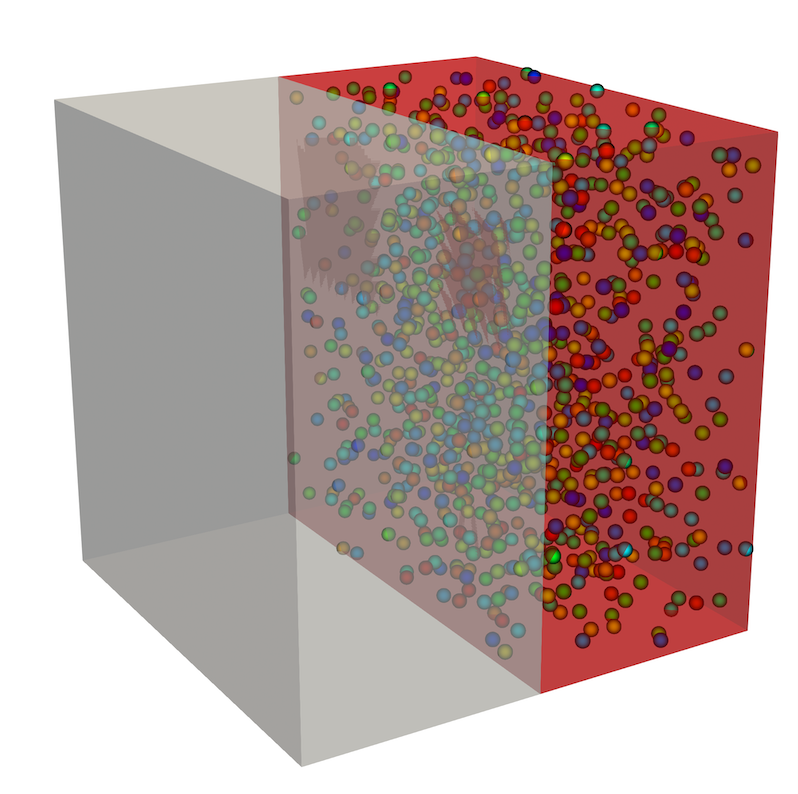
Figure 1: Plate geometry example.
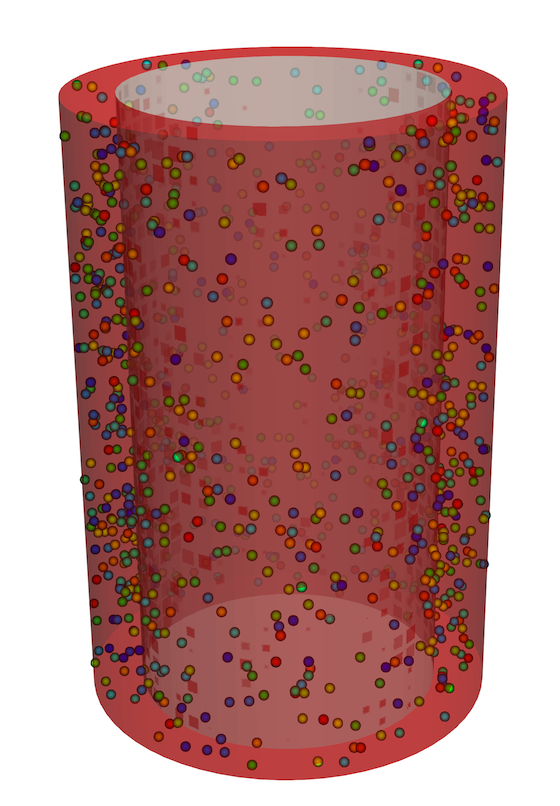
Figure 2: Cylinder geometry example.
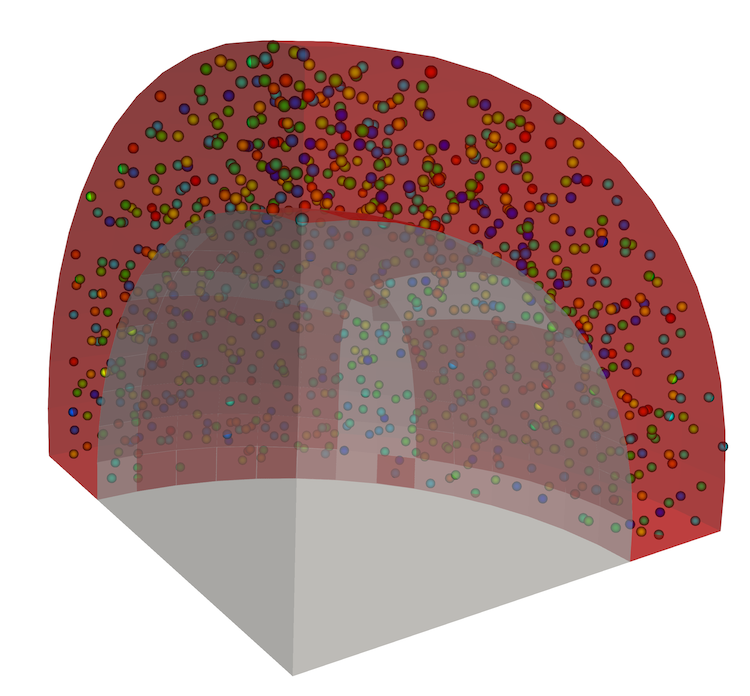
Figure 3: Sphere geometry example.
Example Input Syntax
[UserObjects<<<{"href": "../../syntax/UserObjects/index.html"}>>>]
  [point_source_location]
    type = TRISOMonteCarloPointSourceLocation<<<{"description": "Generate random locations of point sources for TRISO particles.", "href": "TRISOMonteCarloPointSourceLocation.html"}>>>
    min_radius<<<{"description": "The minimum radius of cylindrical or spherical fuel element."}>>> = 0.0138
    max_radius<<<{"description": "The maximum radius of cylindrical or spherical fuel element."}>>> = 0.018
    geometry<<<{"description": "Specifies the domain geometry."}>>> = SPHERE
    sampler<<<{"description": "The sampler object that performs TRISO particle Monte Carlo simulation."}>>> = sample
    fuel_element_blocks<<<{"description": "List of fuel element blocks in which to apply point sources."}>>> = fuel
    execute_on<<<{"description": "The list of flag(s) indicating when this object should be executed. For a description of each flag, see https://mooseframework.inl.gov/source/interfaces/SetupInterface.html."}>>> = 'INITIAL'
  []
[]Input Parameters
- allow_duplicate_execution_on_initialFalseIn the case where this UserObject is depended upon by an initial condition, allow it to be executed twice during the initial setup (once before the IC and again after mesh adaptivity (if applicable).
Default:False
C++ Type:bool
Controllable:No
Description:In the case where this UserObject is depended upon by an initial condition, allow it to be executed twice during the initial setup (once before the IC and again after mesh adaptivity (if applicable).
- execute_onTIMESTEP_ENDThe list of flag(s) indicating when this object should be executed. For a description of each flag, see https://mooseframework.inl.gov/source/interfaces/SetupInterface.html.
Default:TIMESTEP_END
C++ Type:ExecFlagEnum
Options:XFEM_MARK, NONE, INITIAL, LINEAR, NONLINEAR_CONVERGENCE, NONLINEAR, POSTCHECK, TIMESTEP_END, TIMESTEP_BEGIN, MULTIAPP_FIXED_POINT_END, MULTIAPP_FIXED_POINT_BEGIN, FINAL, CUSTOM
Controllable:No
Description:The list of flag(s) indicating when this object should be executed. For a description of each flag, see https://mooseframework.inl.gov/source/interfaces/SetupInterface.html.
- execution_order_group0Execution order groups are executed in increasing order (e.g., the lowest number is executed first). Note that negative group numbers may be used to execute groups before the default (0) group. Please refer to the user object documentation for ordering of user object execution within a group.
Default:0
C++ Type:int
Controllable:No
Description:Execution order groups are executed in increasing order (e.g., the lowest number is executed first). Note that negative group numbers may be used to execute groups before the default (0) group. Please refer to the user object documentation for ordering of user object execution within a group.
- force_postauxFalseForces the UserObject to be executed in POSTAUX
Default:False
C++ Type:bool
Controllable:No
Description:Forces the UserObject to be executed in POSTAUX
- force_preauxFalseForces the UserObject to be executed in PREAUX
Default:False
C++ Type:bool
Controllable:No
Description:Forces the UserObject to be executed in PREAUX
- force_preicFalseForces the UserObject to be executed in PREIC during initial setup
Default:False
C++ Type:bool
Controllable:No
Description:Forces the UserObject to be executed in PREIC during initial setup
Execution Scheduling Parameters
- control_tagsAdds user-defined labels for accessing object parameters via control logic.
C++ Type:std::vector<std::string>
Controllable:No
Description:Adds user-defined labels for accessing object parameters via control logic.
- enableTrueSet the enabled status of the MooseObject.
Default:True
C++ Type:bool
Controllable:Yes
Description:Set the enabled status of the MooseObject.
- use_displaced_meshFalseWhether or not this object should use the displaced mesh for computation. Note that in the case this is true but no displacements are provided in the Mesh block the undisplaced mesh will still be used.
Default:False
C++ Type:bool
Controllable:No
Description:Whether or not this object should use the displaced mesh for computation. Note that in the case this is true but no displacements are provided in the Mesh block the undisplaced mesh will still be used.
Advanced Parameters
- prop_getter_suffixAn optional suffix parameter that can be appended to any attempt to retrieve/get material properties. The suffix will be prepended with a '_' character.
C++ Type:MaterialPropertyName
Unit:(no unit assumed)
Controllable:No
Description:An optional suffix parameter that can be appended to any attempt to retrieve/get material properties. The suffix will be prepended with a '_' character.
- use_interpolated_stateFalseFor the old and older state use projected material properties interpolated at the quadrature points. To set up projection use the ProjectedStatefulMaterialStorageAction.
Default:False
C++ Type:bool
Controllable:No
Description:For the old and older state use projected material properties interpolated at the quadrature points. To set up projection use the ProjectedStatefulMaterialStorageAction.
Material Property Retrieval Parameters
Input Files
- (test/tests/triso_pebble/cylinder_2d_rz.i)
- (examples/TRISO/pebble/3D_pebble.i)
- (test/tests/triso_pebble/plate.i)
- (test/tests/triso_pebble/1D_pebble_picard.i)
- (test/tests/triso_pebble/cylinder_3d.i)
- (test/tests/triso_pebble/sphere_2d_rz.i)
- (test/tests/triso_pebble/1D_pebble.i)
- (test/tests/triso_pebble/3D_pebble.i)
- (test/tests/triso_pebble/1D_pebble_from_csv.i)
- (test/tests/triso_pebble/sphere_3d.i)
- (examples/TRISO/pebble/3D_pebble_with_failed_particles.i)
- (test/tests/triso_pebble/3D_pebble_from_csv.i)
(test/tests/triso_pebble/3D_pebble.i)
[GlobalParams]
  order = FIRST
  family = LAGRANGE
  flux_conversion_factor = 0.85
[]

[Mesh]
  [file]
    type = FileMeshGenerator
    file = pebble.e
  []
[]

[Distributions]
  [normal_kernel_r]
    type = TruncatedNormal
    mean = 213.35e-6
    standard_deviation = 4.4e-6
    lower_bound = 1.9575e-04
    upper_bound = 2.3095e-04
  []
  [normal_buffer_t]
    type = TruncatedNormal
    mean = 98.9e-6
    standard_deviation = 8.4e-6
    lower_bound = 6.53e-05
    upper_bound = 1.325e-04
  []
  [normal_ipyc_t]
    type = TruncatedNormal
    mean = 40.4e-6
    standard_deviation = 2.5e-6
    lower_bound = 3.0400e-05
    upper_bound = 5.0400e-05
  []
  [normal_sic_t]
    type = TruncatedNormal
    mean = 35.2e-6
    standard_deviation = 1.2e-6
    lower_bound = 3.0400e-05
    upper_bound = 4.0000e-05
  []
  [normal_opyc_t]
    type = TruncatedNormal
    mean = 43.4e-6
    standard_deviation = 2.9e-6
    lower_bound = 3.1800e-05
    upper_bound = 5.5000e-05
  []
[]

[Samplers]
  [sample]
    type = MonteCarlo
    num_rows = 10
    distributions = 'normal_kernel_r normal_buffer_t normal_ipyc_t normal_sic_t normal_opyc_t'
    execute_on = 'PRE_MULTIAPP_SETUP'
  []
[]

[MultiApps]
  [sub]
    type = SamplerTransientMultiApp
    input_files = triso_1d.i
    sampler = sample
    execute_on = 'TIMESTEP_BEGIN'
    mode = normal
  []
[]

[DiracKernels]
  [vpp_point_source]
    type = TRISOMonteCarloPointSource
    variable = temperature
    point_source_values = released_heat_inc
    value_name = released_heat_inc:released_heat_inc
    point_source_location = point_source_location
  []
[]

[UserObjects]
  [point_source_location]
    type = TRISOMonteCarloPointSourceLocation
    min_radius = 0.0138
    max_radius = 0.018
    geometry = SPHERE
    sampler = sample
    fuel_element_blocks = fuel
    execute_on = 'INITIAL'
  []
[]

[Transfers]
  [released_heat_inc]
    type = SamplerPostprocessorTransfer
    from_multi_app = sub
    sampler = sample
    to_vector_postprocessor = released_heat_inc
    from_postprocessor = released_heat_inc
  []
  [temp_bc]
    type = MultiAppVectorPostprocessorTransfer
    to_multi_app = sub
    vector_postprocessor = sample_points
    postprocessor = temp_bc
    vector_name = temperature
  []
[]

[Controls]
  [cmdline]
    type = MultiAppSamplerControl
    multi_app = sub
    sampler = sample
    param_names = 'kernel_radius buffer_thickness IPyC_thickness SiC_thickness OPyC_thickness'
  []
[]

[VectorPostprocessors]
  [sample_points]
    type = TRISOMonteCarloPointValueSampler
    variable = temperature
    execute_on = 'INITIAL TIMESTEP_BEGIN'
    point_source_location = point_source_location
  []
  [sampler_data]
    type = SamplerData
    execute_on = 'TIMESTEP_BEGIN'
    sampler = sample
  []
  [released_heat_inc]
    type = StochasticResults
    execute_on = 'TIMESTEP_BEGIN'
  []
  [point_source_output]
    type = TRISOMonteCarloPointSourceOutput
    vector_postprocessor = released_heat_inc
    value_name = released_heat_inc:released_heat_inc
    point_source_location = point_source_location
  []
[]

[Problem]
  type = ReferenceResidualProblem
  reference_vector = 'ref'
  extra_tag_vectors = 'ref'
[]

[Variables]
  [temperature]
    initial_condition = 773.15
  []
[]

[AuxVariables]
  [density]
    order = CONSTANT
    family = MONOMIAL
  []
  [thermal_conductivity]
    order = CONSTANT
    family = MONOMIAL
  []
  [specific_heat]
    order = CONSTANT
    family = MONOMIAL
  []
[]

[Kernels]
  [heat_ie]
    type = HeatConductionTimeDerivative
    variable = temperature
    extra_vector_tags = 'ref'
  []
  [heat]
    type = HeatConduction
    variable = temperature
    extra_vector_tags = 'ref'
  []
[]

[AuxKernels]
  [density]
    type = MaterialRealAux
    variable = density
    property = density
    block = 'core fuel shell'
    execute_on = 'initial linear'
  []
  [thermal_conductivity]
    type = MaterialRealAux
    variable = thermal_conductivity
    property = thermal_conductivity
    block = 'core fuel shell'
    execute_on = timestep_end
  []
  [specific_heat]
    type = MaterialRealAux
    variable = specific_heat
    property = specific_heat
    block = 'core fuel shell'
    execute_on = timestep_end
  []
[]

[BCs]
  [coolant_temp]
    type = DirichletBC
    variable = temperature
    boundary = exterior
    value = 773.15
  []
[]

[Functions]
  [power_history]
    type = PiecewiseLinear
    x = '0 76e6'
    y = '1 1'
  []
  [fission_rate]
    type = LinearCombinationFunction
    functions = power_history
    w = 5.75e19
  []
[]

[Materials]
  [fission_rate]
    type = GenericFunctionMaterial
    prop_names = fission_rate
    prop_values = fission_rate
  []
  [fast_neutron_flux]
    type = FastNeutronFlux
    calculate_fluence = true
    flux_function = power_history
    factor = 6.28e17
  []
  [fueled_region_thermal]
    type = GraphiteMatrixThermal
    block = fuel
    graphite_grade = A3_27_1800
    packing_fraction = 0.22
    temperature = temperature
    initial_matrix_density = 1750.0
  []
  [fuel_region_density]
    type = ParsedMaterial
    block = fuel
    property_name = density
    expression = 1750.0
  []
  [shell_region_thermal]
    type = GraphiteMatrixThermal
    block = shell
    graphite_grade = A3_27_1800
    packing_fraction = 0.0
    temperature = temperature
    initial_matrix_density = 1750.0
  []
  [shell_region_density]
    type = ParsedMaterial
    block = shell
    property_name = density
    expression = 1750.0
  []
  [core_region_thermal]
    type = GraphiteMatrixThermal
    block = core
    graphite_grade = A3_27_1800
    packing_fraction = 0.0
    temperature = temperature
    initial_matrix_density = 1400.0
  []
  [core_region_density]
    type = ParsedMaterial
    block = core
    property_name = density
    expression = 1400.0
  []
[]

[Debug]
  show_var_residual_norms = true
  show_var_residual = 'temperature'
[]

[Preconditioning]
  [smp]
    type = SMP
    full = true
  []
[]

[Executioner]
  type = Transient
  solve_type = 'PJFNK'

  petsc_options_iname = '-pc_type -pc_factor_mat_solver_package'
  petsc_options_value = 'lu superlu_dist'

  line_search = 'none'

  nl_rel_tol = 1e-9
  nl_abs_tol = 1e-9
  nl_max_its = 20

  l_tol = 1e-5
  l_max_its = 30

  start_time = 0.0
  dt = 20000
  num_steps = 2
[]

[Outputs]
  print_linear_residuals = true
  time_step_interval =  1
  exodus = true
  csv = true
  perf_graph = true
[]
(test/tests/triso_pebble/cylinder_2d_rz.i)
[Mesh]
  coord_type = RZ
  [gen]
    type = GeneratedMeshGenerator
    dim = 2
    nx = 2
    ny = 2
  []
  [subdomain_1]
    type = SubdomainBoundingBoxGenerator
    block_id = 1
    bottom_left = '0 0 0'
    top_right = '0.5 1 0'
    input = gen
  []
  [subdomain_2]
    type = SubdomainBoundingBoxGenerator
    block_id = 2
    bottom_left = '0.5 0 0'
    top_right = '1 1 0'
    input = subdomain_1
  []
[]

[Variables]
  [u]
  []
[]

[Kernels]
  [diff]
    type = Diffusion
    variable = u
  []
  [time]
    type = TimeDerivative
    variable = u
  []
[]

[BCs]
  [left]
    type = DirichletBC
    variable = u
    boundary = left
    value = 0
  []
[]

[DiracKernels]
  [vpp_point_source]
    type = TRISOMonteCarloPointSource
    variable = u
    point_source_values = constant
    value_name = source
    point_source_location = point_source_location
  []
[]

[UserObjects]
  [point_source_location]
    type = TRISOMonteCarloPointSourceLocation
    min_radius = 0.5
    max_radius = 1.0
    center = '0 0.5 0'
    height = 1
    geometry = CYLINDER
    sampler = sample
    fuel_element_blocks = 2
    particle_space = 0.04
    execute_on = 'INITIAL'
  []
[]

[Distributions]
  [random]
    type = TruncatedNormal
    mean = 0
    standard_deviation = 0.5
  []
[]

[Samplers]
  [sample]
    type = MonteCarlo
    num_rows = 10
    distributions = 'random'
    execute_on = 'PRE_MULTIAPP_SETUP'
  []
[]

[VectorPostprocessors]
  [constant]
    type = ConstantVectorPostprocessor
    value = '1 2 3 4 5 6 7 8 9 10'
    vector_names = source
    execute_on = initial
  []
  [point_source_output]
    type = TRISOMonteCarloPointSourceOutput
    vector_postprocessor = constant
    value_name = source
    point_source_location = point_source_location
  []
[]

[Executioner]
  type = Transient
  solve_type = 'NEWTON'

  petsc_options_iname = '-pc_type'
  petsc_options_value = 'lu'

  line_search = 'none'

  nl_rel_tol = 1e-6
  nl_abs_tol = 1e-6
  nl_max_its = 20

  l_tol = 1e-4
  l_max_its = 50

  start_time = 0.0
  end_time = 4.831315e7

  num_steps = 1

  dt = 400000
[]

[Outputs]
  csv = true
  exodus = true
[]
(examples/TRISO/pebble/3D_pebble.i)
[GlobalParams]
  order = FIRST
  family = LAGRANGE
  flux_conversion_factor = 0.85
  energy_per_fission = 3.204e-11 #[J/fission]
[]

[Mesh]
  [file]
    type = FileMeshGenerator
    file = pebble.e
  []
[]

[Problem]
  type = ReferenceResidualProblem
  reference_vector = 'ref'
  extra_tag_vectors = 'ref'
[]

[Distributions]
  [normal_kernel_r]
    type = TruncatedNormal
    mean = 213.35e-6
    standard_deviation = 4.4e-6
    lower_bound = 1.9575e-04
    upper_bound = 2.3095e-04
  []
  [normal_buffer_t]
    type = TruncatedNormal
    mean = 98.9e-6
    standard_deviation = 8.4e-6
    lower_bound = 6.53e-05
    upper_bound = 1.325e-04
  []
  [normal_ipyc_t]
    type = TruncatedNormal
    mean = 40.4e-6
    standard_deviation = 2.5e-6
    lower_bound = 3.0400e-05
    upper_bound = 5.0400e-05
  []
  [normal_sic_t]
    type = TruncatedNormal
    mean = 35.2e-6
    standard_deviation = 1.2e-6
    lower_bound = 3.0400e-05
    upper_bound = 4.0000e-05
  []
  [normal_opyc_t]
    type = TruncatedNormal
    mean = 43.4e-6
    standard_deviation = 2.9e-6
    lower_bound = 3.1800e-05
    upper_bound = 5.5000e-05
  []
[]

[Samplers]
  [sample]
    type = MonteCarlo
    num_rows = 100
    distributions = 'normal_kernel_r normal_buffer_t normal_ipyc_t normal_sic_t normal_opyc_t'
    execute_on = 'PRE_MULTIAPP_SETUP'
  []
[]

[MultiApps]
  [sub]
    type = SamplerTransientMultiApp
    input_files = triso_1d.i
    sampler = sample
    execute_on = 'TIMESTEP_BEGIN'
    mode = normal
  []
[]

[DiracKernels]
  [heat_source]
    type = TRISOMonteCarloPointSource
    variable = temperature
    point_source_values = release_heat_inc
    value_name = release_heat_inc:release_heat_inc
    point_source_location = point_source_location
  []
  [Cs_source]
    type = TRISOMonteCarloPointSource
    variable = conc_Cs
    point_source_values = release_Cs_inc
    value_name = release_Cs_inc:release_Cs_inc
    point_source_location = point_source_location
  []
[]

[UserObjects]
  [point_source_location]
    type = TRISOMonteCarloPointSourceLocation
    min_radius = 0.0138
    max_radius = 0.018
    geometry = SPHERE
    sampler = sample
    fuel_element_blocks = 2
    particle_space = 0.0002
    execute_on = 'INITIAL'
  []
[]

[Transfers]
  [release_heat_inc]
    type = SamplerPostprocessorTransfer
    from_multi_app = sub
    sampler = sample
    to_vector_postprocessor = release_heat_inc
    from_postprocessor = release_heat_inc
  []
  [release_Cs_inc]
    type = SamplerPostprocessorTransfer
    from_multi_app = sub
    sampler = sample
    to_vector_postprocessor = release_Cs_inc
    from_postprocessor = release_Cs_inc
  []
  [sub_temp_bc]
    type = SamplerPostprocessorTransfer
    from_multi_app = sub
    sampler = sample
    to_vector_postprocessor = temp_bc
    from_postprocessor = aver_temp_exterior
  []
  [temp_bc]
    type = MultiAppVectorPostprocessorTransfer
    to_multi_app = sub
    vector_postprocessor = sample_points
    postprocessor = temp_bc
    vector_name = temperature
  []
[]

[Controls]
  [cmdline]
    type = MultiAppSamplerControl
    multi_app = sub
    sampler = sample
    param_names = 'kernel_radius buffer_thickness IPyC_thickness SiC_thickness OPyC_thickness'
  []
[]

[VectorPostprocessors]
  [sample_points]
    type = TRISOMonteCarloPointValueSampler
    variable = temperature
    execute_on = 'INITIAL TIMESTEP_BEGIN'
    point_source_location = point_source_location
  []
  [release_heat_inc]
    type = StochasticResults
    execute_on = 'TIMESTEP_BEGIN'
  []
  [release_Cs_inc]
    type = StochasticResults
    execute_on = 'TIMESTEP_BEGIN'
  []
  [heat_source_output]
    type = TRISOMonteCarloPointSourceOutput
    vector_postprocessor = release_heat_inc
    value_name = release_heat_inc:release_heat_inc
    point_source_location = point_source_location
  []
  [Cs_source_output]
    type = TRISOMonteCarloPointSourceOutput
    vector_postprocessor = release_Cs_inc
    value_name = release_Cs_inc:release_Cs_inc
    point_source_location = point_source_location
  []
  [temp_bc]
    type = StochasticResults
    execute_on = 'TIMESTEP_BEGIN'
  []
  [temp_bc_output]
    type = TRISOMonteCarloPointSourceOutput
    vector_postprocessor = temp_bc
    value_name = sub_temp_bc:aver_temp_exterior
    point_source_location = point_source_location
  []
[]

[Variables]
  [temperature]
    initial_condition = 773.15
  []
  [conc_Cs]
  []
[]

[AuxVariables]
  [density]
    order = CONSTANT
    family = MONOMIAL
  []
  [thermal_conductivity]
    order = CONSTANT
    family = MONOMIAL
  []
  [specific_heat]
    order = CONSTANT
    family = MONOMIAL
  []
  [Cs_diff_coef]
    order = CONSTANT
    family = MONOMIAL
  []
[]

[Functions]
  [power_history]
    type = PiecewiseLinear
    x = '0 1e3 4.51008e7' #change time (s) for desired EFPD
    y = '0 1 1'
  []
  [fission_rate]
    type = LinearCombinationFunction
    functions = power_history
    w = 2.927e18
  []
[]

[Kernels]
  [heat_ie]
    type = HeatConductionTimeDerivative
    variable = temperature
    extra_vector_tags = 'ref'
  []
  [heat]
    type = HeatConduction
    variable = temperature
    extra_vector_tags = 'ref'
  []
  [mass_Cs_dt]
    type = TimeDerivative
    variable = conc_Cs
  []
  [mass_Cs]
    type = ArrheniusDiffusion
    variable = conc_Cs
    arrhenius_prpty_name = arrhenius_diffusion_coef_Cs
    extra_vector_tags = 'ref'
  []
[]

[AuxKernels]
  [density]
    type = MaterialRealAux
    variable = density
    property = density
    block = '1 2 3'
    execute_on = 'initial linear'
  []
  [thermal_conductivity]
    type = MaterialRealAux
    variable = thermal_conductivity
    property = thermal_conductivity
    block = '1 2 3'
    execute_on = timestep_end
  []
  [specific_heat]
    type = MaterialRealAux
    variable = specific_heat
    property = specific_heat
    block = '1 2 3'
    execute_on = timestep_end
  []
  [Cs_diff_coef]
    type = MaterialRealAux
    variable = Cs_diff_coef
    property = arrhenius_diffusion_coef_Cs
    execute_on = timestep_end
  []
[]

[BCs]
  [coolant_temp]
    type = DirichletBC
    variable = temperature
    boundary = exterior
    value = 773.15
  []
  [freesurf_conc_Cs]
    type = DirichletBC
    variable = conc_Cs
    boundary = exterior
    value = 0.0
  []
[]

[Materials]
  [fission_rate]
    type = GenericFunctionMaterial
    prop_names = fission_rate
    prop_values = fission_rate
  []
  [fast_neutron_flux]
    type = FastNeutronFlux
    calculate_fluence = true
    flux_function = power_history
    factor = 1.109e18
  []

  ##### fuel region propereties
  [fueled_region_thermal]
    type = GraphiteMatrixThermal
    block = 2
    graphite_grade = A3_27_1800
    packing_fraction = 0.22
    temperature = temperature
    initial_matrix_density = 1750.0
  []
  [fueled_region_density]
    type = ParsedMaterial
    block = 2
    property_name = density
    expression = 1750.0
  []
  [fuel_conc_Cs]
    type = ArrheniusDiffusionCoef
    block = 2
    d1 = 1e-8 # m^2/s
    q1 = 0.0 # J/mol
    temperature = temperature
    arrhenius_prpty_name = arrhenius_diffusion_coef_Cs
  []

  ##### Shell properties
  [shell_region_thermal]
    type = GraphiteMatrixThermal
    block = 3
    graphite_grade = A3_27_1800
    packing_fraction = 0.0
    temperature = temperature
    initial_matrix_density = 1750.0
  []
  [shell_region_density]
    type = ParsedMaterial
    block = 3
    property_name = density
    expression = 1750.0
  []

  [shell_conc_Cs]
    type = ArrheniusDiffusionCoef
    block = 3
    d1 = 1e-8 # m^2/s
    q1 = 0.0 # J/mol
    temperature = temperature
    arrhenius_prpty_name = arrhenius_diffusion_coef_Cs
  []

  ##### pebble core
  [core_region_thermal]
    type = GraphiteMatrixThermal
    block = 1
    graphite_grade = A3_27_1800
    packing_fraction = 0.0
    temperature = temperature
    initial_matrix_density = 1400.0
  []
  [core_region_density]
    type = ParsedMaterial
    block = 1
    property_name = density
    expression = 1400.0
  []
  [core_conc_Cs]
    type = ArrheniusDiffusionCoef
    block = 1
    d1 = 1e-8 # m^2/s
    q1 = 0.0 # J/mol
    temperature = temperature
    arrhenius_prpty_name = arrhenius_diffusion_coef_Cs
  []
[]

[Debug]
  show_var_residual_norms = true
  show_var_residual = 'temperature'
[]

[Preconditioning]
  [smp]
    type = SMP
    full = true
  []
[]

[Executioner]
  type = Transient
  solve_type = 'PJFNK'

  petsc_options_iname = '-pc_type'
  petsc_options_value = 'lu'

  line_search = 'none'

  nl_rel_tol = 1e-9
  nl_abs_tol = 1e-9
  nl_max_its = 15

  l_tol = 1e-5
  l_max_its = 30

  start_time = 0.0
  dt = 500000
  num_steps = 10
[]

[Postprocessors]

  ### irradiation conditions
  [pebble_power]
    type = ElementIntegralPower
    variable = temperature
    use_material_fission_rate = true
    fission_rate_material = fission_rate
    block = 2
    execute_on = 'initial timestep_end'
  []
  [heat_from_pebble]
    type = SideDiffusiveFluxIntegral
    variable = temperature
    boundary = exterior
    diffusivity = thermal_conductivity
    execute_on = 'initial timestep_end'
  []
  [fast_neutron_maximum_fluence_MP]
    type = ElementExtremeMaterialProperty
    mat_prop = fast_neutron_fluence
    block = '1 2 3'
    value_type = 'max'
    execute_on = 'initial timestep_end'
  []
  [fast_neutron_maximum_flux_MP]
    type = ElementExtremeMaterialProperty
    mat_prop = fast_neutron_flux
    block = '1 2 3'
    value_type = 'max'
    execute_on = 'initial timestep_end'
  []
  [fission_rate_maximum]
    type = ElementExtremeMaterialProperty
    mat_prop = fission_rate
    block = '1 2 3'
    value_type = 'max'
    execute_on = 'initial timestep_end'
  []

  ### temperatures
  [fuel_minimum_temperature]
    type = NodalExtremeValue
    variable = temperature
    block = '2'
    value_type = 'min'
    execute_on = 'initial timestep_end'
  []
  [fuel_average_temperature]
    type = AverageNodalVariableValue
    variable = temperature
    block = '2'
    execute_on = 'initial timestep_end'
  []
  [fuel_maximum_temperature]
    type = NodalExtremeValue
    variable = temperature
    block = '2'
    value_type = 'max'
    execute_on = 'initial timestep_end'
  []

  [shell_minimum_temperature]
    type = NodalExtremeValue
    variable = temperature
    block = '3'
    value_type = 'min'
    execute_on = 'initial timestep_end'
  []
  [shell_average_temperature]
    type = AverageNodalVariableValue
    variable = temperature
    block = '3'
    execute_on = 'initial timestep_end'
  []
  [shell_maximum_temperature]
    type = NodalExtremeValue
    variable = temperature
    block = '3'
    value_type = 'max'
    execute_on = 'initial timestep_end'
  []

  [core_minimum_temperature]
    type = NodalExtremeValue
    variable = temperature
    block = '1'
    value_type = 'min'
    execute_on = 'initial timestep_end'
  []
  [core_average_temperature]
    type = AverageNodalVariableValue
    variable = temperature
    block = '1'
    execute_on = 'initial timestep_end'
  []
  [core_maximum_temperature]
    type = NodalExtremeValue
    variable = temperature
    block = '1'
    value_type = 'max'
    execute_on = 'initial timestep_end'
  []
[]

[Outputs]
  print_linear_residuals = true
  time_step_interval =  1
  exodus = true
  csv = true
  perf_graph = true
[]
(test/tests/triso_pebble/plate.i)
[Mesh]
  [gen]
    type = GeneratedMeshGenerator
    dim = 3
    nx = 2
    ny = 2
    nz = 2
  []
  [subdomain_1]
    type = SubdomainBoundingBoxGenerator
    block_id = 1
    bottom_left = '0 0 0'
    top_right = '0.5 1 1'
    input = gen
  []
  [subdomain_2]
    type = SubdomainBoundingBoxGenerator
    block_id = 2
    bottom_left = '0.5 0 0'
    top_right = '1 1 1'
    input = subdomain_1
  []
[]

[Variables]
  [u]
  []
[]

[Kernels]
  [diff]
    type = Diffusion
    variable = u
  []
  [time]
    type = TimeDerivative
    variable = u
  []
[]

[BCs]
  [left]
    type = DirichletBC
    variable = u
    boundary = right
    value = 0
  []
[]

[DiracKernels]
  [vpp_point_source]
    type = TRISOMonteCarloPointSource
    variable = u
    point_source_values = constant
    value_name = source
    point_source_location = point_source_location
  []
[]

[UserObjects]
  [point_source_location]
    type = TRISOMonteCarloPointSourceLocation
    min_location = '0.5 0 0'
    max_location = '1 1 1'
    geometry = PLATE
    sampler = sample
    particle_space = 0.01
    execute_on = 'INITIAL'
  []
[]

[Distributions]
  [random]
    type = TruncatedNormal
    mean = 0
    standard_deviation = 0.5
  []
[]

[Samplers]
  [sample]
    type = MonteCarlo
    num_rows = 10
    distributions = 'random'
    execute_on = 'PRE_MULTIAPP_SETUP'
  []
[]

[VectorPostprocessors]
  [constant]
    type = ConstantVectorPostprocessor
    value = '1 2 3 4 5 6 7 8 9 10'
    vector_names = source
    execute_on = initial
  []
  [point_source_output]
    type = TRISOMonteCarloPointSourceOutput
    vector_postprocessor = constant
    value_name = source
    point_source_location = point_source_location
  []
[]

[Executioner]
  type = Transient
  solve_type = 'NEWTON'

  petsc_options_iname = '-pc_type'
  petsc_options_value = 'lu'

  line_search = 'none'

  nl_rel_tol = 1e-6
  nl_abs_tol = 1e-6
  nl_max_its = 20

  l_tol = 1e-4
  l_max_its = 50

  start_time = 0.0
  end_time = 4.831315e7

  num_steps = 1

  dt = 400000
[]

[Outputs]
  csv = true
  exodus = true
[]
(test/tests/triso_pebble/1D_pebble_picard.i)
[GlobalParams]
  order = SECOND
  family = LAGRANGE
  flux_conversion_factor = 0.85
[]

[Mesh]
  coord_type = RSPHERICAL
  [gen]
    type = TRISO1DMeshGenerator
    elem_type = EDGE3
    coordinates = '0 0.0138 0.018 0.02'
    mesh_density = '5    10   10'
    block_names = 'core fuel shell'
  []
[]

[Distributions]
  [normal_kernel_r]
    type = TruncatedNormal
    mean = 213.35e-6
    standard_deviation = 4.4e-6
    lower_bound = 1.9575e-04
    upper_bound = 2.3095e-04
  []
  [normal_buffer_t]
    type = TruncatedNormal
    mean = 98.9e-6
    standard_deviation = 8.4e-6
    lower_bound = 6.53e-05
    upper_bound = 1.325e-04
  []
  [normal_ipyc_t]
    type = TruncatedNormal
    mean = 40.4e-6
    standard_deviation = 2.5e-6
    lower_bound = 3.0400e-05
    upper_bound = 5.0400e-05
  []
  [normal_sic_t]
    type = TruncatedNormal
    mean = 35.2e-6
    standard_deviation = 1.2e-6
    lower_bound = 3.0400e-05
    upper_bound = 4.0000e-05
  []
  [normal_opyc_t]
    type = TruncatedNormal
    mean = 43.4e-6
    standard_deviation = 2.9e-6
    lower_bound = 3.1800e-05
    upper_bound = 5.5000e-05
  []
[]

[Samplers]
  [sample]
    type = MonteCarlo
    num_rows = 10
    distributions = 'normal_kernel_r normal_buffer_t normal_ipyc_t normal_sic_t normal_opyc_t'
    execute_on = 'PRE_MULTIAPP_SETUP'
  []
[]

[MultiApps]
  [sub]
    type = SamplerTransientMultiApp
    input_files = triso_1d.i
    sampler = sample
    execute_on = 'TIMESTEP_BEGIN'
    mode = normal
  []
[]

[DiracKernels]
  [vpp_point_source]
    type = TRISOMonteCarloPointSource
    variable = temperature
    point_source_values = released_heat_inc
    value_name = released_heat_inc:released_heat_inc
    point_source_location = point_source_location
  []
[]

[UserObjects]
  [point_source_location]
    type = TRISOMonteCarloPointSourceLocation
    min_radius = 0.0138
    max_radius = 0.018
    geometry = SPHERE
    sampler = sample
    fuel_element_blocks = fuel
    execute_on = 'INITIAL'
  []
[]

[Transfers]
  [released_heat_inc]
    type = SamplerPostprocessorTransfer
    from_multi_app = sub
    sampler = sample
    to_vector_postprocessor = released_heat_inc
    from_postprocessor = released_heat_inc
  []
  [sub_temp_bc]
    type = SamplerPostprocessorTransfer
    from_multi_app = sub
    sampler = sample
    to_vector_postprocessor = temp_bc
    from_postprocessor = aver_temp_exterior
  []
  [temp_bc]
    type = MultiAppVectorPostprocessorTransfer
    to_multi_app = sub
    vector_postprocessor = sample_points
    postprocessor = temp_bc
    vector_name = temperature
  []
[]

[Controls]
  [cmdline]
    type = MultiAppSamplerControl
    multi_app = sub
    sampler = sample
    param_names = 'kernel_radius buffer_thickness IPyC_thickness SiC_thickness OPyC_thickness'
  []
[]

[VectorPostprocessors]
  [sample_points]
    type = TRISOMonteCarloPointValueSampler
    variable = temperature
    execute_on = 'INITIAL TIMESTEP_BEGIN'
    point_source_location = point_source_location
  []
  [sampler_data]
    type = SamplerData
    execute_on = 'TIMESTEP_BEGIN'
    sampler = sample
  []
  [released_heat_inc]
    type = StochasticResults
    execute_on = 'TIMESTEP_BEGIN'
  []
  [temp_bc]
    type = StochasticResults
    execute_on = 'INITIAL TIMESTEP_BEGIN'
  []
  [point_source_output]
    type = TRISOMonteCarloPointSourceOutput
    vector_postprocessor = released_heat_inc
    value_name = released_heat_inc:released_heat_inc
    point_source_location = point_source_location
  []
  [temp_bc_output]
    type = TRISOMonteCarloPointSourceOutput
    vector_postprocessor = temp_bc
    value_name = sub_temp_bc:aver_temp_exterior
    point_source_location = point_source_location
  []
[]

[Problem]
  type = ReferenceResidualProblem
  reference_vector = 'ref'
  extra_tag_vectors = 'ref'
[]

[Variables]
  [temperature]
    initial_condition = 773.15
  []
[]

[AuxVariables]
  [density]
    order = CONSTANT
    family = MONOMIAL
  []
  [thermal_conductivity]
    order = CONSTANT
    family = MONOMIAL
  []
  [specific_heat]
    order = CONSTANT
    family = MONOMIAL
  []
[]

[Kernels]
  [heat_ie]
    type = HeatConductionTimeDerivative
    variable = temperature
    extra_vector_tags = 'ref'
  []
  [heat]
    type = HeatConduction
    variable = temperature
    extra_vector_tags = 'ref'
  []
  [heat_source]
    type = FissionRateHeatSource
    variable = temperature
    block = fuel
    fission_rate = fission_rate
    extra_vector_tags = 'ref'
  []
[]

[AuxKernels]
  [density]
    type = MaterialRealAux
    variable = density
    property = density
    block = 'core fuel shell'
    execute_on = 'initial linear'
  []
  [thermal_conductivity]
    type = MaterialRealAux
    variable = thermal_conductivity
    property = thermal_conductivity
    block = 'core fuel shell'
    execute_on = timestep_end
  []
  [specific_heat]
    type = MaterialRealAux
    variable = specific_heat
    property = specific_heat
    block = 'core fuel shell'
    execute_on = timestep_end
  []
[]

[BCs]
  [coolant_temp]
    type = DirichletBC
    variable = temperature
    boundary = exterior
    value = 773.15
  []
[]

[Functions]
  [power_history]
    type = PiecewiseLinear
    x = '0 76e6'
    y = '1 1'
  []
  [fission_rate]
    type = LinearCombinationFunction
    functions = power_history
    w = 5.75e19
  []
[]

[Materials]
  [fission_rate]
    type = GenericFunctionMaterial
    prop_names = fission_rate
    prop_values = fission_rate
  []
  [fast_neutron_flux]
    type = FastNeutronFlux
    calculate_fluence = true
    flux_function = power_history
    factor = 6.28e17
  []
  [fueled_region_thermal]
    type = GraphiteMatrixThermal
    block = fuel
    graphite_grade = A3_27_1800
    packing_fraction = 0.22
    temperature = temperature
    initial_matrix_density = 1750.0
  []
  [fuel_region_density]
    type = ParsedMaterial
    block = fuel
    property_name = density
    expression = 1750.0
  []
  [shell_region_thermal]
    type = GraphiteMatrixThermal
    block = shell
    graphite_grade = A3_27_1800
    packing_fraction = 0.0
    temperature = temperature
    initial_matrix_density = 1750.0
  []
  [shell_region_density]
    type = ParsedMaterial
    block = shell
    property_name = density
    expression = 1750.0
  []
  [core_region_thermal]
    type = GraphiteMatrixThermal
    block = core
    graphite_grade = A3_27_1800
    packing_fraction = 0.0
    temperature = temperature
    initial_matrix_density = 1400.0
  []
  [core_region_density]
    type = ParsedMaterial
    block = core
    property_name = density
    expression = 1400.0
  []
[]

[Debug]
  show_var_residual_norms = true
  show_var_residual = 'temperature'
[]

[Preconditioning]
  [smp]
    type = SMP
    full = true
  []
[]

[Executioner]
  type = Transient
  solve_type = 'PJFNK'

  petsc_options_iname = '-pc_type -pc_factor_mat_solver_package'
  petsc_options_value = 'lu superlu_dist'

  line_search = 'none'

  nl_rel_tol = 1e-12
  nl_abs_tol = 1e-12
  nl_max_its = 15

  nl_forced_its = 2

  l_tol = 1e-5
  l_max_its = 30

  start_time = 0.0
  dt = 20000
  num_steps = 2

  fixed_point_max_its = 20
  accept_on_max_fixed_point_iteration = true
  fixed_point_rel_tol = 1e-8
  fixed_point_abs_tol = 1e-10
[]

[Outputs]
  exodus = true
[]
(test/tests/triso_pebble/cylinder_3d.i)
[Mesh]
  [file]
    type = FileMeshGenerator
    file = cyl.e
  []
[]

[Variables]
  [u]
  []
[]

[Kernels]
  [diff]
    type = Diffusion
    variable = u
  []
  [time]
    type = TimeDerivative
    variable = u
  []
[]

[BCs]
  [left]
    type = DirichletBC
    variable = u
    boundary = 101
    value = 0
  []
[]

[DiracKernels]
  [vpp_point_source]
    type = TRISOMonteCarloPointSource
    variable = u
    point_source_values = constant
    value_name = source
    point_source_location = point_source_location
  []
[]

[UserObjects]
  [point_source_location]
    type = TRISOMonteCarloPointSourceLocation
    min_radius = 0.75
    max_radius = 1.0
    height = 1.5
    geometry = CYLINDER
    sampler = sample
    fuel_element_blocks = 2
    particle_space = 0.04
    execute_on = 'INITIAL'
  []
[]

[Distributions]
  [random]
    type = TruncatedNormal
    mean = 0
    standard_deviation = 0.5
  []
[]

[Samplers]
  [sample]
    type = MonteCarlo
    num_rows = 10
    distributions = 'random'
    execute_on = 'PRE_MULTIAPP_SETUP'
  []
[]

[VectorPostprocessors]
  [constant]
    type = ConstantVectorPostprocessor
    value = '1 2 3 4 5 6 7 8 9 10'
    vector_names = source
    execute_on = initial
  []
  [point_source_output]
    type = TRISOMonteCarloPointSourceOutput
    vector_postprocessor = constant
    value_name = source
    point_source_location = point_source_location
  []
[]

[Executioner]
  type = Transient
  solve_type = 'NEWTON'

  petsc_options_iname = '-pc_type'
  petsc_options_value = 'lu'

  line_search = 'none'

  nl_rel_tol = 1e-6
  nl_abs_tol = 1e-6
  nl_max_its = 20

  l_tol = 1e-4
  l_max_its = 50

  start_time = 0.0
  end_time = 4.831315e7

  num_steps = 1

  dt = 400000
[]

[Outputs]
  csv = true
  exodus = true
[]
(test/tests/triso_pebble/sphere_2d_rz.i)
[Mesh]
  coord_type = RZ
  [gen]
    type = CircularCrossSectionMeshGenerator
    num_sectors = 20
    elements_per_ring = '5 3'
    block_names = 'core fuel'
    coordinates = '0.75 1.0'
    portion = right_half
  []
[]

[Variables]
  [u]
  []
[]

[Kernels]
  [diff]
    type = Diffusion
    variable = u
  []
  [time]
    type = TimeDerivative
    variable = u
  []
[]

[BCs]
  [outer]
    type = DirichletBC
    variable = u
    boundary = outer
    value = 0
  []
[]

[DiracKernels]
  [vpp_point_source]
    type = TRISOMonteCarloPointSource
    variable = u
    point_source_values = constant
    value_name = source
    point_source_location = point_source_location
  []
[]

[UserObjects]
  [point_source_location]
    type = TRISOMonteCarloPointSourceLocation
    min_radius = 0.75
    max_radius = 1.0
    geometry = SPHERE
    sampler = sample
    fuel_element_blocks = 2
    particle_space = 0.05
    execute_on = 'INITIAL'
  []
[]

[Distributions]
  [random]
    type = TruncatedNormal
    mean = 0
    standard_deviation = 0.5
  []
[]

[Samplers]
  [sample]
    type = MonteCarlo
    num_rows = 10
    distributions = 'random'
    execute_on = 'PRE_MULTIAPP_SETUP'
  []
[]

[VectorPostprocessors]
  [constant]
    type = ConstantVectorPostprocessor
    value = '1 2 3 4 5 6 7 8 9 10'
    vector_names = source
    execute_on = initial
  []
  [point_source_output]
    type = TRISOMonteCarloPointSourceOutput
    vector_postprocessor = constant
    value_name = source
    point_source_location = point_source_location
  []
[]

[Executioner]
  type = Transient
  solve_type = 'NEWTON'

  petsc_options_iname = '-pc_type'
  petsc_options_value = 'lu'

  line_search = 'none'

  nl_rel_tol = 1e-6
  nl_abs_tol = 1e-6
  nl_max_its = 20

  l_tol = 1e-4
  l_max_its = 50

  start_time = 0.0
  end_time = 4.831315e7

  num_steps = 1

  dt = 400000
[]

[Outputs]
  csv = true
  exodus = true
[]
(test/tests/triso_pebble/1D_pebble.i)
[GlobalParams]
  order = SECOND
  family = LAGRANGE
  flux_conversion_factor = 0.85
[]

[Mesh]
  coord_type = RSPHERICAL
  [gen]
    type = TRISO1DMeshGenerator
    elem_type = EDGE3
    coordinates = '0 0.0138 0.018 0.02'
    mesh_density = '5    10   10'
    block_names = 'core fuel shell'
  []
[]

[Distributions]
  [normal_kernel_r]
    type = TruncatedNormal
    mean = 213.35e-6
    standard_deviation = 4.4e-6
    lower_bound = 1.9575e-04
    upper_bound = 2.3095e-04
  []
  [normal_buffer_t]
    type = TruncatedNormal
    mean = 98.9e-6
    standard_deviation = 8.4e-6
    lower_bound = 6.53e-05
    upper_bound = 1.325e-04
  []
  [normal_ipyc_t]
    type = TruncatedNormal
    mean = 40.4e-6
    standard_deviation = 2.5e-6
    lower_bound = 3.0400e-05
    upper_bound = 5.0400e-05
  []
  [normal_sic_t]
    type = TruncatedNormal
    mean = 35.2e-6
    standard_deviation = 1.2e-6
    lower_bound = 3.0400e-05
    upper_bound = 4.0000e-05
  []
  [normal_opyc_t]
    type = TruncatedNormal
    mean = 43.4e-6
    standard_deviation = 2.9e-6
    lower_bound = 3.1800e-05
    upper_bound = 5.5000e-05
  []
[]

[Samplers]
  [sample]
    type = MonteCarlo
    num_rows = 10
    distributions = 'normal_kernel_r normal_buffer_t normal_ipyc_t normal_sic_t normal_opyc_t'
    execute_on = 'PRE_MULTIAPP_SETUP'
  []
[]

[MultiApps]
  [sub]
    type = SamplerTransientMultiApp
    input_files = triso_1d.i
    sampler = sample
    execute_on = 'TIMESTEP_BEGIN'
    mode = normal
  []
[]

[DiracKernels]
  [vpp_point_source]
    type = TRISOMonteCarloPointSource
    variable = temperature
    point_source_values = released_heat_inc
    value_name = released_heat_inc:released_heat_inc
    point_source_location = point_source_location
  []
[]

[UserObjects]
  [point_source_location]
    type = TRISOMonteCarloPointSourceLocation
    min_radius = 0.0138
    max_radius = 0.018
    geometry = SPHERE
    sampler = sample
    fuel_element_blocks = fuel
    execute_on = 'INITIAL'
  []
[]

[Transfers]
  [released_heat_inc]
    type = SamplerPostprocessorTransfer
    from_multi_app = sub
    sampler = sample
    to_vector_postprocessor = released_heat_inc
    from_postprocessor = released_heat_inc
  []
  [sub_temp_bc]
    type = SamplerPostprocessorTransfer
    from_multi_app = sub
    sampler = sample
    to_vector_postprocessor = temp_bc
    from_postprocessor = aver_temp_exterior
  []
  [temp_bc]
    type = MultiAppVectorPostprocessorTransfer
    to_multi_app = sub
    vector_postprocessor = sample_points
    postprocessor = temp_bc
    vector_name = temperature
  []
[]

[Controls]
  [cmdline]
    type = MultiAppSamplerControl
    multi_app = sub
    sampler = sample
    param_names = 'kernel_radius buffer_thickness IPyC_thickness SiC_thickness OPyC_thickness'
  []
[]

[VectorPostprocessors]
  [sample_points]
    type = TRISOMonteCarloPointValueSampler
    variable = temperature
    execute_on = 'INITIAL TIMESTEP_BEGIN'
    point_source_location = point_source_location
  []
  [sampler_data]
    type = SamplerData
    execute_on = 'TIMESTEP_BEGIN'
    sampler = sample
  []
  [released_heat_inc]
    type = StochasticResults
    execute_on = 'TIMESTEP_BEGIN'
  []
  [temp_bc]
    type = StochasticResults
    execute_on = 'INITIAL TIMESTEP_BEGIN'
  []
  [point_source_output]
    type = TRISOMonteCarloPointSourceOutput
    vector_postprocessor = released_heat_inc
    value_name = released_heat_inc:released_heat_inc
    point_source_location = point_source_location
  []
  [temp_bc_output]
    type = TRISOMonteCarloPointSourceOutput
    vector_postprocessor = temp_bc
    value_name = sub_temp_bc:aver_temp_exterior
    point_source_location = point_source_location
  []
[]

[Problem]
  type = ReferenceResidualProblem
  reference_vector = 'ref'
  extra_tag_vectors = 'ref'
[]

[Variables]
  [temperature]
    initial_condition = 773.15
  []
[]

[AuxVariables]
  [density]
    order = CONSTANT
    family = MONOMIAL
  []
  [thermal_conductivity]
    order = CONSTANT
    family = MONOMIAL
  []
  [specific_heat]
    order = CONSTANT
    family = MONOMIAL
  []
[]

[Kernels]
  [heat_ie]
    type = HeatConductionTimeDerivative
    variable = temperature
    extra_vector_tags = 'ref'
  []
  [heat]
    type = HeatConduction
    variable = temperature
    extra_vector_tags = 'ref'
  []
  [heat_source]
    type = FissionRateHeatSource
    variable = temperature
    block = fuel
    fission_rate = fission_rate
    extra_vector_tags = 'ref'
  []
[]

[AuxKernels]
  [density]
    type = MaterialRealAux
    variable = density
    property = density
    block = 'core fuel shell'
    execute_on = 'initial linear'
  []
  [thermal_conductivity]
    type = MaterialRealAux
    variable = thermal_conductivity
    property = thermal_conductivity
    block = 'core fuel shell'
    execute_on = timestep_end
  []
  [specific_heat]
    type = MaterialRealAux
    variable = specific_heat
    property = specific_heat
    block = 'core fuel shell'
    execute_on = timestep_end
  []
[]

[BCs]
  [coolant_temp]
    type = DirichletBC
    variable = temperature
    boundary = exterior
    value = 773.15
  []
[]

[Functions]
  [power_history]
    type = PiecewiseLinear
    x = '0 76e6'
    y = '1 1'
  []
  [fission_rate]
    type = LinearCombinationFunction
    functions = power_history
    w = 5.75e19
  []
[]

[UserObjects]
  [particle_geometry]
    type = TRISOGeometry
    outer_core = core_outer_boundary
    outer_fueled_region = fuel_outer_boundary
    outer_shell = shell_outer_boundary
    include_particle = false
    include_pebble = true
  []
[]

[Materials]
  [fission_rate]
    type = GenericFunctionMaterial
    prop_names = fission_rate
    prop_values = fission_rate
  []
  [fast_neutron_flux]
    type = FastNeutronFlux
    calculate_fluence = true
    flux_function = power_history
    factor = 6.28e17
  []
  [fueled_region_thermal]
    type = GraphiteMatrixThermal
    block = fuel
    graphite_grade = A3_27_1800
    packing_fraction = 0.22
    temperature = temperature
    initial_matrix_density = 1750.0
  []
  [fuel_region_density]
    type = ParsedMaterial
    block = fuel
    property_name = density
    expression = 1750.0
  []
  [shell_region_thermal]
    type = GraphiteMatrixThermal
    block = shell
    graphite_grade = A3_27_1800
    packing_fraction = 0.0
    temperature = temperature
    initial_matrix_density = 1750.0
  []
  [shell_region_density]
    type = ParsedMaterial
    block = shell
    property_name = density
    expression = 1750.0
  []
  [core_region_thermal]
    type = GraphiteMatrixThermal
    block = core
    graphite_grade = A3_27_1800
    packing_fraction = 0.0
    temperature = temperature
    initial_matrix_density = 1400.0
  []
  [core_region_density]
    type = ParsedMaterial
    block = core
    property_name = density
    expression = 1400.0
  []
[]

[Debug]
  show_var_residual_norms = true
  show_var_residual = 'temperature'
[]

[Preconditioning]
  [smp]
    type = SMP
    full = true
  []
[]

[Executioner]
  type = Transient
  solve_type = 'PJFNK'

  petsc_options_iname = '-pc_type -pc_factor_mat_solver_package'
  petsc_options_value = 'lu superlu_dist'

  line_search = 'none'

  nl_rel_tol = 1e-12
  nl_abs_tol = 1e-12
  nl_max_its = 15

  l_tol = 1e-5
  l_max_its = 30

  start_time = 0.0
  dt = 20000
  num_steps = 2
[]

[Outputs]
  exodus = true
[]
(test/tests/triso_pebble/3D_pebble.i)
[GlobalParams]
  order = FIRST
  family = LAGRANGE
  flux_conversion_factor = 0.85
[]

[Mesh]
  [file]
    type = FileMeshGenerator
    file = pebble.e
  []
[]

[Distributions]
  [normal_kernel_r]
    type = TruncatedNormal
    mean = 213.35e-6
    standard_deviation = 4.4e-6
    lower_bound = 1.9575e-04
    upper_bound = 2.3095e-04
  []
  [normal_buffer_t]
    type = TruncatedNormal
    mean = 98.9e-6
    standard_deviation = 8.4e-6
    lower_bound = 6.53e-05
    upper_bound = 1.325e-04
  []
  [normal_ipyc_t]
    type = TruncatedNormal
    mean = 40.4e-6
    standard_deviation = 2.5e-6
    lower_bound = 3.0400e-05
    upper_bound = 5.0400e-05
  []
  [normal_sic_t]
    type = TruncatedNormal
    mean = 35.2e-6
    standard_deviation = 1.2e-6
    lower_bound = 3.0400e-05
    upper_bound = 4.0000e-05
  []
  [normal_opyc_t]
    type = TruncatedNormal
    mean = 43.4e-6
    standard_deviation = 2.9e-6
    lower_bound = 3.1800e-05
    upper_bound = 5.5000e-05
  []
[]

[Samplers]
  [sample]
    type = MonteCarlo
    num_rows = 10
    distributions = 'normal_kernel_r normal_buffer_t normal_ipyc_t normal_sic_t normal_opyc_t'
    execute_on = 'PRE_MULTIAPP_SETUP'
  []
[]

[MultiApps]
  [sub]
    type = SamplerTransientMultiApp
    input_files = triso_1d.i
    sampler = sample
    execute_on = 'TIMESTEP_BEGIN'
    mode = normal
  []
[]

[DiracKernels]
  [vpp_point_source]
    type = TRISOMonteCarloPointSource
    variable = temperature
    point_source_values = released_heat_inc
    value_name = released_heat_inc:released_heat_inc
    point_source_location = point_source_location
  []
[]

[UserObjects]
  [point_source_location]
    type = TRISOMonteCarloPointSourceLocation
    min_radius = 0.0138
    max_radius = 0.018
    geometry = SPHERE
    sampler = sample
    fuel_element_blocks = fuel
    execute_on = 'INITIAL'
  []
[]

[Transfers]
  [released_heat_inc]
    type = SamplerPostprocessorTransfer
    from_multi_app = sub
    sampler = sample
    to_vector_postprocessor = released_heat_inc
    from_postprocessor = released_heat_inc
  []
  [temp_bc]
    type = MultiAppVectorPostprocessorTransfer
    to_multi_app = sub
    vector_postprocessor = sample_points
    postprocessor = temp_bc
    vector_name = temperature
  []
[]

[Controls]
  [cmdline]
    type = MultiAppSamplerControl
    multi_app = sub
    sampler = sample
    param_names = 'kernel_radius buffer_thickness IPyC_thickness SiC_thickness OPyC_thickness'
  []
[]

[VectorPostprocessors]
  [sample_points]
    type = TRISOMonteCarloPointValueSampler
    variable = temperature
    execute_on = 'INITIAL TIMESTEP_BEGIN'
    point_source_location = point_source_location
  []
  [sampler_data]
    type = SamplerData
    execute_on = 'TIMESTEP_BEGIN'
    sampler = sample
  []
  [released_heat_inc]
    type = StochasticResults
    execute_on = 'TIMESTEP_BEGIN'
  []
  [point_source_output]
    type = TRISOMonteCarloPointSourceOutput
    vector_postprocessor = released_heat_inc
    value_name = released_heat_inc:released_heat_inc
    point_source_location = point_source_location
  []
[]

[Problem]
  type = ReferenceResidualProblem
  reference_vector = 'ref'
  extra_tag_vectors = 'ref'
[]

[Variables]
  [temperature]
    initial_condition = 773.15
  []
[]

[AuxVariables]
  [density]
    order = CONSTANT
    family = MONOMIAL
  []
  [thermal_conductivity]
    order = CONSTANT
    family = MONOMIAL
  []
  [specific_heat]
    order = CONSTANT
    family = MONOMIAL
  []
[]

[Kernels]
  [heat_ie]
    type = HeatConductionTimeDerivative
    variable = temperature
    extra_vector_tags = 'ref'
  []
  [heat]
    type = HeatConduction
    variable = temperature
    extra_vector_tags = 'ref'
  []
[]

[AuxKernels]
  [density]
    type = MaterialRealAux
    variable = density
    property = density
    block = 'core fuel shell'
    execute_on = 'initial linear'
  []
  [thermal_conductivity]
    type = MaterialRealAux
    variable = thermal_conductivity
    property = thermal_conductivity
    block = 'core fuel shell'
    execute_on = timestep_end
  []
  [specific_heat]
    type = MaterialRealAux
    variable = specific_heat
    property = specific_heat
    block = 'core fuel shell'
    execute_on = timestep_end
  []
[]

[BCs]
  [coolant_temp]
    type = DirichletBC
    variable = temperature
    boundary = exterior
    value = 773.15
  []
[]

[Functions]
  [power_history]
    type = PiecewiseLinear
    x = '0 76e6'
    y = '1 1'
  []
  [fission_rate]
    type = LinearCombinationFunction
    functions = power_history
    w = 5.75e19
  []
[]

[Materials]
  [fission_rate]
    type = GenericFunctionMaterial
    prop_names = fission_rate
    prop_values = fission_rate
  []
  [fast_neutron_flux]
    type = FastNeutronFlux
    calculate_fluence = true
    flux_function = power_history
    factor = 6.28e17
  []
  [fueled_region_thermal]
    type = GraphiteMatrixThermal
    block = fuel
    graphite_grade = A3_27_1800
    packing_fraction = 0.22
    temperature = temperature
    initial_matrix_density = 1750.0
  []
  [fuel_region_density]
    type = ParsedMaterial
    block = fuel
    property_name = density
    expression = 1750.0
  []
  [shell_region_thermal]
    type = GraphiteMatrixThermal
    block = shell
    graphite_grade = A3_27_1800
    packing_fraction = 0.0
    temperature = temperature
    initial_matrix_density = 1750.0
  []
  [shell_region_density]
    type = ParsedMaterial
    block = shell
    property_name = density
    expression = 1750.0
  []
  [core_region_thermal]
    type = GraphiteMatrixThermal
    block = core
    graphite_grade = A3_27_1800
    packing_fraction = 0.0
    temperature = temperature
    initial_matrix_density = 1400.0
  []
  [core_region_density]
    type = ParsedMaterial
    block = core
    property_name = density
    expression = 1400.0
  []
[]

[Debug]
  show_var_residual_norms = true
  show_var_residual = 'temperature'
[]

[Preconditioning]
  [smp]
    type = SMP
    full = true
  []
[]

[Executioner]
  type = Transient
  solve_type = 'PJFNK'

  petsc_options_iname = '-pc_type -pc_factor_mat_solver_package'
  petsc_options_value = 'lu superlu_dist'

  line_search = 'none'

  nl_rel_tol = 1e-9
  nl_abs_tol = 1e-9
  nl_max_its = 20

  l_tol = 1e-5
  l_max_its = 30

  start_time = 0.0
  dt = 20000
  num_steps = 2
[]

[Outputs]
  print_linear_residuals = true
  time_step_interval =  1
  exodus = true
  csv = true
  perf_graph = true
[]
(test/tests/triso_pebble/1D_pebble_from_csv.i)
[GlobalParams]
  order = SECOND
  family = LAGRANGE
  flux_conversion_factor = 0.85
[]

[Mesh]
  coord_type = RSPHERICAL
  [gen]
    type = TRISO1DMeshGenerator
    elem_type = EDGE3
    coordinates = '0 0.0138 0.018 0.02'
    mesh_density = '5    10   10'
    block_names = 'core fuel shell'
  []
[]

[Distributions]
  [normal_kernel_r]
    type = TruncatedNormal
    mean = 213.35e-6
    standard_deviation = 4.4e-6
    lower_bound = 1.9575e-04
    upper_bound = 2.3095e-04
  []
  [normal_buffer_t]
    type = TruncatedNormal
    mean = 98.9e-6
    standard_deviation = 8.4e-6
    lower_bound = 6.53e-05
    upper_bound = 1.325e-04
  []
  [normal_ipyc_t]
    type = TruncatedNormal
    mean = 40.4e-6
    standard_deviation = 2.5e-6
    lower_bound = 3.0400e-05
    upper_bound = 5.0400e-05
  []
  [normal_sic_t]
    type = TruncatedNormal
    mean = 35.2e-6
    standard_deviation = 1.2e-6
    lower_bound = 3.0400e-05
    upper_bound = 4.0000e-05
  []
  [normal_opyc_t]
    type = TruncatedNormal
    mean = 43.4e-6
    standard_deviation = 2.9e-6
    lower_bound = 3.1800e-05
    upper_bound = 5.5000e-05
  []
[]

[DiracKernels]
  [vpp_point_source]
    type = TRISOMonteCarloPointSource
    variable = temperature
    point_source_values = heat_source
    value_name = heat_inc
    point_source_location = point_source_location
  []
[]

[UserObjects]
  [point_source_location]
    type = TRISOMonteCarloPointSourceLocation
    min_radius = 0.0138
    max_radius = 0.018
    geometry = SPHERE
    fuel_element_blocks = fuel
    execute_on = 'INITIAL'
    num_particles = 100
  []
[]

[VectorPostprocessors]
  [heat_source]
    type = TRISOMonteCarloPointSourceFromFile
    file_base_time = monte_carlo_out_time
    file_base_source = monte_carlo_out_release_heat_inc
    x_header_in_file = 'time:time'
    y_header_in_file = 'release_heat_inc:release_heat_inc'
    source_name = heat_inc
    num_files = 2
    num_particles = 100
    format = columns
    execute_on = 'INITIAL TIMESTEP_BEGIN'
  []
  [point_source_output]
    type = TRISOMonteCarloPointSourceOutput
    vector_postprocessor = heat_source
    value_name = heat_inc
    point_source_location = point_source_location
  []
[]

[Problem]
  type = ReferenceResidualProblem
  reference_vector = 'ref'
  extra_tag_vectors = 'ref'
[]

[Variables]
  [temperature]
    initial_condition = 773.15
  []
[]

[AuxVariables]
  [density]
    order = CONSTANT
    family = MONOMIAL
  []
  [thermal_conductivity]
    order = CONSTANT
    family = MONOMIAL
  []
  [specific_heat]
    order = CONSTANT
    family = MONOMIAL
  []
[]

[Kernels]
  [heat_ie]
    type = HeatConductionTimeDerivative
    variable = temperature
    extra_vector_tags = 'ref'
  []
  [heat]
    type = HeatConduction
    variable = temperature
    extra_vector_tags = 'ref'
  []
[]

[AuxKernels]
  [density]
    type = MaterialRealAux
    variable = density
    property = density
    block = 'core fuel shell'
    execute_on = 'initial linear'
  []
  [thermal_conductivity]
    type = MaterialRealAux
    variable = thermal_conductivity
    property = thermal_conductivity
    block = 'core fuel shell'
    execute_on = timestep_end
  []
  [specific_heat]
    type = MaterialRealAux
    variable = specific_heat
    property = specific_heat
    block = 'core fuel shell'
    execute_on = timestep_end
  []
[]

[BCs]
  [coolant_temp]
    type = DirichletBC
    variable = temperature
    boundary = exterior
    value = 773.15
  []
[]

[Functions]
  [power_history]
    type = PiecewiseLinear
    x = '0 76e6'
    y = '1 1'
  []
  [fission_rate]
    type = LinearCombinationFunction
    functions = power_history
    w = 5.75e19
  []
[]

[Materials]
  [fission_rate]
    type = GenericFunctionMaterial
    prop_names = fission_rate
    prop_values = fission_rate
  []
  [fast_neutron_flux]
    type = FastNeutronFlux
    calculate_fluence = true
    flux_function = power_history
    factor = 6.28e17
  []
  [fueled_region_thermal]
    type = GraphiteMatrixThermal
    block = fuel
    graphite_grade = A3_27_1800
    packing_fraction = 0.22
    temperature = temperature
    initial_matrix_density = 1750.0
  []
  [fuel_region_density]
    type = ParsedMaterial
    block = fuel
    property_name = density
    expression = 1750.0
  []
  [shell_region_thermal]
    type = GraphiteMatrixThermal
    block = shell
    graphite_grade = A3_27_1800
    packing_fraction = 0.0
    temperature = temperature
    initial_matrix_density = 1750.0
  []
  [shell_region_density]
    type = ParsedMaterial
    block = shell
    property_name = density
    expression = 1750.0
  []
  [core_region_thermal]
    type = GraphiteMatrixThermal
    block = core
    graphite_grade = A3_27_1800
    packing_fraction = 0.0
    temperature = temperature
    initial_matrix_density = 1400.0
  []
  [core_region_density]
    type = ParsedMaterial
    block = core
    property_name = density
    expression = 1400.0
  []
[]

[Debug]
  show_var_residual_norms = true
  show_var_residual = 'temperature'
[]

[Preconditioning]
  [smp]
    type = SMP
    full = true
  []
[]

[Executioner]
  type = Transient
  solve_type = 'PJFNK'

  petsc_options_iname = '-pc_type -pc_factor_mat_solver_package'
  petsc_options_value = 'lu superlu_dist'

  line_search = 'none'

  nl_rel_tol = 1e-9
  nl_abs_tol = 1e-9
  nl_max_its = 15

  l_tol = 1e-5
  l_max_its = 30

  start_time = 0.0
  dt = 10
  num_steps = 2
[]

[Outputs]
  print_linear_residuals = true
  time_step_interval =  1
  exodus = true
  perf_graph = true
[]
(test/tests/triso_pebble/sphere_3d.i)
[Mesh]
  [file]
    type = FileMeshGenerator
    file = sph.e
  []
[]

[Variables]
  [u]
  []
[]

[Kernels]
  [diff]
    type = Diffusion
    variable = u
  []
  [time]
    type = TimeDerivative
    variable = u
  []
[]

[BCs]
  [left]
    type = DirichletBC
    variable = u
    boundary = exterior
    value = 0
  []
[]

[DiracKernels]
  [vpp_point_source]
    type = TRISOMonteCarloPointSource
    variable = u
    point_source_values = constant
    value_name = source
    point_source_location = point_source_location
  []
[]

[UserObjects]
  [point_source_location]
    type = TRISOMonteCarloPointSourceLocation
    min_radius = 0.75
    max_radius = 1.0
    geometry = SPHERE
    sampler = sample
    fuel_element_blocks = 2
    particle_space = 0.05
    execute_on = 'INITIAL'
  []
[]

[Distributions]
  [random]
    type = TruncatedNormal
    mean = 0
    standard_deviation = 0.5
  []
[]

[Samplers]
  [sample]
    type = MonteCarlo
    num_rows = 10
    distributions = 'random'
    execute_on = 'PRE_MULTIAPP_SETUP'
  []
[]

[VectorPostprocessors]
  [constant]
    type = ConstantVectorPostprocessor
    value = '1 2 3 4 5 6 7 8 9 10'
    vector_names = source
    execute_on = initial
  []
  [point_source_output]
    type = TRISOMonteCarloPointSourceOutput
    vector_postprocessor = constant
    value_name = source
    point_source_location = point_source_location
  []
[]

[Executioner]
  type = Transient
  solve_type = 'NEWTON'

  petsc_options_iname = '-pc_type'
  petsc_options_value = 'lu'

  line_search = 'none'

  nl_rel_tol = 1e-6
  nl_abs_tol = 1e-6
  nl_max_its = 20

  l_tol = 1e-4
  l_max_its = 50

  start_time = 0.0
  end_time = 4.831315e7

  num_steps = 1

  dt = 400000
[]

[Outputs]
  csv = true
  exodus = true
[]
(examples/TRISO/pebble/3D_pebble_with_failed_particles.i)
[GlobalParams]
  order = FIRST
  family = LAGRANGE
  flux_conversion_factor = 0.85
  energy_per_fission = 3.204e-11 #[J/fission]
[]

[Mesh]
  [file]
    type = FileMeshGenerator
    file = pebble.e
  []
[]

[Problem]
  type = ReferenceResidualProblem
  reference_vector = 'ref'
  extra_tag_vectors = 'ref'
[]

[Distributions]
  [normal_kernel_r]
    type = TruncatedNormal
    mean = 213.35e-6
    standard_deviation = 4.4e-6
    lower_bound = 1.9575e-04
    upper_bound = 2.3095e-04
  []
  [normal_buffer_t]
    type = TruncatedNormal
    mean = 98.9e-6
    standard_deviation = 8.4e-6
    lower_bound = 6.53e-05
    upper_bound = 1.325e-04
  []
  [normal_ipyc_t]
    type = TruncatedNormal
    mean = 40.4e-6
    standard_deviation = 2.5e-6
    lower_bound = 3.0400e-05
    upper_bound = 5.0400e-05
  []
  [normal_sic_t]
    type = TruncatedNormal
    mean = 35.2e-6
    standard_deviation = 1.2e-6
    lower_bound = 3.0400e-05
    upper_bound = 4.0000e-05
  []
  [normal_opyc_t]
    type = TruncatedNormal
    mean = 43.4e-6
    standard_deviation = 2.9e-6
    lower_bound = 3.1800e-05
    upper_bound = 5.5000e-05
  []
[]

[Samplers]
  [sample]
    type = MonteCarlo
    num_rows = 100
    distributions = 'normal_kernel_r normal_buffer_t normal_ipyc_t normal_sic_t normal_opyc_t'
    execute_on = 'PRE_MULTIAPP_SETUP'
  []
  [sample_failed]
    type = MonteCarlo
    num_rows = 10
    distributions = 'normal_kernel_r normal_buffer_t normal_ipyc_t normal_sic_t normal_opyc_t'
    execute_on = 'PRE_MULTIAPP_SETUP'
  []
[]

[MultiApps]
  [sub]
    type = SamplerTransientMultiApp
    input_files = triso_1d.i
    sampler = sample
    execute_on = 'TIMESTEP_BEGIN'
    mode = normal
  []
  [sub_failed]
    type = SamplerTransientMultiApp
    input_files = triso_1d_failed.i
    sampler = sample_failed
    execute_on = 'TIMESTEP_BEGIN'
    mode = normal
  []
[]

[DiracKernels]
  [heat_source]
    type = TRISOMonteCarloPointSource
    variable = temperature
    point_source_values = release_heat_inc
    value_name = release_heat_inc:release_heat_inc
    point_source_location = point_source_location
  []
  [Cs_source]
    type = TRISOMonteCarloPointSource
    variable = conc_Cs
    point_source_values = release_Cs_inc
    value_name = release_Cs_inc:release_Cs_inc
    point_source_location = point_source_location
  []

  [heat_source_failed]
    type = TRISOMonteCarloPointSource
    variable = temperature
    point_source_values = release_heat_inc_failed
    value_name = release_heat_inc_failed:release_heat_inc
    point_source_location = point_source_location_failed
  []
  [Cs_source_failed]
    type = TRISOMonteCarloPointSource
    variable = conc_Cs
    point_source_values = release_Cs_inc_failed
    value_name = release_Cs_inc_failed:release_Cs_inc
    point_source_location = point_source_location_failed
  []
[]

[UserObjects]
  [point_source_location]
    type = TRISOMonteCarloPointSourceLocation
    min_radius = 0.0138
    max_radius = 0.018
    geometry = SPHERE
    sampler = sample
    fuel_element_blocks = 2
    particle_space = 0.0002
    execute_on = 'INITIAL'
  []
  [point_source_location_failed]
    type = TRISOMonteCarloPointSourceLocation
    min_radius = 0.0138
    max_radius = 0.018
    geometry = SPHERE
    sampler = sample_failed
    fuel_element_blocks = 2
    particle_space = 0.0002
    execute_on = 'INITIAL'
  []
[]

[Transfers]
  [release_heat_inc]
    type = SamplerPostprocessorTransfer
    from_multi_app = sub
    sampler = sample
    to_vector_postprocessor = release_heat_inc
    from_postprocessor = release_heat_inc
  []
  [release_Cs_inc]
    type = SamplerPostprocessorTransfer
    from_multi_app = sub
    sampler = sample
    to_vector_postprocessor = release_Cs_inc
    from_postprocessor = release_Cs_inc
  []
  [release_heat_inc_failed]
    type = SamplerPostprocessorTransfer
    from_multi_app = sub_failed
    sampler = sample_failed
    to_vector_postprocessor = release_heat_inc_failed
    from_postprocessor = release_heat_inc
  []
  [release_Cs_inc_failed]
    type = SamplerPostprocessorTransfer
    from_multi_app = sub_failed
    sampler = sample_failed
    to_vector_postprocessor = release_Cs_inc_failed
    from_postprocessor = release_Cs_inc
  []
  [temp_bc]
    type = MultiAppVectorPostprocessorTransfer
    to_multi_app = sub
    vector_postprocessor = sample_points
    postprocessor = temp_bc
    vector_name = temperature
  []
  [temp_bc_failed]
    type = MultiAppVectorPostprocessorTransfer
    to_multi_app = sub_failed
    vector_postprocessor = sample_points_failed
    postprocessor = temp_bc
    vector_name = temperature
  []
[]

[Controls]
  [cmdline]
    type = MultiAppSamplerControl
    multi_app = sub
    sampler = sample
    param_names = 'kernel_radius buffer_thickness IPyC_thickness SiC_thickness OPyC_thickness'
  []
  [cmdline_failed]
    type = MultiAppSamplerControl
    multi_app = sub_failed
    sampler = sample_failed
    param_names = 'kernel_radius buffer_thickness IPyC_thickness SiC_thickness OPyC_thickness'
  []
[]

[VectorPostprocessors]
  [sample_points]
    type = TRISOMonteCarloPointValueSampler
    variable = temperature
    execute_on = 'INITIAL TIMESTEP_BEGIN'
    point_source_location = point_source_location
  []
  [sample_points_failed]
    type = TRISOMonteCarloPointValueSampler
    variable = temperature
    execute_on = 'INITIAL TIMESTEP_BEGIN'
    point_source_location = point_source_location_failed
  []
  [release_heat_inc]
    type = StochasticResults
    execute_on = 'TIMESTEP_BEGIN'
  []
  [release_Cs_inc]
    type = StochasticResults
    execute_on = 'TIMESTEP_BEGIN'
  []
  [heat_source_output]
    type = TRISOMonteCarloPointSourceOutput
    vector_postprocessor = release_heat_inc
    value_name = release_heat_inc:release_heat_inc
    point_source_location = point_source_location
    execute_on = 'TIMESTEP_END'
  []
  [Cs_source_output]
    type = TRISOMonteCarloPointSourceOutput
    vector_postprocessor = release_Cs_inc
    value_name = release_Cs_inc:release_Cs_inc
    point_source_location = point_source_location
    execute_on = 'TIMESTEP_END'
  []

  [release_heat_inc_failed]
    type = StochasticResults
    execute_on = 'TIMESTEP_BEGIN'
  []
  [release_Cs_inc_failed]
    type = StochasticResults
    execute_on = 'TIMESTEP_BEGIN'
  []
  [heat_source_output_failed]
    type = TRISOMonteCarloPointSourceOutput
    vector_postprocessor = release_heat_inc_failed
    value_name = release_heat_inc_failed:release_heat_inc
    point_source_location = point_source_location_failed
    execute_on = 'TIMESTEP_END'
  []
  [Cs_source_output_failed]
    type = TRISOMonteCarloPointSourceOutput
    vector_postprocessor = release_Cs_inc_failed
    value_name = release_Cs_inc_failed:release_Cs_inc
    point_source_location = point_source_location_failed
    execute_on = 'TIMESTEP_END'
  []
[]

[Variables]
  [temperature]
    initial_condition = 773.15
  []
  [conc_Cs]
    scaling = 1e14
  []
[]

[AuxVariables]
  [density]
    order = CONSTANT
    family = MONOMIAL
  []
  [thermal_conductivity]
    order = CONSTANT
    family = MONOMIAL
  []
  [specific_heat]
    order = CONSTANT
    family = MONOMIAL
  []
  [Cs_diff_coef]
    order = CONSTANT
    family = MONOMIAL
  []
[]

[Functions]
  [power_history]
    type = PiecewiseLinear
    x = '0 1e3 4.51008e7' #change time (s) for desired EFPD
    y = '0 1 1'
  []
  [fission_rate]
    type = LinearCombinationFunction
    functions = power_history
    w = 2.927e18
  []
[]

[Kernels]
  [heat_ie]
    type = HeatConductionTimeDerivative
    variable = temperature
    extra_vector_tags = 'ref'
  []
  [heat]
    type = HeatConduction
    variable = temperature
    extra_vector_tags = 'ref'
  []
  [mass_Cs_dt]
    type = TimeDerivative
    variable = conc_Cs
  []
  [mass_Cs]
    type = ArrheniusDiffusion
    variable = conc_Cs
    arrhenius_prpty_name = arrhenius_diffusion_coef_Cs
    extra_vector_tags = 'ref'
  []
[]

[AuxKernels]
  [density]
    type = MaterialRealAux
    variable = density
    property = density
    block = '1 2 3'
    execute_on = 'initial linear'
  []
  [thermal_conductivity]
    type = MaterialRealAux
    variable = thermal_conductivity
    property = thermal_conductivity
    block = '1 2 3'
    execute_on = timestep_end
  []
  [specific_heat]
    type = MaterialRealAux
    variable = specific_heat
    property = specific_heat
    block = '1 2 3'
    execute_on = timestep_end
  []
  [Cs_diff_coef]
    type = MaterialRealAux
    variable = Cs_diff_coef
    property = arrhenius_diffusion_coef_Cs
    execute_on = timestep_end
  []
[]

[BCs]
  [coolant_temp]
    type = DirichletBC
    variable = temperature
    boundary = exterior
    value = 773.15
  []
  [freesurf_conc_Cs]
    type = DirichletBC
    variable = conc_Cs
    boundary = exterior
    value = 0.0
  []
[]

[Materials]
  [fission_rate]
    type = GenericFunctionMaterial
    prop_names = fission_rate
    prop_values = fission_rate
  []
  [fast_neutron_flux]
    type = FastNeutronFlux
    calculate_fluence = true
    flux_function = power_history
    factor = 1.109e18
  []

  ##### fuel region propereties
  [fueled_region_thermal]
    type = GraphiteMatrixThermal
    block = 2
    graphite_grade = A3_27_1800
    packing_fraction = 0.22
    temperature = temperature
    initial_matrix_density = 1750.0
  []
  [fueled_region_density]
    type = ParsedMaterial
    block = 2
    property_name = density
    expression = 1750.0
  []
  [fuel_conc_Cs]
    type = ArrheniusDiffusionCoef
    block = 2
    d1 = 1e-8 # m^2/s
    q1 = 0.0 # J/mol
    temperature = temperature
    arrhenius_prpty_name = arrhenius_diffusion_coef_Cs
  []

  ##### Shell properties
  [shell_region_thermal]
    type = GraphiteMatrixThermal
    block = 3
    graphite_grade = A3_27_1800
    packing_fraction = 0.0
    temperature = temperature
    initial_matrix_density = 1750.0
  []
  [shell_region_density]
    type = ParsedMaterial
    block = 3
    property_name = density
    expression = 1750.0
  []

  [shell_conc_Cs]
    type = ArrheniusDiffusionCoef
    block = 3
    d1 = 1e-8 # m^2/s
    q1 = 0.0 # J/mol
    temperature = temperature
    arrhenius_prpty_name = arrhenius_diffusion_coef_Cs
  []

  ##### pebble core
  [core_region_thermal]
    type = GraphiteMatrixThermal
    block = 1
    graphite_grade = A3_27_1800
    packing_fraction = 0.0
    temperature = temperature
    initial_matrix_density = 1400.0
  []
  [core_region_density]
    type = ParsedMaterial
    block = 1
    property_name = density
    expression = 1400.0
  []
  [core_conc_Cs]
    type = ArrheniusDiffusionCoef
    block = 1
    d1 = 1e-8 # m^2/s
    q1 = 0.0 # J/mol
    temperature = temperature
    arrhenius_prpty_name = arrhenius_diffusion_coef_Cs
  []
[]

[Debug]
  show_var_residual_norms = true
  show_var_residual = 'temperature'
[]

[Preconditioning]
  [smp]
    type = SMP
    full = true
  []
[]

[Executioner]
  type = Transient
  solve_type = 'PJFNK'

  petsc_options_iname = '-pc_type'
  petsc_options_value = 'lu'

  line_search = 'none'

  nl_rel_tol = 1e-9
  nl_abs_tol = 1e-9
  nl_max_its = 15

  l_tol = 1e-5
  l_max_its = 30

  start_time = 0.0
  dt = 50000
  num_steps = 10
[]

[Postprocessors]

  ### irradiation conditions
  [pebble_power]
    type = ElementIntegralPower
    variable = temperature
    use_material_fission_rate = true
    fission_rate_material = fission_rate
    block = 2
    execute_on = 'initial timestep_end'
  []
  [heat_from_pebble]
    type = SideDiffusiveFluxIntegral
    variable = temperature
    boundary = exterior
    diffusivity = thermal_conductivity
    execute_on = 'initial timestep_end'
  []
  [fast_neutron_maximum_fluence_MP]
    type = ElementExtremeMaterialProperty
    mat_prop = fast_neutron_fluence
    block = '1 2 3'
    value_type = 'max'
    execute_on = 'initial timestep_end'
  []
  [fast_neutron_maximum_flux_MP]
    type = ElementExtremeMaterialProperty
    mat_prop = fast_neutron_flux
    block = '1 2 3'
    value_type = 'max'
    execute_on = 'initial timestep_end'
  []
  [fission_rate_maximum]
    type = ElementExtremeMaterialProperty
    mat_prop = fission_rate
    block = '1 2 3'
    value_type = 'max'
    execute_on = 'initial timestep_end'
  []

  ### temperatures
  [fuel_minimum_temperature]
    type = NodalExtremeValue
    variable = temperature
    block = '2'
    value_type = 'min'
    execute_on = 'initial timestep_end'
  []
  [fuel_average_temperature]
    type = AverageNodalVariableValue
    variable = temperature
    block = '2'
    execute_on = 'initial timestep_end'
  []
  [fuel_maximum_temperature]
    type = NodalExtremeValue
    variable = temperature
    block = '2'
    value_type = 'max'
    execute_on = 'initial timestep_end'
  []

  [shell_minimum_temperature]
    type = NodalExtremeValue
    variable = temperature
    block = '3'
    value_type = 'min'
    execute_on = 'initial timestep_end'
  []
  [shell_average_temperature]
    type = AverageNodalVariableValue
    variable = temperature
    block = '3'
    execute_on = 'initial timestep_end'
  []
  [shell_maximum_temperature]
    type = NodalExtremeValue
    variable = temperature
    block = '3'
    value_type = 'max'
    execute_on = 'initial timestep_end'
  []

  [core_minimum_temperature]
    type = NodalExtremeValue
    variable = temperature
    block = '1'
    value_type = 'min'
    execute_on = 'initial timestep_end'
  []
  [core_average_temperature]
    type = AverageNodalVariableValue
    variable = temperature
    block = '1'
    execute_on = 'initial timestep_end'
  []
  [core_maximum_temperature]
    type = NodalExtremeValue
    variable = temperature
    block = '1'
    value_type = 'max'
    execute_on = 'initial timestep_end'
  []
[]

[Outputs]
  print_linear_residuals = true
  time_step_interval =  1
  exodus = true
  csv = true
  perf_graph = true
[]
(test/tests/triso_pebble/3D_pebble_from_csv.i)
[GlobalParams]
  order = FIRST
  family = LAGRANGE
  flux_conversion_factor = 0.85
[]

[Mesh]
  [file]
    type = FileMeshGenerator
    file = pebble.e
  []
[]

[Distributions]
  [normal_kernel_r]
    type = TruncatedNormal
    mean = 213.35e-6
    standard_deviation = 4.4e-6
    lower_bound = 1.9575e-04
    upper_bound = 2.3095e-04
  []
  [normal_buffer_t]
    type = TruncatedNormal
    mean = 98.9e-6
    standard_deviation = 8.4e-6
    lower_bound = 6.53e-05
    upper_bound = 1.325e-04
  []
  [normal_ipyc_t]
    type = TruncatedNormal
    mean = 40.4e-6
    standard_deviation = 2.5e-6
    lower_bound = 3.0400e-05
    upper_bound = 5.0400e-05
  []
  [normal_sic_t]
    type = TruncatedNormal
    mean = 35.2e-6
    standard_deviation = 1.2e-6
    lower_bound = 3.0400e-05
    upper_bound = 4.0000e-05
  []
  [normal_opyc_t]
    type = TruncatedNormal
    mean = 43.4e-6
    standard_deviation = 2.9e-6
    lower_bound = 3.1800e-05
    upper_bound = 5.5000e-05
  []
[]

[DiracKernels]
  [vpp_point_source]
    type = TRISOMonteCarloPointSource
    variable = temperature
    point_source_values = heat_source
    value_name = heat_inc
    point_source_location = point_source_location
  []
[]

[UserObjects]
  [point_source_location]
    type = TRISOMonteCarloPointSourceLocation
    min_radius = 0.0138
    max_radius = 0.018
    geometry = SPHERE
    fuel_element_blocks = fuel
    execute_on = 'INITIAL'
    num_particles = 100
  []
[]

[VectorPostprocessors]
  [heat_source]
    type = TRISOMonteCarloPointSourceFromFile
    file_base_time = monte_carlo_out_time
    file_base_source = monte_carlo_out_release_heat_inc
    x_header_in_file = 'time:time'
    y_header_in_file = 'release_heat_inc:release_heat_inc'
    source_name = heat_inc
    num_files = 2
    num_particles = 100
    format = columns
    execute_on = 'INITIAL TIMESTEP_BEGIN'
  []
  [point_source_output]
    type = TRISOMonteCarloPointSourceOutput
    vector_postprocessor = heat_source
    value_name = heat_inc
    point_source_location = point_source_location
  []
[]

[Problem]
  type = ReferenceResidualProblem
  reference_vector = 'ref'
  extra_tag_vectors = 'ref'
[]

[Variables]
  [temperature]
    initial_condition = 773.15
  []
[]

[AuxVariables]
  [density]
    order = CONSTANT
    family = MONOMIAL
  []
  [thermal_conductivity]
    order = CONSTANT
    family = MONOMIAL
  []
  [specific_heat]
    order = CONSTANT
    family = MONOMIAL
  []
[]

[Kernels]
  [heat_ie]
    type = HeatConductionTimeDerivative
    variable = temperature
    extra_vector_tags = 'ref'
  []
  [heat]
    type = HeatConduction
    variable = temperature
    extra_vector_tags = 'ref'
  []
[]

[AuxKernels]
  [density]
    type = MaterialRealAux
    variable = density
    property = density
    block = 'core fuel shell'
    execute_on = 'initial linear'
  []
  [thermal_conductivity]
    type = MaterialRealAux
    variable = thermal_conductivity
    property = thermal_conductivity
    block = 'core fuel shell'
    execute_on = timestep_end
  []
  [specific_heat]
    type = MaterialRealAux
    variable = specific_heat
    property = specific_heat
    block = 'core fuel shell'
    execute_on = timestep_end
  []
[]

[BCs]
  [coolant_temp]
    type = DirichletBC
    variable = temperature
    boundary = exterior
    value = 773.15
  []
[]

[Functions]
  [power_history]
    type = PiecewiseLinear
    x = '0 76e6'
    y = '1 1'
  []
  [fission_rate]
    type = LinearCombinationFunction
    functions = power_history
    w = 5.75e19
  []
[]

[Materials]
  [fission_rate]
    type = GenericFunctionMaterial
    prop_names = fission_rate
    prop_values = fission_rate
  []
  [fast_neutron_flux]
    type = FastNeutronFlux
    calculate_fluence = true
    flux_function = power_history
    factor = 6.28e17
  []
  [fueled_region_thermal]
    type = GraphiteMatrixThermal
    block = fuel
    graphite_grade = A3_27_1800
    packing_fraction = 0.22
    temperature = temperature
    initial_matrix_density = 1750.0
  []
  [fuel_region_density]
    type = ParsedMaterial
    block = fuel
    property_name = density
    expression = 1750.0
  []
  [shell_region_thermal]
    type = GraphiteMatrixThermal
    block = shell
    graphite_grade = A3_27_1800
    packing_fraction = 0.0
    temperature = temperature
    initial_matrix_density = 1750.0
  []
  [shell_region_density]
    type = ParsedMaterial
    block = shell
    property_name = density
    expression = 1750.0
  []
  [core_region_thermal]
    type = GraphiteMatrixThermal
    block = core
    graphite_grade = A3_27_1800
    packing_fraction = 0.0
    temperature = temperature
    initial_matrix_density = 1400.0
  []
  [core_region_density]
    type = ParsedMaterial
    block = core
    property_name = density
    expression = 1400.0
  []
[]

[Debug]
  show_var_residual_norms = true
  show_var_residual = 'temperature'
[]

[Preconditioning]
  [smp]
    type = SMP
    full = true
  []
[]

[Executioner]
  type = Transient
  solve_type = 'PJFNK'

  petsc_options_iname = '-pc_type -pc_factor_mat_solver_package'
  petsc_options_value = 'lu superlu_dist'

  line_search = 'none'

  nl_rel_tol = 1e-9
  nl_abs_tol = 1e-9
  nl_max_its = 15

  l_tol = 1e-5
  l_max_its = 30

  start_time = 0.0
  dt = 10
  num_steps = 2
[]

[Outputs]
  print_linear_residuals = true
  time_step_interval =  1
  exodus = true
  perf_graph = true
[]