- axial_relocation_objectName of the AxialRelocationUserObject that determines whether the fuel has crumbled.
C++ Type:UserObjectName
Controllable:No
Description:Name of the AxialRelocationUserObject that determines whether the fuel has crumbled.
- pellet_outer_radiusAux variable holding the values of the pellet outer radius.
C++ Type:std::vector<VariableName>
Unit:(no unit assumed)
Controllable:No
Description:Aux variable holding the values of the pellet outer radius.
- penetrationAux variable holding the values of the penetration distance between the fuel and clad.
C++ Type:std::vector<VariableName>
Unit:(no unit assumed)
Controllable:No
Description:Aux variable holding the values of the penetration distance between the fuel and clad.
LayeredAxialRelocationEigenstrainUserObject
Determines and stores the eigenstrain to apply to move the mesh during axial relocation as a function of layer and azimuthal position.
Description
The LayeredAxialRelocationEigenstrainUserObject computes and stores an eigenstrain to applied to the fuel in crumbled layers during axial relocation as a function of layer and azimuthal position. The material UO2AxialRelocationEigenstrain then queries this User Object to determine the correct magnitude of the eigenstrain to apply given the layer and azimuthal position of the supplied quadrature point.
When a layer crumbles the effective diameter of the fuel moves into contact with the cladding. To ensure the domain on which the heat equation is applied is correct, the mesh must be moved. This is accommodated by this eigenstrain. Note that the inclusion of a ficticious strain does not affect the solution because after crumbling the stress and strain state within the fuel is meaningless. The eigenstrain is calculated by: where is the current fuel outer radius, is the current fuel to clad gap, is the residual gap size (default is 2), and is the fuel outer radius at the time fuel mass gain is first calculated to occur. Since the current gap width can vary azimuthally, the eigenstrain is calculated and stored as a function of the azimuthal position. The definition of the residual gap is illustrated in Figure 1:
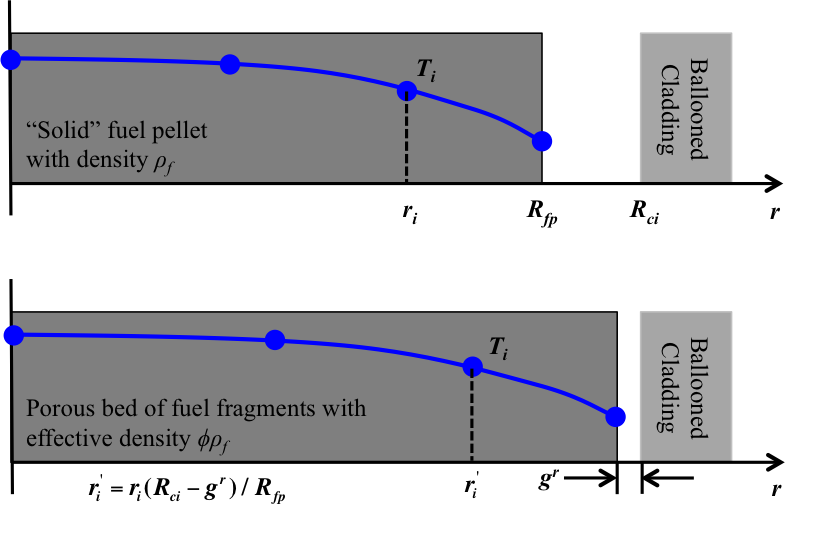
Figure 1: Change in fuel geometry and effective fuel density following fuel pellet collapse in the ballooned region of the cladding. A residual gap is assumed to remain.
Example Input Syntax
[UserObjects<<<{"href": "../../syntax/UserObjects/index.html"}>>>]
  [layered_eigenstrain]
    type = LayeredAxialRelocationEigenstrainUserObject<<<{"description": "Determines and stores the eigenstrain to apply to move the mesh during axial relocation as a function of layer and azimuthal position.", "href": "LayeredAxialRelocationEigenstrainUserObject.html"}>>>
    pellet_outer_radius<<<{"description": "Aux variable holding the values of the pellet outer radius."}>>> = outer_fuel_radius
    axial_relocation_object<<<{"description": "Name of the AxialRelocationUserObject that determines whether the fuel has crumbled."}>>> = axial_relocation
    penetration<<<{"description": "Aux variable holding the values of the penetration distance between the fuel and clad."}>>> = penetration
    direction<<<{"description": "The direction of the layers."}>>> = y
    execute_on<<<{"description": "The list of flag(s) indicating when this object should be executed. For a description of each flag, see https://mooseframework.inl.gov/source/interfaces/SetupInterface.html."}>>> = 'initial timestep_end'
    boundary<<<{"description": "The list of boundaries (ids or names) from the mesh where this object applies"}>>> = 10
    layer_bounding_block<<<{"description": "List of block ids (SubdomainID) that are used to determine the upper and lower geometric bounds for all layers. If this is not specified, the ids specified in 'block' are used for this purpose."}>>> = fuel
    num_layers<<<{"description": "The number of layers."}>>> = 5
  []
[]Input Parameters
- blockThe list of block ids (SubdomainID) that this object will be applied
C++ Type:std::vector<SubdomainName>
Controllable:No
Description:The list of block ids (SubdomainID) that this object will be applied
- boundaryThe list of boundaries (ids or names) from the mesh where this object applies
C++ Type:std::vector<BoundaryName>
Controllable:No
Description:The list of boundaries (ids or names) from the mesh where this object applies
- layer_bounding_blockList of block ids (SubdomainID) that are used to determine the upper and lower geometric bounds for all layers. If this is not specified, the ids specified in 'block' are used for this purpose.
C++ Type:std::vector<SubdomainName>
Controllable:No
Description:List of block ids (SubdomainID) that are used to determine the upper and lower geometric bounds for all layers. If this is not specified, the ids specified in 'block' are used for this purpose.
- residual_gap_size2e-06The residual gap remaining in layers that have crumbled.
Default:2e-06
C++ Type:double
Unit:(no unit assumed)
Controllable:No
Description:The residual gap remaining in layers that have crumbled.
- unique_node_executeFalseWhen false (default), block restricted objects will have the execute method called multiple times on a single node if the node lies on a interface between two subdomains.
Default:False
C++ Type:bool
Controllable:No
Description:When false (default), block restricted objects will have the execute method called multiple times on a single node if the node lies on a interface between two subdomains.
Optional Parameters
- allow_duplicate_execution_on_initialFalseIn the case where this UserObject is depended upon by an initial condition, allow it to be executed twice during the initial setup (once before the IC and again after mesh adaptivity (if applicable).
Default:False
C++ Type:bool
Controllable:No
Description:In the case where this UserObject is depended upon by an initial condition, allow it to be executed twice during the initial setup (once before the IC and again after mesh adaptivity (if applicable).
- execute_onTIMESTEP_ENDThe list of flag(s) indicating when this object should be executed. For a description of each flag, see https://mooseframework.inl.gov/source/interfaces/SetupInterface.html.
Default:TIMESTEP_END
C++ Type:ExecFlagEnum
Controllable:No
Description:The list of flag(s) indicating when this object should be executed. For a description of each flag, see https://mooseframework.inl.gov/source/interfaces/SetupInterface.html.
- execution_order_group0Execution order groups are executed in increasing order (e.g., the lowest number is executed first). Note that negative group numbers may be used to execute groups before the default (0) group. Please refer to the user object documentation for ordering of user object execution within a group.
Default:0
C++ Type:int
Controllable:No
Description:Execution order groups are executed in increasing order (e.g., the lowest number is executed first). Note that negative group numbers may be used to execute groups before the default (0) group. Please refer to the user object documentation for ordering of user object execution within a group.
- force_postauxFalseForces the UserObject to be executed in POSTAUX
Default:False
C++ Type:bool
Controllable:No
Description:Forces the UserObject to be executed in POSTAUX
- force_preauxFalseForces the UserObject to be executed in PREAUX
Default:False
C++ Type:bool
Controllable:No
Description:Forces the UserObject to be executed in PREAUX
- force_preicFalseForces the UserObject to be executed in PREIC during initial setup
Default:False
C++ Type:bool
Controllable:No
Description:Forces the UserObject to be executed in PREIC during initial setup
Execution Scheduling Parameters
- average_radius1When using 'average' sampling this is how the number of values both above and below the layer that will be averaged.
Default:1
C++ Type:unsigned int
Controllable:No
Description:When using 'average' sampling this is how the number of values both above and below the layer that will be averaged.
- cumulativeFalseWhen true the value in each layer is the sum of the values up to and including that layer
Default:False
C++ Type:bool
Controllable:No
Description:When true the value in each layer is the sum of the values up to and including that layer
- positive_cumulative_directionTrueWhen 'cumulative' is true, whether the direction for summing the cumulative value is the positive direction or negative direction
Default:True
C++ Type:bool
Controllable:No
Description:When 'cumulative' is true, whether the direction for summing the cumulative value is the positive direction or negative direction
- sample_typedirectHow to sample the layers. 'direct' means get the value of the layer the point falls in directly (or average if that layer has no value). 'interpolate' does a linear interpolation between the two closest layers. 'average' averages the two closest layers.
Default:direct
C++ Type:MooseEnum
Controllable:No
Description:How to sample the layers. 'direct' means get the value of the layer the point falls in directly (or average if that layer has no value). 'interpolate' does a linear interpolation between the two closest layers. 'average' averages the two closest layers.
Value Sampling / Aggregating Parameters
- boundsThe 'bounding' positions of the layers i.e.: '0, 1.2, 3.7, 4.2' will mean 3 layers between those positions.
C++ Type:std::vector<double>
Unit:(no unit assumed)
Controllable:No
Description:The 'bounding' positions of the layers i.e.: '0, 1.2, 3.7, 4.2' will mean 3 layers between those positions.
- directionThe direction of the layers.
C++ Type:MooseEnum
Controllable:No
Description:The direction of the layers.
- direction_maxMaximum coordinate along 'direction' that bounds the layers
C++ Type:double
Unit:(no unit assumed)
Controllable:No
Description:Maximum coordinate along 'direction' that bounds the layers
- direction_minMinimum coordinate along 'direction' that bounds the layers
C++ Type:double
Unit:(no unit assumed)
Controllable:No
Description:Minimum coordinate along 'direction' that bounds the layers
- num_layersThe number of layers.
C++ Type:unsigned int
Controllable:No
Description:The number of layers.
Layers Extent And Definition Parameters
- control_tagsAdds user-defined labels for accessing object parameters via control logic.
C++ Type:std::vector<std::string>
Controllable:No
Description:Adds user-defined labels for accessing object parameters via control logic.
- enableTrueSet the enabled status of the MooseObject.
Default:True
C++ Type:bool
Controllable:Yes
Description:Set the enabled status of the MooseObject.
- seed0The seed for the master random number generator
Default:0
C++ Type:unsigned int
Controllable:No
Description:The seed for the master random number generator
- use_displaced_meshFalseWhether or not this object should use the displaced mesh for computation. Note that in the case this is true but no displacements are provided in the Mesh block the undisplaced mesh will still be used.
Default:False
C++ Type:bool
Controllable:No
Description:Whether or not this object should use the displaced mesh for computation. Note that in the case this is true but no displacements are provided in the Mesh block the undisplaced mesh will still be used.