- stress_nameName of the stress property.
C++ Type:std::string
Controllable:No
Description:Name of the stress property.
- weibull_modulus,Weibull modulus
C++ Type:double
Unit:(no unit assumed)
Controllable:No
Description:,Weibull modulus
WeibullFailureOutputUsingCorrelation
Computes failure indicator of a TRISO layer using a correlation function.
Description
WeibullFailureOutputUsingCorrelation can be used to determine the failure indicator of a TRISO layer. By default, this Postprocessor returns a value of 1 if individual layer fails, and 0 if it does not. If the new value computed from current time step exceeds the old value from previous time step, the new value will be returned. Otherwise, the old value will be returned. In general, the indicator failure mode will be used in Monte Carlo approach. Users also have the option of retreiving the layer stress or strength using the output_type parameter. With output_type = stress the layer stress will be output, with output_type = strength the layer strength will be output, and by default (i.e., no specification of output_type in the input file) or with output_type = failure_indicator the indicator function will be output.
This postprocessor can be used in conjunction with AD variables through using ADWeibullFailureOutputUsingCorrelation.
One-dimensional analysis
The maximum stress is compared to a strength that is sampled from a Weibull distribution having a mean strength to determine whether or not failure occurs. If neither of the inner PyC or outer PyC layers are cracked, a one-dimensional analysis is used to determine whether the silicon carbide (SiC) layer fails. For a one-dimensional analysis, the mean strength is given by WeibullEffectiveMeanStrength and the maximum stress is obtained from a 1D simulation.
Stress adjustment from high fidelity analysis
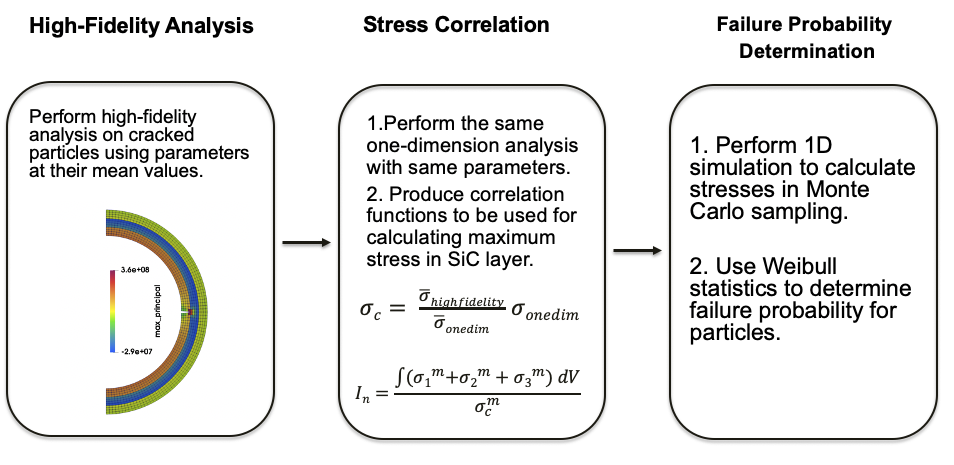
Figure 1: Flow diagram for general statistical approach.
The methodology used by Miller et al. (2018) in Figure 1 is implemented to model the effects of multi-dimensional behavior, such as cracking of the IPyC and asphericity. A statistical approach is used to correlate one-dimensional analysis and high-fidelity analysis. The high-fidelity strength and stress correlation factor are calculated prior to statistical modeling and then used as a function in WeibullFailureOutputUsingCorrelation to determine failure.
IPyC cracking
During irradiation, shrinkage of the initially intact IPyC layer induces a significant tensile stress in that layer. If the stress exceeds the tensile strength of the IPyC layer, then a radial crack develops in the IPyC. The radial crack creates local tensile stress in the SiC layer that could lead to particle failure. The maximum principal stress histories in SiC layer for a cracked particle (near crack tip) and intact particle are shown in Figure 2. The maximum SiC stress in a cracked particle is approximated as
where and are the maximum stress calculated in the high-fidelity and one-dimensional analysis at the mean values for a specified batch of particles, respectively. Upon varying statistical parameters, the maximum stress in the SiC layer is determined from the one dimensional finite element solution for .
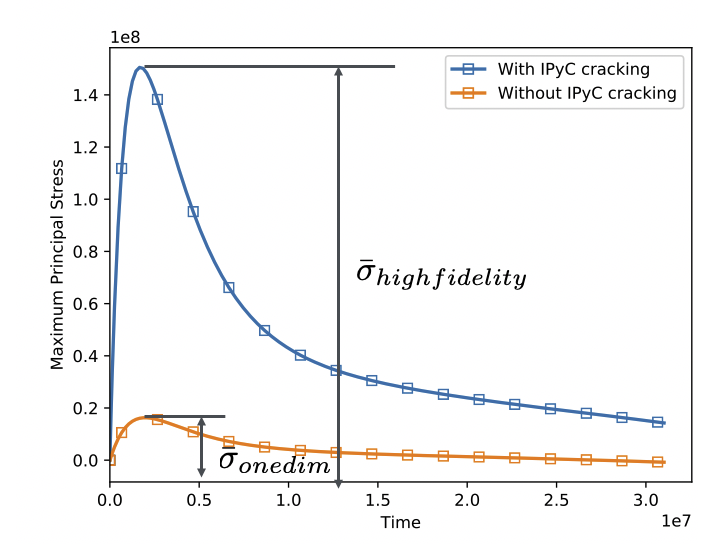
Figure 2: Maximum principal stress histories in SiC layer for a cracked particle (near crack tip) and intact particle.
Asphericity
Geometric defects (a single flat facet on one side) created during fabrication are a common cause of aspherical behavior in particle fuel. During irradiation, the faceted portion of the particle acts as a flat plate that retains the internal gas pressure. If the pressure builds up high enough, this results in a local region of tensile stress in the central portion of the plate, which can contribute to particle failures. The stress histories for representative faceted and spherical fuel particles are shown in Figure 3. In evaluating asphericity, a second term is added to correctly estimate the maximum stress for an aspherical particle:
where , and are changes in the stresses , and going from the minimum to the end of irradiation. If a second extremum (or maximum) occurs before the end of irradiation, then , and are taken as changes in these stress going from the minimum to the maximum. The additional term is needed for asphericity evaluations because failures due to asphericity occur after the first extremum for has been reached, when shrinkage effects from the pyrocarbons are diminishing.
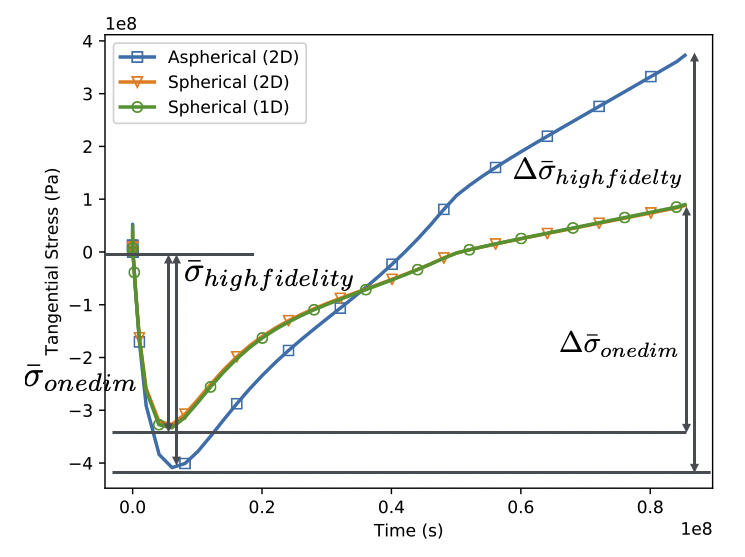
Figure 3: Stress histories for a faceted and spherical fuel particles.
Example Input Syntax
[Postprocessors<<<{"href": "../../syntax/Postprocessors/index.html"}>>>]
  [dt]
    type = TimestepSize<<<{"description": "Reports the timestep size", "href": "TimestepSize.html"}>>>
  []
  [burnup]
    type = ElementExtremeValue<<<{"description": "Finds either the min or max elemental value of a variable over the domain.", "href": "ElementExtremeValue.html"}>>>
    block<<<{"description": "The list of blocks (ids or names) that this object will be applied"}>>> = fuel
    variable<<<{"description": "The name of the variable that this postprocessor operates on"}>>> = burnup
  []
  [fis_gas_produced]
    type = ElementIntegralFisGasGeneratedSifgrs<<<{"description": "Reports the fission gas that is produced in moles.  To be used in combination with the Sifgrs model.", "href": "ElementIntegralFisGasGeneratedSifgrs.html"}>>>
    block<<<{"description": "The list of blocks (ids or names) that this object will be applied"}>>> = fuel
  []
  [fis_gas_released]
    type = ElementIntegralFisGasReleasedSifgrs<<<{"description": "Reports the fission gas that is released to the plenum in moles.  To be used in combination with the Sifgrs model.", "href": "ElementIntegralFisGasReleasedSifgrs.html"}>>>
    block<<<{"description": "The list of blocks (ids or names) that this object will be applied"}>>> = fuel
  []
  [volumeTotal]
    type = InternalVolume<<<{"description": "Computes the volume of an enclosed area by performing an integral over a user-supplied boundary.", "href": "InternalVolume.html"}>>>
    boundary<<<{"description": "The list of boundary IDs from the mesh where this object applies"}>>> = exterior
  []
  [volumeFuel]
    type = InternalVolume<<<{"description": "Computes the volume of an enclosed area by performing an integral over a user-supplied boundary.", "href": "InternalVolume.html"}>>>
    boundary<<<{"description": "The list of boundary IDs from the mesh where this object applies"}>>> = fuel_outer_boundary
  []
  [volumeGas]
    type = InternalVolume<<<{"description": "Computes the volume of an enclosed area by performing an integral over a user-supplied boundary.", "href": "InternalVolume.html"}>>>
    boundary<<<{"description": "The list of boundary IDs from the mesh where this object applies"}>>> = 'fuel_outer_boundary IPyC_inner_boundary'
    addition<<<{"description": "An additional volume to be included in the internal volume calculation. A time-dependent function is expected."}>>> = -5.53e-11
    execute_on<<<{"description": "The list of flag(s) indicating when this object should be executed. For a description of each flag, see https://mooseframework.inl.gov/source/interfaces/SetupInterface.html."}>>> = 'initial timestep_end'
  []
  [volumeBufferShell]
    type = InternalVolume<<<{"description": "Computes the volume of an enclosed area by performing an integral over a user-supplied boundary.", "href": "InternalVolume.html"}>>>
    boundary<<<{"description": "The list of boundary IDs from the mesh where this object applies"}>>> = buffer_IPyC_boundary
  []
  [ave_temp_interior]
    type = SideAverageValue<<<{"description": "Computes the average value of a variable on a sideset. Note that this cannot be used on the centerline of an axisymmetric model.", "href": "SideAverageValue.html"}>>>
    boundary<<<{"description": "The list of boundary IDs from the mesh where this object applies"}>>> = buffer_IPyC_boundary
    variable<<<{"description": "The name of the variable which this postprocessor integrates"}>>> = temperature
    execute_on<<<{"description": "The list of flag(s) indicating when this object should be executed. For a description of each flag, see https://mooseframework.inl.gov/source/interfaces/SetupInterface.html."}>>> = 'initial timestep_end'
  []
  # Postprocessors for CO production
  [total_fission_rate]
    type = ElementIntegralPower<<<{"description": "Computes the power given the fission rate and energy per fission.", "href": "ElementIntegralPower.html"}>>>
    variable<<<{"description": "The name of the variable that this object operates on"}>>> = temperature
    fission_rate<<<{"description": "Coupled fission rate"}>>> = fission_rate
    block<<<{"description": "The list of blocks (ids or names) that this object will be applied"}>>> = fuel
    energy_per_fission<<<{"description": "Energy released per fission (J/fission)"}>>> = 1.0
  []
  [total_fissions]
    type = TimeIntegratedPostprocessor<<<{"description": "Integrate a Postprocessor value over time using trapezoidal rule.", "href": "TimeIntegratedPostprocessor.html"}>>>
    value<<<{"description": "The name of the postprocessor"}>>> = total_fission_rate
  []
  [avg_surface_temperature]
    type = SideAverageValue<<<{"description": "Computes the average value of a variable on a sideset. Note that this cannot be used on the centerline of an axisymmetric model.", "href": "SideAverageValue.html"}>>>
    variable<<<{"description": "The name of the variable which this postprocessor integrates"}>>> = temperature
    boundary<<<{"description": "The list of boundary IDs from the mesh where this object applies"}>>> = exterior
  []
  [time_int_surf_temperature]
    type = TimeIntegratedPostprocessor<<<{"description": "Integrate a Postprocessor value over time using trapezoidal rule.", "href": "TimeIntegratedPostprocessor.html"}>>>
    value<<<{"description": "The name of the postprocessor"}>>> = avg_surface_temperature
  []
  [co_production]
    type = CarbonMonoxideProduction<<<{"description": "Computes CO production in oxide fuel based on the Proksch or GA correlation.", "href": "CarbonMonoxideProduction.html"}>>>
    total_fissions<<<{"description": "The name of the postprocessor containing the total fissions."}>>> = total_fissions
    time_integrated_triso_temperature<<<{"description": "The name of the postprocessor containing the time integrated TRISO surface temperature (for Proksch)."}>>> = time_int_surf_temperature
    initial_enrichment<<<{"description": "initial enrichment fraction of U235 (wt%)"}>>> = 0.14029
  []
  [tang_SiC]
    type = ElementalVariableValue<<<{"description": "Outputs an elemental variable value at a particular location", "href": "ElementalVariableValue.html"}>>>
    variable<<<{"description": "The variable to be monitored"}>>> = stress_yy
    elementid<<<{"description": "The ID of the element where we monitor"}>>> = 18
  []
  [strength_SiC]
    type = WeibullEffectiveMeanStrength<<<{"description": "Computes Weibull effective mean strength, which is used by the WeibullFailureOutputUsingCorrelation Postprocessor.", "href": "WeibullEffectiveMeanStrength.html"}>>>
    block<<<{"description": "The list of blocks (ids or names) that this object will be applied"}>>> = SiC
    weibull_modulus<<<{"description": ",Weibull modulus"}>>> = 6
  []
  [failure_indicator_SiC]
    type = WeibullFailureOutputUsingCorrelation<<<{"description": "Computes failure indicator of a TRISO layer using a correlation function.", "href": "WeibullFailureOutputUsingCorrelation.html"}>>>
    block<<<{"description": "The list of blocks (ids or names) that this object will be applied"}>>> = SiC
    weibull_modulus<<<{"description": ",Weibull modulus"}>>> = 6
    stress_name<<<{"description": "Name of the stress property."}>>> = max_principal_stress
    effective_mean_strength<<<{"description": "The name of the postprocessor calculating the effective mean strength."}>>> = strength_SiC
  []
  [strength_IPyC]
    type = WeibullEffectiveMeanStrength<<<{"description": "Computes Weibull effective mean strength, which is used by the WeibullFailureOutputUsingCorrelation Postprocessor.", "href": "WeibullEffectiveMeanStrength.html"}>>>
    block<<<{"description": "The list of blocks (ids or names) that this object will be applied"}>>> = IPyC
    weibull_modulus<<<{"description": ",Weibull modulus"}>>> = 6
  []
  [failure_indicator_IPyC]
    type = WeibullFailureOutputUsingCorrelation<<<{"description": "Computes failure indicator of a TRISO layer using a correlation function.", "href": "WeibullFailureOutputUsingCorrelation.html"}>>>
    block<<<{"description": "The list of blocks (ids or names) that this object will be applied"}>>> = IPyC
    weibull_modulus<<<{"description": ",Weibull modulus"}>>> = 6
    stress_name<<<{"description": "Name of the stress property."}>>> = max_principal_stress
    effective_mean_strength<<<{"description": "The name of the postprocessor calculating the effective mean strength."}>>> = strength_IPyC
  []
  [failure_indicator_debonding]
    type = TRISODebondingFailureIndicator<<<{"description": "Computes debonding failure indicator of TRISO layers.", "href": "TRISODebondingFailureIndicator.html"}>>>
    boundary<<<{"description": "The list of boundary IDs from the mesh where this object applies"}>>> = IPyC_outer_boundary
    bond_strength<<<{"description": "bond strength is treated as a parameter having a Gaussian distribution with a specific mean value and standard deviation."}>>> = 1e5
    stress_name<<<{"description": "Name of the stress property."}>>> = radial_stress
  []
  [strength_OPyC]
    type = WeibullEffectiveMeanStrength<<<{"description": "Computes Weibull effective mean strength, which is used by the WeibullFailureOutputUsingCorrelation Postprocessor.", "href": "WeibullEffectiveMeanStrength.html"}>>>
    block<<<{"description": "The list of blocks (ids or names) that this object will be applied"}>>> = OPyC
    weibull_modulus<<<{"description": ",Weibull modulus"}>>> = 6
  []
  [failure_indicator_OPyC]
    type = WeibullFailureOutputUsingCorrelation<<<{"description": "Computes failure indicator of a TRISO layer using a correlation function.", "href": "WeibullFailureOutputUsingCorrelation.html"}>>>
    block<<<{"description": "The list of blocks (ids or names) that this object will be applied"}>>> = OPyC
    weibull_modulus<<<{"description": ",Weibull modulus"}>>> = 6
    stress_name<<<{"description": "Name of the stress property."}>>> = max_principal_stress
    effective_mean_strength<<<{"description": "The name of the postprocessor calculating the effective mean strength."}>>> = strength_OPyC
  []
  [failure_indicator_SiC_crackedIPyC]
    type = WeibullFailureOutputUsingCorrelation<<<{"description": "Computes failure indicator of a TRISO layer using a correlation function.", "href": "WeibullFailureOutputUsingCorrelation.html"}>>>
    block<<<{"description": "The list of blocks (ids or names) that this object will be applied"}>>> = SiC
    weibull_modulus<<<{"description": ",Weibull modulus"}>>> = 6
    stress_name<<<{"description": "Name of the stress property."}>>> = max_principal_stress
    high_fidelity_analysis_strength<<<{"description": "The effective mean strength obtained from a high-fidelity analysis."}>>> = 'high_fidelity_strength_crackedIPyC'
    stress_correlation_function<<<{"description": "The stress correlation function obtained from a high-fidelity analysis."}>>> = 'stress_correlation_crackedIPyC'
  []
  [failure_indicator_SiC_crackedOPyC]
    type = WeibullFailureOutputUsingCorrelation<<<{"description": "Computes failure indicator of a TRISO layer using a correlation function.", "href": "WeibullFailureOutputUsingCorrelation.html"}>>>
    block<<<{"description": "The list of blocks (ids or names) that this object will be applied"}>>> = SiC
    weibull_modulus<<<{"description": ",Weibull modulus"}>>> = 6
    stress_name<<<{"description": "Name of the stress property."}>>> = max_principal_stress
    high_fidelity_analysis_strength<<<{"description": "The effective mean strength obtained from a high-fidelity analysis."}>>> = 'high_fidelity_strength_crackedIPyC'
    stress_correlation_function<<<{"description": "The stress correlation function obtained from a high-fidelity analysis."}>>> = 'stress_correlation_crackedOPyC'
  []
  [triso_failure]
    type = TRISOFailureEvaluation<<<{"description": "Computes particle failure based on Weibull statistical theory. It returns either 1 or 0, indicating fails or not fail.", "href": "TRISOFailureEvaluation.html"}>>>
    IPyC_failure<<<{"description": "The name of the postprocessor calculating the IPyC failure."}>>> = failure_indicator_IPyC
    OPyC_failure<<<{"description": "The name of the postprocessor calculating the OPyC failure."}>>> = failure_indicator_OPyC
    SiC_failure<<<{"description": "The name of the postprocessor calculating the SiC failure."}>>> = failure_indicator_SiC
    SiC_failure_crackedIPyC<<<{"description": "The name of the postprocessor calculating the SiC failure due to cracked IPyC."}>>> = failure_indicator_SiC_crackedIPyC
    SiC_failure_crackedOPyC<<<{"description": "The name of the postprocessor calculating the SiC failure due to cracked OPyC."}>>> = failure_indicator_SiC_crackedOPyC
    SiC_failure_debonding<<<{"description": "The name of the postprocessor calculating the SiC failure due to IPyC-SiC debonding."}>>> = failure_indicator_debonding
  []
[]Input Parameters
- blockThe list of blocks (ids or names) that this object will be applied
C++ Type:std::vector<SubdomainName>
Controllable:No
Description:The list of blocks (ids or names) that this object will be applied
- effective_mean_strengthThe name of the postprocessor calculating the effective mean strength.
C++ Type:PostprocessorName
Unit:(no unit assumed)
Controllable:No
Description:The name of the postprocessor calculating the effective mean strength.
- high_fidelity_analysis_strengthThe effective mean strength obtained from a high-fidelity analysis.
C++ Type:FunctionName
Unit:(no unit assumed)
Controllable:No
Description:The effective mean strength obtained from a high-fidelity analysis.
- output_typefailure_indicatorChoose between failure indicator (default), stress, or strength outputs.
Default:failure_indicator
C++ Type:MooseEnum
Options:failure_indicator, stress, strength
Controllable:No
Description:Choose between failure indicator (default), stress, or strength outputs.
- quantile0.5Quantile (ranging from 0 to 1) used to define likelihood of strength evaluated from Weibull distribution
Default:0.5
C++ Type:double
Unit:(no unit assumed)
Controllable:No
Description:Quantile (ranging from 0 to 1) used to define likelihood of strength evaluated from Weibull distribution
- stress_change_correlation_functionCorrelation function of stress change from minumum to maximum during the irradiation history obtained from a high-fidelity analysis.
C++ Type:FunctionName
Unit:(no unit assumed)
Controllable:No
Description:Correlation function of stress change from minumum to maximum during the irradiation history obtained from a high-fidelity analysis.
- stress_correlation_functionThe stress correlation function obtained from a high-fidelity analysis.
C++ Type:FunctionName
Unit:(no unit assumed)
Controllable:No
Description:The stress correlation function obtained from a high-fidelity analysis.
Optional Parameters
- allow_duplicate_execution_on_initialFalseIn the case where this UserObject is depended upon by an initial condition, allow it to be executed twice during the initial setup (once before the IC and again after mesh adaptivity (if applicable).
Default:False
C++ Type:bool
Controllable:No
Description:In the case where this UserObject is depended upon by an initial condition, allow it to be executed twice during the initial setup (once before the IC and again after mesh adaptivity (if applicable).
- execute_onTIMESTEP_ENDThe list of flag(s) indicating when this object should be executed. For a description of each flag, see https://mooseframework.inl.gov/source/interfaces/SetupInterface.html.
Default:TIMESTEP_END
C++ Type:ExecFlagEnum
Options:XFEM_MARK, NONE, INITIAL, LINEAR, NONLINEAR_CONVERGENCE, NONLINEAR, POSTCHECK, TIMESTEP_END, TIMESTEP_BEGIN, MULTIAPP_FIXED_POINT_END, MULTIAPP_FIXED_POINT_BEGIN, FINAL, CUSTOM, TRANSFER
Controllable:No
Description:The list of flag(s) indicating when this object should be executed. For a description of each flag, see https://mooseframework.inl.gov/source/interfaces/SetupInterface.html.
- execution_order_group0Execution order groups are executed in increasing order (e.g., the lowest number is executed first). Note that negative group numbers may be used to execute groups before the default (0) group. Please refer to the user object documentation for ordering of user object execution within a group.
Default:0
C++ Type:int
Controllable:No
Description:Execution order groups are executed in increasing order (e.g., the lowest number is executed first). Note that negative group numbers may be used to execute groups before the default (0) group. Please refer to the user object documentation for ordering of user object execution within a group.
- force_postauxFalseForces the UserObject to be executed in POSTAUX
Default:False
C++ Type:bool
Controllable:No
Description:Forces the UserObject to be executed in POSTAUX
- force_preauxFalseForces the UserObject to be executed in PREAUX
Default:False
C++ Type:bool
Controllable:No
Description:Forces the UserObject to be executed in PREAUX
- force_preicFalseForces the UserObject to be executed in PREIC during initial setup
Default:False
C++ Type:bool
Controllable:No
Description:Forces the UserObject to be executed in PREIC during initial setup
Execution Scheduling Parameters
- control_tagsAdds user-defined labels for accessing object parameters via control logic.
C++ Type:std::vector<std::string>
Controllable:No
Description:Adds user-defined labels for accessing object parameters via control logic.
- enableTrueSet the enabled status of the MooseObject.
Default:True
C++ Type:bool
Controllable:Yes
Description:Set the enabled status of the MooseObject.
- implicitTrueDetermines whether this object is calculated using an implicit or explicit form
Default:True
C++ Type:bool
Controllable:No
Description:Determines whether this object is calculated using an implicit or explicit form
- outputsVector of output names where you would like to restrict the output of variables(s) associated with this object
C++ Type:std::vector<OutputName>
Controllable:No
Description:Vector of output names where you would like to restrict the output of variables(s) associated with this object
- seed0The seed for the master random number generator
Default:0
C++ Type:unsigned int
Controllable:No
Description:The seed for the master random number generator
- use_displaced_meshFalseWhether or not this object should use the displaced mesh for computation. Note that in the case this is true but no displacements are provided in the Mesh block the undisplaced mesh will still be used.
Default:False
C++ Type:bool
Controllable:No
Description:Whether or not this object should use the displaced mesh for computation. Note that in the case this is true but no displacements are provided in the Mesh block the undisplaced mesh will still be used.
Advanced Parameters
- prop_getter_suffixAn optional suffix parameter that can be appended to any attempt to retrieve/get material properties. The suffix will be prepended with a '_' character.
C++ Type:MaterialPropertyName
Unit:(no unit assumed)
Controllable:No
Description:An optional suffix parameter that can be appended to any attempt to retrieve/get material properties. The suffix will be prepended with a '_' character.
- use_interpolated_stateFalseFor the old and older state use projected material properties interpolated at the quadrature points. To set up projection use the ProjectedStatefulMaterialStorageAction.
Default:False
C++ Type:bool
Controllable:No
Description:For the old and older state use projected material properties interpolated at the quadrature points. To set up projection use the ProjectedStatefulMaterialStorageAction.
Material Property Retrieval Parameters
Input Files
- (test/tests/triso_failure/ad_ipyc_characteristic_strength.i)
- (examples/TRISO/failure_probability_monte_carlo/triso_1d_function.i)
- (test/tests/triso_failure/higher_order_correlation.i)
- (test/tests/triso_failure/triso_1d_ipyc_failure.i)
- (test/tests/triso_failure/triso_1d_failure_error.i)
- (test/tests/triso_failure/ad_triso_1d_failure.i)
- (test/tests/triso_failure/triso_1d_failure.i)
- (test/tests/triso_failure/triso_1d_layer_stress_strength.i)
- (test/tests/triso_failure/triso_ipyc_characteristic_strength.i)
- (test/tests/triso_failure/sub.i)
- (test/tests/triso_failure/triso_failure_diffusivity.i)
- (test/tests/triso_failure/triso_1d_kernel_migration.i)
- (test/tests/triso_failure/triso_1d_pd_penetration.i)
- (examples/TRISO/failure_probability_monte_carlo/triso_1d_constant.i)
- (test/tests/triso_failure/triso_1d_asphericity_failure.i)
References
- G.K. Miller, D.A. Petti, J.T. Maki, D.L. Knudson, and W.F. Skerjanc.
PARFUME Theory and Model Basis Report.
Report INL/EXT-08-14497 (Rev.1), Idaho National Laboratory, September 2018.[BibTeX]
@techreport{Miller2018,
    author = "Miller, G.K. and Petti, D.A. and Maki, J.T. and Knudson, D.L. and Skerjanc, W.F.",
    title = "{PARFUME Theory and Model Basis Report}",
    institution = "Idaho National Laboratory",
    year = "2018",
    month = "September",
    number = "INL/EXT-08-14497 (Rev.1)",
    type = "Report"
}
(test/tests/triso_failure/triso_1d_failure.i)
[GlobalParams]
  density = 10810.0
  flux_conversion_factor = 1.0
  order = SECOND
  family = LAGRANGE
  displacements = 'disp_x'
[]

[Mesh]
  coord_type = RSPHERICAL
  [gen]
    type = TRISO1DMeshGenerator
    elem_type = EDGE3
    coordinates = '0 2.485e-4 3.425e-4 3.425e-4 3.835e-4 4.195e-4 4.595e-4'
    mesh_density = '6 6 0 6 8 6'
    block_names = 'fuel buffer IPyC SiC OPyC'
  []
[]

[Variables]
  [disp_x]
  []
  [temperature]
    initial_condition = 1346.0
  []
[]

[Functions]
  [radial_eigenstrain]
    type = ParsedFunction
    expression = 't*(4.52013e-4/6.0*t*t*t*t*t - 8.36313e-3/5.0*t*t*t*t + 5.67549e-2/4.0*t*t*t - 1.74247e-1/3.0*t*t + 2.62692e-1/2.0*t - 1.43234e-1)'
  []
  [tangential_eigenstrain]
    type = ParsedFunction
    expression = 't*(1.30457e-4/4.0*t*t*t - 2.10029e-3/3.0*t*t + 9.07826e-3/2.0*t - 3.24737e-2)'
  []
  [fission_rate]
    type = ParsedFunction
    expression = 7.75e19
  []
  [k_function]
    type = ParsedFunction
    expression = '4.93e-29'
  []
  [high_fidelity_strength_crackedIPyC]
    type = PiecewiseLinear
    x = '0 1.0e11'
    y = '1000000 1000000'
  []
  [high_fidelity_strength_crackedOPyC]
    type = PiecewiseLinear
    x = '0 1.0e11'
    y = '1000000 1000000'
  []
  [stress_correlation_crackedOPyC]
    type = PiecewiseLinear
    x = '0 1.0e11'
    y = '1 1'
  []
  [stress_correlation_crackedIPyC]
    type = PiecewiseLinear
    x = '0 1.0e11'
    y = '1 1'
  []
[]

[AuxVariables]
  [stress_yy]
    order = CONSTANT
    family = MONOMIAL
  []
  [burnup]
    block = fuel
    initial_condition = 0.0
  []
  [fission_rate]
    block = fuel
  []
[]

[Physics/SolidMechanics/QuasiStatic]
  strain = small
  [fuel_buffer_sic]
    block = 'fuel buffer SiC'
    eigenstrain_names = thermal_strain
  []
  [ipyc_opyc]
    block = 'IPyC OPyC'
    incremental = true
    eigenstrain_names = 'thermal_strain pyc_eigenstrain'
  []
[]

[Kernels]
  [heat_ie]
    type = HeatConductionTimeDerivative
    variable = temperature
  []
  [heat]
    type = HeatConduction
    variable = temperature
  []
  [heat_source]
    type = NeutronHeatSource
    variable = temperature
    block = fuel
    energy_per_fission = 3.2e-11
    fission_rate = fission_rate
  []
[]

[AuxKernels]
  [stress_yy]
    type = RankTwoAux
    rank_two_tensor = stress
    variable = stress_yy
    index_i = 1
    index_j = 1
    execute_on = timestep_end
  []
  [fission_rate]
    type = FunctionAux
    variable = fission_rate
    block = fuel
    function = fission_rate
  []
  [burnup]
    type = BurnupAux
    variable = burnup
    block = fuel
    fission_rate = fission_rate
    molecular_weight = 0.270
  []
[]

[Contact]
  [pellet_clad_mechanical]
    primary = IPyC_inner_boundary
    secondary = buffer_outer_boundary
    penalty = 1e5
    model = frictionless
    formulation = kinematic
  []
[]

[ThermalContact]
  [thermal_contact]
    type = GasGapHeatTransfer
    variable = temperature
    primary = IPyC_inner_boundary
    secondary = buffer_outer_boundary
    # coupling to a postprocessor
    initial_moles = initial_moles
    gas_released = 'fis_gas_released co_production'
    released_gas_types = 'Kr Xe;
                          CO'
    released_fractions = '0.153 0.847;
                          1'
    tangential_tolerance = 1e-6
  []
[]

[BCs]
  [no_disp_x]
    type = DirichletBC
    variable = disp_x
    boundary = xzero
    value = 0.0
  []
  [freesurf_temperature]
    type = DirichletBC
    variable = temperature
    boundary = exterior
    value = 1346.0
  []
  [exterior_pressure_x]
    type = Pressure
    use_displaced_mesh = false
    variable = disp_x
    boundary = exterior
    factor = 0.1e6
  []
  [PlenumPressure]
    #  apply gas pressure on buffer and IPyC boundaries
    [plenumPressure]
      use_displaced_mesh = false
      boundary = buffer_IPyC_boundary
      initial_pressure = 0
      startup_time = 1.0e4
      R = 8.3143
      # coupling to post processor
      output_initial_moles = initial_moles
      temperature = ave_temp_interior
      volume = volumeGas
      material_input = 'fis_gas_released co_production'
      output = plenum_pressure
    []
  []

[]

[Materials]
  [radial_stress]
    type = RankTwoCylindricalComponent
    rank_two_tensor = stress
    cylindrical_axis_point1 = '0 0 0'
    cylindrical_axis_point2 = '0 0 1'
    cylindrical_component = RadialStress
    property_name = radial_stress
    outputs = all
  []
  [max_principal_stress]
    type = RankTwoInvariant
    property_name = max_principal_stress
    rank_two_tensor = stress
    invariant = MaxPrincipal
  []
  [flux]
    type = FastNeutronFlux
    calculate_fluence = true
    factor = 1.708707e18
  []
  [fission_gas_release]
    type = UO2Sifgrs
    block = fuel
    temperature = temperature
    fission_rate = fission_rate
    grain_radius_const = 5.0e-6
  []
  [stress]
    type = ComputeLinearElasticStress
    block = 'fuel buffer SiC'
  []
  [PyC_stress]
    type = PyCCreep
    block = 'IPyC OPyC'
    k = k_function
    poissons_ratio = 0.4
    temperature = temperature
  []
  [normal_vectors_triso]
    type = NormalVectorsTRISO
    block = 'IPyC OPyC'
  []
  [PyC_eigenstrain]
    type = PyCIrradiationEigenstrain
    block = 'IPyC OPyC'
    radial_eigenstrain_function = radial_eigenstrain
    tangential_eigenstrain_function = tangential_eigenstrain
    eigenstrain_name = pyc_eigenstrain
  []
  [fuel_thermal_strain]
    type = ComputeThermalExpansionEigenstrain
    block = fuel
    thermal_expansion_coeff = 10e-6
    stress_free_temperature = 1346.0
    eigenstrain_name = thermal_strain
    temperature = temperature
  []
  [PyC_thermal_strain]
    type = ComputeThermalExpansionEigenstrain
    block = 'buffer IPyC OPyC'
    thermal_expansion_coeff = 5.5e-6
    stress_free_temperature = 1346.0
    eigenstrain_name = thermal_strain
    temperature = temperature
  []
  [SiC_thermal_strain]
    type = ComputeThermalExpansionEigenstrain
    block = SiC
    thermal_expansion_coeff = 4.9e-6
    stress_free_temperature = 1346.0
    eigenstrain_name = thermal_strain
    temperature = temperature
  []
  [fuel_thermal]
    type = UO2Thermal
    thermal_conductivity_model = FINK_LUCUTA
    block = fuel
    temperature = temperature
    burnup = burnup
  []
  [fuel_elasticity_tensor]
    type = ComputeIsotropicElasticityTensor
    block = fuel
    youngs_modulus = 2e8
    poissons_ratio = 0.345
  []
  [fuel_den]
    type = StrainAdjustedDensity
    block = fuel
    strain_free_density = 10810.0
  []
  [buffer_elasticity_tensor]
    type = ComputeIsotropicElasticityTensor
    block = buffer
    youngs_modulus = 2e8
    poissons_ratio = 0.345
  []
  [buffer_thermal]
    type = HeatConductionMaterial
    block = buffer
    thermal_conductivity = 0.5
    specific_heat = 720.0
  []
  [buffer_den]
    type = StrainAdjustedDensity
    strain_free_density = 1000
    block = buffer
  []
  [PyC_elasticity_tensor]
    type = ComputeIsotropicElasticityTensor
    block = 'IPyC OPyC'
    youngs_modulus = 3.96e10
    poissons_ratio = 0.33
  []
  [PyC_thermal]
    type = HeatConductionMaterial
    block = 'IPyC OPyC'
    thermal_conductivity = 4.0
    specific_heat = 720.0
  []
  [PyC_den]
    type = StrainAdjustedDensity
    strain_free_density = 1880.0
    block = 'IPyC OPyC'
  []
  [SiC_elasticity_tensor]
    type = ComputeIsotropicElasticityTensor
    block = SiC
    youngs_modulus = 3.7e11
    poissons_ratio = 0.13
  []
  [SiC_thermal]
    type = HeatConductionMaterial
    block = SiC
    thermal_conductivity = 13.9
    specific_heat = 620.0
  []
  [SiC_den]
    type = StrainAdjustedDensity
    strain_free_density = 3200.0
    block = SiC
  []
  [characteristic_strength_SiC]
    type = GenericConstantMaterial
    prop_values = '9640000'
    prop_names = 'characteristic_strength'
    block = SiC
  []
  [characteristic_strength_PyC]
    type = GenericConstantMaterial
    prop_values = '964000'
    prop_names = 'characteristic_strength'
    block = 'IPyC OPyC'
  []
[]

[Dampers]
  [temperature]
    type = MaxIncrement
    variable = temperature
    max_increment = 50
  []
[]

[Debug]
  show_var_residual_norms = true
[]

[Executioner]
  type = Transient
  petsc_options_iname = '-ksp_gmres_restart -pc_type -pc_hypre_type -pc_hypre_boomeramg_max_iter'
  petsc_options_value = '201                hypre    boomeramg      4'
  line_search = 'none'
  solve_type = 'PJFNK'
  nl_rel_tol = 1e-10
  nl_abs_tol = 1e-10
  nl_max_its = 15
  l_tol = 1e-3
  l_max_its = 50
  start_time = 0.0
  num_steps = 10
  dtmax = 2e5
  dtmin = 1
  [TimeStepper]
    type = IterationAdaptiveDT
    dt = 20
    optimal_iterations = 6
    iteration_window = 2
    linear_iteration_ratio = 100
  []
[]

[Postprocessors]
  [dt]
    type = TimestepSize
  []
  [burnup]
    type = ElementExtremeValue
    block = fuel
    variable = burnup
  []
  [fis_gas_produced]
    type = ElementIntegralFisGasGeneratedSifgrs
    block = fuel
  []
  [fis_gas_released]
    type = ElementIntegralFisGasReleasedSifgrs
    block = fuel
  []
  [volumeTotal]
    type = InternalVolume
    boundary = exterior
  []
  [volumeFuel]
    type = InternalVolume
    boundary = fuel_outer_boundary
  []
  [volumeGas]
    type = InternalVolume
    boundary = 'fuel_outer_boundary IPyC_inner_boundary'
    addition = -5.53e-11
    execute_on = 'initial timestep_end'
  []
  [volumeBufferShell]
    type = InternalVolume
    boundary = buffer_IPyC_boundary
  []
  [ave_temp_interior]
    type = SideAverageValue
    boundary = buffer_IPyC_boundary
    variable = temperature
    execute_on = 'initial timestep_end'
  []
  # Postprocessors for CO production
  [total_fission_rate]
    type = ElementIntegralPower
    variable = temperature
    fission_rate = fission_rate
    block = fuel
    energy_per_fission = 1.0
  []
  [total_fissions]
    type = TimeIntegratedPostprocessor
    value = total_fission_rate
  []
  [avg_surface_temperature]
    type = SideAverageValue
    variable = temperature
    boundary = exterior
  []
  [time_int_surf_temperature]
    type = TimeIntegratedPostprocessor
    value = avg_surface_temperature
  []
  [co_production]
    type = CarbonMonoxideProduction
    total_fissions = total_fissions
    time_integrated_triso_temperature = time_int_surf_temperature
    initial_enrichment = 0.14029
  []
  [tang_SiC]
    type = ElementalVariableValue
    variable = stress_yy
    elementid = 18
  []
  [strength_SiC]
    type = WeibullEffectiveMeanStrength
    block = SiC
    weibull_modulus = 6
  []
  [failure_indicator_SiC]
    type = WeibullFailureOutputUsingCorrelation
    block = SiC
    weibull_modulus = 6
    stress_name = max_principal_stress
    effective_mean_strength = strength_SiC
  []
  [strength_IPyC]
    type = WeibullEffectiveMeanStrength
    block = IPyC
    weibull_modulus = 6
  []
  [failure_indicator_IPyC]
    type = WeibullFailureOutputUsingCorrelation
    block = IPyC
    weibull_modulus = 6
    stress_name = max_principal_stress
    effective_mean_strength = strength_IPyC
  []
  [failure_indicator_debonding]
    type = TRISODebondingFailureIndicator
    boundary = IPyC_outer_boundary
    bond_strength = 1e5
    stress_name = radial_stress
  []
  [strength_OPyC]
    type = WeibullEffectiveMeanStrength
    block = OPyC
    weibull_modulus = 6
  []
  [failure_indicator_OPyC]
    type = WeibullFailureOutputUsingCorrelation
    block = OPyC
    weibull_modulus = 6
    stress_name = max_principal_stress
    effective_mean_strength = strength_OPyC
  []
  [failure_indicator_SiC_crackedIPyC]
    type = WeibullFailureOutputUsingCorrelation
    block = SiC
    weibull_modulus = 6
    stress_name = max_principal_stress
    high_fidelity_analysis_strength = 'high_fidelity_strength_crackedIPyC'
    stress_correlation_function = 'stress_correlation_crackedIPyC'
  []
  [failure_indicator_SiC_crackedOPyC]
    type = WeibullFailureOutputUsingCorrelation
    block = SiC
    weibull_modulus = 6
    stress_name = max_principal_stress
    high_fidelity_analysis_strength = 'high_fidelity_strength_crackedIPyC'
    stress_correlation_function = 'stress_correlation_crackedOPyC'
  []
  [triso_failure]
    type = TRISOFailureEvaluation
    IPyC_failure = failure_indicator_IPyC
    OPyC_failure = failure_indicator_OPyC
    SiC_failure = failure_indicator_SiC
    SiC_failure_crackedIPyC = failure_indicator_SiC_crackedIPyC
    SiC_failure_crackedOPyC = failure_indicator_SiC_crackedOPyC
    SiC_failure_debonding = failure_indicator_debonding
  []
[]

[Outputs]
  print_linear_residuals = true
  time_step_interval =  1
  csv = true
  perf_graph = true
[]
(test/tests/triso_failure/ad_ipyc_characteristic_strength.i)
[GlobalParams]
  density = 10810.0
  flux_conversion_factor = 1.0
  order = SECOND
  family = LAGRANGE
  displacements = 'disp_x'
[]

[Mesh]
  coord_type = RSPHERICAL

  [gen]
    type = TRISO1DFiveLayerMeshGenerator
    elem_type = EDGE3
    kernel_radius = 2.485e-4
    buffer_thickness = 9.4e-5
    IPyC_thickness = 4.1e-5
    SiC_thickness = 3.6e-5
    OPyC_thickness = 4.0e-5
    kernel_mesh_density = 6
    buffer_mesh_density = 6
    IPyC_mesh_density = 6
    SiC_mesh_density = 8
    OPyC_mesh_density = 6
  []
[]

[Variables]
  [disp_x]
  []
  [temp]
    initial_condition = 1346.0
  []
[]

[Functions]
  [radial_eigenstrain]
    type = ParsedFunction
    expression = 't*(4.52013e-4/6.0*t*t*t*t*t - 8.36313e-3/5.0*t*t*t*t + 5.67549e-2/4.0*t*t*t - 1.74247e-1/3.0*t*t + 2.62692e-1/2.0*t - 1.43234e-1)'
  []
  [tangential_eigenstrain]
    type = ParsedFunction
    expression = 't*(1.30457e-4/4.0*t*t*t - 2.10029e-3/3.0*t*t + 9.07826e-3/2.0*t - 3.24737e-2)'
  []
  [fission_rate]
    type = ParsedFunction
    expression = 7.75e19 # units of fissions/m**3
  []
  [k_function]
    type = ParsedFunction
    expression = '4.93e-29'
  []
  [high_fidelity_strength_crackedIPyC]
    type = PiecewiseLinear
    x = '0 1.0e11'
    y = '1000000 1000000'
  []
  [high_fidelity_strength_crackedOPyC]
    type = PiecewiseLinear
    x = '0 1.0e11'
    y = '1000000 1000000'
  []
  [stress_correlation_crackedOPyC]
    type = PiecewiseLinear
    x = '0 1.0e11'
    y = '1 1'
  []
  [stress_correlation_crackedIPyC]
    type = PiecewiseLinear
    x = '0 1.0e11'
    y = '100 100'
  []
[]

[AuxVariables]
  [stress_yy]
    order = CONSTANT
    family = MONOMIAL
  []
  [burnup]
    block = fuel
    initial_condition = 0.0
  []
  [fission_rate]
    block = fuel
  []
[]


[Physics/SolidMechanics/QuasiStatic]
  strain = small
  [fuel_buffer_sic]
    block = 'fuel buffer SiC'
    eigenstrain_names = thermal_strain
    use_automatic_differentiation = true
  []
  [ipyc_opyc]
    block = 'IPyC OPyC'
    incremental = true
    eigenstrain_names = 'thermal_strain pyc_eigenstrain'
    use_automatic_differentiation = true
  []
[]

[Kernels]
  [heat_ie]
    type = ADHeatConductionTimeDerivative
    variable = temp
  []
  [heat]
    type = ADHeatConduction
    variable = temp
  []
  [heat_source]
    type = ADNeutronHeatSource
    variable = temp
    block = fuel
    energy_per_fission = 3.2e-11
    fission_rate = fission_rate
  []
[]

[AuxKernels]
  [stress_yy]
    type = ADRankTwoAux
    rank_two_tensor = stress
    variable = stress_yy
    index_i = 1
    index_j = 1
    execute_on = timestep_end
  []
  [fission_rate]
    type = FunctionAux
    variable = fission_rate
    block = fuel
    function = fission_rate
  []
  [burnup]
    type = BurnupAux
    variable = burnup
    block = fuel
    fission_rate = fission_rate
    molecular_weight = 0.270 # units of kg/mole
  []
[]

[Contact]
  [pellet_clad_mechanical]
    primary = IPyC_inner_boundary
    secondary = buffer_outer_boundary
    penalty = 1e5
    model = frictionless
    formulation = kinematic
  []
[]

[ThermalContact]
  [thermal_contact]
    type = GasGapHeatTransfer
    variable = temp
    primary = IPyC_inner_boundary
    secondary = buffer_outer_boundary
    # coupling to a postprocessor
    initial_moles = initial_moles
    gas_released = 'fis_gas_released co_production'
    released_gas_types = 'Kr Xe;
                          CO'
    released_fractions = '0.153 0.847;
                          1'
    tangential_tolerance = 1e-6
    use_automatic_differentiation = true
  []
[]

[BCs]
  # pin particle along symmetry planes
  [no_disp_x]
    type = ADDirichletBC
    variable = disp_x
    boundary = xzero
    value = 0.0
  []
  # fix temperature on free surface
  [freesurf_temp]
    type = ADDirichletBC
    variable = temp
    boundary = exterior
    value = 1346.0
  []
  # exterior and internal pressures
  [exterior_pressure_x]
    type = ADPressure
    use_displaced_mesh = false
    variable = disp_x
    boundary = exterior
    factor = 0.1e6
  []
  #  apply gas pressure on buffer and IPyC boundaries
  [PlenumPressure]
    [plenumPressure]
      use_displaced_mesh = false
      boundary = buffer_IPyC_boundary
      initial_pressure = 0
      startup_time = 1.0e4
      R = 8.3143
      # coupling to post processor
      output_initial_moles = initial_moles
      temperature = ave_temp_interior
      volume = volumeGas
      material_input = 'fis_gas_released co_production'
      output = plenum_pressure
      use_automatic_differentiation = true
    []
  []
[]

[Materials]
  [max_principal_stress]
    type = ADRankTwoInvariant
    property_name = max_principal_stress
    rank_two_tensor = stress
    invariant = MaxPrincipal
  []
  [flux]
    type = ADFastNeutronFlux
    calculate_fluence = true
    factor = 1.708707e18
  []
  [fission_gas_release]
    type = ADUO2Sifgrs
    block = fuel
    temperature = temp
    fission_rate = fission_rate
    grain_radius_const = 5.0e-6
  []
  [stress]
    type = ADComputeLinearElasticStress
    block = 'fuel buffer SiC'
  []
  [PyC_stress]
    type = ADPyCCreep
    block = 'IPyC OPyC'
    k = k_function
    poissons_ratio = 0.4
    temperature = temp
  []
  [normal_vectors_triso]
    type = NormalVectorsTRISO
    block = 'IPyC OPyC'
  []
  [PyC_eigenstrain]
    type = ADPyCIrradiationEigenstrain
    block = 'IPyC OPyC'
    radial_eigenstrain_function = radial_eigenstrain
    tangential_eigenstrain_function = tangential_eigenstrain
    eigenstrain_name = pyc_eigenstrain
  []
  [fuel_thermal_strain]
    type = ADComputeThermalExpansionEigenstrain
    block = fuel
    thermal_expansion_coeff = 10e-6
    stress_free_temperature = 1346.0
    eigenstrain_name = thermal_strain
    temperature = temp
  []
  [PyC_thermal_strain]
    type = ADComputeThermalExpansionEigenstrain
    block = 'buffer IPyC OPyC'
    thermal_expansion_coeff = 5.5e-6
    stress_free_temperature = 1346.0
    eigenstrain_name = thermal_strain
    temperature = temp
  []
  [SiC_thermal_strain]
    type = ADComputeThermalExpansionEigenstrain
    block = SiC
    thermal_expansion_coeff = 4.9e-6
    stress_free_temperature = 1346.0
    eigenstrain_name = thermal_strain
    temperature = temp
  []
  [fuel_thermal]
    type = ADUO2Thermal
    thermal_conductivity_model = FINK_LUCUTA
    block = fuel
    temperature = temp
    burnup = burnup
  []
  [fuel_elasticity_tensor]
    type = ADComputeIsotropicElasticityTensor
    block = fuel
    youngs_modulus = 2e8
    poissons_ratio = 0.345
  []
  [fuel_den]
    type = ADStrainAdjustedDensity
    block = fuel
    strain_free_density = 10810.0
  []
  [buffer_elasticity_tensor]
    type = ADComputeIsotropicElasticityTensor
    block = buffer
    youngs_modulus = 2e8
    poissons_ratio = 0.345
  []
  [buffer_temp]
    type = ADHeatConductionMaterial
    block = buffer
    thermal_conductivity = 0.5
    specific_heat = 720.0
  []
  [buffer_den]
    type = ADStrainAdjustedDensity
    strain_free_density = 1000
    block = buffer
  []
  [PyC_elasticity_tensor]
    type = ADComputeIsotropicElasticityTensor
    block = 'IPyC OPyC'
    youngs_modulus = 3.96e10
    poissons_ratio = 0.33
  []
  [PyC_temp]
    type = ADHeatConductionMaterial
    block = 'IPyC OPyC'
    thermal_conductivity = 4.0
    specific_heat = 720.0
  []
  [PyC_den]
    type = ADStrainAdjustedDensity
    strain_free_density = 1880.0
    block = 'IPyC OPyC'
  []
  [SiC_elasticity_tensor]
    type = ADComputeIsotropicElasticityTensor
    block = SiC
    youngs_modulus = 3.7e11
    poissons_ratio = 0.13
  []
  [SiC_temp]
    type = ADHeatConductionMaterial
    block = SiC
    thermal_conductivity = 13.9
    specific_heat = 620.0
  []
  [SiC_den]
    type = ADStrainAdjustedDensity
    strain_free_density = 3200.0
    block = SiC
  []
  [characteristic_strength_SiC]
    type = ADGenericConstantMaterial
    prop_values = '9640000'
    block = SiC
    prop_names = 'characteristic_strength'
  []
  [characteristic_strength_PyC]
    type = ADPyCCharacteristicStrength
    temperature = temp
    X = 1.02
    flux_conversion_factor = 0.85
    block = 'IPyC OPyC'
  []
[]

[Dampers]
  [temp]
    type = MaxIncrement
    variable = temp
    max_increment = 50
  []
[]

[Debug]
  show_var_residual_norms = true
[]

[Executioner]
  type = Transient
  petsc_options_iname = '-ksp_gmres_restart -pc_type -pc_hypre_type -pc_hypre_boomeramg_max_iter'
  petsc_options_value = '201                hypre    boomeramg      4'
  line_search = 'none'
  solve_type = 'PJFNK'
  nl_rel_tol = 5e-8
  nl_abs_tol = 1e-10
  nl_max_its = 15
  l_tol = 1e-3
  l_max_its = 50
  start_time = 0.0
  num_steps = 10
  dtmax = 2e5
  dtmin = 1
  [TimeStepper]
    type = IterationAdaptiveDT
    dt = 20
    optimal_iterations = 6
    iteration_window = 2
    linear_iteration_ratio = 100
  []
[]

[Postprocessors]
  [dt]
    type = TimestepSize
  []
  [burnup]
    type = ElementExtremeValue
    block = fuel
    variable = burnup
  []
  [fis_gas_produced]
    type = ADElementIntegralFisGasGeneratedSifgrs
    block = fuel
  []
  [fis_gas_released]
    type = ADElementIntegralFisGasReleasedSifgrs
    block = fuel
  []
  [volumeTotal]
    type = InternalVolume
    boundary = exterior
  []
  [volumeFuel]
    type = InternalVolume
    boundary = fuel_outer_boundary
  []
  [volumeGas]
    type = InternalVolume
    boundary = 'fuel_outer_boundary IPyC_inner_boundary'
    addition = -5.53e-11
    execute_on = 'initial timestep_end'
  []
  [volumeBufferShell]
    type = InternalVolume
    boundary = buffer_IPyC_boundary
  []
  [ave_temp_interior]
    type = SideAverageValue
    boundary = buffer_IPyC_boundary
    variable = temp
    execute_on = 'initial timestep_end'
  []
  # Postprocessors for CO production
  [total_fission_rate]
    type = ElementIntegralPower
    variable = temp
    fission_rate = fission_rate
    block = fuel
    energy_per_fission = 1.0
  []
  [total_fissions]
    type = TimeIntegratedPostprocessor
    value = total_fission_rate
  []
  [avg_surface_temp]
    type = SideAverageValue
    variable = temp
    boundary = exterior
  []
  [time_int_surf_temp]
    type = TimeIntegratedPostprocessor
    value = avg_surface_temp
  []
  [co_production]
    type = CarbonMonoxideProduction
    total_fissions = total_fissions
    time_integrated_triso_temperature = time_int_surf_temp
    initial_enrichment = 0.14029
  []
  [tang_SiC]
    type = ElementalVariableValue
    variable = stress_yy
    elementid = 18
  []
  [strength_SiC]
    type = ADWeibullEffectiveMeanStrength
    block = SiC
    weibull_modulus = 6
  []
  [failure_indicator_SiC]
    type = ADWeibullFailureOutputUsingCorrelation
    block = SiC
    weibull_modulus = 6
    stress_name = max_principal_stress
    effective_mean_strength = strength_SiC
  []
  [strength_IPyC]
    type = ADWeibullEffectiveMeanStrength
    block = IPyC
    weibull_modulus = 6
  []
  [failure_indicator_IPyC]
    type = ADWeibullFailureOutputUsingCorrelation
    block = IPyC
    weibull_modulus = 6
    stress_name = max_principal_stress
    effective_mean_strength = strength_IPyC
  []
  [strength_OPyC]
    type = ADWeibullEffectiveMeanStrength
    block = OPyC
    weibull_modulus = 6
  []
  [failure_indicator_OPyC]
    type = ADWeibullFailureOutputUsingCorrelation
    block = OPyC
    weibull_modulus = 6
    stress_name = max_principal_stress
    effective_mean_strength = strength_OPyC
  []
  [failure_indicator_SiC_crackedIPyC]
    type = ADWeibullFailureOutputUsingCorrelation
    block = SiC
    weibull_modulus = 6
    stress_name = max_principal_stress
    high_fidelity_analysis_strength = 'high_fidelity_strength_crackedIPyC'
    stress_correlation_function = 'stress_correlation_crackedIPyC'
  []
  [failure_indicator_SiC_crackedOPyC]
    type = ADWeibullFailureOutputUsingCorrelation
    block = SiC
    weibull_modulus = 6
    stress_name = max_principal_stress
    high_fidelity_analysis_strength = 'high_fidelity_strength_crackedIPyC'
    stress_correlation_function = 'stress_correlation_crackedOPyC'
  []
  [triso_failure]
    type = TRISOFailureEvaluation
    IPyC_failure = failure_indicator_IPyC
    OPyC_failure = failure_indicator_OPyC
    SiC_failure = failure_indicator_SiC
    SiC_failure_crackedIPyC = failure_indicator_SiC_crackedIPyC
    SiC_failure_crackedOPyC = failure_indicator_SiC_crackedOPyC
  []
  [characteristic_strength]
    type = ADElementExtremeMaterialProperty
    mat_prop = characteristic_strength
    block = IPyC
    value_type = max
  []
  [flence]
    type = ADElementExtremeMaterialProperty
    mat_prop = fast_neutron_fluence
    block = IPyC
    value_type = max
  []
[]

[Outputs]
  file_base = triso_ipyc_characteristic_strength_out
  print_linear_residuals = true
  time_step_interval =  1
  csv = true
[]
(examples/TRISO/failure_probability_monte_carlo/triso_1d_function.i)
initial_fuel_density = 5

[GlobalParams]
  order = FIRST
  family = LAGRANGE
  displacements = 'disp_x'
  initial_enrichment = 0.14029 # [wt-]
  flux_conversion_factor = 1.0 # convert E>0.10 to E>0.18 MeV
  stress_free_temperature = 481 # used for thermal expansion
  energy_per_fission = 3.204e-11 # [J/fission]
  O_U = 1.428 # Initial Oxygen to Uranium atom ratio
  C_U = 0.392 # Initial Carbon to Uranium atom ratio
[]

[Mesh]
  coord_type = RSPHERICAL
  [gen]
    type = TRISO1DFiveLayerMeshGenerator
    elem_type = EDGE3
    kernel_radius = 213.35e-6
    buffer_thickness = 98.9e-6
    IPyC_thickness = 40.4e-6
    SiC_thickness = 35.2e-6
    OPyC_thickness = 43.4e-6
    kernel_mesh_density = ${initial_fuel_density}
    buffer_mesh_density = 3
    IPyC_mesh_density = 5
    SiC_mesh_density = 3
    OPyC_mesh_density = 4
  []
[]

[Problem]
  type = ReferenceResidualProblem
  reference_vector = 'ref'
  extra_tag_vectors = 'ref'
[]

[UserObjects]
  [particle_geometry]
    type = TRISOGeometry
    outer_OPyC = OPyC_outer_boundary
    outer_SiC = SiC_outer_boundary
    outer_IPyC = IPyC_outer_boundary
    inner_IPyC = IPyC_inner_boundary
    outer_buffer = buffer_outer_boundary
    outer_kernel = fuel_outer_boundary
    include_particle = true
    include_pebble = false
    IPyC_thickness_mean = 40.4e-6
    SiC_thickness_mean = 35.2e-6
    OPyC_thickness_mean = 43.4e-6
    execute_on = 'INITIAL TIMESTEP_END'
  []
  [sic_failure_terminator]
    type = Terminator
    expression = 'sic_failure_overall > 0'
  []
[]

[Variables]
  [temperature]
    initial_condition = 481
  []
[]

[AuxVariables]
  [fission_rate]
    order = CONSTANT
    family = MONOMIAL
  []
  [burnup]
    order = CONSTANT
    family = MONOMIAL
  []
  [fast_neutron_flux]
    order = CONSTANT
    family = MONOMIAL
  []
  [fast_neutron_fluence]
    order = CONSTANT
    family = MONOMIAL
  []
[]

[Functions]
  [temp_bc]
    type = PiecewiseLinear
    data_file = outer_temp.csv
    x_index_in_file = 0
    y_index_in_file = 1
    format = columns
  []
  [fission_rate]
    type = ConstantFunction
    value = 5.75e19
  []
  [high_fidelity_strength_crackedIPyC]
    type = ConstantFunction
    value = '1403604095.0794'
  []
  [stress_correlation_crackedIPyC]
    type = TRISOStressCorrelationFunction
    triso_geometry = particle_geometry
    polynomial_coefficients_IPyC = '1 5.95176524e3 -2.25337303e8'
    polynomial_coefficients_SiC = '1 1.43220859e4 -5.17689523e7'
    polynomial_coefficients_OPyC = '1 -1.25870267e4 1.81620484e8'
    correlation_factor = -1.2447543093270736
  []
  [high_fidelity_strength_debonding]
    type = ConstantFunction
    value = '1705800293.3578'
  []
  [stress_correlation_debonding]
    type = TRISOStressCorrelationFunction
    triso_geometry = particle_geometry
    polynomial_coefficients_IPyC = '1 0 0'
    polynomial_coefficients_SiC = '1 0 0'
    polynomial_coefficients_OPyC = '1 0 0'
    correlation_factor = -0.14916368684964607
  []
  [high_fidelity_strength_asphericity]
    type = ConstantFunction
    value = '1371700806.9481'
  []
  [stress_correlation_asphericity]
    type = TRISOStressCorrelationFunction
    triso_geometry = particle_geometry
    polynomial_coefficients_IPyC = '1 1.00595402e3 1.43530004e7'
    polynomial_coefficients_SiC = '1 3.27925856e3 -2.02308753e8'
    polynomial_coefficients_OPyC = '1 2.07404580e3 -6.12612615e6'
    correlation_factor = 1.5191967993808713
  []
  [stress_change_correlation_asphericity]
    type = TRISOStressCorrelationFunction
    triso_geometry = particle_geometry
    polynomial_coefficients_IPyC = '1 -5.81891553e3 -2.81628655e7'
    polynomial_coefficients_SiC = '1 1.00990700e4 -5.55290343e8'
    polynomial_coefficients_OPyC = '1 -3.59151050e3 -2.65952373e7'
    correlation_factor = 1.3915168526633837
  []
[]

[Physics/SolidMechanics/QuasiStatic]
  generate_output = 'stress_xx stress_yy stress_zz strain_xx strain_yy strain_zz max_principal_stress'
  add_variables = true
  strain = FINITE
  incremental = true
  [fuel]
    block = fuel
    eigenstrain_names = 'UCO_swelling_eigenstrain UCO_TE_strain'
    extra_vector_tags = 'ref'
  []
  [buffer]
    block = buffer
    eigenstrain_names = 'Buffer_IIDC_strain Buffer_TE_strain'
    extra_vector_tags = 'ref'
  []
  [IPyC]
    block = IPyC
    eigenstrain_names = 'IPyC_IIDC_strain IPyC_TE_strain'
    extra_vector_tags = 'ref'
  []
  [SiC]
    block = SiC
    eigenstrain_names = 'SiC_thermal_eigenstrain'
    extra_vector_tags = 'ref'
  []
  [OPyC]
    block = OPyC
    eigenstrain_names = 'OPyC_IIDC_strain OPyC_TE_strain'
    extra_vector_tags = 'ref'
  []
[]

[Kernels]
  [heat_ie]
    type = HeatConductionTimeDerivative
    variable = temperature
    extra_vector_tags = 'ref'
  []
  [heat]
    type = HeatConduction
    variable = temperature
    extra_vector_tags = 'ref'
  []
  [heat_source]
    type = NeutronHeatSource
    variable = temperature
    block = fuel
    fission_rate = fission_rate
    extra_vector_tags = 'ref'
  []
[]

[AuxKernels]
  [fissionrate]
    type = MaterialRealAux
    variable = fission_rate
    property = fission_rate
    block = fuel
    execute_on = timestep_begin
  []
  [burnup]
    type = MaterialRealAux
    variable = burnup
    property = burnup
    block = fuel
    execute_on = timestep_begin
  []
  [fast_neutron_flux]
    type = MaterialRealAux
    variable = fast_neutron_flux
    property = fast_neutron_flux
    execute_on = timestep_begin
  []
  [fast_neutron_fluence]
    type = MaterialRealAux
    variable = fast_neutron_fluence
    property = fast_neutron_fluence
    execute_on = timestep_begin
  []
[]

[ThermalContact]
  [thermal_contact]
    type = GasGapHeatTransfer
    variable = temperature
    primary = IPyC_inner_boundary
    secondary = buffer_outer_boundary
    initial_moles = initial_moles
    gas_released = 'fis_gas_released'
    released_gas_types = 'Kr Xe'
    released_fractions = '0.185 0.815'
    tangential_tolerance = 1e-6
    quadrature = false
    min_gap = 1e-7
    max_gap = 50e-6
    gap_geometry_type = sphere
  []
[]

[BCs]
  [no_disp_x]
    type = DirichletBC
    variable = disp_x
    boundary = xzero
    value = 0.0
  []
  [freesurf_temp]
    type = FunctionDirichletBC
    variable = temperature
    function = temp_bc
    boundary = exterior
  []
  [exterior_pressure_x]
    type = Pressure
    variable = disp_x
    boundary = exterior
    factor = 0.1e6
  []
  [PlenumPressure]
    [plenumPressure]
      boundary = buffer_IPyC_boundary
      startup_time = 1e4
      initial_pressure = 0
      R = 8.3145
      output_initial_moles = initial_moles
      temperature = ave_gas_temp
      volume = 'gap_volume buffer_void_volume kernel_void_volume'
      material_input = 'fis_gas_released'
      output = gas_pressure
    []
  []
[]

[Materials]
  [radial_stress]
    type = RankTwoCylindricalComponent
    rank_two_tensor = stress
    cylindrical_axis_point1 = '0 0 0'
    cylindrical_axis_point2 = '0 0 1'
    cylindrical_component = RadialStress
    property_name = radial_stress
    outputs = all
  []
  [fission_rate]
    type = GenericFunctionMaterial
    prop_names = fission_rate
    prop_values = fission_rate
    block = fuel
  []
  [fast_neutron_flux]
    type = FastNeutronFlux
    calculate_fluence = true
    factor = 6.2425e+17
  []
  [UCO_burnup]
    type = TRISOBurnup
    initial_density = 10966
    block = fuel
  []
  [UCO_thermal]
    type = UCOThermal
    block = fuel
    temperature = temperature
  []
  [UCO_elasticity_tensor]
    type = UCOElasticityTensor
    block = fuel
    temperature = temperature
  []
  [UCO_stress]
    type = ComputeFiniteStrainElasticStress
    block = fuel
  []
  [UCO_VolumetricSwellingEigenstrain]
    type = UCOVolumetricSwellingEigenstrain
    block = fuel
    eigenstrain_name = UCO_swelling_eigenstrain
  []
  [fuel_thermal_expansion]
    type = ComputeThermalExpansionEigenstrain
    block = fuel
    thermal_expansion_coeff = 10.0e-6
    temperature = temperature
    eigenstrain_name = UCO_TE_strain
  []
  [UCO_density]
    type = StrainAdjustedDensity
    block = fuel
    strain_free_density = 10966
  []
  [fission_gas_release]
    type = UCOFGR
    block = fuel
    average_grain_radius = 10e-6
    temperature = temperature
    triso_geometry = particle_geometry
    cutoff_neutron_flux = 0.0
  []
  [BAF_IPyC]
    type = BaconAnisotropyFactor
    initial_BAF = 1.0465
    block = IPyC
  []
  [BAF_OPyC]
    type = BaconAnisotropyFactor
    initial_BAF = 1.0429
    block = OPyC
  []
  [buffer_elasticity_tensor]
    type = BufferElasticityTensor
    block = buffer
    temperature = temperature
  []
  [buffer_stress]
    type = BufferCEGACreep
    block = buffer
    temperature = temperature
  []
  [buffer_thermal]
    type = BufferThermal
    block = buffer
    initial_density = 1050.0
  []
  [buffer_density]
    type = StrainAdjustedDensity
    block = buffer
    strain_free_density = 1050.0
  []
  [buffer_TE]
    type = BufferThermalExpansionEigenstrain
    block = buffer
    eigenstrain_name = Buffer_TE_strain
    temperature = temperature
  []
  [buffer_IIDC]
    type = BufferCEGAIrradiationEigenstrain
    block = buffer
    eigenstrain_name = Buffer_IIDC_strain
    temperature = temperature
  []
  [IPyC_elasticity_tensor]
    type = PyCElasticityTensor
    block = IPyC
    temperature = temperature
  []
  [IPyC_stress]
    type = PyCCEGACreep
    block = IPyC
    creep_rate_scale_factor = 1
    temperature = temperature
  []

  [IPyC_thermal]
    type = HeatConductionMaterial
    block = IPyC
    thermal_conductivity = 4.0
    specific_heat = 720.0
  []
  [IPyC_density]
    type = GenericConstantMaterial
    block = IPyC
    prop_names = 'density'
    prop_values = 1890
  []
  [normal_vectors_triso]
    type = NormalVectorsTRISO
    block = 'buffer IPyC OPyC'
  []
  [IPyC_IIDC]
    type = PyCCEGAIrradiationEigenstrain
    block = IPyC
    eigenstrain_name = IPyC_IIDC_strain
    temperature = temperature
    irradiation_eigenstrain_scale_factor = 1
  []
  [IPyC_TE]
    type = PyCThermalExpansionEigenstrain
    block = IPyC
    eigenstrain_name = IPyC_TE_strain
    temperature = temperature
  []
  [SiC_elasticity_tensor]
    type = MonolithicSiCElasticityTensor
    block = SiC
    temperature = temperature
    elastic_modulus_model = miller
  []
  [SiC_stress]
    type = ComputeFiniteStrainElasticStress
    block = SiC
  []
  [SiC_thermal]
    type = MonolithicSiCThermal
    block = SiC
    temperature = temperature
    thermal_conductivity_model = miller
  []
  [SiC_density]
    type = StrainAdjustedDensity
    block = SiC
    strain_free_density = 3200.0
  []
  [SiC_thermal_expansion]
    type = ComputeThermalExpansionEigenstrain
    block = SiC
    thermal_expansion_coeff = 4.9e-6
    temperature = temperature
    eigenstrain_name = SiC_thermal_eigenstrain
  []
  [OPyC_elasticity_tensor]
    type = PyCElasticityTensor
    block = OPyC
    temperature = temperature
    initial_BAF = 1.0
  []
  [OPyC_stress]
    type = PyCCEGACreep
    block = OPyC
    creep_rate_scale_factor = 1
    temperature = temperature
  []
  [OPyC_thermal_conductivity]
    type = HeatConductionMaterial
    block = OPyC
    thermal_conductivity = 4.0
    specific_heat = 720.0
  []
  [OPyC_density]
    type = GenericConstantMaterial
    block = OPyC
    prop_names = 'density'
    prop_values = 1900
  []
  [OPyC_IIDC]
    type = PyCCEGAIrradiationEigenstrain
    block = OPyC
    eigenstrain_name = OPyC_IIDC_strain
    temperature = temperature
    irradiation_eigenstrain_scale_factor = 1
  []
  [OPyC_TE]
    type = PyCThermalExpansionEigenstrain
    block = OPyC
    eigenstrain_name = OPyC_TE_strain
    temperature = temperature
  []
  [characteristic_strength_SiC]
    type = GenericConstantMaterial
    prop_values = '9640000'
    block = SiC
    prop_names = 'characteristic_strength'
  []
  [characteristic_strength_PyC]
    type = PyCCharacteristicStrength
    temperature = temperature
    X = 1.02
    block = 'IPyC OPyC'
  []
[]

[Dampers]
  [temp]
    type = MaxIncrement
    variable = temperature
    max_increment = 100
  []
[]

[Preconditioning]
  [smp]
    type = SMP
    full = true
  []
[]

[Executioner]
  type = Transient
  solve_type = 'PJFNK'

  petsc_options_iname = '-pc_type -pc_factor_mat_solver_package'
  petsc_options_value = 'lu superlu_dist'

  line_search = 'none'

  nl_rel_tol = 5e-6
  nl_abs_tol = 1e-8
  nl_max_its = 20

  l_tol = 1e-4
  l_max_its = 50

  start_time = 0.0
  end_time = 4.831315e7

  dtmin = 1e-4
  dt = 5e5
[]

[Postprocessors]
  [ave_gas_temp]
    type = ElementAverageValue
    block = buffer
    variable = temperature
    execute_on = 'initial timestep_end'
  []
  [fis_gas_released]
    type = ElementIntegralMaterialProperty
    mat_prop = fis_gas_released
    block = fuel
    use_displaced_mesh = false
    execute_on = 'initial timestep_end'
  []
  [gap_volume]
    type = InternalVolume
    boundary = buffer_IPyC_boundary
    execute_on = 'initial linear'
    use_displaced_mesh = true
  []
  [buffer_void_volume]
    type = VoidVolume
    block = buffer
    theoretical_density = 2250
    execute_on = 'initial timestep_end'
    use_displaced_mesh = true
  []
  [kernel_th_density]
    type = UCOTheoreticalDensity
    execute_on = initial
  []
  [kernel_void_volume]
    type = VoidVolume
    block = fuel
    theoretical_density = kernel_th_density
    execute_on = 'initial timestep_end'
    use_displaced_mesh = true
  []
  [particle_power]
    type = ElementIntegralPower
    variable = temperature
    use_material_fission_rate = true
    fission_rate_material = fission_rate
    block = fuel
    execute_on = 'initial timestep_end'
  []
  [max_fluence]
    type = ElementExtremeValue
    variable = fast_neutron_fluence
    value_type = 'max'
    execute_on = 'initial timestep_end'
  []
  [max_burnup]
    type = ElementExtremeValue
    variable = burnup
    block = fuel
    value_type = 'max'
    execute_on = 'initial timestep_end'
  []
  [SiC_stress]
    type = ElementExtremeMaterialProperty
    block = SiC
    value_type = min
    mat_prop = stress_yy
  []
  [strength_SiC]
    type = WeibullEffectiveMeanStrength
    block = SiC
    weibull_modulus = 6
  []
  [failure_indicator_SiC]
    type = WeibullFailureOutputUsingCorrelation
    block = SiC
    weibull_modulus = 6
    stress_name = stress_yy
    high_fidelity_analysis_strength = 'high_fidelity_strength_asphericity'
    stress_correlation_function = 'stress_correlation_asphericity'
    stress_change_correlation_function = 'stress_change_correlation_asphericity'
  []
  [strength_IPyC]
    type = WeibullEffectiveMeanStrength
    block = IPyC
    weibull_modulus = 9.5
  []
  [failure_indicator_IPyC]
    type = WeibullFailureOutputUsingCorrelation
    block = IPyC
    weibull_modulus = 9.5
    stress_name = max_principal_stress
    effective_mean_strength = strength_IPyC
  []
  [failure_indicator_SiC_crackedIPyC]
    type = WeibullFailureOutputUsingCorrelation
    block = SiC
    weibull_modulus = 6
    stress_name = stress_yy
    high_fidelity_analysis_strength = 'high_fidelity_strength_crackedIPyC'
    stress_correlation_function = 'stress_correlation_crackedIPyC'
  []
  [failure_indicator_debonding]
    type = TRISODebondingFailureIndicator
    boundary = IPyC_outer_boundary
    bond_strength = 10e6
    stress_name = radial_stress
  []
  [failure_indicator_SiC_debonding]
    type = WeibullFailureOutputUsingCorrelation
    block = SiC
    weibull_modulus = 6
    stress_name = stress_yy
    high_fidelity_analysis_strength = 'high_fidelity_strength_debonding'
    stress_correlation_function = 'stress_correlation_debonding'
  []
  [sic_failure_overall]
    type = TRISOFailureEvaluation
    IPyC_failure = failure_indicator_IPyC
    SiC_failure_crackedIPyC = failure_indicator_SiC_crackedIPyC
    SiC_failure = failure_indicator_SiC
    SiC_failure_pd_penetration = failure_indicator_pd_penetration
    SiC_failure_kernel_migration = failure_indicator_kernel_migration
    failure_type = SIC_FAILURE_OVERALL
  []
  [ipyc_cracking]
    type = TRISOFailureEvaluation
    IPyC_failure = failure_indicator_IPyC
    SiC_failure_crackedIPyC = failure_indicator_SiC_crackedIPyC
    SiC_failure = failure_indicator_SiC
    failure_type = IPYC_CRACKING
  []
  [sic_failure_due_to_pressure]
    type = TRISOFailureEvaluation
    IPyC_failure = failure_indicator_IPyC
    SiC_failure_crackedIPyC = failure_indicator_SiC_crackedIPyC
    SiC_failure = failure_indicator_SiC
    failure_type = SIC_FAILURE_DUE_TO_PRESSURE
  []
  [sic_failure_due_to_ipyc_cracking]
    type = TRISOFailureEvaluation
    IPyC_failure = failure_indicator_IPyC
    SiC_failure_crackedIPyC = failure_indicator_SiC_crackedIPyC
    SiC_failure = failure_indicator_SiC
    failure_type = SIC_FAILURE_DUE_TO_IPYC_CRACKING
  []
  [debonding]
    type = TRISOFailureEvaluation
    IPyC_failure = failure_indicator_IPyC
    SiC_failure_crackedIPyC = failure_indicator_SiC_crackedIPyC
    SiC_failure = failure_indicator_SiC
    IPyC_SiC_debonding = failure_indicator_debonding
    SiC_failure_debonding = failure_indicator_SiC_debonding
    failure_type = IPYC_SIC_DEBONDING
  []
  [fluence_at_failure]
    type = TRISOFailureOccurrenceStatus
    failure_evaluation = ipyc_cracking
    failure_information = max_fluence
  []
  [weibull_failure_probability_IPyC]
    type = WeibullFailureProbability
    block = IPyC
    weibull_modulus = 9.5
    characteristic_strength = characteristic_strength
  []
  [weibull_failure_probability_SiC]
    type = WeibullFailureProbability
    block = SiC
    weibull_modulus = 6
    characteristic_strength = characteristic_strength
  []
  [pd_penetration]
    type = PdPenetration
    boundary = SiC_inner_boundary
    variable = temperature
    execute_on = 'initial timestep_end'
  []
  [failure_indicator_pd_penetration]
    type = PdPenetrationFailureIndicator
    triso_geometry = particle_geometry
    pd_penetration = pd_penetration
  []
  [kernel_migration_distance]
    type = KernelMigrationDistance
    block = 'fuel buffer IPyC SiC OPyC'
    variable = temperature
    temperature_gradient = 15000
    kernel_type = UCO
  []
  [failure_indicator_kernel_migration]
    type = KernelMigrationFailureIndicator
    kernel_migration_distance = kernel_migration_distance
    triso_geometry = particle_geometry
  []
[]

[Outputs]
  print_linear_residuals = false
  time_step_interval =  1
  csv = false
  exodus = false
  perf_graph = true
  print_linear_converged_reason = false
  print_nonlinear_converged_reason = false
[]
(test/tests/triso_failure/higher_order_correlation.i)
[GlobalParams]
  order = FIRST
  family = LAGRANGE
  displacements = 'disp_x'
  initial_enrichment = 0.155 # [wt-]
  flux_conversion_factor = 1.0 # convert E>0.10 to E>0.18 MeV
  stress_free_temperature = 973.15 # used for thermal expansion
  energy_per_fission = 3.204e-11 # [J/fission]
  O_U = 1.5 # Initial Oxygen to Uranium atom ratio
  C_U = 0.4 # Initial Carbon to Uranium atom ratio
[]

[Mesh]
  coord_type = RSPHERICAL
  [gen]
    type = TRISO1DFiveLayerMeshGenerator
    elem_type = EDGE3
    kernel_radius = 212.5e-6
    buffer_thickness = 100e-6
    IPyC_thickness = 41e-6
    SiC_thickness = 34e-6
    OPyC_thickness = 44e-6
    kernel_mesh_density = 5
    buffer_mesh_density = 3
    IPyC_mesh_density = 5
    SiC_mesh_density = 3
    OPyC_mesh_density = 4
  []
[]

[Problem]
  type = ReferenceResidualProblem
  reference_vector = 'ref'
  extra_tag_vectors = 'ref'
[]

[UserObjects]
  [particle_geometry]
    type = TRISOGeometry
    outer_OPyC = OPyC_outer_boundary
    outer_SiC = SiC_outer_boundary
    outer_IPyC = IPyC_outer_boundary
    inner_IPyC = IPyC_inner_boundary
    outer_buffer = buffer_outer_boundary
    outer_kernel = fuel_outer_boundary
    include_particle = true
    include_pebble = false
    IPyC_thickness_mean = 40e-6
    SiC_thickness_mean = 35e-6
    OPyC_thickness_mean = 40e-6
  []
  [triso_failure_terminator]
    type = Terminator
    expression = 'triso_failure > 0'
  []
[]

[Variables]
  [temperature]
    initial_condition = 973.15
  []
[]

[AuxVariables]
  [fission_rate]
    order = CONSTANT
    family = MONOMIAL
  []
  [burnup]
    order = CONSTANT
    family = MONOMIAL
  []
  [fast_neutron_flux]
    order = CONSTANT
    family = MONOMIAL
  []
  [fast_neutron_fluence]
    order = CONSTANT
    family = MONOMIAL
  []
[]

[Functions]
  [power_history]
    type = PiecewiseLinear
    x = '0 76e6'
    y = '1 1'
  []
  [fission_rate]
    type = LinearCombinationFunction
    functions = power_history
    w = 7.78e19
  []
  [high_fidelity_strength_crackedIPyC]
    type = PiecewiseLinear
    x = '0 1.0e10'
    y = '1.198892e9 1.198892e9'
  []
  [stress_correlation_crackedIPyC]
    type = TRISOStressCorrelationFunction
    triso_geometry = particle_geometry
    polynomial_coefficients_IPyC = '1 6922 -2.359e8'
    polynomial_coefficients_SiC = '1 -1.257e4 1.82e8'
    polynomial_coefficients_OPyC = '1 -1.257e4 1.82e8'
    correlation_factor = -1.1932
  []
  [high_fidelity_strength_asphericity]
    type = PiecewiseLinear
    x = '0 1.0e10'
    y = '0.993212e9 0.993212e9'
  []
  [stress_correlation_asphericity]
    type = TRISOStressCorrelationFunction
    triso_geometry = particle_geometry
    polynomial_coefficients_IPyC = '1 -1.716e4 2.123e8'
    polynomial_coefficients_SiC = '1 2.688e4 -1.414e7'
    polynomial_coefficients_OPyC = '1 -1.716e4 2.123e8'
    correlation_factor = 0.2923
  []
  [stress_change_correlation_asphericity]
    type = TRISOStressCorrelationFunction
    triso_geometry = particle_geometry
    polynomial_coefficients_IPyC = '1 -1.664e4 1.929e8'
    polynomial_coefficients_SiC = '1 2.625e4 -1.112e7'
    polynomial_coefficients_OPyC = '1 -1.664e4 1.929e8'
    correlation_factor = 0.5241
  []
[]

[Physics/SolidMechanics/QuasiStatic]
  generate_output = 'stress_xx stress_yy stress_zz strain_xx strain_yy strain_zz max_principal_stress'
  add_variables = true
  strain = FINITE
  incremental = true
  [fuel]
    block = fuel
    eigenstrain_names = 'UCO_swelling_eigenstrain UCO_TE_strain'
    extra_vector_tags = 'ref'
  []
  [buffer]
    block = buffer
    eigenstrain_names = 'Buffer_IIDC_strain Buffer_TE_strain'
    extra_vector_tags = 'ref'
  []
  [IPyC]
    block = IPyC
    eigenstrain_names = 'IPyC_IIDC_strain IPyC_TE_strain'
    extra_vector_tags = 'ref'
  []
  [SiC]
    block = SiC
    eigenstrain_names = 'SiC_thermal_eigenstrain'
    extra_vector_tags = 'ref'
  []
  [OPyC]
    block = OPyC
    eigenstrain_names = 'OPyC_IIDC_strain OPyC_TE_strain'
    extra_vector_tags = 'ref'
  []
[]

[Kernels]
  [heat_ie]
    type = HeatConductionTimeDerivative
    variable = temperature
    extra_vector_tags = 'ref'
  []
  [heat]
    type = HeatConduction
    variable = temperature
    extra_vector_tags = 'ref'
  []
  [heat_source]
    type = NeutronHeatSource
    variable = temperature
    block = fuel
    fission_rate = fission_rate
    extra_vector_tags = 'ref'
  []
[]

[AuxKernels]
  [fissionrate]
    type = MaterialRealAux
    variable = fission_rate
    property = fission_rate
    block = fuel
    execute_on = timestep_begin
  []
  [burnup]
    type = MaterialRealAux
    variable = burnup
    property = burnup
    block = fuel
    execute_on = timestep_begin
  []
  [fast_neutron_flux]
    type = MaterialRealAux
    variable = fast_neutron_flux
    property = fast_neutron_flux
    execute_on = timestep_begin
  []
  [fast_neutron_fluence]
    type = MaterialRealAux
    variable = fast_neutron_fluence
    property = fast_neutron_fluence
    execute_on = timestep_begin
  []
[]

[ThermalContact]
  [thermal_contact]
    type = GasGapHeatTransfer
    variable = temperature
    primary = IPyC_inner_boundary
    secondary = buffer_outer_boundary
    initial_moles = initial_moles
    gas_released = 'fis_gas_released'
    released_gas_types = 'Kr Xe'
    released_fractions = '0.185 0.815'
    tangential_tolerance = 1e-6
    quadrature = false
    min_gap = 1e-7
    max_gap = 50e-6
  []
[]

[BCs]
  [no_disp_x]
    type = DirichletBC
    variable = disp_x
    boundary = xzero
    value = 0.0
  []
  [freesurf_temp]
    type = FunctionDirichletBC
    variable = temperature
    function = 973.15
    boundary = exterior
  []
  [PlenumPressure]
    [plenumPressure]
      boundary = buffer_IPyC_boundary
      startup_time = 1e4
      initial_pressure = 0
      output_initial_moles = initial_moles
      temperature = ave_gas_temp
      volume = 'gap_volume buffer_void_volume kernel_void_volume'
      material_input = 'fis_gas_released'
      output = gas_pressure
    []
  []
[]

[Materials]
  [tangential_stress]
    type = RankTwoCylindricalComponent
    rank_two_tensor = stress
    cylindrical_axis_point1 = '0 0 0'
    cylindrical_axis_point2 = '0 0 1'
    cylindrical_component = HoopStress
    property_name = tangential_stress
    outputs = all
  []
  [fission_rate]
    type = GenericFunctionMaterial
    prop_names = fission_rate
    prop_values = fission_rate
    block = fuel
  []
  [fast_neutron_flux]
    type = FastNeutronFlux
    calculate_fluence = true
    flux_function = power_history
    factor = 1.16e18
  []
  [UCO_burnup]
    type = TRISOBurnup
    initial_density = 11000
    block = fuel
  []
  [UCO_thermal]
    type = UCOThermal
    block = fuel
    temperature = temperature
  []
  [UCO_elasticity_tensor]
    type = UCOElasticityTensor
    block = fuel
    temperature = temperature
  []
  [UCO_stress]
    type = ComputeFiniteStrainElasticStress
    block = fuel
  []
  [UCO_VolumetricSwellingEigenstrain]
    type = UCOVolumetricSwellingEigenstrain
    block = fuel
    eigenstrain_name = UCO_swelling_eigenstrain
  []
  [fuel_thermal_expansion]
    type = ComputeThermalExpansionEigenstrain
    block = fuel
    thermal_expansion_coeff = 10.0e-6
    temperature = temperature
    eigenstrain_name = UCO_TE_strain
  []
  [UCO_density]
    type = StrainAdjustedDensity
    block = fuel
    strain_free_density = 11000.0
  []
  [fission_gas_release]
    type = UCOFGR
    block = fuel
    average_grain_radius = 10e-6
    temperature = temperature
    triso_geometry = particle_geometry
    cutoff_neutron_flux = 0.0
  []
  [BAF]
    type = BaconAnisotropyFactor
    initial_BAF = 1.05
    block = 'buffer IPyC OPyC'
  []
  [buffer_elasticity_tensor]
    type = BufferElasticityTensor
    block = buffer
    temperature = temperature
  []
  [buffer_stress]
    type = BufferCEGACreep
    block = buffer
    temperature = temperature
  []
  [buffer_thermal]
    type = BufferThermal
    block = buffer
    initial_density = 1050.0
  []
  [buffer_density]
    type = StrainAdjustedDensity
    block = buffer
    strain_free_density = 1050.0
  []
  [buffer_TE]
    type = BufferThermalExpansionEigenstrain
    block = buffer
    eigenstrain_name = Buffer_TE_strain
    temperature = temperature
  []
  [buffer_IIDC]
    type = BufferCEGAIrradiationEigenstrain
    block = buffer
    eigenstrain_name = Buffer_IIDC_strain
    temperature = temperature
  []
  [IPyC_elasticity_tensor]
    type = PyCElasticityTensor
    block = IPyC
    temperature = temperature
  []
  [IPyC_stress]
    type = PyCCEGACreep
    block = IPyC
    creep_rate_scale_factor = 1
    temperature = temperature
  []

  [IPyC_thermal]
    type = HeatConductionMaterial
    block = IPyC
    thermal_conductivity = 4.0
    specific_heat = 720.0
  []
  [IPyC_density]
    type = GenericConstantMaterial
    block = IPyC
    prop_names = 'density'
    prop_values = 1900
  []
  [normal_vectors_triso]
    type = NormalVectorsTRISO
    block = 'buffer IPyC OPyC'
  []
  [IPyC_IIDC]
    type = PyCCEGAIrradiationEigenstrain
    block = IPyC
    eigenstrain_name = IPyC_IIDC_strain
    temperature = temperature
    irradiation_eigenstrain_scale_factor = 1
  []
  [IPyC_TE]
    type = PyCThermalExpansionEigenstrain
    block = IPyC
    eigenstrain_name = IPyC_TE_strain
    temperature = temperature
  []
  [SiC_elasticity_tensor]
    type = MonolithicSiCElasticityTensor
    block = SiC
    temperature = temperature
    elastic_modulus_model = miller
  []
  [SiC_stress]
    type = ComputeFiniteStrainElasticStress
    block = SiC
  []
  [SiC_thermal]
    type = MonolithicSiCThermal
    block = SiC
    temperature = temperature
    thermal_conductivity_model = miller
  []
  [SiC_density]
    type = StrainAdjustedDensity
    block = SiC
    strain_free_density = 3200.0
  []
  [SiC_thermal_expansion]
    type = ComputeThermalExpansionEigenstrain
    block = SiC
    thermal_expansion_coeff = 4.9e-6
    temperature = temperature
    eigenstrain_name = SiC_thermal_eigenstrain
  []
  [OPyC_elasticity_tensor]
    type = PyCElasticityTensor
    block = OPyC
    temperature = temperature
    initial_BAF = 1.0
  []
  [OPyC_stress]
    type = PyCCEGACreep
    block = OPyC
    creep_rate_scale_factor = 1
    temperature = temperature
  []
  [OPyC_thermal_conductivity]
    type = HeatConductionMaterial
    block = OPyC
    thermal_conductivity = 4.0
    specific_heat = 720.0
  []
  [OPyC_density]
    type = GenericConstantMaterial
    block = OPyC
    prop_names = 'density'
    prop_values = 1900
  []
  [OPyC_IIDC]
    type = PyCCEGAIrradiationEigenstrain
    block = OPyC
    eigenstrain_name = OPyC_IIDC_strain
    temperature = temperature
    irradiation_eigenstrain_scale_factor = 1
  []
  [OPyC_TE]
    type = PyCThermalExpansionEigenstrain
    block = OPyC
    eigenstrain_name = OPyC_TE_strain
    temperature = temperature
  []
  [characteristic_strength_SiC]
    type = GenericConstantMaterial
    prop_values = '9640000'
    block = SiC
    prop_names = 'characteristic_strength'
  []
  [characteristic_strength_PyC]
    type = PyCCharacteristicStrength
    temperature = temperature
    X = 1.02
    block = 'IPyC OPyC'
  []
[]

[Dampers]
  [temp]
    type = MaxIncrement
    variable = temperature
    max_increment = 100
  []
[]

[Preconditioning]
  [smp]
    type = SMP
    full = true
  []
[]

[Executioner]
  type = Transient
  solve_type = 'PJFNK'

  petsc_options_iname = '-pc_type -pc_factor_mat_solver_package'
  petsc_options_value = 'lu superlu_dist'

  line_search = 'none'

  nl_rel_tol = 5e-6
  nl_abs_tol = 1e-8
  nl_max_its = 20

  l_tol = 1e-4
  l_max_its = 50

  start_time = 0.0
  end_time = 1e+06

  dtmax = 2e5
  dtmin = 1e-4

  [TimeStepper]
    type = IterationAdaptiveDT
    dt = 1
    optimal_iterations = 10
    linear_iteration_ratio = 100
  []
[]

[Postprocessors]
  [ave_gas_temp]
    type = ElementAverageValue
    block = buffer
    variable = temperature
    execute_on = 'initial timestep_end'
  []
  [fis_gas_released]
    type = ElementIntegralMaterialProperty
    mat_prop = fis_gas_released
    block = fuel
    use_displaced_mesh = false
    execute_on = 'initial timestep_end'
  []
  [gap_volume]
    type = InternalVolume
    boundary = buffer_IPyC_boundary
    execute_on = 'initial linear'
    use_displaced_mesh = true
  []
  [buffer_void_volume]
    type = VoidVolume
    block = buffer
    theoretical_density = 2250
    execute_on = 'initial timestep_end'
    use_displaced_mesh = true
  []
  [kernel_th_density]
    type = UCOTheoreticalDensity
    execute_on = initial
  []
  [kernel_void_volume]
    type = VoidVolume
    block = fuel
    theoretical_density = kernel_th_density
    execute_on = 'initial timestep_end'
    use_displaced_mesh = true
  []
  [particle_power]
    type = ElementIntegralPower
    variable = temperature
    use_material_fission_rate = true
    fission_rate_material = fission_rate
    block = fuel
    execute_on = 'initial timestep_end'
  []
  [max_fluence]
    type = ElementExtremeValue
    variable = fast_neutron_fluence
    value_type = 'max'
    execute_on = 'initial timestep_end'
  []
  [max_burnup]
    type = ElementExtremeValue
    variable = burnup
    block = fuel
    value_type = 'max'
    execute_on = 'initial timestep_end'
  []
  [SiC_stress]
    type = ElementExtremeMaterialProperty
    block = SiC
    value_type = max
    mat_prop = tangential_stress
  []
  [strength_SiC]
    type = WeibullEffectiveMeanStrength
    block = SiC
    weibull_modulus = 6
    use_displaced_mesh = true
  []
  [failure_indicator_SiC]
    type = WeibullFailureOutputUsingCorrelation
    block = SiC
    weibull_modulus = 6
    stress_name = stress_yy
    high_fidelity_analysis_strength = 'high_fidelity_strength_asphericity'
    stress_correlation_function = 'stress_correlation_asphericity'
    stress_change_correlation_function = 'stress_change_correlation_asphericity'
  []
  [strength_IPyC]
    type = WeibullEffectiveMeanStrength
    block = IPyC
    weibull_modulus = 9.5
    use_displaced_mesh = true
  []
  [failure_indicator_IPyC]
    type = WeibullFailureOutputUsingCorrelation
    block = IPyC
    weibull_modulus = 9.5
    stress_name = max_principal_stress
    effective_mean_strength = strength_IPyC
  []
  [failure_indicator_SiC_crackedIPyC]
    type = WeibullFailureOutputUsingCorrelation
    block = SiC
    weibull_modulus = 6
    stress_name = stress_yy
    high_fidelity_analysis_strength = 'high_fidelity_strength_crackedIPyC'
    stress_correlation_function = 'stress_correlation_crackedIPyC'
  []
  [triso_failure]
    type = TRISOFailureEvaluation
    IPyC_failure = failure_indicator_IPyC
    SiC_failure_crackedIPyC = failure_indicator_SiC_crackedIPyC
    SiC_failure = failure_indicator_SiC
  []
[]

[Outputs]
  print_linear_residuals = false
  time_step_interval =  1
  csv = true
  exodus = false
[]
(test/tests/triso_failure/triso_1d_ipyc_failure.i)
[GlobalParams]
  density = 10810.0
  flux_conversion_factor = 1.0
  order = SECOND
  family = LAGRANGE
  displacements = 'disp_x'
[]

[Mesh]
  coord_type = RSPHERICAL
  [gen]
    type = TRISO1DFiveLayerMeshGenerator
    elem_type = EDGE3
    kernel_radius = 2.485e-4
    buffer_thickness = 9.4e-5
    IPyC_thickness = 4.1e-5
    SiC_thickness = 3.6e-5
    OPyC_thickness = 4.0e-5
    kernel_mesh_density = 6
    buffer_mesh_density = 6
    IPyC_mesh_density = 6
    SiC_mesh_density = 8
    OPyC_mesh_density = 6
  []
[]

[Variables]
  [disp_x]
  []
  [temp]
    initial_condition = 1346.0
  []
[]

[Functions]
  [radial_eigenstrain]
    type = ParsedFunction
    expression = 't*(4.52013e-4/6.0*t*t*t*t*t - 8.36313e-3/5.0*t*t*t*t + 5.67549e-2/4.0*t*t*t - 1.74247e-1/3.0*t*t + 2.62692e-1/2.0*t - 1.43234e-1)'
  []
  [tangential_eigenstrain]
    type = ParsedFunction
    expression = 't*(1.30457e-4/4.0*t*t*t - 2.10029e-3/3.0*t*t + 9.07826e-3/2.0*t - 3.24737e-2)'
  []
  [fission_rate]
    type = ParsedFunction
    expression = 7.75e19 # units of fissions/m**3
  []
  [k_function]
    type = ParsedFunction
    expression = '4.93e-29'
  []
  [high_fidelity_strength_crackedIPyC]
    type = PiecewiseLinear
    x = '0 1.0e11'
    y = '1000000 1000000'
  []
  [high_fidelity_strength_crackedOPyC]
    type = PiecewiseLinear
    x = '0 1.0e11'
    y = '1000000 1000000'
  []
  [stress_correlation_crackedOPyC]
    type = PiecewiseLinear
    x = '0 1.0e11'
    y = '1 1'
  []
  [stress_correlation_crackedIPyC]
    type = PiecewiseLinear
    x = '0 1.0e11'
    y = '100 100'
  []
[]

[AuxVariables]
  [stress_yy]
    order = CONSTANT
    family = MONOMIAL
  []
  [burnup]
    block = fuel
    initial_condition = 0.0
  []
  [fission_rate]
    block = fuel
  []
[]

[Physics/SolidMechanics/QuasiStatic]
  strain = small
  [fuel_buffer_sic]
    block = 'fuel buffer SiC'
    eigenstrain_names = thermal_strain
  []
  [ipyc_opyc]
    block = 'IPyC OPyC'
    incremental = true
    eigenstrain_names = 'thermal_strain pyc_eigenstrain'
  []
[]

[Kernels]
  [heat_ie]
    type = HeatConductionTimeDerivative
    variable = temp
  []
  [heat]
    type = HeatConduction
    variable = temp
  []
  [heat_source]
    type = NeutronHeatSource
    variable = temp
    block = fuel
    energy_per_fission = 3.2e-11
    fission_rate = fission_rate
  []
[]

[AuxKernels]
  [stress_yy]
    type = RankTwoAux
    rank_two_tensor = stress
    variable = stress_yy
    index_i = 1
    index_j = 1
    execute_on = timestep_end
  []
  [fission_rate]
    type = FunctionAux
    variable = fission_rate
    block = fuel
    function = fission_rate
  []
  [burnup]
    type = BurnupAux
    variable = burnup
    block = fuel
    fission_rate = fission_rate
    molecular_weight = 0.270 # units of kg/mole
  []
[]

[Contact]
  [pellet_clad_mechanical]
    primary = IPyC_inner_boundary
    secondary = buffer_outer_boundary
    penalty = 1e5
    model = frictionless
    formulation = kinematic
  []
[]

[ThermalContact]
  [thermal_contact]
    type = GasGapHeatTransfer
    variable = temp
    primary = IPyC_inner_boundary
    secondary = buffer_outer_boundary
    # coupling to a postprocessor
    initial_moles = initial_moles
    gas_released = 'fis_gas_released co_production'
    released_gas_types = 'Kr Xe;
                          CO'
    released_fractions = '0.153 0.847;
                          1'
    tangential_tolerance = 1e-6
    #    contact_pressure_input = 10e6
    #    quadrature = true
  []
[]

[BCs]
  # pin particle along symmetry planes
  [no_disp_x]
    type = DirichletBC
    variable = disp_x
    boundary = xzero
    value = 0.0
  []
  # fix temperature on free surface
  [freesurf_temp]
    type = DirichletBC
    variable = temp
    boundary = exterior
    value = 1346.0
  []
  # exterior and internal pressures
  [exterior_pressure_x]
    type = Pressure
    use_displaced_mesh = false
    variable = disp_x
    boundary = exterior
    factor = 0.1e6
  []
  #  apply gas pressure on buffer and IPyC boundaries
  [PlenumPressure]
    [plenumPressure]
      use_displaced_mesh = false
      boundary = buffer_IPyC_boundary
      initial_pressure = 0
      startup_time = 1.0e4
      R = 8.3143
      # coupling to post processor
      output_initial_moles = initial_moles
      temperature = ave_temp_interior
      volume = volumeGas
      material_input = 'fis_gas_released co_production'
      output = plenum_pressure
    []
  []
[]

[Materials]
  [max_principal_stress]
    type = RankTwoInvariant
    property_name = max_principal_stress
    rank_two_tensor = stress
    invariant = MaxPrincipal
  []
  [flux]
    type = FastNeutronFlux
    calculate_fluence = true
    factor = 1.708707e18
  []
  [fission_gas_release]
    type = UO2Sifgrs
    block = fuel
    temperature = temp
    fission_rate = fission_rate
    grain_radius_const = 5.0e-6
  []
  [stress]
    type = ComputeLinearElasticStress
    block = 'fuel buffer SiC'
  []
  [PyC_stress]
    type = PyCCreep
    block = 'IPyC OPyC'
    k = k_function
    poissons_ratio = 0.4
    temperature = temp
  []
  [normal_vectors_triso]
    type = NormalVectorsTRISO
    block = 'IPyC OPyC'
  []
  [PyC_eigenstrain]
    type = PyCIrradiationEigenstrain
    block = 'IPyC OPyC'
    radial_eigenstrain_function = radial_eigenstrain
    tangential_eigenstrain_function = tangential_eigenstrain
    eigenstrain_name = pyc_eigenstrain
  []
  [fuel_thermal_strain]
    type = ComputeThermalExpansionEigenstrain
    block = fuel
    thermal_expansion_coeff = 10e-6
    stress_free_temperature = 1346.0
    eigenstrain_name = thermal_strain
    temperature = temp
  []
  [PyC_thermal_strain]
    type = ComputeThermalExpansionEigenstrain
    block = 'buffer IPyC OPyC'
    thermal_expansion_coeff = 5.5e-6
    stress_free_temperature = 1346.0
    eigenstrain_name = thermal_strain
    temperature = temp
  []
  [SiC_thermal_strain]
    type = ComputeThermalExpansionEigenstrain
    block = SiC
    thermal_expansion_coeff = 4.9e-6
    stress_free_temperature = 1346.0
    eigenstrain_name = thermal_strain
    temperature = temp
  []
  [fuel_thermal]
    type = UO2Thermal
    thermal_conductivity_model = FINK_LUCUTA
    block = fuel
    temperature = temp
    burnup = burnup
  []
  [fuel_elasticity_tensor]
    type = ComputeIsotropicElasticityTensor
    block = fuel
    youngs_modulus = 2e8
    poissons_ratio = 0.345
  []
  [fuel_den]
    type = StrainAdjustedDensity
    block = fuel
    strain_free_density = 10810.0
  []
  [buffer_elasticity_tensor]
    type = ComputeIsotropicElasticityTensor
    block = buffer
    youngs_modulus = 2e8
    poissons_ratio = 0.345
  []
  [buffer_temp]
    type = HeatConductionMaterial
    block = buffer
    thermal_conductivity = 0.5
    specific_heat = 720.0
  []
  [buffer_den]
    type = StrainAdjustedDensity
    strain_free_density = 1000
    block = buffer
  []
  [PyC_elasticity_tensor]
    type = ComputeIsotropicElasticityTensor
    block = 'IPyC OPyC'
    youngs_modulus = 3.96e10
    poissons_ratio = 0.33
  []
  [PyC_temp]
    type = HeatConductionMaterial
    block = 'IPyC OPyC'
    thermal_conductivity = 4.0
    specific_heat = 720.0
  []
  [PyC_den]
    type = StrainAdjustedDensity
    strain_free_density = 1880.0
    block = 'IPyC OPyC'
  []
  [SiC_elasticity_tensor]
    type = ComputeIsotropicElasticityTensor
    block = SiC
    youngs_modulus = 3.7e11
    poissons_ratio = 0.13
  []
  [SiC_temp]
    type = HeatConductionMaterial
    block = SiC
    thermal_conductivity = 13.9
    specific_heat = 620.0
  []
  [SiC_den]
    type = StrainAdjustedDensity
    strain_free_density = 3200.0
    block = SiC
  []
  [characteristic_strength_SiC]
    type = GenericConstantMaterial
    prop_values = '9640000'
    prop_names = 'characteristic_strength'
    block = SiC
  []

  [characteristic_strength_PyC]
    type = GenericConstantMaterial
    prop_values = '964000'
    prop_names = 'characteristic_strength'
    block = 'IPyC OPyC'
  []
[]

[Dampers]
  [temp]
    type = MaxIncrement
    variable = temp
    max_increment = 50
  []
[]

[Debug]
  show_var_residual_norms = true
[]

[Executioner]
  type = Transient
  petsc_options_iname = '-ksp_gmres_restart -pc_type -pc_hypre_type -pc_hypre_boomeramg_max_iter'
  petsc_options_value = '201                hypre    boomeramg      4'
  line_search = 'none'
  solve_type = 'PJFNK'
  nl_rel_tol = 5e-6
  nl_abs_tol = 1e-10
  nl_max_its = 15
  l_tol = 1e-3
  l_max_its = 50
  start_time = 0.0
  num_steps = 10
  dtmax = 2e5
  dtmin = 1
  [TimeStepper]
    type = IterationAdaptiveDT
    dt = 20
    optimal_iterations = 6
    iteration_window = 2
    linear_iteration_ratio = 100
  []
[]

[Postprocessors]
  [dt]
    type = TimestepSize
  []
  [burnup]
    type = ElementExtremeValue
    block = fuel
    variable = burnup
  []
  [fis_gas_produced]
    type = ElementIntegralFisGasGeneratedSifgrs
    block = fuel
  []
  [fis_gas_released]
    type = ElementIntegralFisGasReleasedSifgrs
    block = fuel
  []
  [volumeTotal]
    type = InternalVolume
    boundary = exterior
  []
  [volumeFuel]
    type = InternalVolume
    boundary = fuel_outer_boundary
  []
  [volumeGas]
    type = InternalVolume
    boundary = 'fuel_outer_boundary IPyC_inner_boundary'
    addition = -5.53e-11
    execute_on = 'initial timestep_end'
  []
  [volumeBufferShell]
    type = InternalVolume
    boundary = buffer_IPyC_boundary
  []
  [ave_temp_interior]
    type = SideAverageValue
    boundary = buffer_IPyC_boundary
    variable = temp
    execute_on = 'initial timestep_end'
  []
  # Postprocessors for CO production
  [total_fission_rate]
    type = ElementIntegralPower
    variable = temp
    fission_rate = fission_rate
    block = fuel
    energy_per_fission = 1.0
  []
  [total_fissions]
    type = TimeIntegratedPostprocessor
    value = total_fission_rate
  []
  [avg_surface_temp]
    type = SideAverageValue
    variable = temp
    boundary = exterior
  []
  [time_int_surf_temp]
    type = TimeIntegratedPostprocessor
    value = avg_surface_temp
  []
  [co_production]
    type = CarbonMonoxideProduction
    total_fissions = total_fissions
    time_integrated_triso_temperature = time_int_surf_temp
    initial_enrichment = 0.14029
  []
  [tang_SiC]
    type = ElementalVariableValue
    variable = stress_yy
    elementid = 18
  []
  [strength_SiC]
    type = WeibullEffectiveMeanStrength
    block = SiC
    weibull_modulus = 6
  []
  [failure_indicator_SiC]
    type = WeibullFailureOutputUsingCorrelation
    block = SiC
    weibull_modulus = 6
    stress_name = max_principal_stress
    effective_mean_strength = strength_SiC
  []
  [strength_IPyC]
    type = WeibullEffectiveMeanStrength
    block = IPyC
    weibull_modulus = 6
  []
  [failure_indicator_IPyC]
    type = WeibullFailureOutputUsingCorrelation
    block = IPyC
    weibull_modulus = 6
    stress_name = max_principal_stress
    effective_mean_strength = strength_IPyC
  []
  [strength_OPyC]
    type = WeibullEffectiveMeanStrength
    block = OPyC
    weibull_modulus = 6
  []
  [failure_indicator_OPyC]
    type = WeibullFailureOutputUsingCorrelation
    block = OPyC
    weibull_modulus = 6
    stress_name = max_principal_stress
    effective_mean_strength = strength_OPyC
  []
  [failure_indicator_SiC_crackedIPyC]
    type = WeibullFailureOutputUsingCorrelation
    block = SiC
    weibull_modulus = 6
    stress_name = max_principal_stress
    high_fidelity_analysis_strength = 'high_fidelity_strength_crackedIPyC'
    stress_correlation_function = 'stress_correlation_crackedIPyC'
  []
  [failure_indicator_SiC_crackedOPyC]
    type = WeibullFailureOutputUsingCorrelation
    block = SiC
    weibull_modulus = 6
    stress_name = max_principal_stress
    high_fidelity_analysis_strength = 'high_fidelity_strength_crackedIPyC'
    stress_correlation_function = 'stress_correlation_crackedOPyC'
  []
  [triso_failure]
    type = TRISOFailureEvaluation
    IPyC_failure = failure_indicator_IPyC
    OPyC_failure = failure_indicator_OPyC
    SiC_failure = failure_indicator_SiC
    SiC_failure_crackedIPyC = failure_indicator_SiC_crackedIPyC
    SiC_failure_crackedOPyC = failure_indicator_SiC_crackedOPyC
  []
[]

[Outputs]
  print_linear_residuals = true
  time_step_interval =  1
  csv = true
  perf_graph = true
[]
(test/tests/triso_failure/triso_1d_failure_error.i)
[GlobalParams]
  density = 10810.0
  flux_conversion_factor = 1.0
  order = SECOND
  family = LAGRANGE
  displacements = 'disp_x'
[]

[Mesh]
  coord_type = RSPHERICAL
  [gen]
    type = TRISO1DMeshGenerator
    elem_type = EDGE3
    coordinates = '0 2.485e-4 3.425e-4 3.425e-4 3.835e-4 4.195e-4 4.595e-4'
    mesh_density = '6 6 0 6 8 6'
    block_names = 'fuel buffer IPyC SiC OPyC'
  []
[]

[Variables]
  [disp_x]
  []
  [temperature]
    initial_condition = 1346.0
  []
[]

[Functions]
  [radial_eigenstrain]
    type = ParsedFunction
    expression = 't*(4.52013e-4/6.0*t*t*t*t*t - 8.36313e-3/5.0*t*t*t*t + 5.67549e-2/4.0*t*t*t - 1.74247e-1/3.0*t*t + 2.62692e-1/2.0*t - 1.43234e-1)'
  []
  [tangential_eigenstrain]
    type = ParsedFunction
    expression = 't*(1.30457e-4/4.0*t*t*t - 2.10029e-3/3.0*t*t + 9.07826e-3/2.0*t - 3.24737e-2)'
  []
  [fission_rate]
    type = ParsedFunction
    expression = 7.75e19 # units of fissions/m**3
  []
  [k_function]
    type = ParsedFunction
    expression = '4.93e-29'
  []
  [high_fidelity_strength_crackedIPyC]
    type = PiecewiseLinear
    x = '0 1.0e11'
    y = '1000000 1000000'
  []
  [high_fidelity_strength_crackedOPyC]
    type = PiecewiseLinear
    x = '0 1.0e11'
    y = '1000000 1000000'
  []
  [stress_correlation_crackedOPyC]
    type = PiecewiseLinear
    x = '0 1.0e11'
    y = '1 1'
  []
  [stress_correlation_crackedIPyC]
    type = PiecewiseLinear
    x = '0 1.0e11'
    y = '1 1'
  []
  [high_fidelity_strength_asphericity]
    type = PiecewiseLinear
    x = '0 1.0e11'
    y = '1000000 1000000'
  []
  [stress_correlation_asphericity]
    type = PiecewiseLinear
    x = '0 1.0e11'
    y = '1 1'
  []
  [stress_change_correlation_asphericity]
    type = PiecewiseLinear
    x = '0 1.0e11'
    y = '1 1'
  []
[]

[AuxVariables]
  [stress_yy]
    order = CONSTANT
    family = MONOMIAL
  []
  [burnup]
    block = fuel
    initial_condition = 0.0
  []
  [fast_neutron_flux]
  []
  [fast_neutron_fluence]
    initial_condition = 0.0
  []
  [fission_rate]
    block = fuel
  []
[]

[Physics/SolidMechanics/QuasiStatic]
  strain = small
  [fuel_buffer_sic]
    block = 'fuel buffer SiC'
    eigenstrain_names = thermal_strain
  []
  [ipyc_opyc]
    block = 'IPyC OPyC'
    incremental = true
    eigenstrain_names = 'thermal_strain pyc_eigenstrain'
  []
[]

[Kernels]
  [heat_ie]
    type = HeatConductionTimeDerivative
    variable = temperature
  []
  [heat]
    type = HeatConduction
    variable = temperature
  []
  [heat_source]
    type = NeutronHeatSource
    variable = temperature
    block = fuel
    energy_per_fission = 3.2e-11
    fission_rate = fission_rate
  []
[]

[AuxKernels]
  [stress_yy]
    type = RankTwoAux
    rank_two_tensor = stress
    variable = stress_yy
    index_i = 1
    index_j = 1
    execute_on = timestep_end
  []
  [fast_neutron_flux]
    type = FastNeutronFluxAux
    variable = fast_neutron_flux
    factor = 1.708707e18 # n/m^2-sec
  []
  [fast_neutron_fluence]
    type = FastNeutronFluenceAux
    variable = fast_neutron_fluence
    fast_neutron_flux = fast_neutron_flux
  []
  [fission_rate]
    type = FunctionAux
    variable = fission_rate
    block = fuel
    function = fission_rate
  []
  [burnup]
    type = BurnupAux
    variable = burnup
    block = fuel
    fission_rate = fission_rate
    molecular_weight = 0.270
  []
[]

[Contact]
  [pellet_clad_mechanical]
    primary = IPyC_inner_boundary
    secondary = buffer_outer_boundary
    penalty = 1e5
    model = frictionless
    formulation = kinematic
  []
[]

[ThermalContact]
  [thermal_contact]
    type = GasGapHeatTransfer
    variable = temperature
    primary = IPyC_inner_boundary
    secondary = buffer_outer_boundary
    # coupling to a postprocessor
    initial_moles = initial_moles
    gas_released = 'fis_gas_released co_production'
    released_gas_types = 'Kr Xe;
                          CO'
    released_fractions = '0.153 0.847;
                          1'
    tangential_tolerance = 1e-6
    #    contact_pressure_input = 10e6
    #    quadrature = true
  []
[]

[BCs]
  [no_disp_x]
    type = DirichletBC
    variable = disp_x
    boundary = xzero
    value = 0.0
  []
  [freesurf_temperature]
    type = DirichletBC
    variable = temperature
    boundary = exterior
    value = 1346.0
  []
  [exterior_pressure_x]
    type = Pressure
    use_displaced_mesh = false
    variable = disp_x
    boundary = exterior
    factor = 0.1e6
  []
  [PlenumPressure]
    #  apply gas pressure on buffer and IPyC boundaries
    [plenumPressure]
      use_displaced_mesh = false
      boundary = buffer_IPyC_boundary
      initial_pressure = 0
      startup_time = 1.0e4
      # coupling to post processor
      output_initial_moles = initial_moles
      temperature = ave_temperature_interior
      volume = volumeGas
      material_input = 'fis_gas_released co_production'
      output = plenum_pressure
    []
  []

[]

[Materials]
  [fission_gas_release]
    type = UO2Sifgrs
    block = fuel
    temperature = temperature
    fission_rate = fission_rate
    grain_radius_const = 5.0e-6
  []
  [stress]
    type = ComputeLinearElasticStress
    block = 'fuel buffer SiC'
  []
  [PyC_stress]
    type = PyCCreep
    block = 'IPyC OPyC'
    k = k_function
    poissons_ratio = 0.4
    flux = fast_neutron_flux
    temperature = temperature
  []
  [PyC_den]
    type = StrainAdjustedDensity
    strain_free_density = 1880.0
    block = 'IPyC OPyC'
  []
  [normal_vectors_triso]
    type = NormalVectorsTRISO
    block = 'IPyC OPyC'
  []
  [PyC_eigenstrain]
    type = PyCIrradiationEigenstrain
    block = 'IPyC OPyC'
    fluence = fast_neutron_fluence
    radial_eigenstrain_function = radial_eigenstrain
    tangential_eigenstrain_function = tangential_eigenstrain
    eigenstrain_name = pyc_eigenstrain
  []
  [fuel_thermal_strain]
    type = ComputeThermalExpansionEigenstrain
    block = fuel
    thermal_expansion_coeff = 10e-6
    stress_free_temperature = 1346.0
    eigenstrain_name = thermal_strain
    temperature = temperature
  []
  [PyC_thermal_strain]
    type = ComputeThermalExpansionEigenstrain
    block = 'buffer IPyC OPyC'
    thermal_expansion_coeff = 5.5e-6
    stress_free_temperature = 1346.0
    eigenstrain_name = thermal_strain
    temperature = temperature
  []
  [SiC_thermal_strain]
    type = ComputeThermalExpansionEigenstrain
    block = SiC
    thermal_expansion_coeff = 4.9e-6
    stress_free_temperature = 1346.0
    eigenstrain_name = thermal_strain
    temperature = temperature
  []
  [fuel_thermal]
    type = UO2Thermal
    thermal_conductivity_model = FINK_LUCUTA
    block = fuel
    temperature = temperature
    burnup = burnup
  []
  [fuel_elasticity_tensor]
    type = ComputeIsotropicElasticityTensor
    block = fuel
    youngs_modulus = 2e8
    poissons_ratio = 0.345
  []
  [fuel_den]
    type = StrainAdjustedDensity
    block = fuel
    strain_free_density = 10810.0
  []
  [buffer_elasticity_tensor]
    type = ComputeIsotropicElasticityTensor
    block = buffer
    youngs_modulus = 2e8
    poissons_ratio = 0.345
  []
  [buffer_temperature]
    type = HeatConductionMaterial
    block = buffer
    thermal_conductivity = 0.5
    specific_heat = 720.0
  []
  [buffer_den]
    type = StrainAdjustedDensity
    strain_free_density = 1000
    block = buffer
  []
  [PyC_elasticity_tensor]
    type = ComputeIsotropicElasticityTensor
    block = 'IPyC OPyC'
    youngs_modulus = 3.96e10
    poissons_ratio = 0.33
  []
  [PyC_thermal]
    type = HeatConductionMaterial
    block = 'IPyC OPyC'
    thermal_conductivity = 4.0
    specific_heat = 720.0
  []
  [SiC_elasticity_tensor]
    type = ComputeIsotropicElasticityTensor
    block = SiC
    youngs_modulus = 3.7e11
    poissons_ratio = 0.13
  []
  [SiC_temperature]
    type = HeatConductionMaterial
    block = SiC
    thermal_conductivity = 13.9
    specific_heat = 620.0
  []
  [SiC_den]
    type = StrainAdjustedDensity
    strain_free_density = 3200.0
    block = SiC
  []
  [characteristic_strength]
    type = GenericConstantMaterial
    prop_values = '9640000 9640000 9640000'
    prop_names = 'characteristic_strength_SiC characteristic_strength_IPyC characteristic_strength_OPyC'
  []
[]

[Dampers]
  [temperature]
    type = MaxIncrement
    variable = temperature
    max_increment = 50
  []
[]

[Debug]
  show_var_residual_norms = true
[]

[Executioner]
  type = Transient
  petsc_options_iname = '-ksp_gmres_restart -pc_type -pc_hypre_type -pc_hypre_boomeramg_max_iter'
  petsc_options_value = '201                hypre    boomeramg      4'
  line_search = 'none'
  solve_type = 'PJFNK'
  nl_rel_tol = 5e-6
  nl_abs_tol = 1e-10
  nl_max_its = 15
  l_tol = 1e-3
  l_max_its = 50
  start_time = 0.0
  num_steps = 10
  dtmax = 2e5
  dtmin = 1
  [TimeStepper]
    type = IterationAdaptiveDT
    dt = 20
    optimal_iterations = 6
    iteration_window = 2
    linear_iteration_ratio = 100
  []
[]

[Postprocessors]
  [dt]
    type = TimestepSize
  []
  [burnup]
    type = ElementExtremeValue
    block = fuel
    variable = burnup
  []
  [fis_gas_produced]
    type = ElementIntegralFisGasGeneratedSifgrs
    block = fuel
  []
  [fis_gas_released]
    type = ElementIntegralFisGasReleasedSifgrs
    block = fuel
  []
  [volumeTotal]
    type = InternalVolume
    boundary = exterior
  []
  [volumeFuel]
    type = InternalVolume
    boundary = fuel_outer_boundary
  []
  [volumeGas]
    type = InternalVolume
    boundary = 'fuel_outer_boundary IPyC_inner_boundary'
    addition = -5.53e-11
    execute_on = 'initial timestep_end'
  []
  [volumeBufferShell]
    type = InternalVolume
    boundary = buffer_IPyC_boundary
  []
  [ave_temperature_interior]
    type = SideAverageValue
    boundary = buffer_IPyC_boundary
    variable = temperature
    execute_on = 'initial timestep_end'
  []
  [total_fission_rate]
    type = ElementIntegralPower
    variable = temperature
    fission_rate = fission_rate
    block = fuel
    energy_per_fission = 1.0
  []
  [total_fissions]
    type = TimeIntegratedPostprocessor
    value = total_fission_rate
  []
  [avg_surface_temperature]
    type = SideAverageValue
    variable = temperature
    boundary = exterior
  []
  [time_int_surf_temperature]
    type = TimeIntegratedPostprocessor
    value = avg_surface_temperature
  []
  [co_production]
    type = CarbonMonoxideProduction
    total_fissions = total_fissions
    time_integrated_triso_temperature = time_int_surf_temperature
    initial_enrichment = 0.14029
  []
  [tang_SiC]
    type = ElementalVariableValue
    variable = stress_yy
    elementid = 18
  []
  [strength_SiC]
    type = WeibullEffectiveMeanStrength
    block = SiC
    weibull_modulus = 6
    characteristic_strength = characteristic_strength_SiC
  []
  [failure_indicator_SiC]
    type = WeibullFailureOutputUsingCorrelation
    block = SiC
    weibull_modulus = 6
  []
  [strength_IPyC]
    type = WeibullEffectiveMeanStrength
    block = IPyC
    weibull_modulus = 6
    characteristic_strength = characteristic_strength_IPyC
  []
  [failure_indicator_IPyC]
    type = WeibullFailureOutputUsingCorrelation
    block = IPyC
    weibull_modulus = 6
    stress_type = scalar_quantity
    scalar_type = MaxPrincipal
    effective_mean_strength = strength_IPyC
  []
  [strength_OPyC]
    type = WeibullEffectiveMeanStrength
    block = OPyC
    weibull_modulus = 6
    characteristic_strength = characteristic_strength_OPyC
  []
  [failure_indicator_OPyC]
    type = WeibullFailureOutputUsingCorrelation
    block = OPyC
    weibull_modulus = 6
    stress_type = scalar_quantity
    scalar_type = MaxPrincipal
    effective_mean_strength = strength_OPyC
  []
  [failure_indicator_SiC_crackedIPyC]
    type = WeibullFailureOutputUsingCorrelation
    block = SiC
    weibull_modulus = 6
    stress_type = scalar_quantity
    scalar_type = MaxPrincipal
    high_fidelity_analysis_strength = 'high_fidelity_strength_crackedIPyC'
    stress_correlation_function = 'stress_correlation_crackedIPyC'
  []
  [failure_indicator_SiC_crackedOPyC]
    type = WeibullFailureOutputUsingCorrelation
    block = SiC
    weibull_modulus = 6
    stress_type = scalar_quantity
    scalar_type = MaxPrincipal
    high_fidelity_analysis_strength = 'high_fidelity_strength_crackedIPyC'
    stress_correlation_function = 'stress_correlation_crackedOPyC'
  []
  [triso_failure]
    type = TRISOFailureEvaluation
    IPyC_failure = failure_indicator_IPyC
    OPyC_failure = failure_indicator_OPyC
    SiC_failure = failure_indicator_SiC
    SiC_failure_crackedIPyC = failure_indicator_SiC_crackedIPyC
    SiC_failure_crackedOPyC = failure_indicator_SiC_crackedOPyC
  []
[]

[Outputs]
  print_linear_residuals = true
  time_step_interval =  1
  csv = true
  perf_graph = true
[]
(test/tests/triso_failure/ad_triso_1d_failure.i)
[GlobalParams]
  density = 10810.0
  flux_conversion_factor = 1.0
  order = SECOND
  family = LAGRANGE
  displacements = 'disp_x'
[]

[Mesh]
  coord_type = RSPHERICAL
  [gen]
    type = TRISO1DMeshGenerator
    elem_type = EDGE3
    coordinates = '0 2.485e-4 3.425e-4 3.425e-4 3.835e-4 4.195e-4 4.595e-4'
    mesh_density = '6 6 0 6 8 6'
    block_names = 'fuel buffer IPyC SiC OPyC'
  []
[]

[Variables]
  [disp_x]
  []
  [temperature]
    initial_condition = 1346.0
  []
[]

[Functions]
  [radial_eigenstrain]
    type = ParsedFunction
    expression = 't*(4.52013e-4/6.0*t*t*t*t*t - 8.36313e-3/5.0*t*t*t*t + 5.67549e-2/4.0*t*t*t - 1.74247e-1/3.0*t*t + 2.62692e-1/2.0*t - 1.43234e-1)'
  []
  [tangential_eigenstrain]
    type = ParsedFunction
    expression = 't*(1.30457e-4/4.0*t*t*t - 2.10029e-3/3.0*t*t + 9.07826e-3/2.0*t - 3.24737e-2)'
  []
  [fission_rate]
    type = ParsedFunction
    expression = 7.75e19
  []
  [k_function]
    type = ParsedFunction
    expression = '4.93e-29'
  []
  [high_fidelity_strength_crackedIPyC]
    type = PiecewiseLinear
    x = '0 1.0e11'
    y = '1000000 1000000'
  []
  [high_fidelity_strength_crackedOPyC]
    type = PiecewiseLinear
    x = '0 1.0e11'
    y = '1000000 1000000'
  []
  [stress_correlation_crackedOPyC]
    type = PiecewiseLinear
    x = '0 1.0e11'
    y = '1 1'
  []
  [stress_correlation_crackedIPyC]
    type = PiecewiseLinear
    x = '0 1.0e11'
    y = '1 1'
  []
[]

[AuxVariables]
  [stress_yy]
    order = CONSTANT
    family = MONOMIAL
  []
  [burnup]
    block = fuel
    initial_condition = 0.0
  []
  [fission_rate]
    block = fuel
  []
[]

[Physics/SolidMechanics/QuasiStatic]
  strain = small
  [fuel_buffer_sic]
    block = 'fuel buffer SiC'
    eigenstrain_names = thermal_strain
    use_automatic_differentiation = true
  []
  [ipyc_opyc]
    block = 'IPyC OPyC'
    incremental = true
    eigenstrain_names = 'thermal_strain pyc_eigenstrain'
    use_automatic_differentiation = true
  []
[]

[Kernels]
  [heat_ie]
    type = ADHeatConductionTimeDerivative
    variable = temperature
  []
  [heat]
    type = ADHeatConduction
    variable = temperature
  []
  [heat_source]
    type = ADNeutronHeatSource
    variable = temperature
    block = fuel
    energy_per_fission = 3.2e-11
    fission_rate = fission_rate
  []
[]

[AuxKernels]
  [stress_yy]
    type = ADRankTwoAux
    rank_two_tensor = stress
    variable = stress_yy
    index_i = 1
    index_j = 1
    execute_on = timestep_end
  []
  [fission_rate]
    type = FunctionAux
    variable = fission_rate
    block = fuel
    function = fission_rate
  []
  [burnup]
    type = ADBurnupAux
    variable = burnup
    block = fuel
    fission_rate = fission_rate
    molecular_weight = 0.270
  []
[]

[Contact]
  [pellet_clad_mechanical]
    primary = IPyC_inner_boundary
    secondary = buffer_outer_boundary
    penalty = 1e5
    model = frictionless
    formulation = kinematic
  []
[]

[ThermalContact]
  [thermal_contact]
    type = GasGapHeatTransfer
    variable = temperature
    primary = IPyC_inner_boundary
    secondary = buffer_outer_boundary
    # coupling to a postprocessor
    initial_moles = initial_moles
    gas_released = 'fis_gas_released co_production'
    released_gas_types = 'Kr Xe;
                          CO'
    released_fractions = '0.153 0.847;
                          1'
    tangential_tolerance = 1e-6
    use_automatic_differentiation = true
  []
[]

[BCs]
  [no_disp_x]
    type = ADDirichletBC
    variable = disp_x
    boundary = xzero
    value = 0.0
  []
  [freesurf_temperature]
    type = ADDirichletBC
    variable = temperature
    boundary = exterior
    value = 1346.0
  []
  [exterior_pressure_x]
    type = ADPressure
    use_displaced_mesh = false
    variable = disp_x
    boundary = exterior
    factor = 0.1e6
  []
  [PlenumPressure]
    #  apply gas pressure on buffer and IPyC boundaries
    [plenumPressure]
      use_displaced_mesh = false
      boundary = buffer_IPyC_boundary
      initial_pressure = 0
      startup_time = 1.0e4
      R = 8.3143
      # coupling to post processor
      output_initial_moles = initial_moles
      temperature = ave_temp_interior
      volume = volumeGas
      material_input = 'fis_gas_released co_production'
      output = plenum_pressure
      use_automatic_differentiation = true
    []
  []
[]

[Materials]
  [radial_stress]
    type = ADRankTwoCylindricalComponent
    rank_two_tensor = stress
    cylindrical_axis_point1 = '0 0 0'
    cylindrical_axis_point2 = '0 0 1'
    cylindrical_component = RadialStress
    property_name = radial_stress
    outputs = all
  []
  [max_principal_stress]
    type = ADRankTwoInvariant
    property_name = max_principal_stress
    rank_two_tensor = stress
    invariant = MaxPrincipal
  []
  [flux]
    type = ADFastNeutronFlux
    calculate_fluence = true
    factor = 1.708707e18
  []
  [fission_gas_release]
    type = ADUO2Sifgrs
    block = fuel
    temperature = temperature
    fission_rate = fission_rate
    grain_radius_const = 5.0e-6
  []
  [stress]
    type = ADComputeLinearElasticStress
    block = 'fuel buffer SiC'
  []
  [PyC_stress]
    type = ADPyCCreep
    block = 'IPyC OPyC'
    k = k_function
    poissons_ratio = 0.4
    temperature = temperature
  []
  [normal_vectors_triso]
    type = NormalVectorsTRISO
    block = 'IPyC OPyC'
  []
  [PyC_eigenstrain]
    type = ADPyCIrradiationEigenstrain
    block = 'IPyC OPyC'
    radial_eigenstrain_function = radial_eigenstrain
    tangential_eigenstrain_function = tangential_eigenstrain
    eigenstrain_name = pyc_eigenstrain
  []
  [fuel_thermal_strain]
    type = ADComputeThermalExpansionEigenstrain
    block = fuel
    thermal_expansion_coeff = 10e-6
    stress_free_temperature = 1346.0
    eigenstrain_name = thermal_strain
    temperature = temperature
  []
  [PyC_thermal_strain]
    type = ADComputeThermalExpansionEigenstrain
    block = 'buffer IPyC OPyC'
    thermal_expansion_coeff = 5.5e-6
    stress_free_temperature = 1346.0
    eigenstrain_name = thermal_strain
    temperature = temperature
  []
  [SiC_thermal_strain]
    type = ADComputeThermalExpansionEigenstrain
    block = SiC
    thermal_expansion_coeff = 4.9e-6
    stress_free_temperature = 1346.0
    eigenstrain_name = thermal_strain
    temperature = temperature
  []
  [fuel_thermal]
    type = ADUO2Thermal
    thermal_conductivity_model = FINK_LUCUTA
    block = fuel
    temperature = temperature
    burnup = burnup
  []
  [fuel_elasticity_tensor]
    type = ADComputeIsotropicElasticityTensor
    block = fuel
    youngs_modulus = 2e8
    poissons_ratio = 0.345
  []
  [fuel_den]
    type = ADStrainAdjustedDensity
    block = fuel
    strain_free_density = 10810.0
  []
  [buffer_elasticity_tensor]
    type = ADComputeIsotropicElasticityTensor
    block = buffer
    youngs_modulus = 2e8
    poissons_ratio = 0.345
  []
  [buffer_thermal]
    type = ADHeatConductionMaterial
    block = buffer
    thermal_conductivity = 0.5
    specific_heat = 720.0
  []
  [buffer_den]
    type = ADStrainAdjustedDensity
    strain_free_density = 1000
    block = buffer
  []
  [PyC_elasticity_tensor]
    type = ADComputeIsotropicElasticityTensor
    block = 'IPyC OPyC'
    youngs_modulus = 3.96e10
    poissons_ratio = 0.33
  []
  [PyC_thermal]
    type = ADHeatConductionMaterial
    block = 'IPyC OPyC'
    thermal_conductivity = 4.0
    specific_heat = 720.0
  []
  [PyC_den]
    type = ADStrainAdjustedDensity
    strain_free_density = 1880.0
    block = 'IPyC OPyC'
  []
  [SiC_elasticity_tensor]
    type = ADComputeIsotropicElasticityTensor
    block = SiC
    youngs_modulus = 3.7e11
    poissons_ratio = 0.13
  []
  [SiC_thermal]
    type = ADHeatConductionMaterial
    block = SiC
    thermal_conductivity = 13.9
    specific_heat = 620.0
  []
  [SiC_den]
    type = ADStrainAdjustedDensity
    strain_free_density = 3200.0
    block = SiC
  []
  [characteristic_strength_SiC]
    type = ADGenericConstantMaterial
    prop_values = '9640000'
    prop_names = 'characteristic_strength'
    block = SiC
  []
  [characteristic_strength_PyC]
    type = ADGenericConstantMaterial
    prop_values = '964000'
    prop_names = 'characteristic_strength'
    block = 'IPyC OPyC'
  []
[]

[Dampers]
  [temperature]
    type = MaxIncrement
    variable = temperature
    max_increment = 50
  []
[]

[Debug]
  show_var_residual_norms = true
[]

[Executioner]
  type = Transient
  petsc_options_iname = '-ksp_gmres_restart -pc_type -pc_hypre_type -pc_hypre_boomeramg_max_iter'
  petsc_options_value = '201                hypre    boomeramg      4'
  line_search = 'none'
  solve_type = 'PJFNK'
  nl_rel_tol = 1e-10
  nl_abs_tol = 1e-10
  nl_max_its = 15
  l_tol = 1e-3
  l_max_its = 50
  start_time = 0.0
  num_steps = 10
  dtmax = 2e5
  dtmin = 1
  [TimeStepper]
    type = IterationAdaptiveDT
    dt = 20
    optimal_iterations = 6
    iteration_window = 2
    linear_iteration_ratio = 100
  []
[]

[Postprocessors]
  [dt]
    type = TimestepSize
  []
  [burnup]
    type = ElementExtremeValue
    block = fuel
    variable = burnup
  []
  [fis_gas_produced]
    type = ADElementIntegralFisGasGeneratedSifgrs
    block = fuel
  []
  [fis_gas_released]
    type = ADElementIntegralFisGasReleasedSifgrs
    block = fuel
  []
  [volumeTotal]
    type = InternalVolume
    boundary = exterior
  []
  [volumeFuel]
    type = InternalVolume
    boundary = fuel_outer_boundary
  []
  [volumeGas]
    type = InternalVolume
    boundary = 'fuel_outer_boundary IPyC_inner_boundary'
    addition = -5.53e-11
    execute_on = 'initial timestep_end'
  []
  [volumeBufferShell]
    type = InternalVolume
    boundary = buffer_IPyC_boundary
  []
  [ave_temp_interior]
    type = SideAverageValue
    boundary = buffer_IPyC_boundary
    variable = temperature
    execute_on = 'initial timestep_end'
  []
  # Postprocessors for CO production
  [total_fission_rate]
    type = ADElementIntegralPower
    variable = temperature
    fission_rate = fission_rate
    block = fuel
    energy_per_fission = 1.0
  []
  [total_fissions]
    type = TimeIntegratedPostprocessor
    value = total_fission_rate
  []
  [avg_surface_temperature]
    type = SideAverageValue
    variable = temperature
    boundary = exterior
  []
  [time_int_surf_temperature]
    type = TimeIntegratedPostprocessor
    value = avg_surface_temperature
  []
  [co_production]
    type = CarbonMonoxideProduction
    total_fissions = total_fissions
    time_integrated_triso_temperature = time_int_surf_temperature
    initial_enrichment = 0.14029
  []
  [tang_SiC]
    type = ElementalVariableValue
    variable = stress_yy
    elementid = 18
  []
  [strength_SiC]
    type = ADWeibullEffectiveMeanStrength
    block = SiC
    weibull_modulus = 6
  []
  [failure_indicator_SiC]
    type = ADWeibullFailureOutputUsingCorrelation
    block = SiC
    weibull_modulus = 6
    stress_name = max_principal_stress
    effective_mean_strength = strength_SiC
  []
  [strength_IPyC]
    type = ADWeibullEffectiveMeanStrength
    block = IPyC
    weibull_modulus = 6
  []
  [failure_indicator_IPyC]
    type = ADWeibullFailureOutputUsingCorrelation
    block = IPyC
    weibull_modulus = 6
    stress_name = max_principal_stress
    effective_mean_strength = strength_IPyC
  []
  [failure_indicator_debonding]
    type = ADTRISODebondingFailureIndicator
    boundary = IPyC_outer_boundary
    bond_strength = 1e5
    stress_name = radial_stress
  []
  [strength_OPyC]
    type = ADWeibullEffectiveMeanStrength
    block = OPyC
    weibull_modulus = 6
  []
  [failure_indicator_OPyC]
    type = ADWeibullFailureOutputUsingCorrelation
    block = OPyC
    weibull_modulus = 6
    stress_name = max_principal_stress
    effective_mean_strength = strength_OPyC
  []
  [failure_indicator_SiC_crackedIPyC]
    type = ADWeibullFailureOutputUsingCorrelation
    block = SiC
    weibull_modulus = 6
    stress_name = max_principal_stress
    high_fidelity_analysis_strength = 'high_fidelity_strength_crackedIPyC'
    stress_correlation_function = 'stress_correlation_crackedIPyC'
  []
  [failure_indicator_SiC_crackedOPyC]
    type = ADWeibullFailureOutputUsingCorrelation
    block = SiC
    weibull_modulus = 6
    stress_name = max_principal_stress
    high_fidelity_analysis_strength = 'high_fidelity_strength_crackedIPyC'
    stress_correlation_function = 'stress_correlation_crackedOPyC'
  []
  [triso_failure]
    type = TRISOFailureEvaluation
    IPyC_failure = failure_indicator_IPyC
    OPyC_failure = failure_indicator_OPyC
    SiC_failure = failure_indicator_SiC
    SiC_failure_crackedIPyC = failure_indicator_SiC_crackedIPyC
    SiC_failure_crackedOPyC = failure_indicator_SiC_crackedOPyC
    SiC_failure_debonding = failure_indicator_debonding
  []
[]

[Outputs]
  print_linear_residuals = true
  time_step_interval =  1
  csv = true
  perf_graph = true
[]
(test/tests/triso_failure/triso_1d_failure.i)
[GlobalParams]
  density = 10810.0
  flux_conversion_factor = 1.0
  order = SECOND
  family = LAGRANGE
  displacements = 'disp_x'
[]

[Mesh]
  coord_type = RSPHERICAL
  [gen]
    type = TRISO1DMeshGenerator
    elem_type = EDGE3
    coordinates = '0 2.485e-4 3.425e-4 3.425e-4 3.835e-4 4.195e-4 4.595e-4'
    mesh_density = '6 6 0 6 8 6'
    block_names = 'fuel buffer IPyC SiC OPyC'
  []
[]

[Variables]
  [disp_x]
  []
  [temperature]
    initial_condition = 1346.0
  []
[]

[Functions]
  [radial_eigenstrain]
    type = ParsedFunction
    expression = 't*(4.52013e-4/6.0*t*t*t*t*t - 8.36313e-3/5.0*t*t*t*t + 5.67549e-2/4.0*t*t*t - 1.74247e-1/3.0*t*t + 2.62692e-1/2.0*t - 1.43234e-1)'
  []
  [tangential_eigenstrain]
    type = ParsedFunction
    expression = 't*(1.30457e-4/4.0*t*t*t - 2.10029e-3/3.0*t*t + 9.07826e-3/2.0*t - 3.24737e-2)'
  []
  [fission_rate]
    type = ParsedFunction
    expression = 7.75e19
  []
  [k_function]
    type = ParsedFunction
    expression = '4.93e-29'
  []
  [high_fidelity_strength_crackedIPyC]
    type = PiecewiseLinear
    x = '0 1.0e11'
    y = '1000000 1000000'
  []
  [high_fidelity_strength_crackedOPyC]
    type = PiecewiseLinear
    x = '0 1.0e11'
    y = '1000000 1000000'
  []
  [stress_correlation_crackedOPyC]
    type = PiecewiseLinear
    x = '0 1.0e11'
    y = '1 1'
  []
  [stress_correlation_crackedIPyC]
    type = PiecewiseLinear
    x = '0 1.0e11'
    y = '1 1'
  []
[]

[AuxVariables]
  [stress_yy]
    order = CONSTANT
    family = MONOMIAL
  []
  [burnup]
    block = fuel
    initial_condition = 0.0
  []
  [fission_rate]
    block = fuel
  []
[]

[Physics/SolidMechanics/QuasiStatic]
  strain = small
  [fuel_buffer_sic]
    block = 'fuel buffer SiC'
    eigenstrain_names = thermal_strain
  []
  [ipyc_opyc]
    block = 'IPyC OPyC'
    incremental = true
    eigenstrain_names = 'thermal_strain pyc_eigenstrain'
  []
[]

[Kernels]
  [heat_ie]
    type = HeatConductionTimeDerivative
    variable = temperature
  []
  [heat]
    type = HeatConduction
    variable = temperature
  []
  [heat_source]
    type = NeutronHeatSource
    variable = temperature
    block = fuel
    energy_per_fission = 3.2e-11
    fission_rate = fission_rate
  []
[]

[AuxKernels]
  [stress_yy]
    type = RankTwoAux
    rank_two_tensor = stress
    variable = stress_yy
    index_i = 1
    index_j = 1
    execute_on = timestep_end
  []
  [fission_rate]
    type = FunctionAux
    variable = fission_rate
    block = fuel
    function = fission_rate
  []
  [burnup]
    type = BurnupAux
    variable = burnup
    block = fuel
    fission_rate = fission_rate
    molecular_weight = 0.270
  []
[]

[Contact]
  [pellet_clad_mechanical]
    primary = IPyC_inner_boundary
    secondary = buffer_outer_boundary
    penalty = 1e5
    model = frictionless
    formulation = kinematic
  []
[]

[ThermalContact]
  [thermal_contact]
    type = GasGapHeatTransfer
    variable = temperature
    primary = IPyC_inner_boundary
    secondary = buffer_outer_boundary
    # coupling to a postprocessor
    initial_moles = initial_moles
    gas_released = 'fis_gas_released co_production'
    released_gas_types = 'Kr Xe;
                          CO'
    released_fractions = '0.153 0.847;
                          1'
    tangential_tolerance = 1e-6
  []
[]

[BCs]
  [no_disp_x]
    type = DirichletBC
    variable = disp_x
    boundary = xzero
    value = 0.0
  []
  [freesurf_temperature]
    type = DirichletBC
    variable = temperature
    boundary = exterior
    value = 1346.0
  []
  [exterior_pressure_x]
    type = Pressure
    use_displaced_mesh = false
    variable = disp_x
    boundary = exterior
    factor = 0.1e6
  []
  [PlenumPressure]
    #  apply gas pressure on buffer and IPyC boundaries
    [plenumPressure]
      use_displaced_mesh = false
      boundary = buffer_IPyC_boundary
      initial_pressure = 0
      startup_time = 1.0e4
      R = 8.3143
      # coupling to post processor
      output_initial_moles = initial_moles
      temperature = ave_temp_interior
      volume = volumeGas
      material_input = 'fis_gas_released co_production'
      output = plenum_pressure
    []
  []

[]

[Materials]
  [radial_stress]
    type = RankTwoCylindricalComponent
    rank_two_tensor = stress
    cylindrical_axis_point1 = '0 0 0'
    cylindrical_axis_point2 = '0 0 1'
    cylindrical_component = RadialStress
    property_name = radial_stress
    outputs = all
  []
  [max_principal_stress]
    type = RankTwoInvariant
    property_name = max_principal_stress
    rank_two_tensor = stress
    invariant = MaxPrincipal
  []
  [flux]
    type = FastNeutronFlux
    calculate_fluence = true
    factor = 1.708707e18
  []
  [fission_gas_release]
    type = UO2Sifgrs
    block = fuel
    temperature = temperature
    fission_rate = fission_rate
    grain_radius_const = 5.0e-6
  []
  [stress]
    type = ComputeLinearElasticStress
    block = 'fuel buffer SiC'
  []
  [PyC_stress]
    type = PyCCreep
    block = 'IPyC OPyC'
    k = k_function
    poissons_ratio = 0.4
    temperature = temperature
  []
  [normal_vectors_triso]
    type = NormalVectorsTRISO
    block = 'IPyC OPyC'
  []
  [PyC_eigenstrain]
    type = PyCIrradiationEigenstrain
    block = 'IPyC OPyC'
    radial_eigenstrain_function = radial_eigenstrain
    tangential_eigenstrain_function = tangential_eigenstrain
    eigenstrain_name = pyc_eigenstrain
  []
  [fuel_thermal_strain]
    type = ComputeThermalExpansionEigenstrain
    block = fuel
    thermal_expansion_coeff = 10e-6
    stress_free_temperature = 1346.0
    eigenstrain_name = thermal_strain
    temperature = temperature
  []
  [PyC_thermal_strain]
    type = ComputeThermalExpansionEigenstrain
    block = 'buffer IPyC OPyC'
    thermal_expansion_coeff = 5.5e-6
    stress_free_temperature = 1346.0
    eigenstrain_name = thermal_strain
    temperature = temperature
  []
  [SiC_thermal_strain]
    type = ComputeThermalExpansionEigenstrain
    block = SiC
    thermal_expansion_coeff = 4.9e-6
    stress_free_temperature = 1346.0
    eigenstrain_name = thermal_strain
    temperature = temperature
  []
  [fuel_thermal]
    type = UO2Thermal
    thermal_conductivity_model = FINK_LUCUTA
    block = fuel
    temperature = temperature
    burnup = burnup
  []
  [fuel_elasticity_tensor]
    type = ComputeIsotropicElasticityTensor
    block = fuel
    youngs_modulus = 2e8
    poissons_ratio = 0.345
  []
  [fuel_den]
    type = StrainAdjustedDensity
    block = fuel
    strain_free_density = 10810.0
  []
  [buffer_elasticity_tensor]
    type = ComputeIsotropicElasticityTensor
    block = buffer
    youngs_modulus = 2e8
    poissons_ratio = 0.345
  []
  [buffer_thermal]
    type = HeatConductionMaterial
    block = buffer
    thermal_conductivity = 0.5
    specific_heat = 720.0
  []
  [buffer_den]
    type = StrainAdjustedDensity
    strain_free_density = 1000
    block = buffer
  []
  [PyC_elasticity_tensor]
    type = ComputeIsotropicElasticityTensor
    block = 'IPyC OPyC'
    youngs_modulus = 3.96e10
    poissons_ratio = 0.33
  []
  [PyC_thermal]
    type = HeatConductionMaterial
    block = 'IPyC OPyC'
    thermal_conductivity = 4.0
    specific_heat = 720.0
  []
  [PyC_den]
    type = StrainAdjustedDensity
    strain_free_density = 1880.0
    block = 'IPyC OPyC'
  []
  [SiC_elasticity_tensor]
    type = ComputeIsotropicElasticityTensor
    block = SiC
    youngs_modulus = 3.7e11
    poissons_ratio = 0.13
  []
  [SiC_thermal]
    type = HeatConductionMaterial
    block = SiC
    thermal_conductivity = 13.9
    specific_heat = 620.0
  []
  [SiC_den]
    type = StrainAdjustedDensity
    strain_free_density = 3200.0
    block = SiC
  []
  [characteristic_strength_SiC]
    type = GenericConstantMaterial
    prop_values = '9640000'
    prop_names = 'characteristic_strength'
    block = SiC
  []
  [characteristic_strength_PyC]
    type = GenericConstantMaterial
    prop_values = '964000'
    prop_names = 'characteristic_strength'
    block = 'IPyC OPyC'
  []
[]

[Dampers]
  [temperature]
    type = MaxIncrement
    variable = temperature
    max_increment = 50
  []
[]

[Debug]
  show_var_residual_norms = true
[]

[Executioner]
  type = Transient
  petsc_options_iname = '-ksp_gmres_restart -pc_type -pc_hypre_type -pc_hypre_boomeramg_max_iter'
  petsc_options_value = '201                hypre    boomeramg      4'
  line_search = 'none'
  solve_type = 'PJFNK'
  nl_rel_tol = 1e-10
  nl_abs_tol = 1e-10
  nl_max_its = 15
  l_tol = 1e-3
  l_max_its = 50
  start_time = 0.0
  num_steps = 10
  dtmax = 2e5
  dtmin = 1
  [TimeStepper]
    type = IterationAdaptiveDT
    dt = 20
    optimal_iterations = 6
    iteration_window = 2
    linear_iteration_ratio = 100
  []
[]

[Postprocessors]
  [dt]
    type = TimestepSize
  []
  [burnup]
    type = ElementExtremeValue
    block = fuel
    variable = burnup
  []
  [fis_gas_produced]
    type = ElementIntegralFisGasGeneratedSifgrs
    block = fuel
  []
  [fis_gas_released]
    type = ElementIntegralFisGasReleasedSifgrs
    block = fuel
  []
  [volumeTotal]
    type = InternalVolume
    boundary = exterior
  []
  [volumeFuel]
    type = InternalVolume
    boundary = fuel_outer_boundary
  []
  [volumeGas]
    type = InternalVolume
    boundary = 'fuel_outer_boundary IPyC_inner_boundary'
    addition = -5.53e-11
    execute_on = 'initial timestep_end'
  []
  [volumeBufferShell]
    type = InternalVolume
    boundary = buffer_IPyC_boundary
  []
  [ave_temp_interior]
    type = SideAverageValue
    boundary = buffer_IPyC_boundary
    variable = temperature
    execute_on = 'initial timestep_end'
  []
  # Postprocessors for CO production
  [total_fission_rate]
    type = ElementIntegralPower
    variable = temperature
    fission_rate = fission_rate
    block = fuel
    energy_per_fission = 1.0
  []
  [total_fissions]
    type = TimeIntegratedPostprocessor
    value = total_fission_rate
  []
  [avg_surface_temperature]
    type = SideAverageValue
    variable = temperature
    boundary = exterior
  []
  [time_int_surf_temperature]
    type = TimeIntegratedPostprocessor
    value = avg_surface_temperature
  []
  [co_production]
    type = CarbonMonoxideProduction
    total_fissions = total_fissions
    time_integrated_triso_temperature = time_int_surf_temperature
    initial_enrichment = 0.14029
  []
  [tang_SiC]
    type = ElementalVariableValue
    variable = stress_yy
    elementid = 18
  []
  [strength_SiC]
    type = WeibullEffectiveMeanStrength
    block = SiC
    weibull_modulus = 6
  []
  [failure_indicator_SiC]
    type = WeibullFailureOutputUsingCorrelation
    block = SiC
    weibull_modulus = 6
    stress_name = max_principal_stress
    effective_mean_strength = strength_SiC
  []
  [strength_IPyC]
    type = WeibullEffectiveMeanStrength
    block = IPyC
    weibull_modulus = 6
  []
  [failure_indicator_IPyC]
    type = WeibullFailureOutputUsingCorrelation
    block = IPyC
    weibull_modulus = 6
    stress_name = max_principal_stress
    effective_mean_strength = strength_IPyC
  []
  [failure_indicator_debonding]
    type = TRISODebondingFailureIndicator
    boundary = IPyC_outer_boundary
    bond_strength = 1e5
    stress_name = radial_stress
  []
  [strength_OPyC]
    type = WeibullEffectiveMeanStrength
    block = OPyC
    weibull_modulus = 6
  []
  [failure_indicator_OPyC]
    type = WeibullFailureOutputUsingCorrelation
    block = OPyC
    weibull_modulus = 6
    stress_name = max_principal_stress
    effective_mean_strength = strength_OPyC
  []
  [failure_indicator_SiC_crackedIPyC]
    type = WeibullFailureOutputUsingCorrelation
    block = SiC
    weibull_modulus = 6
    stress_name = max_principal_stress
    high_fidelity_analysis_strength = 'high_fidelity_strength_crackedIPyC'
    stress_correlation_function = 'stress_correlation_crackedIPyC'
  []
  [failure_indicator_SiC_crackedOPyC]
    type = WeibullFailureOutputUsingCorrelation
    block = SiC
    weibull_modulus = 6
    stress_name = max_principal_stress
    high_fidelity_analysis_strength = 'high_fidelity_strength_crackedIPyC'
    stress_correlation_function = 'stress_correlation_crackedOPyC'
  []
  [triso_failure]
    type = TRISOFailureEvaluation
    IPyC_failure = failure_indicator_IPyC
    OPyC_failure = failure_indicator_OPyC
    SiC_failure = failure_indicator_SiC
    SiC_failure_crackedIPyC = failure_indicator_SiC_crackedIPyC
    SiC_failure_crackedOPyC = failure_indicator_SiC_crackedOPyC
    SiC_failure_debonding = failure_indicator_debonding
  []
[]

[Outputs]
  print_linear_residuals = true
  time_step_interval =  1
  csv = true
  perf_graph = true
[]
(test/tests/triso_failure/triso_1d_layer_stress_strength.i)
[GlobalParams]
  density = 10810.0
  flux_conversion_factor = 1.0
  order = SECOND
  family = LAGRANGE
  displacements = 'disp_x'
[]

[Mesh]
  coord_type = RSPHERICAL
  [gen]
    type = TRISO1DFiveLayerMeshGenerator
    elem_type = EDGE3
    kernel_radius = 2.485e-4
    buffer_thickness = 9.4e-5
    IPyC_thickness = 4.1e-5
    SiC_thickness = 3.6e-5
    OPyC_thickness = 4.0e-5
    kernel_mesh_density = 6
    buffer_mesh_density = 6
    IPyC_mesh_density = 6
    SiC_mesh_density = 8
    OPyC_mesh_density = 6
  []
[]

[Variables]
  [disp_x]
  []
  [temp]
    initial_condition = 1346.0
  []
[]

[Functions]
  [radial_eigenstrain]
    type = ParsedFunction
    expression = 't*(4.52013e-4/6.0*t*t*t*t*t - 8.36313e-3/5.0*t*t*t*t + 5.67549e-2/4.0*t*t*t - 1.74247e-1/3.0*t*t + 2.62692e-1/2.0*t - 1.43234e-1)'
  []
  [tangential_eigenstrain]
    type = ParsedFunction
    expression = 't*(1.30457e-4/4.0*t*t*t - 2.10029e-3/3.0*t*t + 9.07826e-3/2.0*t - 3.24737e-2)'
  []
  [fission_rate]
    type = ParsedFunction
    expression = 7.75e19 # units of fissions/m**3
  []
  [k_function]
    type = ParsedFunction
    expression = '4.93e-29'
  []
  [high_fidelity_strength_crackedIPyC]
    type = PiecewiseLinear
    x = '0 1.0e11'
    y = '1000000 1000000'
  []
  [high_fidelity_strength_crackedOPyC]
    type = PiecewiseLinear
    x = '0 1.0e11'
    y = '1000000 1000000'
  []
  [stress_correlation_crackedOPyC]
    type = PiecewiseLinear
    x = '0 1.0e11'
    y = '1 1'
  []
  [stress_correlation_crackedIPyC]
    type = PiecewiseLinear
    x = '0 1.0e11'
    y = '100 100'
  []
  [ipyc_stress_strength]
    type = ParsedFunction
    expression = 'a-b'
    symbol_names = 'a b'
    symbol_values = 'stress_IPyC actual_strength_IPyC'
  []
  [opyc_stress_strength]
    type = ParsedFunction
    expression = 'a-b'
    symbol_names = 'a b'
    symbol_values = 'stress_OPyC actual_strength_OPyC'
  []
  [sic_crackedipyc_stress_strength]
    type = ParsedFunction
    expression = 'a-b'
    symbol_names = 'a b'
    symbol_values = 'stress_SiC_crackedIPyC actual_strength_SiC_crackedIPyC'
  []
  [sic_crackedopyc_stress_strength]
    type = ParsedFunction
    expression = 'a-b'
    symbol_names = 'a b'
    symbol_values = 'stress_SiC_crackedOPyC actual_strength_SiC_crackedOPyC'
  []
[]

[AuxVariables]
  [stress_yy]
    order = CONSTANT
    family = MONOMIAL
  []
  [burnup]
    block = fuel
    initial_condition = 0.0
  []
  [fission_rate]
    block = fuel
  []
[]

[Physics/SolidMechanics/QuasiStatic]
  strain = small
  use_automatic_differentiation = true
  [fuel_buffer_sic]
    block = 'fuel buffer SiC'
    eigenstrain_names = thermal_strain
  []
  [ipyc_opyc]
    block = 'IPyC OPyC'
    incremental = true
    eigenstrain_names = 'thermal_strain pyc_eigenstrain'
  []
[]

[Kernels]
  [heat_ie]
    type = HeatConductionTimeDerivative
    variable = temp
  []
  [heat]
    type = HeatConduction
    variable = temp
  []
  [heat_source]
    type = NeutronHeatSource
    variable = temp
    block = fuel
    energy_per_fission = 3.2e-11
    fission_rate = fission_rate
  []
[]

[AuxKernels]
  [stress_yy]
    type = RankTwoAux
    rank_two_tensor = stress
    variable = stress_yy
    index_i = 1
    index_j = 1
    execute_on = timestep_end
  []
  [fission_rate]
    type = FunctionAux
    variable = fission_rate
    block = fuel
    function = fission_rate
  []
  [burnup]
    type = BurnupAux
    variable = burnup
    block = fuel
    fission_rate = fission_rate
    molecular_weight = 0.270 # units of kg/mole
  []
[]

[Contact]
  [pellet_clad_mechanical]
    primary = IPyC_inner_boundary
    secondary = buffer_outer_boundary
    penalty = 1e5
    model = frictionless
    formulation = kinematic
  []
[]

[ThermalContact]
  [thermal_contact]
    type = GasGapHeatTransfer
    variable = temp
    primary = IPyC_inner_boundary
    secondary = buffer_outer_boundary
    # coupling to a postprocessor
    initial_moles = initial_moles
    gas_released = 'fis_gas_released co_production'
    released_gas_types = 'Kr Xe;
                            CO'
    released_fractions = '0.153 0.847;
                            1'
    tangential_tolerance = 1e-6
    #    contact_pressure_input = 10e6
    #    quadrature = true
  []
[]

[BCs]
  # pin particle along symmetry planes
  [no_disp_x]
    type = DirichletBC
    variable = disp_x
    boundary = xzero
    value = 0.0
  []
  # fix temperature on free surface
  [freesurf_temp]
    type = DirichletBC
    variable = temp
    boundary = exterior
    value = 1346.0
  []
  # exterior and internal pressures
  [exterior_pressure_x]
    type = Pressure
    use_displaced_mesh = false
    variable = disp_x
    boundary = exterior
    factor = 0.1e6
  []
  #  apply gas pressure on buffer and IPyC boundaries
  [PlenumPressure]
    [plenumPressure]
      use_displaced_mesh = false
      boundary = buffer_IPyC_boundary
      initial_pressure = 0
      startup_time = 1.0e4
      R = 8.3143
      # coupling to post processor
      output_initial_moles = initial_moles
      temperature = ave_temp_interior
      volume = volumeGas
      material_input = 'fis_gas_released co_production'
      output = plenum_pressure
    []
  []
[]

[Materials]
  [max_principal_stress]
    type = RankTwoInvariant
    property_name = max_principal_stress
    rank_two_tensor = stress
    invariant = MaxPrincipal
  []
  [flux]
    type = FastNeutronFlux
    calculate_fluence = true
    factor = 1.708707e18
  []
  [fission_gas_release]
    type = UO2Sifgrs
    block = fuel
    temperature = temp
    fission_rate = fission_rate
    grain_radius_const = 5.0e-6
  []
  [stress]
    type = ComputeLinearElasticStress
    block = 'fuel buffer SiC'
  []
  [PyC_stress]
    type = PyCCreep
    block = 'IPyC OPyC'
    k = k_function
    poissons_ratio = 0.4
    temperature = temp
  []
  [normal_vectors_triso]
    type = NormalVectorsTRISO
    block = 'IPyC OPyC'
  []
  [PyC_eigenstrain]
    type = PyCIrradiationEigenstrain
    block = 'IPyC OPyC'
    radial_eigenstrain_function = radial_eigenstrain
    tangential_eigenstrain_function = tangential_eigenstrain
    eigenstrain_name = pyc_eigenstrain
  []
  [fuel_thermal_strain]
    type = ComputeThermalExpansionEigenstrain
    block = fuel
    thermal_expansion_coeff = 10e-6
    stress_free_temperature = 1346.0
    eigenstrain_name = thermal_strain
    temperature = temp
  []
  [PyC_thermal_strain]
    type = ComputeThermalExpansionEigenstrain
    block = 'buffer IPyC OPyC'
    thermal_expansion_coeff = 5.5e-6
    stress_free_temperature = 1346.0
    eigenstrain_name = thermal_strain
    temperature = temp
  []
  [SiC_thermal_strain]
    type = ComputeThermalExpansionEigenstrain
    block = SiC
    thermal_expansion_coeff = 4.9e-6
    stress_free_temperature = 1346.0
    eigenstrain_name = thermal_strain
    temperature = temp
  []
  [fuel_thermal]
    type = UO2Thermal
    thermal_conductivity_model = FINK_LUCUTA
    block = fuel
    temperature = temp
    burnup = burnup
  []
  [fuel_elasticity_tensor]
    type = ComputeIsotropicElasticityTensor
    block = fuel
    youngs_modulus = 2e8
    poissons_ratio = 0.345
  []
  [fuel_den]
    type = StrainAdjustedDensity
    block = fuel
    strain_free_density = 10810.0
  []
  [buffer_elasticity_tensor]
    type = ComputeIsotropicElasticityTensor
    block = buffer
    youngs_modulus = 2e8
    poissons_ratio = 0.345
  []
  [buffer_temp]
    type = HeatConductionMaterial
    block = buffer
    thermal_conductivity = 0.5
    specific_heat = 720.0
  []
  [buffer_den]
    type = StrainAdjustedDensity
    strain_free_density = 1000
    block = buffer
  []
  [PyC_elasticity_tensor]
    type = ComputeIsotropicElasticityTensor
    block = 'IPyC OPyC'
    youngs_modulus = 3.96e10
    poissons_ratio = 0.33
  []
  [PyC_temp]
    type = HeatConductionMaterial
    block = 'IPyC OPyC'
    thermal_conductivity = 4.0
    specific_heat = 720.0
  []
  [PyC_den]
    type = StrainAdjustedDensity
    strain_free_density = 1880.0
    block = 'IPyC OPyC'
  []
  [SiC_elasticity_tensor]
    type = ComputeIsotropicElasticityTensor
    block = SiC
    youngs_modulus = 3.7e11
    poissons_ratio = 0.13
  []
  [SiC_temp]
    type = HeatConductionMaterial
    block = SiC
    thermal_conductivity = 13.9
    specific_heat = 620.0
  []
  [SiC_den]
    type = StrainAdjustedDensity
    strain_free_density = 3200.0
    block = SiC
  []
  [characteristic_strength_SiC]
    type = GenericConstantMaterial
    prop_values = '9640000'
    prop_names = 'characteristic_strength'
    block = SiC
  []

  [characteristic_strength_PyC]
    type = GenericConstantMaterial
    prop_values = '964000'
    prop_names = 'characteristic_strength'
    block = 'IPyC OPyC'
  []
[]

[Dampers]
  [temp]
    type = MaxIncrement
    variable = temp
    max_increment = 50
  []
[]

[Debug]
  show_var_residual_norms = true
[]

[Executioner]
  type = Transient
  petsc_options_iname = '-ksp_gmres_restart -pc_type -pc_hypre_type -pc_hypre_boomeramg_max_iter'
  petsc_options_value = '201                hypre    boomeramg      4'
  line_search = 'none'
  solve_type = 'PJFNK'
  nl_rel_tol = 5e-6
  nl_abs_tol = 1e-10
  nl_max_its = 15
  l_tol = 1e-3
  l_max_its = 50
  start_time = 0.0
  num_steps = 10
  dtmax = 2e5
  dtmin = 1
  [TimeStepper]
    type = IterationAdaptiveDT
    dt = 20
    optimal_iterations = 6
    iteration_window = 2
    linear_iteration_ratio = 100
  []
[]

[Postprocessors]
  [dt]
    type = TimestepSize
  []
  [burnup]
    type = ElementExtremeValue
    block = fuel
    variable = burnup
  []
  [fis_gas_produced]
    type = ElementIntegralFisGasGeneratedSifgrs
    block = fuel
  []
  [fis_gas_released]
    type = ElementIntegralFisGasReleasedSifgrs
    block = fuel
  []
  [volumeTotal]
    type = InternalVolume
    boundary = exterior
  []
  [volumeFuel]
    type = InternalVolume
    boundary = fuel_outer_boundary
  []
  [volumeGas]
    type = InternalVolume
    boundary = 'fuel_outer_boundary IPyC_inner_boundary'
    addition = -5.53e-11
    execute_on = 'initial timestep_end'
  []
  [volumeBufferShell]
    type = InternalVolume
    boundary = buffer_IPyC_boundary
  []
  [ave_temp_interior]
    type = SideAverageValue
    boundary = buffer_IPyC_boundary
    variable = temp
    execute_on = 'initial timestep_end'
  []
  # Postprocessors for CO production
  [total_fission_rate]
    type = ElementIntegralPower
    variable = temp
    fission_rate = fission_rate
    block = fuel
    energy_per_fission = 1.0
  []
  [total_fissions]
    type = TimeIntegratedPostprocessor
    value = total_fission_rate
  []
  [avg_surface_temp]
    type = SideAverageValue
    variable = temp
    boundary = exterior
  []
  [time_int_surf_temp]
    type = TimeIntegratedPostprocessor
    value = avg_surface_temp
  []
  [co_production]
    type = CarbonMonoxideProduction
    total_fissions = total_fissions
    time_integrated_triso_temperature = time_int_surf_temp
    initial_enrichment = 0.14029
  []
  [tang_SiC]
    type = ElementalVariableValue
    variable = stress_yy
    elementid = 18
  []
  [strength_SiC]
    type = WeibullEffectiveMeanStrength
    block = SiC
    weibull_modulus = 6
  []
  [stress_SiC]
    type = WeibullFailureOutputUsingCorrelation
    block = SiC
    weibull_modulus = 6
    stress_name = max_principal_stress
    effective_mean_strength = strength_SiC
    output_type = 'stress'
  []
  [actual_strength_SiC]
    type = WeibullFailureOutputUsingCorrelation
    block = SiC
    weibull_modulus = 6
    stress_name = max_principal_stress
    effective_mean_strength = strength_SiC
    output_type = 'strength'
  []
  [strength_IPyC]
    type = WeibullEffectiveMeanStrength
    block = IPyC
    weibull_modulus = 6
  []
  [stress_IPyC]
    type = WeibullFailureOutputUsingCorrelation
    block = IPyC
    weibull_modulus = 6
    stress_name = max_principal_stress
    effective_mean_strength = strength_IPyC
    output_type = 'stress'
  []
  [actual_strength_IPyC]
    type = WeibullFailureOutputUsingCorrelation
    block = IPyC
    weibull_modulus = 6
    stress_name = max_principal_stress
    effective_mean_strength = strength_IPyC
    output_type = 'strength'
  []
  [IPyC_stressminusstrength]
    type = FunctionValuePostprocessor
    function = 'ipyc_stress_strength'
  []
  [strength_OPyC]
    type = WeibullEffectiveMeanStrength
    block = OPyC
    weibull_modulus = 6
  []
  [stress_OPyC]
    type = WeibullFailureOutputUsingCorrelation
    block = OPyC
    weibull_modulus = 6
    stress_name = max_principal_stress
    effective_mean_strength = strength_OPyC
    output_type = 'stress'
  []
  [actual_strength_OPyC]
    type = WeibullFailureOutputUsingCorrelation
    block = OPyC
    weibull_modulus = 6
    stress_name = max_principal_stress
    effective_mean_strength = strength_OPyC
    output_type = 'strength'
  []
  [OPyC_stressminusstrength]
    type = FunctionValuePostprocessor
    function = 'opyc_stress_strength'
  []
  [stress_SiC_crackedIPyC]
    type = WeibullFailureOutputUsingCorrelation
    block = SiC
    weibull_modulus = 6
    stress_name = max_principal_stress
    high_fidelity_analysis_strength = 'high_fidelity_strength_crackedIPyC'
    stress_correlation_function = 'stress_correlation_crackedIPyC'
    output_type = 'stress'
  []
  [actual_strength_SiC_crackedIPyC]
    type = WeibullFailureOutputUsingCorrelation
    block = SiC
    weibull_modulus = 6
    stress_name = max_principal_stress
    high_fidelity_analysis_strength = 'high_fidelity_strength_crackedIPyC'
    stress_correlation_function = 'stress_correlation_crackedIPyC'
    output_type = 'strength'
  []
  [SiC_crackedIPyC_stressminusstrength]
    type = FunctionValuePostprocessor
    function = 'sic_crackedipyc_stress_strength'
  []
  [stress_SiC_crackedOPyC]
    type = WeibullFailureOutputUsingCorrelation
    block = SiC
    weibull_modulus = 6
    stress_name = max_principal_stress
    high_fidelity_analysis_strength = 'high_fidelity_strength_crackedIPyC'
    stress_correlation_function = 'stress_correlation_crackedOPyC'
    output_type = 'stress'
  []
  [actual_strength_SiC_crackedOPyC]
    type = WeibullFailureOutputUsingCorrelation
    block = SiC
    weibull_modulus = 6
    stress_name = max_principal_stress
    high_fidelity_analysis_strength = 'high_fidelity_strength_crackedIPyC'
    stress_correlation_function = 'stress_correlation_crackedOPyC'
    output_type = 'strength'
  []
  [SiC_crackedOPyC_stressminusstrength]
    type = FunctionValuePostprocessor
    function = 'sic_crackedopyc_stress_strength'
  []
[]

[Outputs]
  print_linear_residuals = true
  time_step_interval =  1
  csv = true
  perf_graph = true
[]
(test/tests/triso_failure/triso_ipyc_characteristic_strength.i)
[GlobalParams]
  density = 10810.0
  flux_conversion_factor = 1.0
  order = SECOND
  family = LAGRANGE
  displacements = 'disp_x'
[]

[Mesh]
  coord_type = RSPHERICAL
  [gen]
    type = TRISO1DFiveLayerMeshGenerator
    elem_type = EDGE3
    kernel_radius = 2.485e-4
    buffer_thickness = 9.4e-5
    IPyC_thickness = 4.1e-5
    SiC_thickness = 3.6e-5
    OPyC_thickness = 4.0e-5
    kernel_mesh_density = 6
    buffer_mesh_density = 6
    IPyC_mesh_density = 6
    SiC_mesh_density = 8
    OPyC_mesh_density = 6
  []
[]

[Variables]
  [disp_x]
  []
  [temp]
    initial_condition = 1346.0
  []
[]

[Functions]
  [radial_eigenstrain]
    type = ParsedFunction
    expression = 't*(4.52013e-4/6.0*t*t*t*t*t - 8.36313e-3/5.0*t*t*t*t + 5.67549e-2/4.0*t*t*t - 1.74247e-1/3.0*t*t + 2.62692e-1/2.0*t - 1.43234e-1)'
  []
  [tangential_eigenstrain]
    type = ParsedFunction
    expression = 't*(1.30457e-4/4.0*t*t*t - 2.10029e-3/3.0*t*t + 9.07826e-3/2.0*t - 3.24737e-2)'
  []
  [fission_rate]
    type = ParsedFunction
    expression = 7.75e19 # units of fissions/m**3
  []
  [k_function]
    type = ParsedFunction
    expression = '4.93e-29'
  []
  [high_fidelity_strength_crackedIPyC]
    type = PiecewiseLinear
    x = '0 1.0e11'
    y = '1000000 1000000'
  []
  [high_fidelity_strength_crackedOPyC]
    type = PiecewiseLinear
    x = '0 1.0e11'
    y = '1000000 1000000'
  []
  [stress_correlation_crackedOPyC]
    type = PiecewiseLinear
    x = '0 1.0e11'
    y = '1 1'
  []
  [stress_correlation_crackedIPyC]
    type = PiecewiseLinear
    x = '0 1.0e11'
    y = '100 100'
  []
[]

[AuxVariables]
  [stress_yy]
    order = CONSTANT
    family = MONOMIAL
  []
  [burnup]
    block = fuel
    initial_condition = 0.0
  []
  [fission_rate]
    block = fuel
  []
[]

[Physics/SolidMechanics/QuasiStatic]
  strain = small
  [fuel_buffer_sic]
    block = 'fuel buffer SiC'
    eigenstrain_names = thermal_strain
  []
  [ipyc_opyc]
    block = 'IPyC OPyC'
    incremental = true
    eigenstrain_names = 'thermal_strain pyc_eigenstrain'
  []
[]

[Kernels]
  [heat_ie]
    type = HeatConductionTimeDerivative
    variable = temp
  []
  [heat]
    type = HeatConduction
    variable = temp
  []
  [heat_source]
    type = NeutronHeatSource
    variable = temp
    block = fuel
    energy_per_fission = 3.2e-11
    fission_rate = fission_rate
  []
[]

[AuxKernels]
  [stress_yy]
    type = RankTwoAux
    rank_two_tensor = stress
    variable = stress_yy
    index_i = 1
    index_j = 1
    execute_on = timestep_end
  []
  [fission_rate]
    type = FunctionAux
    variable = fission_rate
    block = fuel
    function = fission_rate
  []
  [burnup]
    type = BurnupAux
    variable = burnup
    block = fuel
    fission_rate = fission_rate
    molecular_weight = 0.270 # units of kg/mole
  []
[]

[Contact]
  [pellet_clad_mechanical]
    primary = IPyC_inner_boundary
    secondary = buffer_outer_boundary
    penalty = 1e5
    model = frictionless
    formulation = kinematic
  []
[]

[ThermalContact]
  [thermal_contact]
    type = GasGapHeatTransfer
    variable = temp
    primary = IPyC_inner_boundary
    secondary = buffer_outer_boundary
    # coupling to a postprocessor
    initial_moles = initial_moles
    gas_released = 'fis_gas_released co_production'
    released_gas_types = 'Kr Xe;
                          CO'
    released_fractions = '0.153 0.847;
                          1'
    tangential_tolerance = 1e-6
  []
[]

[BCs]
  # pin particle along symmetry planes
  [no_disp_x]
    type = DirichletBC
    variable = disp_x
    boundary = xzero
    value = 0.0
  []
  # fix temperature on free surface
  [freesurf_temp]
    type = DirichletBC
    variable = temp
    boundary = exterior
    value = 1346.0
  []
  # exterior and internal pressures
  [exterior_pressure_x]
    type = Pressure
    use_displaced_mesh = false
    variable = disp_x
    boundary = exterior
    factor = 0.1e6
  []
  #  apply gas pressure on buffer and IPyC boundaries
  [PlenumPressure]
    [plenumPressure]
      use_displaced_mesh = false
      boundary = buffer_IPyC_boundary
      initial_pressure = 0
      startup_time = 1.0e4
      R = 8.3143
      # coupling to post processor
      output_initial_moles = initial_moles
      temperature = ave_temp_interior
      volume = volumeGas
      material_input = 'fis_gas_released co_production'
      output = plenum_pressure
    []
  []
[]

[Materials]
  [max_principal_stress]
    type = RankTwoInvariant
    property_name = max_principal_stress
    rank_two_tensor = stress
    invariant = MaxPrincipal
  []
  [flux]
    type = FastNeutronFlux
    calculate_fluence = true
    factor = 1.708707e18
  []
  [fission_gas_release]
    type = UO2Sifgrs
    block = fuel
    temperature = temp
    fission_rate = fission_rate
    grain_radius_const = 5.0e-6
  []
  [stress]
    type = ComputeLinearElasticStress
    block = 'fuel buffer SiC'
  []
  [PyC_stress]
    type = PyCCreep
    block = 'IPyC OPyC'
    k = k_function
    poissons_ratio = 0.4
    temperature = temp
  []
  [normal_vectors_triso]
    type = NormalVectorsTRISO
    block = 'IPyC OPyC'
  []
  [PyC_eigenstrain]
    type = PyCIrradiationEigenstrain
    block = 'IPyC OPyC'
    radial_eigenstrain_function = radial_eigenstrain
    tangential_eigenstrain_function = tangential_eigenstrain
    eigenstrain_name = pyc_eigenstrain
  []
  [fuel_thermal_strain]
    type = ComputeThermalExpansionEigenstrain
    block = fuel
    thermal_expansion_coeff = 10e-6
    stress_free_temperature = 1346.0
    eigenstrain_name = thermal_strain
    temperature = temp
  []
  [PyC_thermal_strain]
    type = ComputeThermalExpansionEigenstrain
    block = 'buffer IPyC OPyC'
    thermal_expansion_coeff = 5.5e-6
    stress_free_temperature = 1346.0
    eigenstrain_name = thermal_strain
    temperature = temp
  []
  [SiC_thermal_strain]
    type = ComputeThermalExpansionEigenstrain
    block = SiC
    thermal_expansion_coeff = 4.9e-6
    stress_free_temperature = 1346.0
    eigenstrain_name = thermal_strain
    temperature = temp
  []
  [fuel_thermal]
    type = UO2Thermal
    thermal_conductivity_model = FINK_LUCUTA
    block = fuel
    temperature = temp
    burnup = burnup
  []
  [fuel_elasticity_tensor]
    type = ComputeIsotropicElasticityTensor
    block = fuel
    youngs_modulus = 2e8
    poissons_ratio = 0.345
  []
  [fuel_den]
    type = StrainAdjustedDensity
    block = fuel
    strain_free_density = 10810.0
  []
  [buffer_elasticity_tensor]
    type = ComputeIsotropicElasticityTensor
    block = buffer
    youngs_modulus = 2e8
    poissons_ratio = 0.345
  []
  [buffer_temp]
    type = HeatConductionMaterial
    block = buffer
    thermal_conductivity = 0.5
    specific_heat = 720.0
  []
  [buffer_den]
    type = StrainAdjustedDensity
    strain_free_density = 1000
    block = buffer
  []
  [PyC_elasticity_tensor]
    type = ComputeIsotropicElasticityTensor
    block = 'IPyC OPyC'
    youngs_modulus = 3.96e10
    poissons_ratio = 0.33
  []
  [PyC_temp]
    type = HeatConductionMaterial
    block = 'IPyC OPyC'
    thermal_conductivity = 4.0
    specific_heat = 720.0
  []
  [PyC_den]
    type = StrainAdjustedDensity
    strain_free_density = 1880.0
    block = 'IPyC OPyC'
  []
  [SiC_elasticity_tensor]
    type = ComputeIsotropicElasticityTensor
    block = SiC
    youngs_modulus = 3.7e11
    poissons_ratio = 0.13
  []
  [SiC_temp]
    type = HeatConductionMaterial
    block = SiC
    thermal_conductivity = 13.9
    specific_heat = 620.0
  []
  [SiC_den]
    type = StrainAdjustedDensity
    strain_free_density = 3200.0
    block = SiC
  []
  [characteristic_strength_SiC]
    type = GenericConstantMaterial
    prop_values = '9640000'
    block = SiC
    prop_names = 'characteristic_strength'
  []
  [characteristic_strength_PyC]
    type = PyCCharacteristicStrength
    temperature = temp
    X = 1.02
    flux_conversion_factor = 0.85
    block = 'IPyC OPyC'
  []
[]

[Dampers]
  [temp]
    type = MaxIncrement
    variable = temp
    max_increment = 50
  []
[]

[Debug]
  show_var_residual_norms = true
[]

[Executioner]
  type = Transient
  petsc_options_iname = '-ksp_gmres_restart -pc_type -pc_hypre_type -pc_hypre_boomeramg_max_iter'
  petsc_options_value = '201                hypre    boomeramg      4'
  line_search = 'none'
  solve_type = 'PJFNK'
  nl_rel_tol = 5e-6
  nl_abs_tol = 1e-10
  nl_max_its = 15
  l_tol = 1e-3
  l_max_its = 50
  start_time = 0.0
  num_steps = 10
  dtmax = 2e5
  dtmin = 1
  [TimeStepper]
    type = IterationAdaptiveDT
    dt = 20
    optimal_iterations = 6
    iteration_window = 2
    linear_iteration_ratio = 100
  []
[]

[Postprocessors]
  [dt]
    type = TimestepSize
  []
  [burnup]
    type = ElementExtremeValue
    block = fuel
    variable = burnup
  []
  [fis_gas_produced]
    type = ElementIntegralFisGasGeneratedSifgrs
    block = fuel
  []
  [fis_gas_released]
    type = ElementIntegralFisGasReleasedSifgrs
    block = fuel
  []
  [volumeTotal]
    type = InternalVolume
    boundary = exterior
  []
  [volumeFuel]
    type = InternalVolume
    boundary = fuel_outer_boundary
  []
  [volumeGas]
    type = InternalVolume
    boundary = 'fuel_outer_boundary IPyC_inner_boundary'
    addition = -5.53e-11
    execute_on = 'initial timestep_end'
  []
  [volumeBufferShell]
    type = InternalVolume
    boundary = buffer_IPyC_boundary
  []
  [ave_temp_interior]
    type = SideAverageValue
    boundary = buffer_IPyC_boundary
    variable = temp
    execute_on = 'initial timestep_end'
  []
  # Postprocessors for CO production
  [total_fission_rate]
    type = ElementIntegralPower
    variable = temp
    fission_rate = fission_rate
    block = fuel
    energy_per_fission = 1.0
  []
  [total_fissions]
    type = TimeIntegratedPostprocessor
    value = total_fission_rate
  []
  [avg_surface_temp]
    type = SideAverageValue
    variable = temp
    boundary = exterior
  []
  [time_int_surf_temp]
    type = TimeIntegratedPostprocessor
    value = avg_surface_temp
  []
  [co_production]
    type = CarbonMonoxideProduction
    total_fissions = total_fissions
    time_integrated_triso_temperature = time_int_surf_temp
    initial_enrichment = 0.14029
  []
  [tang_SiC]
    type = ElementalVariableValue
    variable = stress_yy
    elementid = 18
  []
  [strength_SiC]
    type = WeibullEffectiveMeanStrength
    block = SiC
    weibull_modulus = 6
  []
  [failure_indicator_SiC]
    type = WeibullFailureOutputUsingCorrelation
    block = SiC
    weibull_modulus = 6
    stress_name = max_principal_stress
    effective_mean_strength = strength_SiC
  []
  [strength_IPyC]
    type = WeibullEffectiveMeanStrength
    block = IPyC
    weibull_modulus = 6
  []
  [failure_indicator_IPyC]
    type = WeibullFailureOutputUsingCorrelation
    block = IPyC
    weibull_modulus = 6
    stress_name = max_principal_stress
    effective_mean_strength = strength_IPyC
  []
  [strength_OPyC]
    type = WeibullEffectiveMeanStrength
    block = OPyC
    weibull_modulus = 6
  []
  [failure_indicator_OPyC]
    type = WeibullFailureOutputUsingCorrelation
    block = OPyC
    weibull_modulus = 6
    stress_name = max_principal_stress
    effective_mean_strength = strength_OPyC
  []
  [failure_indicator_SiC_crackedIPyC]
    type = WeibullFailureOutputUsingCorrelation
    block = SiC
    weibull_modulus = 6
    stress_name = max_principal_stress
    high_fidelity_analysis_strength = 'high_fidelity_strength_crackedIPyC'
    stress_correlation_function = 'stress_correlation_crackedIPyC'
  []
  [failure_indicator_SiC_crackedOPyC]
    type = WeibullFailureOutputUsingCorrelation
    block = SiC
    weibull_modulus = 6
    stress_name = max_principal_stress
    high_fidelity_analysis_strength = 'high_fidelity_strength_crackedIPyC'
    stress_correlation_function = 'stress_correlation_crackedOPyC'
  []
  [triso_failure]
    type = TRISOFailureEvaluation
    IPyC_failure = failure_indicator_IPyC
    OPyC_failure = failure_indicator_OPyC
    SiC_failure = failure_indicator_SiC
    SiC_failure_crackedIPyC = failure_indicator_SiC_crackedIPyC
    SiC_failure_crackedOPyC = failure_indicator_SiC_crackedOPyC
  []
  [characteristic_strength]
    type = ElementExtremeMaterialProperty
    mat_prop = characteristic_strength
    block = IPyC
    value_type = max
  []
  [flence]
    type = ElementExtremeMaterialProperty
    mat_prop = fast_neutron_fluence
    block = IPyC
    value_type = max
  []
[]

[Outputs]
  print_linear_residuals = true
  time_step_interval =  1
  csv = true
[]
(test/tests/triso_failure/sub.i)
[GlobalParams]
  density = 10810.0 # kg/m^3
  flux_conversion_factor = 1.0
  order = SECOND
  family = LAGRANGE
  displacements = 'disp_x'
[]

[Mesh]
  coord_type = RSPHERICAL
  [gen]
    type = TRISO1DMeshGenerator
    elem_type = EDGE3
    coordinates = '0 2.485e-4 3.425e-4 3.425e-4 3.835e-4 4.195e-4 4.595e-4'
    mesh_density = '6 6 0 6 8 6'
    block_names = 'fuel buffer IPyC SiC OPyC'
  []
[]

[Variables]
  [disp_x]
  []
  [temp]
    initial_condition = 1346.0
  []
[]

[Functions]
  [radial_eigenstrain]
    type = ParsedFunction
    expression = 't*(4.52013e-4/6.0*t*t*t*t*t - 8.36313e-3/5.0*t*t*t*t + 5.67549e-2/4.0*t*t*t - 1.74247e-1/3.0*t*t + 2.62692e-1/2.0*t - 1.43234e-1)'
  []
  [tangential_eigenstrain]
    type = ParsedFunction
    expression = 't*(1.30457e-4/4.0*t*t*t - 2.10029e-3/3.0*t*t + 9.07826e-3/2.0*t - 3.24737e-2)'
  []
  [fission_rate]
    type = ParsedFunction
    expression = 7.75e19 # units of fissions/m**3
  []
  [k_function]
    type = ParsedFunction
    expression = '4.93e-29'
  []
  [high_fidelity_strength_crackedIPyC]
    type = PiecewiseLinear
    x = '0 1.0e11'
    y = '1000000 1000000'
  []
  [high_fidelity_strength_crackedOPyC]
    type = PiecewiseLinear
    x = '0 1.0e11'
    y = '1000000 1000000'
  []
  [stress_correlation_crackedOPyC]
    type = PiecewiseLinear
    x = '0 1.0e11'
    y = '1 1'
  []
  [stress_correlation_crackedIPyC]
    type = PiecewiseLinear
    x = '0 1.0e11'
    y = '1 1'
  []
[]

[AuxVariables]
  [stress_yy]
    order = CONSTANT
    family = MONOMIAL
  []
  [burnup]
    block = fuel
    initial_condition = 0.0
  []
  [fission_rate]
    block = fuel
  []
[]

[Physics/SolidMechanics/QuasiStatic]
  strain = small
  [fuel_buffer_sic]
    block = 'fuel buffer SiC'
    eigenstrain_names = thermal_strain
  []
  [ipyc_opyc]
    block = 'IPyC OPyC'
    incremental = true
    eigenstrain_names = 'thermal_strain pyc_eigenstrain'
  []
[]

[Kernels]
  [heat_ie]
    type = HeatConductionTimeDerivative
    variable = temp
  []
  [heat]
    type = HeatConduction
    variable = temp
  []
  [heat_source]
    type = NeutronHeatSource
    variable = temp
    block = fuel
    energy_per_fission = 3.2e-11 # units of J/fission
    fission_rate = fission_rate
  []
[]

[AuxKernels]
  [stress_yy]
    type = RankTwoAux
    rank_two_tensor = stress
    variable = stress_yy
    index_i = 1
    index_j = 1
    execute_on = timestep_end
  []
  [fission_rate]
    type = FunctionAux
    variable = fission_rate
    block = fuel
    function = fission_rate
  []
  [burnup]
    type = BurnupAux
    variable = burnup
    block = fuel
    fission_rate = fission_rate
    molecular_weight = 0.270 # units of kg/mole
  []
[]

[Contact]
  [pellet_clad_mechanical]
    primary = IPyC_inner_boundary
    secondary = buffer_outer_boundary
    penalty = 1e5
    model = frictionless
    formulation = kinematic
  []
[]

[ThermalContact]
  [thermal_contact]
    type = GasGapHeatTransfer
    variable = temp
    primary = IPyC_inner_boundary
    secondary = buffer_outer_boundary
    initial_moles = initial_moles # coupling to a postprocessor which supplies the initial plenum/gap gas mass
    gas_released = 'fis_gas_released co_production' # coupling to postprocessors which supply the fission gas addition, co addition
    released_gas_types = 'Kr Xe;
                          CO'
    released_fractions = '0.153 0.847;
                          1'
    tangential_tolerance = 1e-6
    #    contact_pressure_input = 10e6
    #    quadrature = true
  []
[]

[BCs]

  # pin particle along symmetry planes
  [no_disp_x]
    type = DirichletBC
    variable = disp_x
    boundary = xzero
    value = 0.0
  []

  # fix temperature on free surface
  [freesurf_temp]
    type = DirichletBC
    variable = temp
    boundary = exterior
    value = 1346.0
  []

  # exterior and internal pressures
  [exterior_pressure_x]
    type = Pressure
    use_displaced_mesh = false
    variable = disp_x
    boundary = exterior
    factor = 0.1e6
  []

  [PlenumPressure] #  apply gas pressure on buffer and IPyC boundaries
    [plenumPressure]
      use_displaced_mesh = false
      boundary = buffer_IPyC_boundary
      initial_pressure = 0
      startup_time = 1.0e4
      output_initial_moles = initial_moles # coupling to post processor to get initial fill gas mass
      temperature = ave_temp_interior # coupling to post processor to get gas temperature approximation
      volume = volumeGas # coupling to post processor to get gas volume
      material_input = 'fis_gas_released co_production' # coupling to post processor to get fission gas added, co added
      output = plenum_pressure # coupling to post processor to output plenum/gap pressure
    []
  []

[]

[Materials]
  [max_principal_stress]
    type = RankTwoInvariant
    property_name = max_principal_stress
    rank_two_tensor = stress
    invariant = MaxPrincipal
  []
  [flux]
    type = FastNeutronFlux
    calculate_fluence = true
    factor = 1.708707e18 # n/m^2-sec
  []

  [fission_gas_release] # Sifgr fission gas release mode
    type = UO2Sifgrs
    block = fuel
    temperature = temp
    fission_rate = fission_rate # coupling to fission_rate aux variable
    grain_radius_const = 5.0e-6
  []

  [stress]
    type = ComputeLinearElasticStress
    block = 'fuel buffer SiC'
  []
  [PyC_stress]
    type = PyCCreep
    block = 'IPyC OPyC'
    k = k_function
    poissons_ratio = 0.4
    temperature = temp
  []
  [normal_vectors_triso]
    type = NormalVectorsTRISO
    block = 'IPyC OPyC'
  []
  [PyC_eigenstrain]
    type = PyCIrradiationEigenstrain
    block = 'IPyC OPyC'
    radial_eigenstrain_function = radial_eigenstrain
    tangential_eigenstrain_function = tangential_eigenstrain
    eigenstrain_name = pyc_eigenstrain
  []

  [fuel_thermal_strain]
    type = ComputeThermalExpansionEigenstrain
    block = fuel
    thermal_expansion_coeff = 10e-6
    stress_free_temperature = 1346.0
    eigenstrain_name = thermal_strain
    temperature = temp
  []
  [PyC_thermal_strain]
    type = ComputeThermalExpansionEigenstrain
    block = 'buffer IPyC OPyC'
    thermal_expansion_coeff = 5.5e-6
    stress_free_temperature = 1346.0
    eigenstrain_name = thermal_strain
    temperature = temp
  []
  [SiC_thermal_strain]
    type = ComputeThermalExpansionEigenstrain
    block = SiC
    thermal_expansion_coeff = 4.9e-6
    stress_free_temperature = 1346.0
    eigenstrain_name = thermal_strain
    temperature = temp
  []

  [fuel_thermal] # temperature and burnup dependent thermal properties of UO2 (bison kernel)
    type = UO2Thermal
    thermal_conductivity_model = FINK_LUCUTA
    block = fuel
    temperature = temp
    burnup = burnup
  []

  [fuel_elasticity_tensor]
    type = ComputeIsotropicElasticityTensor
    block = fuel
    youngs_modulus = 2e8
    poissons_ratio = 0.345
  []

  [fuel_den]
    type = StrainAdjustedDensity
    block = fuel
    strain_free_density = 10810.0
  []

  [buffer_elasticity_tensor]
    type = ComputeIsotropicElasticityTensor
    block = buffer
    youngs_modulus = 2e8
    poissons_ratio = 0.345
  []

  [buffer_temp]
    type = HeatConductionMaterial
    block = buffer
    thermal_conductivity = 0.5 # J/m-s-K
    specific_heat = 720.0 # J/kg-K
  []

  [buffer_den]
    type = StrainAdjustedDensity
    strain_free_density = 1000 #kg/m^3
    block = buffer
  []

  [PyC_elasticity_tensor]
    type = ComputeIsotropicElasticityTensor
    block = 'IPyC OPyC'
    youngs_modulus = 3.96e10 #47787559927.148 #3.96e10
    poissons_ratio = 0.33
  []

  [PyC_temp]
    type = HeatConductionMaterial
    block = 'IPyC OPyC'
    thermal_conductivity = 4.0 # J/m-s-K
    specific_heat = 720.0 # J/kg-K
  []

  [PyC_den]
    type = StrainAdjustedDensity
    strain_free_density = 1880.0 # kg/m^3
    block = 'IPyC OPyC'
  []

  [SiC_elasticity_tensor]
    type = ComputeIsotropicElasticityTensor
    block = SiC
    youngs_modulus = 3.7e11
    poissons_ratio = 0.13
  []

  [SiC_temp]
    type = HeatConductionMaterial
    block = SiC
    thermal_conductivity = 13.9 # J/m-s-K
    specific_heat = 620.0 # J/kg-K
  []

  [SiC_den]
    type = StrainAdjustedDensity
    strain_free_density = 3200.0 # kg/m^3
    block = SiC
  []

  [characteristic_strength_SiC]
    type = GenericConstantMaterial
    prop_values = '9640000'
    prop_names = 'characteristic_strength'
    block = SiC
  []

  [characteristic_strength_PyC]
    type = GenericConstantMaterial
    prop_values = '964000'
    prop_names = 'characteristic_strength'
    block = 'IPyC OPyC'
  []
[]

[Dampers]
  [temp]
    type = MaxIncrement
    variable = temp
    max_increment = 50
  []
[]

[Debug]
  show_var_residual_norms = true
[]

[Executioner]
  type = Transient

  #  petsc_options = '-snes_mf_operator -snes_ksp_ew -ksp_monitor'
  #  petsc_options_iname = '-pc_type -pc_hypre_type'
  #  petsc_options_value = 'hypre boomeramg'

  petsc_options_iname = '-ksp_gmres_restart -pc_type -pc_hypre_type -pc_hypre_boomeramg_max_iter'
  petsc_options_value = '201                hypre    boomeramg      4'

  line_search = 'none'

  solve_type = 'PJFNK'

  nl_rel_tol = 5e-6
  nl_abs_tol = 1e-10
  nl_max_its = 15

  l_tol = 1e-3
  l_max_its = 50

  start_time = 0.0
  num_steps = 2

  dtmax = 2e5
  dtmin = 1
  [TimeStepper]
    type = IterationAdaptiveDT
    dt = 20
    optimal_iterations = 6
    iteration_window = 2
    linear_iteration_ratio = 100
  []
[]

[Postprocessors]
  [dt]
    type = TimestepSize
  []
  [burnup]
    type = ElementExtremeValue
    block = fuel
    variable = burnup
  []
  [fis_gas_produced] # fission gas produced (moles)
    type = ElementIntegralFisGasGeneratedSifgrs
    block = fuel
  []

  [fis_gas_released] # fission gas released to plenum (moles)
    type = ElementIntegralFisGasReleasedSifgrs
    block = fuel
  []
  [volumeTotal]
    type = InternalVolume
    boundary = exterior
  []
  [volumeFuel]
    type = InternalVolume
    boundary = fuel_outer_boundary
  []
  [volumeGas]
    type = InternalVolume
    boundary = 'fuel_outer_boundary IPyC_inner_boundary'
    addition = -5.53e-11
    execute_on = 'initial timestep_end'
  []
  [volumeBufferShell]
    type = InternalVolume
    boundary = buffer_IPyC_boundary
  []
  [ave_temp_interior]
    type = SideAverageValue
    boundary = buffer_IPyC_boundary
    variable = temp
    execute_on = 'initial timestep_end'
  []

  # Postprocessors for CO production

  [total_fission_rate]
    type = ElementIntegralPower
    variable = temp
    fission_rate = fission_rate
    block = fuel
    energy_per_fission = 1.0
  []

  [total_fissions]
    type = TimeIntegratedPostprocessor
    value = total_fission_rate
  []

  [avg_surface_temp]
    type = SideAverageValue
    variable = temp
    boundary = exterior
  []

  [time_int_surf_temp]
    type = TimeIntegratedPostprocessor
    value = avg_surface_temp
  []

  [co_production]
    type = CarbonMonoxideProduction
    total_fissions = total_fissions
    time_integrated_triso_temperature = time_int_surf_temp
    initial_enrichment = 0.14029
  []

  [tang_SiC]
    type = ElementalVariableValue
    variable = stress_yy
    elementid = 18
  []

  [strength_SiC]
    type = WeibullEffectiveMeanStrength
    block = SiC
    weibull_modulus = 6
  []

  [failure_indicator_SiC]
    type = WeibullFailureOutputUsingCorrelation
    block = SiC
    weibull_modulus = 6
    stress_name = max_principal_stress
    effective_mean_strength = strength_SiC
  []

  [strength_IPyC]
    type = WeibullEffectiveMeanStrength
    block = IPyC
    weibull_modulus = 6
  []

  [failure_indicator_IPyC]
    type = WeibullFailureOutputUsingCorrelation
    block = IPyC
    weibull_modulus = 6
    stress_name = max_principal_stress
    effective_mean_strength = strength_IPyC
  []

  [strength_OPyC]
    type = WeibullEffectiveMeanStrength
    block = OPyC
    weibull_modulus = 6
  []

  [failure_indicator_OPyC]
    type = WeibullFailureOutputUsingCorrelation
    block = OPyC
    weibull_modulus = 6
    stress_name = max_principal_stress
    effective_mean_strength = strength_OPyC
  []

  [failure_indicator_SiC_crackedIPyC]
    type = WeibullFailureOutputUsingCorrelation
    block = SiC
    weibull_modulus = 6
    stress_name = max_principal_stress
    high_fidelity_analysis_strength = 'high_fidelity_strength_crackedIPyC'
    stress_correlation_function = 'stress_correlation_crackedIPyC'
  []

  [failure_indicator_SiC_crackedOPyC]
    type = WeibullFailureOutputUsingCorrelation
    block = SiC
    weibull_modulus = 6
    stress_name = max_principal_stress
    high_fidelity_analysis_strength = 'high_fidelity_strength_crackedIPyC'
    stress_correlation_function = 'stress_correlation_crackedOPyC'
  []

  [triso_failure]
    type = TRISOFailureEvaluation
    IPyC_failure = failure_indicator_IPyC
    OPyC_failure = failure_indicator_OPyC
    SiC_failure = failure_indicator_SiC
    SiC_failure_crackedIPyC = failure_indicator_SiC_crackedIPyC
    SiC_failure_crackedOPyC = failure_indicator_SiC_crackedOPyC
  []

  [ipyc_cracking]
    type = TRISOFailureEvaluation
    IPyC_failure = failure_indicator_IPyC
    OPyC_failure = failure_indicator_OPyC
    SiC_failure = failure_indicator_SiC
    SiC_failure_crackedIPyC = failure_indicator_SiC_crackedIPyC
    SiC_failure_crackedOPyC = failure_indicator_SiC_crackedOPyC
    failure_type = IPYC_CRACKING
  []

  [burnup_at_failure]
    type = TRISOFailureOccurrenceStatus
    failure_evaluation = ipyc_cracking
    failure_information = burnup
  []

  [left_bc]
    type = NodalExtremeValue
    boundary = xzero
    variable = disp_x
  []
[]

[UserObjects]
  [triso_failure_terminator]
    type = Terminator
    expression = 'triso_failure > 0'
  []
[]

[Outputs]
  print_linear_residuals = true
  time_step_interval =  1
  csv = false
  perf_graph = true
[]

[Controls]
  [stochastic]
    type = SamplerReceiver
  []
[]
(test/tests/triso_failure/triso_failure_diffusivity.i)
kernel_radius = 213.35e-6
buffer_thickness = 98.9e-6
IPyC_thickness = 40.4e-6
SiC_thickness = 35.2e-6
OPyC_thickness = 43.4e-6

coordinates1 = '${fparse kernel_radius}'
coordinates2 = '${fparse coordinates1+buffer_thickness}'
coordinates3 = '${fparse coordinates2+IPyC_thickness}'
coordinates4 = '${fparse coordinates3+SiC_thickness}'
coordinates5 = '${fparse coordinates4+OPyC_thickness}'

[GlobalParams]
  order = FIRST
  family = LAGRANGE
  displacements = 'disp_x'
  initial_enrichment = 0.14029 # [wt-]
  flux_conversion_factor = 1.0 # convert E>0.10 to E>0.18 MeV
  stress_free_temperature = 481 # used for thermal expansion
  energy_per_fission = 3.204e-11 # [J/fission]
  O_U = 1.428 # Initial Oxygen to Uranium atom ratio
  C_U = 0.392 # Initial Carbon to Uranium atom ratio
[]

[Mesh]
  coord_type = RSPHERICAL
  [mesh]
    type = TRISO1DMeshGenerator
    elem_type = EDGE2
    coordinates = '0 ${coordinates1} ${coordinates2} ${coordinates2} ${coordinates3} ${coordinates4} ${coordinates5}'
    mesh_density = '18 14 0 12 16 16'
    block_names = 'fuel buffer IPyC SiC OPyC'
  []
[]

[Problem]
  type = ReferenceResidualProblem
  reference_vector = 'ref'
  extra_tag_vectors = 'ref'
[]

[Physics/SolidMechanics/QuasiStatic]
  generate_output = 'stress_xx stress_yy stress_zz strain_xx strain_yy strain_zz max_principal_stress'
  add_variables = true
  strain = FINITE
  incremental = true
  [fuel]
    block = fuel
    eigenstrain_names = 'UCO_swelling_eigenstrain UCO_TE_strain'
    extra_vector_tags = 'ref'
  []
  [buffer]
    block = buffer
    eigenstrain_names = 'Buffer_IIDC_strain Buffer_TE_strain'
    extra_vector_tags = 'ref'
  []
  [IPyC]
    block = IPyC
    eigenstrain_names = 'IPyC_IIDC_strain IPyC_TE_strain'
    extra_vector_tags = 'ref'
  []
  [SiC]
    block = SiC
    eigenstrain_names = 'SiC_thermal_eigenstrain'
    extra_vector_tags = 'ref'
  []
  [OPyC]
    block = OPyC
    eigenstrain_names = 'OPyC_IIDC_strain OPyC_TE_strain'
    extra_vector_tags = 'ref'
  []
[]

[UserObjects]
  [particle_geometry]
    type = TRISOGeometry
    outer_OPyC = OPyC_outer_boundary
    outer_SiC = SiC_outer_boundary
    outer_IPyC = IPyC_outer_boundary
    inner_IPyC = IPyC_inner_boundary
    outer_buffer = buffer_outer_boundary
    outer_kernel = fuel_outer_boundary
    include_particle = true
    include_pebble = false
    IPyC_thickness_mean = ${IPyC_thickness}
    SiC_thickness_mean = ${SiC_thickness}
    OPyC_thickness_mean = ${OPyC_thickness}
  []
[]

[Variables]
  [temperature]
    initial_condition = 873.15
  []
  [conc_Ag]
    initial_condition = 0.0
    scaling = 1e12
  []
[]

[AuxVariables]
  [bounds_dummy]
    order = FIRST
    family = LAGRANGE
  []
  [fission_rate]
    order = CONSTANT
    family = MONOMIAL
  []
  [burnup]
    order = CONSTANT
    family = MONOMIAL
  []
  [fast_neutron_flux]
    order = CONSTANT
    family = MONOMIAL
  []
  [fast_neutron_fluence]
    order = CONSTANT
    family = MONOMIAL
  []
  [fis_gas_produced]
    order = CONSTANT
    family = MONOMIAL
  []
  [fis_gas_released]
    order = CONSTANT
    family = MONOMIAL
  []
  [Ag_diff_coef]
    order = CONSTANT
    family = MONOMIAL
  []
[]

[Functions]
  [power_history]
    type = PiecewiseLinear
    x = '0 76e6'
    y = '1 1'
  []
  [fission_rate]
    type = LinearCombinationFunction
    functions = power_history
    w = 7.78e19
  []
  [high_fidelity_strength_crackedIPyC]
    type = ConstantFunction
    value = '1403604095.5707'
  []
  [stress_correlation_crackedIPyC]
    type = TRISOStressCorrelationFunction
    triso_geometry = particle_geometry
    polynomial_coefficients_IPyC = '1 0 0'
    polynomial_coefficients_SiC = '1 0 0'
    polynomial_coefficients_OPyC = '1 0 0'
    correlation_factor = -4.0
  []
  [high_fidelity_strength_asphericity]
    type = ConstantFunction
    value = '1371700766.8875'
  []
  [stress_correlation_asphericity]
    type = TRISOStressCorrelationFunction
    triso_geometry = particle_geometry
    polynomial_coefficients_IPyC = '1 0 0'
    polynomial_coefficients_SiC = '1 0 0'
    polynomial_coefficients_OPyC = '1 0 0'
    correlation_factor = 1.5191967987843993
  []
  [stress_change_correlation_asphericity]
    type = TRISOStressCorrelationFunction
    triso_geometry = particle_geometry
    polynomial_coefficients_IPyC = '1 0 0'
    polynomial_coefficients_SiC = '1 0 0'
    polynomial_coefficients_OPyC = '1 0 0'
    correlation_factor = 1.391516859626456
  []
  [d_gap]
    type = PiecewiseLinear
    x = '1500  2100'
    y = '1e-14 1e-12'
  []
  [ag_d1]
    type = ParsedFunction
    symbol_values = 'sic_failure_overall'
    symbol_names = 'failure'
    expression = 'if(failure > 0.5,1e-6,3.6e-9)'
  []
  [ag_q1]
    type = ParsedFunction
    symbol_values = 'sic_failure_overall'
    symbol_names = 'failure'
    expression = 'if(failure > 0.5,0,215e3)'
  []
[]

[Kernels]
  [heat_ie]
    type = HeatConductionTimeDerivative
    variable = temperature
    extra_vector_tags = 'ref'
  []
  [heat]
    type = HeatConduction
    variable = temperature
    extra_vector_tags = 'ref'
  []
  [heat_source]
    type = NeutronHeatSource
    variable = temperature
    block = fuel
    fission_rate = fission_rate
    extra_vector_tags = 'ref'
  []

  [mass_Ag_dt]
    type = TimeDerivative
    variable = conc_Ag
  []
  [mass_Ag]
    type = ArrheniusDiffusion
    variable = conc_Ag
    arrhenius_prpty_name = arrhenius_diffusion_coef_Ag
    extra_vector_tags = 'ref'
  []
  [mass_source_Ag]
    type = SpeciesSourceRate
    variable = conc_Ag
    property_name = Ag_generation
    block = fuel
    extra_vector_tags = 'ref'
  []
[]

[AuxKernels]
  [fissionrate]
    type = MaterialRealAux
    variable = fission_rate
    property = fission_rate
    block = fuel
    execute_on = timestep_begin
  []
  [burnup]
    type = MaterialRealAux
    variable = burnup
    property = burnup
    block = fuel
    execute_on = timestep_begin
  []
  [fast_neutron_flux]
    type = MaterialRealAux
    variable = fast_neutron_flux
    property = fast_neutron_flux
    execute_on = timestep_begin
  []
  [fast_neutron_fluence]
    type = MaterialRealAux
    variable = fast_neutron_fluence
    property = fast_neutron_fluence
    execute_on = timestep_begin
  []
  [Ag_diff_coef]
    type = MaterialRealAux
    variable = Ag_diff_coef
    property = arrhenius_diffusion_coef_Ag
    execute_on = timestep_end
  []
[]

[BCs]
  [freesurf_temp]
    type = FunctionDirichletBC
    variable = temperature
    function = 873.15
    boundary = exterior
  []
  [freesurf_conc_Ag]
    type = DirichletBC
    variable = conc_Ag
    boundary = exterior
    value = 0.0
  []

  [no_disp_x]
    type = DirichletBC
    variable = disp_x
    boundary = xzero
    value = 0.0
  []

  [exterior_pressure_x]
    type = Pressure
    variable = disp_x
    boundary = exterior
    factor = 0.1e6
  []

  [PlenumPressure]
    [plenumPressure]
      boundary = buffer_IPyC_boundary
      startup_time = 1e4
      initial_pressure = 0
      output_initial_moles = initial_moles
      temperature = ave_gas_temp
      volume = 'gap_volume buffer_void_volume kernel_void_volume'
      material_input = 'fis_gas_released'
      output = gas_pressure
    []
  []
[]

[Controls]
  [ag_d1]
    type = RealFunctionControl
    parameter = 'Materials/SiC_conc_Ag/d1'
    function = 'ag_d1'
    execute_on = 'INITIAL TIMESTEP_BEGIN'
  []
  [ag_q1]
    type = RealFunctionControl
    parameter = 'Materials/SiC_conc_Ag/q1'
    function = 'ag_q1'
    execute_on = 'INITIAL TIMESTEP_BEGIN'
  []
[]

[Materials]
  [fission_rate]
    type = GenericFunctionMaterial
    prop_names = fission_rate
    prop_values = fission_rate
    #block = fuel
  []
  [fast_neutron_flux]
    type = FastNeutronFlux
    calculate_fluence = true
    flux_function = power_history
    factor = 1.16e18
  []

  # Arrhenius diffusion coefficients for kernel, PyC, and SiC
  #   come from IAEA TECDOC-978, French parameters.
  [fuel_conc_Ag]
    type = ArrheniusDiffusionCoef
    block = fuel
    d1 = 6.7e-9 # m^2/s
    q1 = 165e3 # J/mol
    temperature = temperature
    arrhenius_prpty_name = arrhenius_diffusion_coef_Ag
  []

  [mass_source_Ag_property]
    type = SpeciesSourceMaterial
    property_name = Ag_generation
    kind = Ag
    block = fuel
  []

  ### Buffer Properties

  [buffer_conc_Ag]
    type = ArrheniusDiffusionCoef
    block = buffer
    d1 = 1e-8 # m^2/s
    q1 = 0.0
    temperature = temperature
    arrhenius_prpty_name = arrhenius_diffusion_coef_Ag
  []

  ### IPyC  properties

  [IPyC_conc_Ag]
    type = ArrheniusDiffusionCoef
    block = IPyC
    d1 = 5.3e-9 # m^2/s
    q1 = 154e3 # J/mol
    temperature = temperature
    arrhenius_prpty_name = arrhenius_diffusion_coef_Ag
  []

  ### SiC properties

  [SiC_conc_Ag]
    type = ArrheniusDiffusionCoef
    block = SiC
    d1 = 3.6e-9 # m^2/s
    q1 = 215e3 # J/mol
    temperature = temperature
    arrhenius_prpty_name = arrhenius_diffusion_coef_Ag
  []

  ###  OPyC properties

  [OPyC_conc_Ag]
    type = ArrheniusDiffusionCoef
    block = OPyC
    d1 = 5.3e-9 # m^2/s
    q1 = 154e3 # J/mol
    temperature = temperature
    arrhenius_prpty_name = arrhenius_diffusion_coef_Ag
  []

  [UCO_burnup]
    type = TRISOBurnup
    initial_density = 10966
    block = fuel
  []
  [UCO_thermal]
    type = UCOThermal
    block = fuel
    temperature = temperature
  []
  [UCO_elasticity_tensor]
    type = UCOElasticityTensor
    block = fuel
    temperature = temperature
  []
  [UCO_stress]
    type = ComputeFiniteStrainElasticStress
    block = fuel
  []
  [UCO_VolumetricSwellingEigenstrain]
    type = UCOVolumetricSwellingEigenstrain
    block = fuel
    eigenstrain_name = UCO_swelling_eigenstrain
  []
  [fuel_thermal_expansion]
    type = ComputeThermalExpansionEigenstrain
    block = fuel
    thermal_expansion_coeff = 10.0e-6
    temperature = temperature
    eigenstrain_name = UCO_TE_strain
  []
  [UCO_density]
    type = StrainAdjustedDensity
    block = fuel
    strain_free_density = 10966
  []
  [fission_gas_release]
    type = UCOFGR
    block = fuel
    average_grain_radius = 10e-6
    temperature = temperature
    triso_geometry = particle_geometry
    cutoff_neutron_flux = 0.0
  []
  [normal_vectors_triso]
    type = NormalVectorsTRISO
    block = 'buffer IPyC OPyC'
  []
  [BAF_IPyC]
    type = BaconAnisotropyFactor
    initial_BAF = 1.0465
    block = IPyC
  []
  [BAF_OPyC]
    type = BaconAnisotropyFactor
    initial_BAF = 1.0429
    block = OPyC
  []
  [buffer_elasticity_tensor]
    type = BufferElasticityTensor
    block = buffer
    temperature = temperature
  []
  [buffer_stress]
    type = BufferCEGACreep
    block = buffer
    temperature = temperature
  []
  [buffer_thermal]
    type = BufferThermal
    block = buffer
    initial_density = 1050.0
  []
  [buffer_density]
    type = StrainAdjustedDensity
    block = buffer
    strain_free_density = 1050.0
  []
  [buffer_TE]
    type = BufferThermalExpansionEigenstrain
    block = buffer
    eigenstrain_name = Buffer_TE_strain
    temperature = temperature
  []
  [buffer_IIDC]
    type = BufferCEGAIrradiationEigenstrain
    block = buffer
    eigenstrain_name = Buffer_IIDC_strain
    temperature = temperature
  []
  [IPyC_elasticity_tensor]
    type = PyCElasticityTensor
    block = IPyC
    temperature = temperature
  []
  [IPyC_stress]
    type = PyCCEGACreep
    block = IPyC
    creep_rate_scale_factor = 1
    temperature = temperature
  []

  [IPyC_thermal]
    type = HeatConductionMaterial
    block = IPyC
    thermal_conductivity = 4.0
    specific_heat = 720.0
  []
  [IPyC_density]
    type = GenericConstantMaterial
    block = IPyC
    prop_names = 'density'
    prop_values = 1890
  []
  [IPyC_IIDC]
    type = PyCCEGAIrradiationEigenstrain
    block = IPyC
    eigenstrain_name = IPyC_IIDC_strain
    temperature = temperature
    irradiation_eigenstrain_scale_factor = 1
  []
  [IPyC_TE]
    type = PyCThermalExpansionEigenstrain
    block = IPyC
    eigenstrain_name = IPyC_TE_strain
    temperature = temperature
  []
  [SiC_elasticity_tensor]
    type = MonolithicSiCElasticityTensor
    block = SiC
    temperature = temperature
    elastic_modulus_model = miller
  []
  [SiC_stress]
    type = ComputeFiniteStrainElasticStress
    block = SiC
  []
  [SiC_thermal]
    type = MonolithicSiCThermal
    block = SiC
    temperature = temperature
    thermal_conductivity_model = miller
  []
  [SiC_density]
    type = StrainAdjustedDensity
    block = SiC
    strain_free_density = 3200.0
  []
  [SiC_thermal_expansion]
    type = ComputeThermalExpansionEigenstrain
    block = SiC
    thermal_expansion_coeff = 4.9e-6
    temperature = temperature
    eigenstrain_name = SiC_thermal_eigenstrain
  []
  [OPyC_elasticity_tensor]
    type = PyCElasticityTensor
    block = OPyC
    temperature = temperature
    initial_BAF = 1.0
  []
  [OPyC_stress]
    type = PyCCEGACreep
    block = OPyC
    creep_rate_scale_factor = 1
    temperature = temperature
  []
  [OPyC_thermal_conductivity]
    type = HeatConductionMaterial
    block = OPyC
    thermal_conductivity = 4.0
    specific_heat = 720.0
  []
  [OPyC_density]
    type = GenericConstantMaterial
    block = OPyC
    prop_names = 'density'
    prop_values = 1900
  []
  [OPyC_IIDC]
    type = PyCCEGAIrradiationEigenstrain
    block = OPyC
    eigenstrain_name = OPyC_IIDC_strain
    temperature = temperature
    irradiation_eigenstrain_scale_factor = 1
  []
  [OPyC_TE]
    type = PyCThermalExpansionEigenstrain
    block = OPyC
    eigenstrain_name = OPyC_TE_strain
    temperature = temperature
  []
  [characteristic_strength_SiC]
    type = GenericConstantMaterial
    prop_values = '9640000'
    block = SiC
    prop_names = 'characteristic_strength'
  []
  [characteristic_strength_PyC]
    type = PyCCharacteristicStrength
    temperature = temperature
    X = 1.02
    block = 'IPyC OPyC'
  []
[]

[ThermalContact]
  [thermal_contact]
    type = GasGapHeatTransfer
    variable = temperature
    primary = IPyC_inner_boundary
    secondary = buffer_outer_boundary
    initial_moles = initial_moles # coupling to a postprocessor which supplies the initial plenum/gap gas mass
    initial_gas_types = 'Kr Xe'
    initial_fractions = '0.185 0.815'
    gas_released = 'fis_gas_released'
    released_gas_types = 'Kr Xe'
    released_fractions = '0.185 0.815'
    tangential_tolerance = 1e-6
    roughness_primary = 0e-6
    roughness_secondary = 0e-6
    jumpdistance_primary = 0
    jumpdistance_secondary = 0
    quadrature = true
    emissivity_secondary = 0.0
    emissivity_primary = 0.0
    min_gap = 1e-7
    max_gap = 50e-6
    gap_geometry_type = sphere
  []

  [conc_Ag]
    type = GapHeatTransfer
    variable = conc_Ag
    primary = IPyC_inner_boundary
    secondary = buffer_outer_boundary
    tangential_tolerance = 1e-6
    gap_conductivity_function = d_gap
    gap_conductivity_function_variable = temperature
    appended_property_name = _conc_Ag
    quadrature = true
    gap_geometry_type = sphere
    emissivity_primary = 0.0
    emissivity_secondary = 0.0
    min_gap = 1e-7
  []
[]

[Preconditioning]
  [smp]
    type = SMP
    full = true
  []
[]

[Executioner]
  type = Transient
  solve_type = 'PJFNK'

  petsc_options_iname = '-pc_type'
  petsc_options_value = 'lu'

  line_search = 'none'

  nl_rel_tol = 1e-7
  nl_abs_tol = 1e-7
  nl_max_its = 20

  l_tol = 1e-4
  l_max_its = 50

  start_time = 0.0
  end_time = 4.831315e7

  dtmin = 1e-4

  [TimeStepper]
    type = IterationAdaptiveDT
    dt = 20
    growth_factor = 1.5
    optimal_iterations = 8 #6
    linear_iteration_ratio = 100
    time_t = '0    76e6  76.001e6 84.641e6 84.6482e6'
    time_dt = '20  20     20      20       20'
  []
[]

[Postprocessors]
  [ave_gas_temp]
    type = ElementAverageValue
    block = buffer
    variable = temperature
    execute_on = 'initial timestep_end'
  []
  [gap_volume]
    type = InternalVolume
    boundary = buffer_IPyC_boundary
    execute_on = 'initial linear'
    use_displaced_mesh = true
  []
  [buffer_void_volume]
    type = VoidVolume
    block = buffer
    theoretical_density = 2250
    execute_on = 'initial timestep_end'
    use_displaced_mesh = true
  []
  [kernel_th_density]
    type = UCOTheoreticalDensity
    execute_on = initial
  []
  [kernel_void_volume]
    type = VoidVolume
    block = fuel
    theoretical_density = kernel_th_density
    execute_on = 'initial timestep_end'
    use_displaced_mesh = true
  []
  [release_heat_inc]
    type = SideIntegralMassFlux
    variable = temperature
    boundary = exterior
    arrhenius_prpty_name = thermal_conductivity
    execute_on = 'initial timestep_end'
  []
  [release_Ag_inc]
    type = SideIntegralMassFlux
    variable = conc_Ag
    boundary = exterior
    arrhenius_prpty_name = arrhenius_diffusion_coef_Ag
    execute_on = 'initial timestep_end'
  []
  [released_Ag]
    type = TimeIntegratedPostprocessor # computes time integration of value
    value = release_Ag_inc
    execute_on = 'initial timestep_end'
  []
  [total_Ag]
    type = ElementIntegralMaterialProperty
    mat_prop = Ag_generation_total
    block = fuel
    execute_on = 'initial timestep_end'
  []
  [x_Ag_released]
    type = FractionalRelease
    released = released_Ag
    total = total_Ag
  []
  [retained_Ag]
    type = ElementIntegralVariablePostprocessor
    variable = conc_Ag
  []

  [fis_gas_produced]
    type = ElementIntegralMaterialProperty
    mat_prop = fis_gas_produced
    block = fuel
    execute_on = 'initial timestep_end'
  []

  [fis_gas_released]
    type = ElementIntegralMaterialProperty
    mat_prop = fis_gas_released
    block = fuel
    execute_on = 'initial linear timestep_end'
  []

  ### Postprocessors for CO production
  [total_fission_rate]
    type = ElementIntegralPower
    variable = temperature
    fission_rate = fission_rate
    block = fuel
    energy_per_fission = 1.0
    execute_on = 'initial timestep_end'
  []
  [total_fissions]
    type = TimeIntegratedPostprocessor
    value = total_fission_rate
    execute_on = 'initial timestep_end'
  []

  ##### irradiation conditions

  [particle_power]
    type = ElementIntegralPower
    variable = temperature
    use_material_fission_rate = true
    fission_rate_material = fission_rate
    block = fuel
    execute_on = 'initial timestep_end'
  []

  [max_fluence]
    type = ElementExtremeValue
    variable = fast_neutron_fluence
    value_type = 'max'
    execute_on = 'initial timestep_end'
  []

  [max_burnup]
    type = ElementExtremeValue
    variable = burnup
    block = fuel
    value_type = 'max'
    execute_on = 'initial timestep_end'
  []

  [SiC_stress]
    type = ElementExtremeMaterialProperty
    block = SiC
    value_type = min
    mat_prop = stress_yy
  []
  [strength_SiC]
    type = WeibullEffectiveMeanStrength
    block = SiC
    weibull_modulus = 6
  []
  [failure_indicator_SiC]
    type = WeibullFailureOutputUsingCorrelation
    block = SiC
    weibull_modulus = 6
    stress_name = stress_yy
    high_fidelity_analysis_strength = 'high_fidelity_strength_asphericity'
    stress_correlation_function = 'stress_correlation_asphericity'
    stress_change_correlation_function = 'stress_change_correlation_asphericity'
  []
  [strength_IPyC]
    type = WeibullEffectiveMeanStrength
    block = IPyC
    weibull_modulus = 9.5
  []
  [failure_indicator_IPyC]
    type = WeibullFailureOutputUsingCorrelation
    block = IPyC
    weibull_modulus = 9.5
    stress_name = max_principal_stress
    effective_mean_strength = strength_IPyC
  []
  [failure_indicator_SiC_crackedIPyC]
    type = WeibullFailureOutputUsingCorrelation
    block = SiC
    weibull_modulus = 6
    stress_name = stress_yy
    high_fidelity_analysis_strength = 'high_fidelity_strength_crackedIPyC'
    stress_correlation_function = 'stress_correlation_crackedIPyC'
  []
  [sic_failure_overall]
    type = TRISOFailureEvaluation
    IPyC_failure = failure_indicator_IPyC
    SiC_failure_crackedIPyC = failure_indicator_SiC_crackedIPyC
    SiC_failure = failure_indicator_SiC
    SiC_failure_pd_penetration = failure_indicator_pd_penetration
    failure_type = SIC_FAILURE_OVERALL
  []
  [ipyc_cracking]
    type = TRISOFailureEvaluation
    IPyC_failure = failure_indicator_IPyC
    SiC_failure_crackedIPyC = failure_indicator_SiC_crackedIPyC
    SiC_failure = failure_indicator_SiC
    failure_type = IPYC_CRACKING
  []
  [sic_failure_due_to_pressure]
    type = TRISOFailureEvaluation
    IPyC_failure = failure_indicator_IPyC
    SiC_failure_crackedIPyC = failure_indicator_SiC_crackedIPyC
    SiC_failure = failure_indicator_SiC
    failure_type = SIC_FAILURE_DUE_TO_PRESSURE
  []
  [sic_failure_due_to_ipyc_cracking]
    type = TRISOFailureEvaluation
    IPyC_failure = failure_indicator_IPyC
    SiC_failure_crackedIPyC = failure_indicator_SiC_crackedIPyC
    SiC_failure = failure_indicator_SiC
    failure_type = SIC_FAILURE_DUE_TO_IPYC_CRACKING
  []
  [weibull_failure_probability_IPyC]
    type = WeibullFailureProbability
    block = IPyC
    weibull_modulus = 9.5
    characteristic_strength = characteristic_strength
  []
  [weibull_failure_probability_SiC]
    type = WeibullFailureProbability
    block = SiC
    weibull_modulus = 6
    characteristic_strength = characteristic_strength
  []
  [pd_penetration]
    type = PdPenetration
    boundary = SiC_inner_boundary
    variable = temperature
    execute_on = 'initial timestep_end'
  []
  [failure_indicator_pd_penetration]
    type = PdPenetrationFailureIndicator
    triso_geometry = particle_geometry
    pd_penetration = pd_penetration
  []
[]

[Outputs]
  csv = true
[]
(test/tests/triso_failure/triso_1d_kernel_migration.i)
kernel_radius = 213.35e-6
buffer_thickness = 98.9e-6
IPyC_thickness = 40.4e-6
SiC_thickness = 35.2e-6
OPyC_thickness = 43.4e-6

coordinates1 = '${fparse kernel_radius}'
coordinates2 = '${fparse coordinates1+buffer_thickness}'
coordinates3 = '${fparse coordinates2+IPyC_thickness}'
coordinates4 = '${fparse coordinates3+SiC_thickness}'
coordinates5 = '${fparse coordinates4+OPyC_thickness}'

[GlobalParams]
  order = FIRST
  family = LAGRANGE
  displacements = 'disp_x'
  initial_enrichment = 0.14029 # [wt-]
  flux_conversion_factor = 1.0 # convert E>0.10 to E>0.18 MeV
  stress_free_temperature = 1573 # used for thermal expansion
  energy_per_fission = 3.204e-11 # [J/fission]
  O_U = 1.428 # Initial Oxygen to Uranium atom ratio
  C_U = 0.392 # Initial Carbon to Uranium atom ratio
[]

[Mesh]
  coord_type = RSPHERICAL
  [mesh]
    type = TRISO1DMeshGenerator
    elem_type = EDGE2
    coordinates = '0 ${coordinates1} ${coordinates2} ${coordinates2} ${coordinates3} ${coordinates4} '
                  '${coordinates5}'
    mesh_density = '20 8 0 4 4 4'
    block_names = 'fuel buffer IPyC SiC OPyC'
  []
[]

[Problem]
  type = ReferenceResidualProblem
  reference_vector = 'ref'
  extra_tag_vectors = 'ref'
[]

[UserObjects]
  [particle_geometry]
    type = TRISOGeometry
    outer_OPyC = OPyC_outer_boundary
    outer_SiC = SiC_outer_boundary
    outer_IPyC = IPyC_outer_boundary
    inner_IPyC = IPyC_inner_boundary
    outer_buffer = buffer_outer_boundary
    outer_kernel = fuel_outer_boundary
    include_particle = true
    include_pebble = false
    execute_on = 'INITIAL TIMESTEP_END'
  []
[]

[Variables]
  [temperature]
    initial_condition = 1573
  []
[]

[AuxVariables]
  [fission_rate]
    order = CONSTANT
    family = MONOMIAL
  []
  [burnup]
    order = CONSTANT
    family = MONOMIAL
  []
  [fast_neutron_flux]
    order = CONSTANT
    family = MONOMIAL
  []
  [fast_neutron_fluence]
    order = CONSTANT
    family = MONOMIAL
  []
[]

[Functions]
  [fission_rate]
    type = ConstantFunction
    value = 5.75e19
  []
  [high_fidelity_strength_crackedIPyC]
    type = PiecewiseLinear
    x = '0 1.0e11'
    y = '1000000 1000000'
  []
  [high_fidelity_strength_crackedOPyC]
    type = PiecewiseLinear
    x = '0 1.0e11'
    y = '1000000 1000000'
  []
  [stress_correlation_crackedOPyC]
    type = PiecewiseLinear
    x = '0 1.0e11'
    y = '1 1'
  []
  [stress_correlation_crackedIPyC]
    type = PiecewiseLinear
    x = '0 1.0e11'
    y = '100 100'
  []
[]

[Physics/SolidMechanics/QuasiStatic]
  generate_output = 'stress_xx stress_yy stress_zz strain_xx strain_yy strain_zz '
                    'max_principal_stress'
  add_variables = true
  strain = FINITE
  incremental = true
  [fuel]
    block = fuel
    eigenstrain_names = 'UCO_swelling_eigenstrain UCO_TE_strain'
    extra_vector_tags = 'ref'
  []
  [buffer]
    block = buffer
    eigenstrain_names = 'Buffer_IIDC_strain Buffer_TE_strain'
    extra_vector_tags = 'ref'
  []
  [IPyC]
    block = IPyC
    eigenstrain_names = 'IPyC_IIDC_strain IPyC_TE_strain'
    extra_vector_tags = 'ref'
  []
  [SiC]
    block = SiC
    eigenstrain_names = 'SiC_thermal_eigenstrain'
    extra_vector_tags = 'ref'
  []
  [OPyC]
    block = OPyC
    eigenstrain_names = 'OPyC_IIDC_strain OPyC_TE_strain'
    extra_vector_tags = 'ref'
  []
[]

[Kernels]
  [heat_ie]
    type = HeatConductionTimeDerivative
    variable = temperature
    extra_vector_tags = 'ref'
  []
  [heat]
    type = HeatConduction
    variable = temperature
    extra_vector_tags = 'ref'
  []
  [heat_source]
    type = NeutronHeatSource
    variable = temperature
    block = fuel
    fission_rate = fission_rate
    extra_vector_tags = 'ref'
  []
[]

[AuxKernels]
  [fissionrate]
    type = MaterialRealAux
    variable = fission_rate
    property = fission_rate
    block = fuel
    execute_on = timestep_begin
  []
  [burnup]
    type = MaterialRealAux
    variable = burnup
    property = burnup
    block = fuel
    execute_on = timestep_begin
  []
  [fast_neutron_flux]
    type = MaterialRealAux
    variable = fast_neutron_flux
    property = fast_neutron_flux
    execute_on = timestep_begin
  []
  [fast_neutron_fluence]
    type = MaterialRealAux
    variable = fast_neutron_fluence
    property = fast_neutron_fluence
    execute_on = timestep_begin
  []
[]

[ThermalContact]
  [thermal_contact]
    type = GasGapHeatTransfer
    variable = temperature
    primary = IPyC_inner_boundary
    secondary = buffer_outer_boundary
    initial_moles = initial_moles
    gas_released = 'fis_gas_released'
    released_gas_types = 'Kr Xe'
    released_fractions = '0.185 0.815'
    tangential_tolerance = 1e-6
    quadrature = false
    min_gap = 1e-7
    max_gap = 50e-6
    gap_geometry_type = sphere
  []
[]

[BCs]
  [no_disp_x]
    type = DirichletBC
    variable = disp_x
    boundary = xzero
    value = 0.0
  []
  [freesurf_temp]
    type = DirichletBC
    variable = temperature
    value = 1573
    boundary = exterior
  []
  [exterior_pressure_x]
    type = Pressure
    variable = disp_x
    boundary = exterior
    factor = 0.1e6
  []
  [PlenumPressure]
    [plenumPressure]
      boundary = buffer_IPyC_boundary
      startup_time = 1e4
      initial_pressure = 0
      output_initial_moles = initial_moles
      temperature = ave_gas_temp
      volume = 'gap_volume buffer_void_volume kernel_void_volume'
      material_input = 'fis_gas_released'
      output = gas_pressure
    []
  []
[]

[Materials]
  [fission_rate]
    type = GenericFunctionMaterial
    prop_names = fission_rate
    prop_values = fission_rate
    block = fuel
  []
  [fast_neutron_flux]
    type = FastNeutronFlux
    calculate_fluence = true
    factor = 6.2425e+17
  []
  [UCO_burnup]
    type = TRISOBurnup
    initial_density = 10966
    block = fuel
  []
  [UCO_thermal]
    type = UCOThermal
    block = fuel
    temperature = temperature
  []
  [UCO_elasticity_tensor]
    type = UCOElasticityTensor
    block = fuel
    temperature = temperature
  []
  [UCO_stress]
    type = ComputeFiniteStrainElasticStress
    block = fuel
  []
  [UCO_VolumetricSwellingEigenstrain]
    type = UCOVolumetricSwellingEigenstrain
    block = fuel
    eigenstrain_name = UCO_swelling_eigenstrain
  []
  [fuel_thermal_expansion]
    type = ComputeThermalExpansionEigenstrain
    block = fuel
    thermal_expansion_coeff = 10.0e-6
    temperature = temperature
    eigenstrain_name = UCO_TE_strain
  []
  [UCO_density]
    type = StrainAdjustedDensity
    block = fuel
    strain_free_density = 10966
  []
  [fission_gas_release]
    type = UCOFGR
    block = fuel
    average_grain_radius = 10e-6
    temperature = temperature
    triso_geometry = particle_geometry
    cutoff_neutron_flux = 0.0
  []
  [normal_vectors_triso]
    type = NormalVectorsTRISO
    block = 'buffer IPyC OPyC'
  []
  [BAF_IPyC]
    type = BaconAnisotropyFactor
    initial_BAF = 1.0465
    block = IPyC
  []
  [BAF_OPyC]
    type = BaconAnisotropyFactor
    initial_BAF = 1.0429
    block = OPyC
  []
  [buffer_elasticity_tensor]
    type = BufferElasticityTensor
    block = buffer
    temperature = temperature
  []
  [buffer_stress]
    type = BufferCEGACreep
    block = buffer
    temperature = temperature
  []
  [buffer_thermal]
    type = BufferThermal
    block = buffer
    initial_density = 1050.0
  []
  [buffer_density]
    type = StrainAdjustedDensity
    block = buffer
    strain_free_density = 1050.0
  []
  [buffer_TE]
    type = BufferThermalExpansionEigenstrain
    block = buffer
    eigenstrain_name = Buffer_TE_strain
    temperature = temperature
  []
  [buffer_IIDC]
    type = BufferCEGAIrradiationEigenstrain
    block = buffer
    eigenstrain_name = Buffer_IIDC_strain
    temperature = temperature
  []
  [IPyC_elasticity_tensor]
    type = PyCElasticityTensor
    block = IPyC
    temperature = temperature
  []
  [IPyC_stress]
    type = PyCCEGACreep
    block = IPyC
    creep_rate_scale_factor = 1
    temperature = temperature
  []

  [IPyC_thermal]
    type = HeatConductionMaterial
    block = IPyC
    thermal_conductivity = 4.0
    specific_heat = 720.0
  []
  [IPyC_density]
    type = GenericConstantMaterial
    block = IPyC
    prop_names = 'density'
    prop_values = 1890
  []
  [IPyC_IIDC]
    type = PyCCEGAIrradiationEigenstrain
    block = IPyC
    eigenstrain_name = IPyC_IIDC_strain
    temperature = temperature
    irradiation_eigenstrain_scale_factor = 1
  []
  [IPyC_TE]
    type = PyCThermalExpansionEigenstrain
    block = IPyC
    eigenstrain_name = IPyC_TE_strain
    temperature = temperature
  []
  [SiC_elasticity_tensor]
    type = MonolithicSiCElasticityTensor
    block = SiC
    temperature = temperature
    elastic_modulus_model = miller
  []
  [SiC_stress]
    type = ComputeFiniteStrainElasticStress
    block = SiC
  []
  [SiC_thermal]
    type = MonolithicSiCThermal
    block = SiC
    temperature = temperature
    thermal_conductivity_model = miller
  []
  [SiC_density]
    type = StrainAdjustedDensity
    block = SiC
    strain_free_density = 3200.0
  []
  [SiC_thermal_expansion]
    type = ComputeThermalExpansionEigenstrain
    block = SiC
    thermal_expansion_coeff = 4.9e-6
    temperature = temperature
    eigenstrain_name = SiC_thermal_eigenstrain
  []
  [OPyC_elasticity_tensor]
    type = PyCElasticityTensor
    block = OPyC
    temperature = temperature
    initial_BAF = 1.0
  []
  [OPyC_stress]
    type = PyCCEGACreep
    block = OPyC
    creep_rate_scale_factor = 1
    temperature = temperature
  []
  [OPyC_thermal_conductivity]
    type = HeatConductionMaterial
    block = OPyC
    thermal_conductivity = 4.0
    specific_heat = 720.0
  []
  [OPyC_density]
    type = GenericConstantMaterial
    block = OPyC
    prop_names = 'density'
    prop_values = 1900
  []
  [OPyC_IIDC]
    type = PyCCEGAIrradiationEigenstrain
    block = OPyC
    eigenstrain_name = OPyC_IIDC_strain
    temperature = temperature
    irradiation_eigenstrain_scale_factor = 1
  []
  [OPyC_TE]
    type = PyCThermalExpansionEigenstrain
    block = OPyC
    eigenstrain_name = OPyC_TE_strain
    temperature = temperature
  []
  [characteristic_strength_SiC]
    type = GenericConstantMaterial
    prop_values = '9640000'
    block = SiC
    prop_names = 'characteristic_strength'
  []
  [characteristic_strength_PyC]
    type = PyCCharacteristicStrength
    temperature = temperature
    X = 1.02
    block = 'IPyC OPyC'
  []
[]

[Dampers]
  [temp]
    type = MaxIncrement
    variable = temperature
    max_increment = 100
  []
[]

[Preconditioning]
  [smp]
    type = SMP
    full = true
  []
[]

[Executioner]
  type = Transient
  solve_type = 'PJFNK'

  petsc_options_iname = '-pc_type -pc_factor_mat_solver_package'
  petsc_options_value = 'lu superlu_dist'

  line_search = 'none'

  nl_rel_tol = 5e-6
  nl_abs_tol = 1e-8
  nl_max_its = 20

  l_tol = 1e-4
  l_max_its = 50

  start_time = 0.0
  num_steps = 10

  dtmin = 1e-4
  dt = 1e4
[]

[Postprocessors]
  [ave_gas_temp]
    type = ElementAverageValue
    block = buffer
    variable = temperature
    execute_on = 'initial timestep_end'
  []
  [fis_gas_released]
    type = ElementIntegralMaterialProperty
    mat_prop = fis_gas_released
    block = fuel
    use_displaced_mesh = false
    execute_on = 'initial timestep_end'
  []
  [gap_volume]
    type = InternalVolume
    boundary = buffer_IPyC_boundary
    execute_on = 'initial linear'
    use_displaced_mesh = true
  []
  [buffer_void_volume]
    type = VoidVolume
    block = buffer
    theoretical_density = 2250
    execute_on = 'initial timestep_end'
    use_displaced_mesh = true
  []
  [kernel_th_density]
    type = UCOTheoreticalDensity
    execute_on = initial
  []
  [kernel_void_volume]
    type = VoidVolume
    block = fuel
    theoretical_density = kernel_th_density
    execute_on = 'initial timestep_end'
    use_displaced_mesh = true
  []
  [particle_power]
    type = ElementIntegralPower
    variable = temperature
    use_material_fission_rate = true
    fission_rate_material = fission_rate
    block = fuel
    execute_on = 'initial timestep_end'
  []
  [max_fluence]
    type = ElementExtremeValue
    variable = fast_neutron_fluence
    value_type = 'max'
    execute_on = 'initial timestep_end'
  []
  [max_burnup]
    type = ElementExtremeValue
    variable = burnup
    block = fuel
    value_type = 'max'
    execute_on = 'initial timestep_end'
  []
  [SiC_stress_max]
    type = ElementExtremeMaterialProperty
    block = SiC
    value_type = max
    mat_prop = stress_yy
  []
  [SiC_stress_min]
    type = ElementExtremeMaterialProperty
    block = SiC
    value_type = min
    mat_prop = stress_yy
  []
  [strength_SiC]
    type = WeibullEffectiveMeanStrength
    block = SiC
    weibull_modulus = 6
  []
  [kernel_migration_distance]
    type = KernelMigrationDistance
    block = 'fuel buffer IPyC SiC OPyC'
    variable = temperature
    temperature_gradient = 15000
    kernel_type = UO2
  []
  [failure_indicator_kernel_migration]
    type = KernelMigrationFailureIndicator
    kernel_migration_distance = kernel_migration_distance
    triso_geometry = particle_geometry
  []
  [failure_indicator_SiC]
    type = WeibullFailureOutputUsingCorrelation
    block = SiC
    weibull_modulus = 6
    stress_name = max_principal_stress
    effective_mean_strength = strength_SiC
  []
  [strength_IPyC]
    type = WeibullEffectiveMeanStrength
    block = IPyC
    weibull_modulus = 6
  []
  [failure_indicator_IPyC]
    type = WeibullFailureOutputUsingCorrelation
    block = IPyC
    weibull_modulus = 6
    stress_name = max_principal_stress
    effective_mean_strength = strength_IPyC
  []
  [strength_OPyC]
    type = WeibullEffectiveMeanStrength
    block = OPyC
    weibull_modulus = 6
  []
  [failure_indicator_OPyC]
    type = WeibullFailureOutputUsingCorrelation
    block = OPyC
    weibull_modulus = 6
    stress_name = max_principal_stress
    effective_mean_strength = strength_OPyC
  []
  [pd_penetration]
    type = PdPenetration
    boundary = SiC_inner_boundary
    variable = temperature
    execute_on = 'initial timestep_end'
  []
  [failure_indicator_pd_penetration]
    type = PdPenetrationFailureIndicator
    triso_geometry = particle_geometry
    pd_penetration = pd_penetration
  []
  [failure_indicator_SiC_crackedIPyC]
    type = WeibullFailureOutputUsingCorrelation
    block = SiC
    weibull_modulus = 6
    stress_name = max_principal_stress
    high_fidelity_analysis_strength = 'high_fidelity_strength_crackedIPyC'
    stress_correlation_function = 'stress_correlation_crackedIPyC'
  []
  [failure_indicator_SiC_crackedOPyC]
    type = WeibullFailureOutputUsingCorrelation
    block = SiC
    weibull_modulus = 6
    stress_name = max_principal_stress
    high_fidelity_analysis_strength = 'high_fidelity_strength_crackedIPyC'
    stress_correlation_function = 'stress_correlation_crackedOPyC'
  []
  [triso_failure]
    type = TRISOFailureEvaluation
    IPyC_failure = failure_indicator_IPyC
    OPyC_failure = failure_indicator_OPyC
    SiC_failure = failure_indicator_SiC
    SiC_failure_crackedIPyC = failure_indicator_SiC_crackedIPyC
    SiC_failure_crackedOPyC = failure_indicator_SiC_crackedOPyC
    SiC_failure_pd_penetration = failure_indicator_pd_penetration
    SiC_failure_kernel_migration = failure_indicator_kernel_migration
  []
[]

[Outputs]
  show = 'kernel_migration_distance failure_indicator_kernel_migration triso_failure '
  print_linear_residuals = false
  time_step_interval =  1
  csv = true
  perf_graph = true
[]
(test/tests/triso_failure/triso_1d_pd_penetration.i)
[GlobalParams]
  density = 10810.0
  flux_conversion_factor = 1.0
  order = SECOND
  family = LAGRANGE
  displacements = 'disp_x'
[]

[Mesh]
  coord_type = RSPHERICAL
  [gen]
    type = TRISO1DFiveLayerMeshGenerator
    elem_type = EDGE3
    kernel_radius = 2.485e-4
    buffer_thickness = 9.4e-5
    IPyC_thickness = 4.1e-5
    SiC_thickness = 3.6e-5
    OPyC_thickness = 4.0e-5
    kernel_mesh_density = 6
    buffer_mesh_density = 6
    IPyC_mesh_density = 6
    SiC_mesh_density = 8
    OPyC_mesh_density = 6
  []
[]

[Variables]
  [disp_x]
  []
  [temperature]
    initial_condition = 1346.0
  []
[]

[UserObjects]
  [particle_geometry]
    type = TRISOGeometry
    outer_OPyC = OPyC_outer_boundary
    outer_SiC = SiC_outer_boundary
    outer_IPyC = IPyC_outer_boundary
    inner_IPyC = IPyC_inner_boundary
    outer_buffer = buffer_outer_boundary
    outer_kernel = fuel_outer_boundary
  []
[]

[Functions]
  [radial_eigenstrain]
    type = ParsedFunction
    expression = 't*(4.52013e-4/6.0*t*t*t*t*t - 8.36313e-3/5.0*t*t*t*t + 5.67549e-2/4.0*t*t*t - 1.74247e-1/3.0*t*t + 2.62692e-1/2.0*t - 1.43234e-1)'
  []
  [tangential_eigenstrain]
    type = ParsedFunction
    expression = 't*(1.30457e-4/4.0*t*t*t - 2.10029e-3/3.0*t*t + 9.07826e-3/2.0*t - 3.24737e-2)'
  []
  [fission_rate]
    type = ParsedFunction
    expression = 7.75e19 # units of fissions/m**3
  []
  [k_function]
    type = ParsedFunction
    expression = '4.93e-29'
  []
  [high_fidelity_strength_crackedIPyC]
    type = PiecewiseLinear
    x = '0 1.0e11'
    y = '1000000 1000000'
  []
  [high_fidelity_strength_crackedOPyC]
    type = PiecewiseLinear
    x = '0 1.0e11'
    y = '1000000 1000000'
  []
  [stress_correlation_crackedOPyC]
    type = PiecewiseLinear
    x = '0 1.0e11'
    y = '1 1'
  []
  [stress_correlation_crackedIPyC]
    type = PiecewiseLinear
    x = '0 1.0e11'
    y = '100 100'
  []
[]

[AuxVariables]
  [stress_yy]
    order = CONSTANT
    family = MONOMIAL
  []
  [burnup]
    block = fuel
    initial_condition = 0.0
  []
  [fission_rate]
    block = fuel
  []
[]

[Physics/SolidMechanics/QuasiStatic]
  strain = small
  [fuel_buffer_sic]
    block = 'fuel buffer SiC'
    eigenstrain_names = thermal_strain
  []
  [ipyc_opyc]
    block = 'IPyC OPyC'
    incremental = true
    eigenstrain_names = 'thermal_strain pyc_eigenstrain'
  []
[]

[Kernels]
  [heat_ie]
    type = HeatConductionTimeDerivative
    variable = temperature
  []
  [heat]
    type = HeatConduction
    variable = temperature
  []
  [heat_source]
    type = NeutronHeatSource
    variable = temperature
    block = fuel
    energy_per_fission = 3.2e-11
    fission_rate = fission_rate
  []
[]

[AuxKernels]
  [stress_yy]
    type = RankTwoAux
    rank_two_tensor = stress
    variable = stress_yy
    index_i = 1
    index_j = 1
    execute_on = timestep_end
  []
  [fission_rate]
    type = FunctionAux
    variable = fission_rate
    block = fuel
    function = fission_rate
  []
  [burnup]
    type = BurnupAux
    variable = burnup
    block = fuel
    fission_rate = fission_rate
    molecular_weight = 0.270 # units of kg/mole
  []
[]

[Contact]
  [pellet_clad_mechanical]
    primary = IPyC_inner_boundary
    secondary = buffer_outer_boundary
    penalty = 1e5
    model = frictionless
    formulation = kinematic
  []
[]

[ThermalContact]
  [thermal_contact]
    type = GasGapHeatTransfer
    variable = temperature
    primary = IPyC_inner_boundary
    secondary = buffer_outer_boundary
    initial_moles = initial_moles
    gas_released = 'fis_gas_released co_production'
    released_gas_types = 'Kr Xe;
                          CO'
    released_fractions = '0.153 0.847;
                          1'
    tangential_tolerance = 1e-6
  []
[]

[BCs]
  # pin particle along symmetry planes
  [no_disp_x]
    type = DirichletBC
    variable = disp_x
    boundary = xzero
    value = 0.0
  []
  # fix temperature on free surface
  [freesurf_temp]
    type = DirichletBC
    variable = temperature
    boundary = exterior
    value = 1346.0
  []
  # exterior and internal pressures
  [exterior_pressure_x]
    type = Pressure
    use_displaced_mesh = false
    variable = disp_x
    boundary = exterior
    factor = 0.1e6
  []
  #  apply gas pressure on buffer and IPyC boundaries
  [PlenumPressure]
    [plenumPressure]
      use_displaced_mesh = false
      boundary = buffer_IPyC_boundary
      initial_pressure = 0
      startup_time = 1.0e4
      # coupling to post processor
      output_initial_moles = initial_moles
      temperature = ave_temp_interior
      volume = volumeGas
      material_input = 'fis_gas_released co_production'
      output = plenum_pressure
    []
  []
[]

[Materials]
  [max_principal_stress]
    type = RankTwoInvariant
    property_name = max_principal_stress
    rank_two_tensor = stress
    invariant = MaxPrincipal
  []
  [flux]
    type = FastNeutronFlux
    calculate_fluence = true
    factor = 1.708707e18
  []
  [fission_gas_release]
    type = UO2Sifgrs
    block = fuel
    temperature = temperature
    fission_rate = fission_rate
    grain_radius_const = 5.0e-6
  []
  [stress]
    type = ComputeLinearElasticStress
    block = 'fuel buffer SiC'
  []
  [PyC_stress]
    type = PyCCreep
    block = 'IPyC OPyC'
    k = k_function
    poissons_ratio = 0.4
    temperature = temperature
  []
  [normal_vectors_triso]
    type = NormalVectorsTRISO
    block = 'IPyC OPyC'
  []
  [PyC_eigenstrain]
    type = PyCIrradiationEigenstrain
    block = 'IPyC OPyC'
    radial_eigenstrain_function = radial_eigenstrain
    tangential_eigenstrain_function = tangential_eigenstrain
    eigenstrain_name = pyc_eigenstrain
  []
  [fuel_thermal_strain]
    type = ComputeThermalExpansionEigenstrain
    block = fuel
    thermal_expansion_coeff = 10e-6
    stress_free_temperature = 1346.0
    eigenstrain_name = thermal_strain
    temperature = temperature
  []
  [PyC_thermal_strain]
    type = ComputeThermalExpansionEigenstrain
    block = 'buffer IPyC OPyC'
    thermal_expansion_coeff = 5.5e-6
    stress_free_temperature = 1346.0
    eigenstrain_name = thermal_strain
    temperature = temperature
  []
  [SiC_thermal_strain]
    type = ComputeThermalExpansionEigenstrain
    block = SiC
    thermal_expansion_coeff = 4.9e-6
    stress_free_temperature = 1346.0
    eigenstrain_name = thermal_strain
    temperature = temperature
  []
  [fuel_thermal]
    type = UO2Thermal
    thermal_conductivity_model = FINK_LUCUTA
    block = fuel
    temperature = temperature
    burnup = burnup
  []
  [fuel_elasticity_tensor]
    type = ComputeIsotropicElasticityTensor
    block = fuel
    youngs_modulus = 2e8
    poissons_ratio = 0.345
  []
  [fuel_den]
    type = StrainAdjustedDensity
    block = fuel
    strain_free_density = 10810.0
  []
  [buffer_elasticity_tensor]
    type = ComputeIsotropicElasticityTensor
    block = buffer
    youngs_modulus = 2e8
    poissons_ratio = 0.345
  []
  [buffer_temp]
    type = HeatConductionMaterial
    block = buffer
    thermal_conductivity = 0.5
    specific_heat = 720.0
  []
  [buffer_den]
    type = StrainAdjustedDensity
    strain_free_density = 1000
    block = buffer
  []
  [PyC_elasticity_tensor]
    type = ComputeIsotropicElasticityTensor
    block = 'IPyC OPyC'
    youngs_modulus = 3.96e10
    poissons_ratio = 0.33
  []
  [PyC_temp]
    type = HeatConductionMaterial
    block = 'IPyC OPyC'
    thermal_conductivity = 4.0
    specific_heat = 720.0
  []
  [PyC_den]
    type = StrainAdjustedDensity
    strain_free_density = 1880.0
    block = 'IPyC OPyC'
  []
  [SiC_elasticity_tensor]
    type = ComputeIsotropicElasticityTensor
    block = SiC
    youngs_modulus = 3.7e11
    poissons_ratio = 0.13
  []
  [SiC_temp]
    type = HeatConductionMaterial
    block = SiC
    thermal_conductivity = 13.9
    specific_heat = 620.0
  []
  [SiC_den]
    type = StrainAdjustedDensity
    strain_free_density = 3200.0
    block = SiC
  []
  [characteristic_strength_SiC]
    type = GenericConstantMaterial
    prop_values = '9640000'
    prop_names = 'characteristic_strength'
    block = SiC
  []

  [characteristic_strength_PyC]
    type = GenericConstantMaterial
    prop_values = '964000'
    prop_names = 'characteristic_strength'
    block = 'IPyC OPyC'
  []
[]

[Dampers]
  [temperature]
    type = MaxIncrement
    variable = temperature
    max_increment = 50
  []
[]

[Debug]
  show_var_residual_norms = true
[]

[Executioner]
  type = Transient
  petsc_options_iname = '-ksp_gmres_restart -pc_type -pc_hypre_type -pc_hypre_boomeramg_max_iter'
  petsc_options_value = '201                hypre    boomeramg      4'
  line_search = 'none'
  solve_type = 'PJFNK'
  nl_rel_tol = 5e-6
  nl_abs_tol = 1e-10
  nl_max_its = 15
  l_tol = 1e-3
  l_max_its = 50
  start_time = 0.0
  num_steps = 2
  dtmax = 2e5
  dtmin = 1
  [TimeStepper]
    type = IterationAdaptiveDT
    dt = 20
    optimal_iterations = 6
    iteration_window = 2
    linear_iteration_ratio = 100
  []
[]

[Postprocessors]
  [dt]
    type = TimestepSize
  []
  [burnup]
    type = ElementExtremeValue
    block = fuel
    variable = burnup
  []
  [fis_gas_produced]
    type = ElementIntegralFisGasGeneratedSifgrs
    block = fuel
  []
  [fis_gas_released]
    type = ElementIntegralFisGasReleasedSifgrs
    block = fuel
  []
  [volumeTotal]
    type = InternalVolume
    boundary = exterior
  []
  [volumeFuel]
    type = InternalVolume
    boundary = fuel_outer_boundary
  []
  [volumeGas]
    type = InternalVolume
    boundary = 'fuel_outer_boundary IPyC_inner_boundary'
    addition = -5.53e-11
    execute_on = 'initial timestep_end'
  []
  [volumeBufferShell]
    type = InternalVolume
    boundary = buffer_IPyC_boundary
  []
  [ave_temp_interior]
    type = SideAverageValue
    boundary = buffer_IPyC_boundary
    variable = temperature
    execute_on = 'initial timestep_end'
  []
  # Postprocessors for CO production
  [total_fission_rate]
    type = ElementIntegralPower
    variable = temperature
    fission_rate = fission_rate
    block = fuel
    energy_per_fission = 1.0
  []
  [total_fissions]
    type = TimeIntegratedPostprocessor
    value = total_fission_rate
  []
  [avg_surface_temp]
    type = SideAverageValue
    variable = temperature
    boundary = exterior
  []
  [time_int_surf_temp]
    type = TimeIntegratedPostprocessor
    value = avg_surface_temp
  []
  [co_production]
    type = CarbonMonoxideProduction
    total_fissions = total_fissions
    time_integrated_triso_temperature = time_int_surf_temp
    initial_enrichment = 0.14029
  []
  [tang_SiC]
    type = ElementalVariableValue
    variable = stress_yy
    elementid = 18
  []
  [strength_SiC]
    type = WeibullEffectiveMeanStrength
    block = SiC
    weibull_modulus = 6
  []
  [failure_indicator_SiC]
    type = WeibullFailureOutputUsingCorrelation
    block = SiC
    weibull_modulus = 6
    stress_name = max_principal_stress
    effective_mean_strength = strength_SiC
  []
  [strength_IPyC]
    type = WeibullEffectiveMeanStrength
    block = IPyC
    weibull_modulus = 6
  []
  [failure_indicator_IPyC]
    type = WeibullFailureOutputUsingCorrelation
    block = IPyC
    weibull_modulus = 6
    stress_name = max_principal_stress
    effective_mean_strength = strength_IPyC
  []
  [strength_OPyC]
    type = WeibullEffectiveMeanStrength
    block = OPyC
    weibull_modulus = 6
  []
  [failure_indicator_OPyC]
    type = WeibullFailureOutputUsingCorrelation
    block = OPyC
    weibull_modulus = 6
    stress_name = max_principal_stress
    effective_mean_strength = strength_OPyC
  []
  [pd_penetration]
    type = PdPenetration
    boundary = SiC_inner_boundary
    variable = temperature
    execute_on = 'initial timestep_end'
  []
  [failure_indicator_pd_penetration]
    type = PdPenetrationFailureIndicator
    triso_geometry = particle_geometry
    pd_penetration = pd_penetration
  []
  [failure_indicator_SiC_crackedIPyC]
    type = WeibullFailureOutputUsingCorrelation
    block = SiC
    weibull_modulus = 6
    stress_name = max_principal_stress
    high_fidelity_analysis_strength = 'high_fidelity_strength_crackedIPyC'
    stress_correlation_function = 'stress_correlation_crackedIPyC'
  []
  [failure_indicator_SiC_crackedOPyC]
    type = WeibullFailureOutputUsingCorrelation
    block = SiC
    weibull_modulus = 6
    stress_name = max_principal_stress
    high_fidelity_analysis_strength = 'high_fidelity_strength_crackedIPyC'
    stress_correlation_function = 'stress_correlation_crackedOPyC'
  []
  [triso_failure]
    type = TRISOFailureEvaluation
    IPyC_failure = failure_indicator_IPyC
    OPyC_failure = failure_indicator_OPyC
    SiC_failure = failure_indicator_SiC
    SiC_failure_crackedIPyC = failure_indicator_SiC_crackedIPyC
    SiC_failure_crackedOPyC = failure_indicator_SiC_crackedOPyC
    SiC_failure_pd_penetration = failure_indicator_pd_penetration
  []
[]

[Outputs]
  print_linear_residuals = true
  time_step_interval =  1
  csv = true
  perf_graph = true
[]
(examples/TRISO/failure_probability_monte_carlo/triso_1d_constant.i)
initial_fuel_density = 5

[GlobalParams]
  order = FIRST
  family = LAGRANGE
  displacements = 'disp_x'
  initial_enrichment = 0.14029 # [wt-]
  flux_conversion_factor = 1.0 # convert E>0.10 to E>0.18 MeV
  stress_free_temperature = 481 # used for thermal expansion
  energy_per_fission = 3.204e-11 # [J/fission]
  O_U = 1.428 # Initial Oxygen to Uranium atom ratio
  C_U = 0.392 # Initial Carbon to Uranium atom ratio
[]

[Mesh]
  coord_type = RSPHERICAL
  [gen]
    type = TRISO1DFiveLayerMeshGenerator
    elem_type = EDGE3
    kernel_radius = 213.35e-6
    buffer_thickness = 98.9e-6
    IPyC_thickness = 40.4e-6
    SiC_thickness = 35.2e-6
    OPyC_thickness = 43.4e-6
    kernel_mesh_density = ${initial_fuel_density}
    buffer_mesh_density = 3
    IPyC_mesh_density = 5
    SiC_mesh_density = 3
    OPyC_mesh_density = 4
  []
[]

[Problem]
  type = ReferenceResidualProblem
  reference_vector = 'ref'
  extra_tag_vectors = 'ref'
[]

[UserObjects]
  [particle_geometry]
    type = TRISOGeometry
    outer_OPyC = OPyC_outer_boundary
    outer_SiC = SiC_outer_boundary
    outer_IPyC = IPyC_outer_boundary
    inner_IPyC = IPyC_inner_boundary
    outer_buffer = buffer_outer_boundary
    outer_kernel = fuel_outer_boundary
    include_particle = true
    include_pebble = false
    IPyC_thickness_mean = 40.4e-6
    SiC_thickness_mean = 35.2e-6
    OPyC_thickness_mean = 43.4e-6
    execute_on = 'INITIAL TIMESTEP_END'
  []
  [sic_failure_terminator]
    type = Terminator
    expression = 'sic_failure_overall > 0'
  []
[]

[Variables]
  [temperature]
    initial_condition = 481
  []
[]

[AuxVariables]
  [fission_rate]
    order = CONSTANT
    family = MONOMIAL
  []
  [burnup]
    order = CONSTANT
    family = MONOMIAL
  []
  [fast_neutron_flux]
    order = CONSTANT
    family = MONOMIAL
  []
  [fast_neutron_fluence]
    order = CONSTANT
    family = MONOMIAL
  []
[]

[Functions]
  [temp_bc]
    type = PiecewiseLinear
    data_file = outer_temp.csv
    x_index_in_file = 0
    y_index_in_file = 1
    format = columns
  []
  [fission_rate]
    type = ConstantFunction
    value = 5.75e19
  []
  [high_fidelity_strength_crackedIPyC]
    type = ConstantFunction
    value = '1403604095.5707'
  []
  [stress_correlation_crackedIPyC]
    type = TRISOStressCorrelationFunction
    triso_geometry = particle_geometry
    polynomial_coefficients_IPyC = '1 0 0'
    polynomial_coefficients_SiC = '1 0 0'
    polynomial_coefficients_OPyC = '1 0 0'
    correlation_factor = -1.2447543103484047
  []
  [high_fidelity_strength_debonding]
    type = ConstantFunction
    value = '1705800293.3578'
  []
  [stress_correlation_debonding]
    type = TRISOStressCorrelationFunction
    triso_geometry = particle_geometry
    polynomial_coefficients_IPyC = '1 0 0'
    polynomial_coefficients_SiC = '1 0 0'
    polynomial_coefficients_OPyC = '1 0 0'
    correlation_factor = -0.14916368684964607
  []
  [high_fidelity_strength_asphericity]
    type = ConstantFunction
    value = '1371700766.8875'
  []
  [stress_correlation_asphericity]
    type = TRISOStressCorrelationFunction
    triso_geometry = particle_geometry
    polynomial_coefficients_IPyC = '1 0 0'
    polynomial_coefficients_SiC = '1 0 0'
    polynomial_coefficients_OPyC = '1 0 0'
    correlation_factor = 1.5191967987843993
  []
  [stress_change_correlation_asphericity]
    type = TRISOStressCorrelationFunction
    triso_geometry = particle_geometry
    polynomial_coefficients_IPyC = '1 0 0'
    polynomial_coefficients_SiC = '1 0 0'
    polynomial_coefficients_OPyC = '1 0 0'
    correlation_factor = 1.391516859626456
  []
  [sic_crackedipyc_stress_strength]
    type = ParsedFunction
    expression = 'a-b'
    symbol_names = 'a b'
    symbol_values = 'stress_SiC_crackedIPyC actual_strength_SiC_crackedIPyC'
  []
[]

[Physics/SolidMechanics/QuasiStatic]
  generate_output = 'stress_xx stress_yy stress_zz strain_xx strain_yy strain_zz max_principal_stress'
  add_variables = true
  strain = FINITE
  incremental = true
  [fuel]
    block = fuel
    eigenstrain_names = 'UCO_swelling_eigenstrain UCO_TE_strain'
    extra_vector_tags = 'ref'
  []
  [buffer]
    block = buffer
    eigenstrain_names = 'Buffer_IIDC_strain Buffer_TE_strain'
    extra_vector_tags = 'ref'
  []
  [IPyC]
    block = IPyC
    eigenstrain_names = 'IPyC_IIDC_strain IPyC_TE_strain'
    extra_vector_tags = 'ref'
  []
  [SiC]
    block = SiC
    eigenstrain_names = 'SiC_thermal_eigenstrain'
    extra_vector_tags = 'ref'
  []
  [OPyC]
    block = OPyC
    eigenstrain_names = 'OPyC_IIDC_strain OPyC_TE_strain'
    extra_vector_tags = 'ref'
  []
[]

[Kernels]
  [heat_ie]
    type = HeatConductionTimeDerivative
    variable = temperature
    extra_vector_tags = 'ref'
  []
  [heat]
    type = HeatConduction
    variable = temperature
    extra_vector_tags = 'ref'
  []
  [heat_source]
    type = NeutronHeatSource
    variable = temperature
    block = fuel
    fission_rate = fission_rate
    extra_vector_tags = 'ref'
  []
[]

[AuxKernels]
  [fissionrate]
    type = MaterialRealAux
    variable = fission_rate
    property = fission_rate
    block = fuel
    execute_on = timestep_begin
  []
  [burnup]
    type = MaterialRealAux
    variable = burnup
    property = burnup
    block = fuel
    execute_on = timestep_begin
  []
  [fast_neutron_flux]
    type = MaterialRealAux
    variable = fast_neutron_flux
    property = fast_neutron_flux
    execute_on = timestep_begin
  []
  [fast_neutron_fluence]
    type = MaterialRealAux
    variable = fast_neutron_fluence
    property = fast_neutron_fluence
    execute_on = timestep_begin
  []
[]

[ThermalContact]
  [thermal_contact]
    type = GasGapHeatTransfer
    variable = temperature
    primary = IPyC_inner_boundary
    secondary = buffer_outer_boundary
    initial_moles = initial_moles
    gas_released = 'fis_gas_released'
    released_gas_types = 'Kr Xe'
    released_fractions = '0.185 0.815'
    tangential_tolerance = 1e-6
    quadrature = false
    min_gap = 1e-7
    max_gap = 50e-6
    gap_geometry_type = sphere
  []
[]

[BCs]
  [no_disp_x]
    type = DirichletBC
    variable = disp_x
    boundary = xzero
    value = 0.0
  []
  [freesurf_temp]
    type = FunctionDirichletBC
    variable = temperature
    function = temp_bc
    boundary = exterior
  []
  [exterior_pressure_x]
    type = Pressure
    variable = disp_x
    boundary = exterior
    factor = 0.1e6
  []
  [PlenumPressure]
    [plenumPressure]
      boundary = buffer_IPyC_boundary
      startup_time = 1e4
      initial_pressure = 0
      R = 8.3145
      output_initial_moles = initial_moles
      temperature = ave_gas_temp
      volume = 'gap_volume buffer_void_volume kernel_void_volume'
      material_input = 'fis_gas_released'
      output = gas_pressure
    []
  []
[]

[Materials]
  [radial_stress]
    type = RankTwoCylindricalComponent
    rank_two_tensor = stress
    cylindrical_axis_point1 = '0 0 0'
    cylindrical_axis_point2 = '0 0 1'
    cylindrical_component = RadialStress
    property_name = radial_stress
    outputs = all
  []
  [fission_rate]
    type = GenericFunctionMaterial
    prop_names = fission_rate
    prop_values = fission_rate
    block = fuel
  []
  [fast_neutron_flux]
    type = FastNeutronFlux
    calculate_fluence = true
    factor = 6.2425e+17
  []
  [UCO_burnup]
    type = TRISOBurnup
    initial_density = 10966
    block = fuel
  []
  [UCO_thermal]
    type = UCOThermal
    block = fuel
    temperature = temperature
  []
  [UCO_elasticity_tensor]
    type = UCOElasticityTensor
    block = fuel
    temperature = temperature
  []
  [UCO_stress]
    type = ComputeFiniteStrainElasticStress
    block = fuel
  []
  [UCO_VolumetricSwellingEigenstrain]
    type = UCOVolumetricSwellingEigenstrain
    block = fuel
    eigenstrain_name = UCO_swelling_eigenstrain
  []
  [fuel_thermal_expansion]
    type = ComputeThermalExpansionEigenstrain
    block = fuel
    thermal_expansion_coeff = 10.0e-6
    temperature = temperature
    eigenstrain_name = UCO_TE_strain
  []
  [UCO_density]
    type = StrainAdjustedDensity
    block = fuel
    strain_free_density = 10966
  []
  [fission_gas_release]
    type = UCOFGR
    block = fuel
    average_grain_radius = 10e-6
    temperature = temperature
    triso_geometry = particle_geometry
    cutoff_neutron_flux = 0.0
  []
  [normal_vectors_triso]
    type = NormalVectorsTRISO
    block = 'buffer IPyC OPyC'
  []
  [BAF_IPyC]
    type = BaconAnisotropyFactor
    initial_BAF = 1.0465
    block = IPyC
  []
  [BAF_OPyC]
    type = BaconAnisotropyFactor
    initial_BAF = 1.0429
    block = OPyC
  []
  [buffer_elasticity_tensor]
    type = BufferElasticityTensor
    block = buffer
    temperature = temperature
  []
  [buffer_stress]
    type = BufferCEGACreep
    block = buffer
    temperature = temperature
  []
  [buffer_thermal]
    type = BufferThermal
    block = buffer
    initial_density = 1050.0
  []
  [buffer_density]
    type = StrainAdjustedDensity
    block = buffer
    strain_free_density = 1050.0
  []
  [buffer_TE]
    type = BufferThermalExpansionEigenstrain
    block = buffer
    eigenstrain_name = Buffer_TE_strain
    temperature = temperature
  []
  [buffer_IIDC]
    type = BufferCEGAIrradiationEigenstrain
    block = buffer
    eigenstrain_name = Buffer_IIDC_strain
    temperature = temperature
  []
  [IPyC_elasticity_tensor]
    type = PyCElasticityTensor
    block = IPyC
    temperature = temperature
  []
  [IPyC_stress]
    type = PyCCEGACreep
    block = IPyC
    creep_rate_scale_factor = 1
    temperature = temperature
  []

  [IPyC_thermal]
    type = HeatConductionMaterial
    block = IPyC
    thermal_conductivity = 4.0
    specific_heat = 720.0
  []
  [IPyC_density]
    type = GenericConstantMaterial
    block = IPyC
    prop_names = 'density'
    prop_values = 1890
  []
  [IPyC_IIDC]
    type = PyCCEGAIrradiationEigenstrain
    block = IPyC
    eigenstrain_name = IPyC_IIDC_strain
    temperature = temperature
    irradiation_eigenstrain_scale_factor = 1
  []
  [IPyC_TE]
    type = PyCThermalExpansionEigenstrain
    block = IPyC
    eigenstrain_name = IPyC_TE_strain
    temperature = temperature
  []
  [SiC_elasticity_tensor]
    type = MonolithicSiCElasticityTensor
    block = SiC
    temperature = temperature
    elastic_modulus_model = miller
  []
  [SiC_stress]
    type = ComputeFiniteStrainElasticStress
    block = SiC
  []
  [SiC_thermal]
    type = MonolithicSiCThermal
    block = SiC
    temperature = temperature
    thermal_conductivity_model = miller
  []
  [SiC_density]
    type = StrainAdjustedDensity
    block = SiC
    strain_free_density = 3200.0
  []
  [SiC_thermal_expansion]
    type = ComputeThermalExpansionEigenstrain
    block = SiC
    thermal_expansion_coeff = 4.9e-6
    temperature = temperature
    eigenstrain_name = SiC_thermal_eigenstrain
  []
  [OPyC_elasticity_tensor]
    type = PyCElasticityTensor
    block = OPyC
    temperature = temperature
    initial_BAF = 1.0
  []
  [OPyC_stress]
    type = PyCCEGACreep
    block = OPyC
    creep_rate_scale_factor = 1
    temperature = temperature
  []
  [OPyC_thermal_conductivity]
    type = HeatConductionMaterial
    block = OPyC
    thermal_conductivity = 4.0
    specific_heat = 720.0
  []
  [OPyC_density]
    type = GenericConstantMaterial
    block = OPyC
    prop_names = 'density'
    prop_values = 1900
  []
  [OPyC_IIDC]
    type = PyCCEGAIrradiationEigenstrain
    block = OPyC
    eigenstrain_name = OPyC_IIDC_strain
    temperature = temperature
    irradiation_eigenstrain_scale_factor = 1
  []
  [OPyC_TE]
    type = PyCThermalExpansionEigenstrain
    block = OPyC
    eigenstrain_name = OPyC_TE_strain
    temperature = temperature
  []
  [characteristic_strength_SiC]
    type = GenericConstantMaterial
    prop_values = '9640000'
    block = SiC
    prop_names = 'characteristic_strength'
  []
  [characteristic_strength_PyC]
    type = PyCCharacteristicStrength
    temperature = temperature
    X = 1.02
    block = 'IPyC OPyC'
  []
[]

[Dampers]
  [temp]
    type = MaxIncrement
    variable = temperature
    max_increment = 100
  []
[]

[Preconditioning]
  [smp]
    type = SMP
    full = true
  []
[]

[Executioner]
  type = Transient
  solve_type = 'PJFNK'

  petsc_options_iname = '-pc_type -pc_factor_mat_solver_package'
  petsc_options_value = 'lu superlu_dist'

  line_search = 'none'

  nl_rel_tol = 5e-6
  nl_abs_tol = 1e-8
  nl_max_its = 20

  l_tol = 1e-4
  l_max_its = 50

  start_time = 0.0
  end_time = 4.831315e7

  dtmin = 1e-4
  dt = 5e5
[]

[Postprocessors]
  [ave_gas_temp]
    type = ElementAverageValue
    block = buffer
    variable = temperature
    execute_on = 'initial timestep_end'
  []
  [fis_gas_released]
    type = ElementIntegralMaterialProperty
    mat_prop = fis_gas_released
    block = fuel
    use_displaced_mesh = false
    execute_on = 'initial timestep_end'
  []
  [gap_volume]
    type = InternalVolume
    boundary = buffer_IPyC_boundary
    execute_on = 'initial linear'
    use_displaced_mesh = true
  []
  [buffer_void_volume]
    type = VoidVolume
    block = buffer
    theoretical_density = 2250
    execute_on = 'initial timestep_end'
    use_displaced_mesh = true
  []
  [kernel_th_density]
    type = UCOTheoreticalDensity
    execute_on = initial
  []
  [kernel_void_volume]
    type = VoidVolume
    block = fuel
    theoretical_density = kernel_th_density
    execute_on = 'initial timestep_end'
    use_displaced_mesh = true
  []
  [particle_power]
    type = ElementIntegralPower
    variable = temperature
    use_material_fission_rate = true
    fission_rate_material = fission_rate
    block = fuel
    execute_on = 'initial timestep_end'
  []
  [max_fluence]
    type = ElementExtremeValue
    variable = fast_neutron_fluence
    value_type = 'max'
    execute_on = 'initial timestep_end'
  []
  [max_burnup]
    type = ElementExtremeValue
    variable = burnup
    block = fuel
    value_type = 'max'
    execute_on = 'initial timestep_end'
  []
  [SiC_stress]
    type = ElementExtremeMaterialProperty
    block = SiC
    value_type = min
    mat_prop = stress_yy
  []
  [strength_SiC]
    type = WeibullEffectiveMeanStrength
    block = SiC
    weibull_modulus = 6
  []
  [failure_indicator_SiC]
    type = WeibullFailureOutputUsingCorrelation
    block = SiC
    weibull_modulus = 6
    stress_name = stress_yy
    high_fidelity_analysis_strength = 'high_fidelity_strength_asphericity'
    stress_correlation_function = 'stress_correlation_asphericity'
    stress_change_correlation_function = 'stress_change_correlation_asphericity'
  []
  [strength_IPyC]
    type = WeibullEffectiveMeanStrength
    block = IPyC
    weibull_modulus = 9.5
  []
  [failure_indicator_IPyC]
    type = WeibullFailureOutputUsingCorrelation
    block = IPyC
    weibull_modulus = 9.5
    stress_name = max_principal_stress
    effective_mean_strength = strength_IPyC
  []
  [failure_indicator_SiC_crackedIPyC]
    type = WeibullFailureOutputUsingCorrelation
    block = SiC
    weibull_modulus = 6
    stress_name = stress_yy
    high_fidelity_analysis_strength = 'high_fidelity_strength_crackedIPyC'
    stress_correlation_function = 'stress_correlation_crackedIPyC'
  []
  [failure_indicator_debonding]
    type = TRISODebondingFailureIndicator
    boundary = IPyC_outer_boundary
    bond_strength = 10e6
    stress_name = radial_stress
  []
  [failure_indicator_SiC_debonding]
    type = WeibullFailureOutputUsingCorrelation
    block = SiC
    weibull_modulus = 6
    stress_name = stress_yy
    high_fidelity_analysis_strength = 'high_fidelity_strength_debonding'
    stress_correlation_function = 'stress_correlation_debonding'
  []
  [sic_failure_overall]
    type = TRISOFailureEvaluation
    IPyC_failure = failure_indicator_IPyC
    SiC_failure_crackedIPyC = failure_indicator_SiC_crackedIPyC
    SiC_failure = failure_indicator_SiC
    SiC_failure_pd_penetration = failure_indicator_pd_penetration
    SiC_failure_kernel_migration = failure_indicator_kernel_migration
    failure_type = SIC_FAILURE_OVERALL
  []
  [ipyc_cracking]
    type = TRISOFailureEvaluation
    IPyC_failure = failure_indicator_IPyC
    SiC_failure_crackedIPyC = failure_indicator_SiC_crackedIPyC
    SiC_failure = failure_indicator_SiC
    failure_type = IPYC_CRACKING
  []
  [sic_failure_due_to_pressure]
    type = TRISOFailureEvaluation
    IPyC_failure = failure_indicator_IPyC
    SiC_failure_crackedIPyC = failure_indicator_SiC_crackedIPyC
    SiC_failure = failure_indicator_SiC
    failure_type = SIC_FAILURE_DUE_TO_PRESSURE
  []
  [sic_failure_due_to_ipyc_cracking]
    type = TRISOFailureEvaluation
    IPyC_failure = failure_indicator_IPyC
    SiC_failure_crackedIPyC = failure_indicator_SiC_crackedIPyC
    SiC_failure = failure_indicator_SiC
    failure_type = SIC_FAILURE_DUE_TO_IPYC_CRACKING
  []
  [stress_SiC_crackedIPyC]
    type = WeibullFailureOutputUsingCorrelation
    block = SiC
    weibull_modulus = 6
    stress_name = stress_yy
    high_fidelity_analysis_strength = 'high_fidelity_strength_crackedIPyC'
    stress_correlation_function = 'stress_correlation_crackedIPyC'
    output_type = 'stress'
  []
  [actual_strength_SiC_crackedIPyC]
    type = WeibullFailureOutputUsingCorrelation
    block = SiC
    weibull_modulus = 6
    stress_name = stress_yy
    high_fidelity_analysis_strength = 'high_fidelity_strength_crackedIPyC'
    stress_correlation_function = 'stress_correlation_crackedIPyC'
    output_type = 'strength'
  []
  [SiC_crackedIPyC_stressminusstrength]
    type = FunctionValuePostprocessor
    function = 'sic_crackedipyc_stress_strength'
  []
  [debonding]
    type = TRISOFailureEvaluation
    IPyC_failure = failure_indicator_IPyC
    SiC_failure_crackedIPyC = failure_indicator_SiC_crackedIPyC
    SiC_failure = failure_indicator_SiC
    IPyC_SiC_debonding = failure_indicator_debonding
    SiC_failure_debonding = failure_indicator_SiC_debonding
    failure_type = IPYC_SIC_DEBONDING
  []
  [fluence_at_failure]
    type = TRISOFailureOccurrenceStatus
    failure_evaluation = ipyc_cracking
    failure_information = max_fluence
  []
  [weibull_failure_probability_IPyC]
    type = WeibullFailureProbability
    block = IPyC
    weibull_modulus = 9.5
    characteristic_strength = characteristic_strength
  []
  [weibull_failure_probability_SiC]
    type = WeibullFailureProbability
    block = SiC
    weibull_modulus = 6
    characteristic_strength = characteristic_strength
  []
  [pd_penetration]
    type = PdPenetration
    boundary = SiC_inner_boundary
    variable = temperature
    execute_on = 'initial timestep_end'
  []
  [failure_indicator_pd_penetration]
    type = PdPenetrationFailureIndicator
    triso_geometry = particle_geometry
    pd_penetration = pd_penetration
  []
  [kernel_migration_distance]
    type = KernelMigrationDistance
    block = 'fuel buffer IPyC SiC OPyC'
    variable = temperature
    temperature_gradient = 15000
    kernel_type = UCO
  []
  [failure_indicator_kernel_migration]
    type = KernelMigrationFailureIndicator
    kernel_migration_distance = kernel_migration_distance
    triso_geometry = particle_geometry
  []
[]

[Outputs]
  print_linear_residuals = false
  time_step_interval =  1
  csv = false
  exodus = false
  perf_graph = true
  print_linear_converged_reason = false
  print_nonlinear_converged_reason = false
[]
(test/tests/triso_failure/triso_1d_asphericity_failure.i)
[GlobalParams]
  density = 10810.0
  flux_conversion_factor = 1.0
  order = SECOND
  family = LAGRANGE
  displacements = 'disp_x'
[]

[Mesh]
  coord_type = RSPHERICAL
  [gen]
    type = TRISO1DMeshGenerator
    elem_type = EDGE3
    coordinates = '0 2.485e-4 3.425e-4 3.425e-4 3.835e-4 4.195e-4 4.595e-4'
    mesh_density = '6 6 0 6 8 6'
    block_names = 'fuel buffer IPyC SiC OPyC'
  []
[]

[Variables]
  [disp_x]
  []
  [temperature]
    initial_condition = 1346.0
  []
[]

[Functions]
  [radial_eigenstrain]
    type = ParsedFunction
    expression = 't*(4.52013e-4/6.0*t*t*t*t*t - 8.36313e-3/5.0*t*t*t*t + 5.67549e-2/4.0*t*t*t - 1.74247e-1/3.0*t*t + 2.62692e-1/2.0*t - 1.43234e-1)'
  []
  [tangential_eigenstrain]
    type = ParsedFunction
    expression = 't*(1.30457e-4/4.0*t*t*t - 2.10029e-3/3.0*t*t + 9.07826e-3/2.0*t - 3.24737e-2)'
  []
  [fission_rate]
    type = ParsedFunction
    expression = 7.75e19
  []
  [k_function]
    type = ParsedFunction
    expression = '4.93e-29'
  []
  [high_fidelity_strength_asphericity]
    type = PiecewiseLinear
    x = '0 1.0e11'
    y = '1000000 1000000'
  []
  [stress_correlation_asphericity]
    type = PiecewiseLinear
    x = '0 1.0e11'
    y = '1 1'
  []
  [stress_change_correlation_asphericity]
    type = PiecewiseLinear
    x = '0 1.0e11'
    y = '1 1'
  []
[]

[AuxVariables]
  [stress_yy]
    order = CONSTANT
    family = MONOMIAL
  []
  [burnup]
    block = fuel
    initial_condition = 0.0
  []
  [fission_rate]
    block = fuel
  []
[]

[Physics/SolidMechanics/QuasiStatic]
  strain = small
  [fuel_buffer_sic]
    block = 'fuel buffer SiC'
    eigenstrain_names = thermal_strain
  []
  [ipyc_opyc]
    block = 'IPyC OPyC'
    incremental = true
    eigenstrain_names = 'thermal_strain pyc_eigenstrain'
  []
[]

[Kernels]
  [heat_ie]
    type = HeatConductionTimeDerivative
    variable = temperature
  []
  [heat]
    type = HeatConduction
    variable = temperature
  []
  [heat_source]
    type = NeutronHeatSource
    variable = temperature
    block = fuel
    energy_per_fission = 3.2e-11
    fission_rate = fission_rate
  []
[]

[AuxKernels]
  [stress_yy]
    type = RankTwoAux
    rank_two_tensor = stress
    variable = stress_yy
    index_i = 1
    index_j = 1
    execute_on = timestep_end
  []
  [fission_rate]
    type = FunctionAux
    variable = fission_rate
    block = fuel
    function = fission_rate
  []
  [burnup]
    type = BurnupAux
    variable = burnup
    block = fuel
    fission_rate = fission_rate
    molecular_weight = 0.270
  []
[]

[Contact]
  [pellet_clad_mechanical]
    primary = IPyC_inner_boundary
    secondary = buffer_outer_boundary
    penalty = 1e5
    model = frictionless
    formulation = kinematic
  []
[]

[ThermalContact]
  [thermal_contact]
    type = GasGapHeatTransfer
    variable = temperature
    primary = IPyC_inner_boundary
    secondary = buffer_outer_boundary
    # coupling to a postprocessor
    initial_moles = initial_moles
    gas_released = 'fis_gas_released co_production'
    released_gas_types = 'Kr Xe;
                          CO'
    released_fractions = '0.153 0.847;
                          1'
    tangential_tolerance = 1e-6
    #    contact_pressure_input = 10e6
    #    quadrature = true
  []
[]

[BCs]
  [no_disp_x]
    type = DirichletBC
    variable = disp_x
    boundary = xzero
    value = 0.0
  []
  [freesurf_temperature]
    type = DirichletBC
    variable = temperature
    boundary = exterior
    value = 1346.0
  []
  [exterior_pressure_x]
    type = Pressure
    use_displaced_mesh = false
    variable = disp_x
    boundary = exterior
    factor = 0.1e6
  []
  [PlenumPressure]
    #  apply gas pressure on buffer and IPyC boundaries
    [plenumPressure]
      use_displaced_mesh = false
      boundary = buffer_IPyC_boundary
      initial_pressure = 0
      startup_time = 1.0e4
      R = 8.3143
      # coupling to post processor
      output_initial_moles = initial_moles
      temperature = ave_temp_interior
      volume = volumeGas
      material_input = 'fis_gas_released co_production'
      output = plenum_pressure
    []
  []

[]

[Materials]
  [stress_yy]
    type = RankTwoCartesianComponent
    rank_two_tensor = stress
    property_name = stress_yy
    index_i = 1
    index_j = 1
  []
  [flux]
    type = FastNeutronFlux
    calculate_fluence = true
    factor = 1.708707e18
  []
  [fission_gas_release]
    type = UO2Sifgrs
    block = fuel
    temperature = temperature
    fission_rate = fission_rate
    grain_radius_const = 5.0e-6
  []
  [stress]
    type = ComputeLinearElasticStress
    block = 'fuel buffer SiC'
  []
  [PyC_stress]
    type = PyCCreep
    block = 'IPyC OPyC'
    k = k_function
    poissons_ratio = 0.4
    temperature = temperature
  []
  [normal_vectors_triso]
    type = NormalVectorsTRISO
    block = 'IPyC OPyC'
  []
  [PyC_eigenstrain]
    type = PyCIrradiationEigenstrain
    block = 'IPyC OPyC'
    radial_eigenstrain_function = radial_eigenstrain
    tangential_eigenstrain_function = tangential_eigenstrain
    eigenstrain_name = pyc_eigenstrain
  []
  [fuel_thermal_strain]
    type = ComputeThermalExpansionEigenstrain
    block = fuel
    thermal_expansion_coeff = 10e-6
    stress_free_temperature = 1346.0
    eigenstrain_name = thermal_strain
    temperature = temperature
  []
  [PyC_thermal_strain]
    type = ComputeThermalExpansionEigenstrain
    block = 'buffer IPyC OPyC'
    thermal_expansion_coeff = 5.5e-6
    stress_free_temperature = 1346.0
    eigenstrain_name = thermal_strain
    temperature = temperature
  []
  [SiC_thermal_strain]
    type = ComputeThermalExpansionEigenstrain
    block = SiC
    thermal_expansion_coeff = 4.9e-6
    stress_free_temperature = 1346.0
    eigenstrain_name = thermal_strain
    temperature = temperature
  []
  [fuel_thermal]
    type = UO2Thermal
    thermal_conductivity_model = FINK_LUCUTA
    block = fuel
    temperature = temperature
    burnup = burnup
  []
  [fuel_elasticity_tensor]
    type = ComputeIsotropicElasticityTensor
    block = fuel
    youngs_modulus = 2e8
    poissons_ratio = 0.345
  []
  [fuel_den]
    type = StrainAdjustedDensity
    block = fuel
    strain_free_density = 10810.0
  []
  [buffer_elasticity_tensor]
    type = ComputeIsotropicElasticityTensor
    block = buffer
    youngs_modulus = 2e8
    poissons_ratio = 0.345
  []
  [buffer_thermal]
    type = HeatConductionMaterial
    block = buffer
    thermal_conductivity = 0.5
    specific_heat = 720.0
  []
  [buffer_den]
    type = StrainAdjustedDensity
    strain_free_density = 1000
    block = buffer
  []
  [PyC_elasticity_tensor]
    type = ComputeIsotropicElasticityTensor
    block = 'IPyC OPyC'
    youngs_modulus = 3.96e10
    poissons_ratio = 0.33
  []
  [PyC_thermal]
    type = HeatConductionMaterial
    block = 'IPyC OPyC'
    thermal_conductivity = 4.0
    specific_heat = 720.0
  []
  [PyC_den]
    type = StrainAdjustedDensity
    strain_free_density = 1880.0
    block = 'IPyC OPyC'
  []
  [SiC_elasticity_tensor]
    type = ComputeIsotropicElasticityTensor
    block = SiC
    youngs_modulus = 3.7e11
    poissons_ratio = 0.13
  []
  [SiC_thermal]
    type = HeatConductionMaterial
    block = SiC
    thermal_conductivity = 13.9
    specific_heat = 620.0
  []
  [SiC_den]
    type = StrainAdjustedDensity
    strain_free_density = 3200.0
    block = SiC
  []

  [characteristic_strength]
    type = GenericConstantMaterial
    prop_values = '9640000'
    prop_names = 'characteristic_strength'
    block = SiC
  []
[]

[Dampers]
  [temperature]
    type = MaxIncrement
    variable = temperature
    max_increment = 50
  []
[]

[Debug]
  show_var_residual_norms = true
[]

[Executioner]
  type = Transient
  petsc_options_iname = '-ksp_gmres_restart -pc_type -pc_hypre_type -pc_hypre_boomeramg_max_iter'
  petsc_options_value = '201                hypre    boomeramg      4'
  line_search = 'none'
  solve_type = 'PJFNK'
  nl_rel_tol = 5e-6
  nl_abs_tol = 1e-10
  nl_max_its = 15
  l_tol = 1e-3
  l_max_its = 50
  start_time = 0.0
  num_steps = 10
  dtmax = 2e5
  dtmin = 1
  [TimeStepper]
    type = IterationAdaptiveDT
    dt = 20
    optimal_iterations = 6
    iteration_window = 2
    linear_iteration_ratio = 100
  []
[]

[Postprocessors]
  [dt]
    type = TimestepSize
  []
  [burnup]
    type = ElementExtremeValue
    block = fuel
    variable = burnup
  []
  [fis_gas_produced]
    type = ElementIntegralFisGasGeneratedSifgrs
    block = fuel
  []
  [fis_gas_released]
    type = ElementIntegralFisGasReleasedSifgrs
    block = fuel
  []
  [volumeTotal]
    type = InternalVolume
    boundary = exterior
  []
  [volumeFuel]
    type = InternalVolume
    boundary = fuel_outer_boundary
  []
  [volumeGas]
    type = InternalVolume
    boundary = 'fuel_outer_boundary IPyC_inner_boundary'
    addition = -5.53e-11
    execute_on = 'initial timestep_end'
  []
  [volumeBufferShell]
    type = InternalVolume
    boundary = buffer_IPyC_boundary
  []
  [ave_temp_interior]
    type = SideAverageValue
    boundary = buffer_IPyC_boundary
    variable = temperature
    execute_on = 'initial timestep_end'
  []
  # Postprocessors for CO production
  [total_fission_rate]
    type = ElementIntegralPower
    variable = temperature
    fission_rate = fission_rate
    block = fuel
    energy_per_fission = 1.0
  []
  [total_fissions]
    type = TimeIntegratedPostprocessor
    value = total_fission_rate
  []
  [avg_surface_temperature]
    type = SideAverageValue
    variable = temperature
    boundary = exterior
  []
  [time_int_surf_temperature]
    type = TimeIntegratedPostprocessor
    value = avg_surface_temperature
  []
  [co_production]
    type = CarbonMonoxideProduction
    total_fissions = total_fissions
    time_integrated_triso_temperature = time_int_surf_temperature
    initial_enrichment = 0.14029
  []
  [tang_SiC]
    type = ElementalVariableValue
    variable = stress_yy
    elementid = 18
  []
  [strength_SiC]
    type = WeibullEffectiveMeanStrength
    block = SiC
    weibull_modulus = 6
  []
  [failure_indicator_SiC]
    type = WeibullFailureOutputUsingCorrelation
    block = SiC
    weibull_modulus = 6
    stress_name = stress_yy
    high_fidelity_analysis_strength = 'high_fidelity_strength_asphericity'
    stress_correlation_function = 'stress_correlation_asphericity'
    stress_change_correlation_function = 'stress_change_correlation_asphericity'
  []
  [triso_failure]
    type = TRISOFailureEvaluation
    SiC_failure = failure_indicator_SiC
  []
[]

[Outputs]
  print_linear_residuals = true
  time_step_interval =  1
  csv = true
  perf_graph = true
[]