- build_graveyardFalseWhether to build a graveyard around the geometry
Default:False
C++ Type:bool
Controllable:No
Description:Whether to build a graveyard around the geometry
- faceting_tol0.0001Faceting tolerance for DagMC
Default:0.0001
C++ Type:Real
Unit:(no unit assumed)
Range:faceting_tol > 0
Controllable:No
Description:Faceting tolerance for DagMC
- fieldsVariable(s) to bin elements by, e.g. temperature, density, etc.
C++ Type:std::vector<std::string>
Controllable:No
Description:Variable(s) to bin elements by, e.g. temperature, density, etc.
- fields_maxUpper bounds of the bins for each field
C++ Type:std::vector<Real>
Unit:(no unit assumed)
Controllable:No
Description:Upper bounds of the bins for each field
- fields_minLower bounds of the bins for each field
C++ Type:std::vector<Real>
Unit:(no unit assumed)
Controllable:No
Description:Lower bounds of the bins for each field
- geom_tol1e-06Geometry tolerance for DagMC
Default:1e-06
C++ Type:Real
Unit:(no unit assumed)
Range:geom_tol > 0
Controllable:No
Description:Geometry tolerance for DagMC
- graveyard_scale_inner1.01Multiplier on mesh bounding box to form inner graveyard surface
Default:1.01
C++ Type:Real
Unit:(no unit assumed)
Range:graveyard_scale_inner > 1
Controllable:No
Description:Multiplier on mesh bounding box to form inner graveyard surface
- graveyard_scale_outer1.1Multiplier on mesh bounding box to form outer graveyard surface
Default:1.1
C++ Type:Real
Unit:(no unit assumed)
Controllable:No
Description:Multiplier on mesh bounding box to form outer graveyard surface
- implicit_complement_materialAssigns OpenMC material name or ID to the implicit complement region. If not provided, void material is assigned by default.
C++ Type:std::string
Controllable:No
Description:Assigns OpenMC material name or ID to the implicit complement region. If not provided, void material is assigned by default.
- material_blocksList of mesh subdomain names (or IDs) for which to assign material names in the generated DAGMC geometry. Must be provided together with 'material_names' where both have the same length and are listed in the same order.Any subdomain not listed in 'material_blocks' will have no material assignment and OpenMC willdefault to void for that region. This parameter is optional when used in combination with OpenMCCellAverageProblembecause in this case, the default is to auto-detect the materials in the original h5m file and re-apply them during skinning.
C++ Type:std::vector<SubdomainName>
Controllable:No
Description:List of mesh subdomain names (or IDs) for which to assign material names in the generated DAGMC geometry. Must be provided together with 'material_names' where both have the same length and are listed in the same order.Any subdomain not listed in 'material_blocks' will have no material assignment and OpenMC willdefault to void for that region. This parameter is optional when used in combination with OpenMCCellAverageProblembecause in this case, the default is to auto-detect the materials in the original h5m file and re-apply them during skinning.
- material_namesMaterial names (or IDs) to assign to subdomains in the generated DAGMC geometry. Must be provided together with 'material_blocks' where both have the same lengthand listed in the same order. This parameter is optional when used in combination with OpenMCCellAverageProblem because in this case, the default is to auto-detect the materials in the original h5m file and re-apply them during skinning.
C++ Type:std::vector<std::string>
Controllable:No
Description:Material names (or IDs) to assign to subdomains in the generated DAGMC geometry. Must be provided together with 'material_blocks' where both have the same lengthand listed in the same order. This parameter is optional when used in combination with OpenMCCellAverageProblem because in this case, the default is to auto-detect the materials in the original h5m file and re-apply them during skinning.
- n_field_binsNumber of bins for each field
C++ Type:std::vector<unsigned int>
Controllable:No
Description:Number of bins for each field
- output_fullFalseWhether the MOAB mesh (copied from the libMesh [Mesh]) should be written to a file. The files will be named moab_full_
.h5m, where is the time step index. You can then visualize these files by running 'mbconvert'. Default:False
C++ Type:bool
Controllable:No
Description:Whether the MOAB mesh (copied from the libMesh [Mesh]) should be written to a file. The files will be named moab_full_
.h5m, where is the time step index. You can then visualize these files by running 'mbconvert'. - output_skinsFalseWhether the skinned MOAB mesh (skins generated from the libMesh [Mesh]) should be written to a file. The files will be named moab_skins_
.h5m, where is the time step index. You can then visualize these files by running 'mbconvert'. Default:False
C++ Type:bool
Controllable:No
Description:Whether the skinned MOAB mesh (skins generated from the libMesh [Mesh]) should be written to a file. The files will be named moab_skins_
.h5m, where is the time step index. You can then visualize these files by running 'mbconvert'. - reflective_bcs_surfacesMesh sideset names or numeric sideset IDs to assign DAGMC reflective boundary conditions to. Both string names and integer IDs are accepted. If not specified, the surface defaults to transmission.
C++ Type:std::vector<BoundaryName>
Controllable:No
Description:Mesh sideset names or numeric sideset IDs to assign DAGMC reflective boundary conditions to. Both string names and integer IDs are accepted. If not specified, the surface defaults to transmission.
- vacuum_bcs_surfacesMesh sideset names or numeric sideset IDs to assign DAGMC vacuum boundary conditions to. Both string names and integer IDs are accepted. If not specified, the surface defaults to transmission.
C++ Type:std::vector<BoundaryName>
Controllable:No
Description:Mesh sideset names or numeric sideset IDs to assign DAGMC vacuum boundary conditions to. Both string names and integer IDs are accepted. If not specified, the surface defaults to transmission.
- verboseFalseWhether to print diagnostic information
Default:False
C++ Type:bool
Controllable:No
Description:Whether to print diagnostic information
MoabSkinner
Re-generate the OpenMC geometry on-the-fly according to changes in the mesh geometry and/or contours in temperature and density
Description
This user object bins the spatial domain according to two characteristics:
any number of user-specified scalar fields (e.g., temperature, density), by grouping elements into uniform bins with equal spacing between each field's
fields_minandfields_maxbounds, as set inn_field_binssubdomain
Fields are binned in the order they are listed in fields. Each field increases the total number of bins; the combined bin index of an element accounts for its subdomain bin and its bin in every field.
For example, suppose the domain consists of two subdomains, with temperature and density distributions as shown in the top row of Figure 1. The elements are then grouped into individualized bins, according to unique combinations of the temperature bin, the density bin, and the subdomain bin. In the lower right of Figure 1 is then shown the surface skins produced internally, which can be used to define the boundaries of new regions on which to track particles.
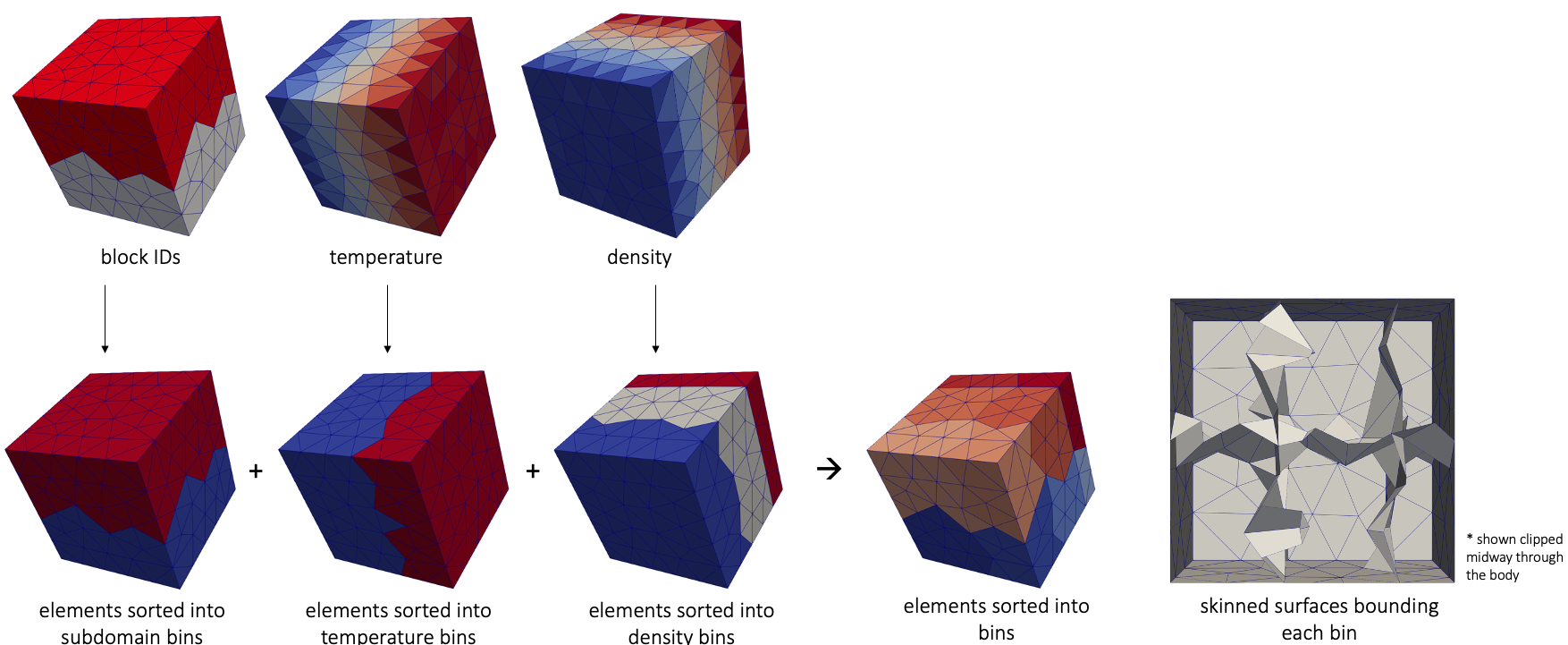
Figure 1: Mesh skinning operation
You can visualize this user object (i.e., the bin indices) using a SpatialUserObjectAux.
Supported Mesh Element Types
MoabSkinner natively supports meshes consisting of TET4 and TET10 elements, since DAGMC geometry requires triangulated surfaces (i.e. skins of tetrahedra). Meshes containing HEX, PYRAMID, PRISM elements are also supported: when these elements are detected, an internal all-TET4 copy of the mesh is built automatically, and all skinning and geometry operations are performed on that copy. The original MOOSE mesh is never modified; field and subdomain binning are always evaluated on the original mesh where the auxiliary variables live. Higher order versions of these element types are also supported.
Example Input Syntax
Below is an example input file that skins a mesh, generating the bin distributions shown in Figure 1.
[UserObjects<<<{"href": "../../syntax/UserObjects/index.html"}>>>]
  [moab]
    type = MoabSkinner<<<{"description": "Re-generate the OpenMC geometry on-the-fly according to changes in the mesh geometry and/or contours in temperature and density", "href": "MoabSkinner.html"}>>>
    fields<<<{"description": "Variable(s) to bin elements by, e.g. temperature, density, etc."}>>> = 'temp rho'
    fields_min<<<{"description": "Lower bounds of the bins for each field"}>>> = '445 445'
    fields_max<<<{"description": "Upper bounds of the bins for each field"}>>> = '655 655'
    n_field_bins<<<{"description": "Number of bins for each field"}>>> = '3 5'
    verbose<<<{"description": "Whether to print diagnostic information"}>>> = true
    material_blocks<<<{"description": "List of mesh subdomain names (or IDs) for which to assign material names in the generated DAGMC geometry. Must be provided together with 'material_names' where both have the same length and are listed in the same order.Any subdomain not listed in 'material_blocks' will have no material assignment and OpenMC willdefault to void for that region. This parameter is optional when used in combination with OpenMCCellAverageProblembecause in this case, the default is to auto-detect the materials in the original h5m file and re-apply them during skinning."}>>> = "1 3"
    material_names<<<{"description": "Material names (or IDs) to assign to subdomains in the generated DAGMC geometry. Must be provided together with 'material_blocks' where both have the same lengthand listed in the same order. This parameter is optional when used in combination with OpenMCCellAverageProblem because in this case, the default is to auto-detect the materials in the original h5m file and re-apply them during skinning."}>>> = "mat mat"

    output_skins<<<{"description": "Whether the skinned MOAB mesh (skins generated from the libMesh [Mesh]) should be written to a file. The files will be named moab_skins_<n>.h5m, where <n> is the time step index. You can then visualize these files by running 'mbconvert'."}>>> = true
  []
[]The binning, colored on a per-element basis as shown in Figure 1 can be visualized with the SkinnedBins auxiliary kernel.
Material Names and Blocks
For the vast majority of use cases, you will be using the MoabSkinner in tandem with OpenMCCellAverageProblem. In this case, you can rely on OpenMC to auto-detect the mapping between materials and subdomains from the loaded .h5m model, so that when the geometry is re-skinned, OpenMC will re-apply the original materials corresponding to the regions of space. However, if you'd like to instead force the use of a _different_ material from what was present in the original .h5m file, you can provide material_blocks and material_names to have the skinner apply specific materials on each block.
The MoabSkinner can also be used independently of OpenMCCellAverageProblem to generate an initial DAGMC geometry (.h5m file) directly from a MOOSE mesh, without needing any pre-existing DAGMC model. In this mode, material_blocks and material_names are required in order to tag the generated volumes with OpenMC material assignments, and output_full should be set to true to write the generated geometry to a file, then point OpenMC's geometry.xml at the generated file for subsequent coupled runs.
Both mesh subdomains (in material_blocks) and materials (in material_names) may be specified either by name or by numeric ID. The two parameters must be the same length and are matched in order. Any mesh subdomain not listed in material_blocks receives no material assignment, and the corresponding region will be void in OpenMC; a warning listing these subdomains is printed at setup.
Below is an example of generating an initial DAGMC geometry directly from a MOOSE mesh
[UserObjects<<<{"href": "../../syntax/UserObjects/index.html"}>>>]
  [moab]
    type = MoabSkinner<<<{"description": "Re-generate the OpenMC geometry on-the-fly according to changes in the mesh geometry and/or contours in temperature and density", "href": "MoabSkinner.html"}>>>
    fields<<<{"description": "Variable(s) to bin elements by, e.g. temperature, density, etc."}>>> = 'temp'
    fields_min<<<{"description": "Lower bounds of the bins for each field"}>>> = '0'
    fields_max<<<{"description": "Upper bounds of the bins for each field"}>>> = '1000'
    n_field_bins<<<{"description": "Number of bins for each field"}>>> = '1'
    build_graveyard<<<{"description": "Whether to build a graveyard around the geometry"}>>> = true
    graveyard_scale_inner<<<{"description": "Multiplier on mesh bounding box to form inner graveyard surface"}>>> = 1.1
    graveyard_scale_outer<<<{"description": "Multiplier on mesh bounding box to form outer graveyard surface"}>>> = 1.2
    material_blocks<<<{"description": "List of mesh subdomain names (or IDs) for which to assign material names in the generated DAGMC geometry. Must be provided together with 'material_names' where both have the same length and are listed in the same order.Any subdomain not listed in 'material_blocks' will have no material assignment and OpenMC willdefault to void for that region. This parameter is optional when used in combination with OpenMCCellAverageProblembecause in this case, the default is to auto-detect the materials in the original h5m file and re-apply them during skinning."}>>> = 'block_1 block_2'
    material_names<<<{"description": "Material names (or IDs) to assign to subdomains in the generated DAGMC geometry. Must be provided together with 'material_blocks' where both have the same lengthand listed in the same order. This parameter is optional when used in combination with OpenMCCellAverageProblem because in this case, the default is to auto-detect the materials in the original h5m file and re-apply them during skinning."}>>> = '1 U35_U38'
    output_full<<<{"description": "Whether the MOAB mesh (copied from the libMesh [Mesh]) should be written to a file. The files will be named moab_full_<n>.h5m, where <n> is the time step index. You can then visualize these files by running 'mbconvert'."}>>> = true
  []
[]Input Parameters
- allow_duplicate_execution_on_initialFalseIn the case where this UserObject is depended upon by an initial condition, allow it to be executed twice during the initial setup (once before the IC and again after mesh adaptivity (if applicable).
Default:False
C++ Type:bool
Controllable:No
Description:In the case where this UserObject is depended upon by an initial condition, allow it to be executed twice during the initial setup (once before the IC and again after mesh adaptivity (if applicable).
- execute_onTIMESTEP_ENDThe list of flag(s) indicating when this object should be executed. For a description of each flag, see https://mooseframework.inl.gov/source/interfaces/SetupInterface.html.
Default:TIMESTEP_END
C++ Type:ExecFlagEnum
Controllable:No
Description:The list of flag(s) indicating when this object should be executed. For a description of each flag, see https://mooseframework.inl.gov/source/interfaces/SetupInterface.html.
- execution_order_group0Execution order groups are executed in increasing order (e.g., the lowest number is executed first). Note that negative group numbers may be used to execute groups before the default (0) group. Please refer to the user object documentation for ordering of user object execution within a group.
Default:0
C++ Type:int
Controllable:No
Description:Execution order groups are executed in increasing order (e.g., the lowest number is executed first). Note that negative group numbers may be used to execute groups before the default (0) group. Please refer to the user object documentation for ordering of user object execution within a group.
- force_postauxFalseForces the UserObject to be executed in POSTAUX
Default:False
C++ Type:bool
Controllable:No
Description:Forces the UserObject to be executed in POSTAUX
- force_preauxFalseForces the UserObject to be executed in PREAUX
Default:False
C++ Type:bool
Controllable:No
Description:Forces the UserObject to be executed in PREAUX
- force_preicFalseForces the UserObject to be executed in PREIC during initial setup
Default:False
C++ Type:bool
Controllable:No
Description:Forces the UserObject to be executed in PREIC during initial setup
Execution Scheduling Parameters
- control_tagsAdds user-defined labels for accessing object parameters via control logic.
C++ Type:std::vector<std::string>
Controllable:No
Description:Adds user-defined labels for accessing object parameters via control logic.
- enableTrueSet the enabled status of the MooseObject.
Default:True
C++ Type:bool
Controllable:Yes
Description:Set the enabled status of the MooseObject.
- use_displaced_meshFalseWhether the skinned mesh should be generated from a displaced mesh
Default:False
C++ Type:bool
Controllable:No
Description:Whether the skinned mesh should be generated from a displaced mesh
Advanced Parameters
- prop_getter_suffixAn optional suffix parameter that can be appended to any attempt to retrieve/get material properties. The suffix will be prepended with a '_' character.
C++ Type:MaterialPropertyName
Unit:(no unit assumed)
Controllable:No
Description:An optional suffix parameter that can be appended to any attempt to retrieve/get material properties. The suffix will be prepended with a '_' character.
- use_interpolated_stateFalseFor the old and older state use projected material properties interpolated at the quadrature points. To set up projection use the ProjectedStatefulMaterialStorageAction.
Default:False
C++ Type:bool
Controllable:No
Description:For the old and older state use projected material properties interpolated at the quadrature points. To set up projection use the ProjectedStatefulMaterialStorageAction.
Material Property Retrieval Parameters
Input Files
- (test/tests/neutronics/dagmc/missing_graveyard.i)
- (test/tests/userobjects/moab_skinner/wrong_type.i)
- (test/tests/neutronics/dagmc/implicit_comp_material/without_graveyard/openmc.i)
- (test/tests/neutronics/dagmc/add_bcs/openmc.i)
- (test/tests/neutronics/dagmc/density_skin/openmc.i)
- (test/tests/neutronics/dagmc/cell_tallies/unmapped_cells.i)
- (test/tests/userobjects/moab_skinner/hex-mesh/sub_bins.i)
- (test/tests/neutronics/dagmc/density_skin/only_solid.i)
- (test/tests/userobjects/moab_skinner/expanding-cube/all_bins.i)
- (test/tests/neutronics/dagmc/incompatible_geom/mismatch/openmc.i)
- (test/tests/neutronics/dagmc/no_symmetry.i)
- (test/tests/neutronics/dagmc/mesh_tallies/direct_tally.i)
- (test/tests/neutronics/dagmc/with_csg/dag_cell_not_root/openmc.i)
- (test/tests/neutronics/dagmc/mesh_tallies/with_relaxation.i)
- (test/tests/neutronics/dagmc/cell_tallies/one_bin.i)
- (tutorials/csg_to_cad/openmc.i)
- (test/tests/userobjects/moab_skinner/all_bins.i)
- (test/tests/userobjects/moab_skinner/graveyard/graveyard.i)
- (tutorials/tokamak/openmc.i)
- (test/tests/neutronics/dagmc/cell_tallies/with_relaxation.i)
- (test/tests/neutronics/mg/rr_thermal_expansion/openmc.i)
- (tutorials/msfr/openmc.i)
- (test/tests/neutronics/kinetics/geom_reset/one_bin.i)
- (test/tests/userobjects/moab_skinner/errors/skinner.i)
- (test/tests/neutronics/dagmc/with_csg/dag_lattice_outer/openmc.i)
- (test/tests/userobjects/moab_skinner/hex-mesh/mixed_elements.i)
- (test/tests/neutronics/dagmc/properties.i)
- (doc/content/vv/slab_benchmark_model/openmc.i)
- (test/tests/neutronics/dagmc/with_csg/multi_cell_dag/openmc.i)
- (test/tests/userobjects/moab_skinner/hex-mesh/all_bins.i)
- (test/tests/neutronics/dagmc/with_csg/openmc.i)
- (test/tests/neutronics/dagmc/density_skin/disjoint_bins.i)
- (test/tests/neutronics/dagmc/mesh_tallies/openmc.i)
- (test/tests/neutronics/moving_mesh/scale.i)
- (test/tests/userobjects/moab_skinner/output/mesh.i)
- (test/tests/neutronics/dagmc/mesh_tallies/disjoint_bins.i)
- (test/tests/neutronics/dagmc/with_csg/dag_lattice/openmc.i)
- (test/tests/userobjects/moab_skinner/three_fields.i)
- (test/tests/neutronics/dagmc/cell_tallies/with_scaling.i)
- (test/tests/openmc_errors/input_params/no_dag.i)
- (test/tests/neutronics/dagmc/mesh_tallies/one_bin.i)
- (test/tests/userobjects/moab_skinner/sub_bins.i)
- (test/tests/neutronics/dagmc/assign_materials/generate_dagmc.i)
- (test/tests/userobjects/moab_skinner/second_order/all_bins.i)
- (test/tests/neutronics/moving_mesh/volumes.i)
- (test/tests/neutronics/dagmc/assign_materials/openmc.i)
- (test/tests/neutronics/dagmc/cell_tallies/null_density.i)
- (test/tests/neutronics/dagmc/assign_materials/no_material_names.i)
- (test/tests/neutronics/dagmc/cell_tallies/openmc.i)
- (test/tests/neutronics/dagmc/with_csg/multiple_dag/openmc.i)
- (test/tests/neutronics/dagmc/implicit_comp_material/openmc.i)
- (test/tests/neutronics/dagmc/mesh_tallies/with_scaling.i)
- (test/tests/neutronics/dagmc/add_bcs/openmc_hex.i)
- (test/tests/neutronics/dagmc/with_csg/mixed_feedback/openmc.i)